Decision comparison
capsul vs CCDash
capsul and CCDash approach Claude usage limits from opposite sides. CCDash shows how close the next throttle is; capsul lowers what each request sends. Pick CCDash to see quota and burn rate, pick capsul to draw less against the limit, and use both if limits stop your work.
Used together. These are normally used together rather than chosen between. The comparison explains what each one does in the stack.
All 2 are claude code tooling.
Quick Comparison
| Decision factor | capsul | CCDash |
|---|---|---|
| Best for | A developer who keeps hitting Claude or Codex usage limits and wants each request to carry fewer tokens. capsul sends Claude and Codex only what a task needs, never the whole repository, so each request carries fewer tokens. It drives the Claude or Codex CLI you are already signed into and needs no API key to get started. | A developer or small team on Claude who wants one panel for token, quota and cost usage across Claude Code, claude.ai and the API, and an alert before a limit arrives. |
| What it does about usage limits | capsul lowers what each request sends, so the same work draws fewer tokens against a limit. capsul's benchmark reports a median 67% reduction in context sent across twelve models, measured as the reduction in cache-weighted input on the same five short questions with and without capsul. capsul says savings vary with the task and the cache. capsul does not raise a usage limit. | CCDash shows how close the next throttle is. It tracks the 5-hour and 7-day subscription quotas, predicts rate limits and burn rate, and raises Slack or Discord webhook alerts when token budgets pass a threshold. It reports usage; it leaves the size of each request to you. |
| Quota and burn-rate view | capsul reports local spend by agent, model and project from a ledger on your own disk. It describes no 5-hour or 7-day quota tracking and no rate-limit prediction. | CCDash costs sessions against Anthropic's published pricing, breaks usage down per model and per project, and grades cache efficiency from Excellent to Poor. A lightweight agent aggregates several machines into one view. |
| Where your data goes | capsul lists what it sends: your task word for word, the files you point at, short extracts of the repository and whatever the agent then asks to open. It lists what it never sends: whole files nobody asked for, anything outside the repository, past sessions, keys, remotes and environment variables. capsul states that its server is told that a prompt ran and never the prompt, the repository or the reply. The savings ledger is a file on your own disk and nothing about it is uploaded. | CCDash is self-hosted and reads Claude Code's local JSONL session files with no API key. Its feature list says it runs locally and no data leaves your machine. |
| How you run it | capsul is a command-line tool installed from npm with npm i -g @penra/capsul. capsul stops at the budget ceiling and tells you what it left out; raise it with --budget or name a file with --open. | A self-hosted web dashboard, written in Python and MIT licensed, with a CLI for terminal checks. Live status badges show whether each local or remote session is working, idle or done. |
| Pricing | Free: 10 trial prompts, no card. Pro: €5.99 per month, a launch offer (list price €9.99), unlimited prompts. Team: from €20.99 per month with 15 seats included, then €3.50 per extra seat, up to 30 seats. All prices in euros, no VAT charged. The terms let the publisher change prices at any time; a rate stays until the subscription expires. Official pricing and terms pages checked November 8, 2026. | Free and open source |
capsul
- Best for:
- A developer who keeps hitting Claude or Codex usage limits and wants each request to carry fewer tokens. capsul sends Claude and Codex only what a task needs, never the whole repository, so each request carries fewer tokens. It drives the Claude or Codex CLI you are already signed into and needs no API key to get started.
- What it does about usage limits:
- capsul lowers what each request sends, so the same work draws fewer tokens against a limit. capsul's benchmark reports a median 67% reduction in context sent across twelve models, measured as the reduction in cache-weighted input on the same five short questions with and without capsul. capsul says savings vary with the task and the cache. capsul does not raise a usage limit.
- Quota and burn-rate view:
- capsul reports local spend by agent, model and project from a ledger on your own disk. It describes no 5-hour or 7-day quota tracking and no rate-limit prediction.
- Where your data goes:
- capsul lists what it sends: your task word for word, the files you point at, short extracts of the repository and whatever the agent then asks to open. It lists what it never sends: whole files nobody asked for, anything outside the repository, past sessions, keys, remotes and environment variables. capsul states that its server is told that a prompt ran and never the prompt, the repository or the reply. The savings ledger is a file on your own disk and nothing about it is uploaded.
- How you run it:
- capsul is a command-line tool installed from npm with npm i -g @penra/capsul. capsul stops at the budget ceiling and tells you what it left out; raise it with --budget or name a file with --open.
- Pricing:
- Free: 10 trial prompts, no card. Pro: €5.99 per month, a launch offer (list price €9.99), unlimited prompts. Team: from €20.99 per month with 15 seats included, then €3.50 per extra seat, up to 30 seats. All prices in euros, no VAT charged. The terms let the publisher change prices at any time; a rate stays until the subscription expires. Official pricing and terms pages checked November 8, 2026.
CCDash
- Best for:
- A developer or small team on Claude who wants one panel for token, quota and cost usage across Claude Code, claude.ai and the API, and an alert before a limit arrives.
- What it does about usage limits:
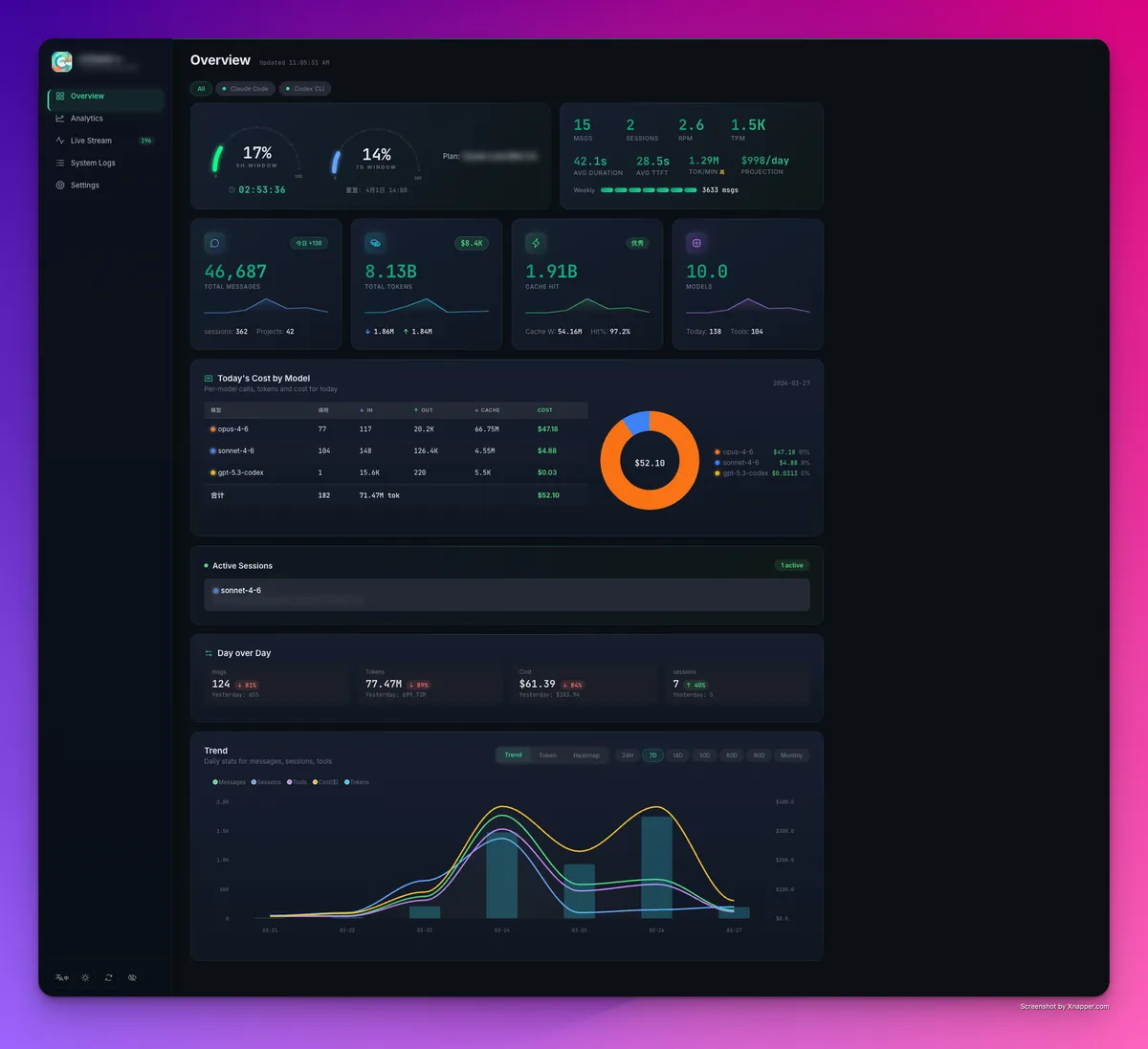
- CCDash shows how close the next throttle is. It tracks the 5-hour and 7-day subscription quotas, predicts rate limits and burn rate, and raises Slack or Discord webhook alerts when token budgets pass a threshold. It reports usage; it leaves the size of each request to you.
- Quota and burn-rate view:
- CCDash costs sessions against Anthropic's published pricing, breaks usage down per model and per project, and grades cache efficiency from Excellent to Poor. A lightweight agent aggregates several machines into one view.
- Where your data goes:
- CCDash is self-hosted and reads Claude Code's local JSONL session files with no API key. Its feature list says it runs locally and no data leaves your machine.
- How you run it:
- A self-hosted web dashboard, written in Python and MIT licensed, with a CLI for terminal checks. Live status badges show whether each local or remote session is working, idle or done.
- Pricing:
- Free and open source
Public signals
Verified factual signals only. Bars appear only for like-for-like metrics with five weekly assessments for every tool; missing evidence stays explicit. These signals do not establish enterprise adoption, product quality, or total cost.
| Metric | capsul | CCDash |
|---|---|---|
| npm weekly downloads(Developer adoption) | 29 | Not available |
| GitHub commits, 90d(Product adoption) | Not available | 0 |
| GitHub stars(Product adoption) | Not available | 73 |
| Product Hunt comments(Community interest) | Not available | 1 |
| Product Hunt reviews(Community interest) | Not available | 0 |
| Product Hunt votes(Community interest) | Not available | 3 |
As of November 9, 2026 — updated weekly.
Health & risk evidence
Observed public-source checks for mapped package versions and repositories.
capsul
November 9, 2026Package vulnerabilities
npm · @penra/capsul@1.4.8
0 vulnerabilities
across 1 package
Repository security score
Not available
CCDash
Package vulnerabilities
Not available
Repository security score
Not available
Interface Preview
CCDash
Feature Comparison
| Feature | capsul | CCDash |
|---|---|---|
| Core job | ||
| Main purpose | Lowers what each Claude or Codex request sends by choosing the context a task needs. | Shows token, quota and cost usage for Claude Code, claude.ai and the API in one panel. |
| When it acts | Before the request goes out. | While you work and after, by reading session files and quota state. |
| Output you see | A savings ledger by agent, model and project on your own disk. | Daily cost trend, per-model and per-project breakdown, cache efficiency grade, model mix and tool distribution. |
| Limits and alerts | ||
| Quota tracking | No 5-hour or 7-day quota view is described. | Tracks the 5-hour and 7-day subscription quotas. |
| Rate-limit prediction | Not described. | Predicts rate limits and burn rate. |
| Alerts | Stops at a token budget ceiling you set and lists what it left out. | Slack or Discord webhook alerts when a token budget passes a threshold. |
| Coverage | ||
| Agents and surfaces | Claude (Claude CLI) and Codex. | Claude Code, claude.ai and the API. |
| Multiple machines | Savings history across machines is listed on the Pro plan. | A lightweight agent aggregates several machines into one view. |
| Data handling and cost | ||
| What leaves your machine | The task, pointed-at files, short repository extracts and agent-requested opens go to the model through your own subscription. | Nothing is described as leaving; runs locally with no API key. |
| Licence | Commercial; use is governed by the vendor's terms. | MIT, Python. |
| Price to start | Free for ten trial prompts, no card; Pro €5.99 per month as a launch offer. | Free and open source. |
Core job
Main purpose
When it acts
Output you see
Limits and alerts
Quota tracking
Rate-limit prediction
Alerts
Coverage
Agents and surfaces
Multiple machines
Data handling and cost
What leaves your machine
Licence
Price to start
How they fit together
capsul and CCDash approach Claude usage limits from opposite sides. CCDash shows how close the next throttle is; capsul lowers what each request sends. Pick CCDash to see quota and burn rate, pick capsul to draw less against the limit, and use both if limits stop your work.
What each one handles
Use capsul for:
Choose capsul when the problem is the size of each request. It sends Claude and Codex only what a task needs, under a token budget you set, and lists what it left out. It drives the Claude or Codex CLI you are already signed into, so there is no API key and no second model bill. Its benchmark reports a median 67% reduction in cache-weighted input across twelve models on five short questions, and capsul says savings vary with the task and the cache, so try the free ten prompts on your own repository first. capsul does not raise a usage limit and describes no quota tracking, so CCDash is the better first install if you need to see how close the next throttle is. Pro is €5.99 per month as a launch offer; Team starts at €20.99 per month for 15 seats.
Use CCDash for:
Choose CCDash when you need to see usage rather than change it. It tracks the 5-hour and 7-day subscription quotas, predicts rate limits and burn rate, costs sessions against Anthropic's published pricing, and raises Slack or Discord alerts when a token budget passes a threshold. It is self-hosted, MIT licensed and free, reads Claude Code's local session files with no API key, and aggregates several machines through a lightweight agent. It reports Claude surfaces only: Claude Code, claude.ai and the API. It leaves the size of each request unchanged, so pair it with capsul when the dashboard shows Claude Code or Codex CLI requests drawing the quota. Choose CCDash first when you need an alert before the limit arrives, because capsul describes none.
These roles reflect the available product evidence. Most teams run both; which one owns a given job depends on your stack and team.
Frequently Asked Questions
Does capsul raise my Claude usage limit?
No. capsul says it lowers what each turn spends against a limit; it does not raise the limit. CCDash does not change the limit either: it tracks the 5-hour and 7-day quotas and predicts rate limits.
Which one tells me how close I am to a limit?
CCDash. It tracks the 5-hour and 7-day subscription quotas, predicts rate limits and burn rate, and alerts through Slack or Discord when a token budget passes a threshold. capsul describes no quota view.
Can I run both together?
Yes. They do different jobs: CCDash reads Claude Code's local session files and reports usage, and capsul lowers what each request sends. Use CCDash to see the quota and burn rate, and capsul to draw less against it.