Decision comparison
AgentsDock vs Claude Grimoire
For researchers who need to run and inspect Claude Code or other coding agents on remote machines from desktop or mobile devices, AgentsDock is the better fit. For macOS users whose workload is designing, versioning, exporting, and maintaining Claude Code configuration in ~/.claude/, Claude Grimoire is the better fit. AgentsDock stops being the focused answer when configuration authoring is the primary task; Claude Grimoire stops being the answer when remote multi-server execution or non-Claude agents are required.
Architecture choice. These take different approaches to the same problem. Read the table as a fit question rather than a feature race.
All 2 are claude code tooling.
Quick Comparison
| Decision factor | AgentsDock | Claude Grimoire |
|---|---|---|
| Best For | AI researchers running Claude Code, Codex, OpenCode, or Cursor across multiple machines and mobile devices. | macOS users who want a visual desktop editor for Claude Code commands, agents, pipelines, prompts, and configuration. |
| Architecture | Cross-platform desktop and mobile workspace connecting to multiple servers, with persistent tmux sessions and remote code editing. | Native macOS application that manages Claude Code configuration stored in the local ~/.claude/ directory. |
| Pricing Model | Open source under the Apache-2.0 license; source code at https://github.com/zhengyiluo/agentsdock. | The Hexstack store lists a Claude Grimoire license at $14.99, bought once. This is the store product, distinct from the separate GitHub plugin version. The checkout lists MacOS, Node.js and Claude Code requirements; confirm platform compatibility before buying. Older Easter promotion text is not treated as the current checkout price. |
| Ease of Use | Centralizes remote agent sessions, files, jobs, and server switching in one workspace instead of separate terminal tools. | Provides visual editors and avoids manually editing Claude configuration files, making common configuration work more approachable. |
| Scalability | Supports multiple server connections and persistent sessions; scale depends on the user-managed machines and connected infrastructure. | Designed around one local macOS Claude Code configuration; it does not provide documented multi-server or mobile workspace capabilities. |
| Community/Support | Open-source GitHub project with 113 stars, Python as primary language, and latest release v1.0.11. | Configuration portability comes through JSON export/import and Git version control; no repository popularity metrics were provided. |
AgentsDock
- Best For:
- AI researchers running Claude Code, Codex, OpenCode, or Cursor across multiple machines and mobile devices.
- Architecture:
- Cross-platform desktop and mobile workspace connecting to multiple servers, with persistent tmux sessions and remote code editing.
- Pricing Model:
- Open source under the Apache-2.0 license; source code at https://github.com/zhengyiluo/agentsdock.
- Ease of Use:
- Centralizes remote agent sessions, files, jobs, and server switching in one workspace instead of separate terminal tools.
- Scalability:
- Supports multiple server connections and persistent sessions; scale depends on the user-managed machines and connected infrastructure.
- Community/Support:
- Open-source GitHub project with 113 stars, Python as primary language, and latest release v1.0.11.
Claude Grimoire
- Best For:
- macOS users who want a visual desktop editor for Claude Code commands, agents, pipelines, prompts, and configuration.
- Architecture:
- Native macOS application that manages Claude Code configuration stored in the local ~/.claude/ directory.
- Pricing Model:
- The Hexstack store lists a Claude Grimoire license at $14.99, bought once. This is the store product, distinct from the separate GitHub plugin version. The checkout lists MacOS, Node.js and Claude Code requirements; confirm platform compatibility before buying. Older Easter promotion text is not treated as the current checkout price.
- Ease of Use:
- Provides visual editors and avoids manually editing Claude configuration files, making common configuration work more approachable.
- Scalability:
- Designed around one local macOS Claude Code configuration; it does not provide documented multi-server or mobile workspace capabilities.
- Community/Support:
- Configuration portability comes through JSON export/import and Git version control; no repository popularity metrics were provided.
Public signals
Verified factual signals only. Bars appear only for like-for-like metrics with five weekly assessments for every tool; missing evidence stays explicit. These signals do not establish enterprise adoption, product quality, or total cost.
| Metric | AgentsDock | Claude Grimoire |
|---|---|---|
| GitHub commits, 90d(Product adoption) | 1.3k | Not available |
| GitHub stars(Product adoption) | 119 | Not available |
| Product Hunt comments(Community interest) | Not available | 1 |
| Product Hunt rating(Community interest) | Not available | 5.0/5 |
| Product Hunt reviews(Community interest) | Not available | 1 |
| Product Hunt votes(Community interest) | Not available | 3 |
As of November 23, 2026 — updated weekly.
Interface Preview
AgentsDock
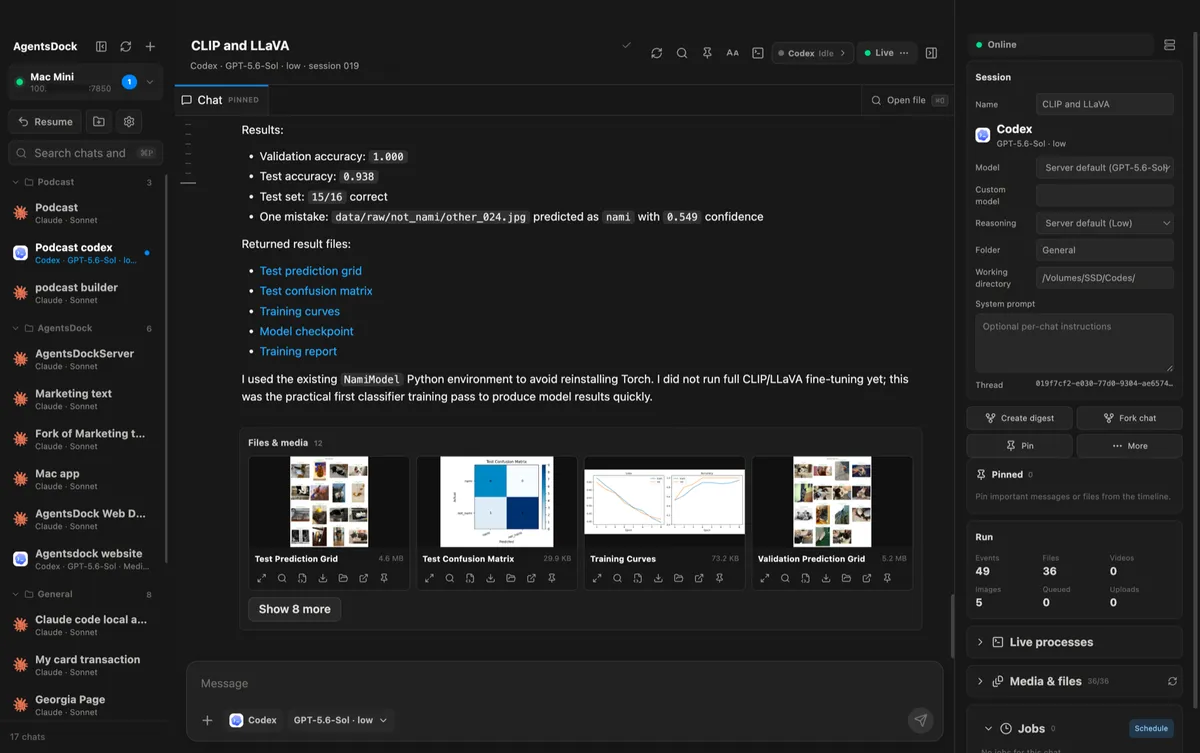
Feature Comparison
| Feature | AgentsDock | Claude Grimoire |
|---|---|---|
| Agent and CLI Support | ||
| Claude Code workflow | Runs Claude Code within persistent remote workspace sessions | Visually manages Claude Code commands, agents, and prompts |
| Additional coding agents | Supports Codex, OpenCode, and Cursor alongside Claude Code | Focuses product workflow on Claude Code configuration |
| Multi-agent operation | Organizes concurrent agent work in a multi-agent workspace | Defines reusable agents and skills inside Claude configuration |
| Access and Deployment | ||
| Device access | Offers desktop and mobile access from supported devices | Runs as a native desktop application on macOS |
| Remote infrastructure | Connects to multiple servers and switches between them | No documented multi-server connection workflow |
| Remote code editing | Edits files remotely with syntax-highlighted file views | Edits local ~/.claude/ configuration through visual forms |
| Configuration Management | ||
| Commands | Runs supported coding-agent sessions through its workspace | Creates and edits custom Claude slash commands visually |
| Prompts and pipelines | Presents inline results from active agent jobs | Stores saved prompts and composes agentic pipelines |
| Configuration portability | No documented Claude configuration export or import feature | Exports and imports the complete ~/.claude/ configuration as JSON |
| Session and Work Management | ||
| Session persistence | Keeps agent processes alive in persistent tmux sessions | Manages saved configuration rather than terminal session persistence |
| Job visibility | Displays job outputs inline, including returned images and videos | Provides visual configuration editing rather than remote job monitoring |
| Workspace scope | Combines agents, servers, files, and sessions in one workspace | Concentrates on one user's local Claude Code configuration |
| Governance and Extensibility | ||
| Source availability | Apache-2.0 source code available through its GitHub repository | Free and open-source product with configuration-focused desktop workflow |
| Version control | No dedicated configuration Git workflow documented in provided data | Uses Git version control for Claude configuration changes |
| Platform focus | Cross-platform releases include macOS, Linux, Windows, Android, and iOS | Native macOS application built specifically for Apple desktops |
Agent and CLI Support
Claude Code workflow
Additional coding agents
Multi-agent operation
Access and Deployment
Device access
Remote infrastructure
Remote code editing
Configuration Management
Commands
Prompts and pipelines
Configuration portability
Session and Work Management
Session persistence
Job visibility
Workspace scope
Governance and Extensibility
Source availability
Version control
Platform focus
Which approach fits
For researchers who need to run and inspect Claude Code or other coding agents on remote machines from desktop or mobile devices, AgentsDock is the better fit. For macOS users whose workload is designing, versioning, exporting, and maintaining Claude Code configuration in ~/.claude/, Claude Grimoire is the better fit. AgentsDock stops being the focused answer when configuration authoring is the primary task; Claude Grimoire stops being the answer when remote multi-server execution or non-Claude agents are required.
When each approach fits
Choose AgentsDock if:
Choose AgentsDock when you need persistent remote Claude Code, Codex, OpenCode, or Cursor sessions; server switching; remote file editing; and mobile visibility into active agent jobs.
Choose Claude Grimoire if:
Choose Claude Grimoire when your team uses macOS and needs a GUI for creating Claude commands, agents, skills, pipelines, saved prompts, JSON exports, and Git-tracked configuration.
These scenarios reflect the available product evidence. Your requirements, existing stack, and team expertise should guide the final decision.
Frequently Asked Questions
What is the main difference between AgentsDock and Claude Grimoire?
AgentsDock is an agentic-research IDE and remote workspace: it runs Claude Code, Codex, OpenCode, and Cursor across connected servers, preserves tmux sessions, supports remote editing, and is available across desktop and mobile platforms. Claude Grimoire is a native macOS configuration-management app for Claude Code. Its core value is visually editing the commands, agents, skills, pipelines, and prompts stored in ~/.claude/, rather than operating remote agent sessions.
Which is better for small teams?
A small research or engineering team sharing access to remote development machines will generally benefit more from AgentsDock, because it provides multiple server connections, persistent sessions, remote code editing, and mobile access to active work. A small macOS-only team that standardizes on Claude Code may prefer Claude Grimoire when its main need is maintaining consistent commands, agents, prompts, and pipelines. Its JSON export/import and Git version-control features are particularly relevant for configuration sharing and review.
Can I migrate from AgentsDock to Claude Grimoire?
There is no documented direct migration path between the products because they manage different layers of the workflow. AgentsDock manages agent execution environments, remote servers, files, sessions, and job results. Claude Grimoire manages the local Claude Code configuration in ~/.claude/. You can adopt Claude Grimoire to organize an existing local Claude configuration while continuing to use AgentsDock for execution, but remote sessions, server connections, and tmux state are not described as exportable into Claude Grimoire.
What are the pricing differences?
AgentsDock is Apache-2.0 open source. For the store product, Hexstack lists a Claude Grimoire license at $14.99 and describes its software store as buy once, with license keys and machine activations managed through an account. The checkout lists MacOS, Node.js and Claude Code requirements, so confirm compatibility before buying. Distinguish this store purchase from the separate GitHub plugin version. The checkout's Buy price is used here; the older Easter promotion is not treated as current pricing.