Decision comparison
Azure Synapse Analytics vs Google BigQuery
Azure Synapse and BigQuery are both central analytics stores and are chosen, in practice, by which cloud the organisation is on. Synapse bundles SQL warehousing, Spark and data integration in one Azure workspace, with provisioned pools you size or a serverless option. BigQuery is serverless by default with per-terabyte-scanned pricing and no cluster to manage. The technical differences are real but rarely outweigh the gravity of an existing cloud commitment.
Direct comparison. These are reviewed substitutes bought for the same job, so the differences below are the ones that decide between them.
All 2 are cloud data warehouses.
Quick Comparison
| Decision factor | Azure Synapse Analytics | Google BigQuery |
|---|---|---|
| What it is | Microsoft's unified analytics service combining SQL warehousing, Spark and data integration | Google's serverless data warehouse with pay-per-query pricing |
| Compute model | Dedicated SQL pools you provision and scale, plus a serverless SQL option and Spark pools | Fully serverless: no cluster to size, with capacity available as reserved slots if you prefer |
| Pricing shape | Usage-based. USD prices for East US 2, the page default; rates vary by region. Serverless SQL pool: $5 per TB of data processed. Dedicated SQL pool: from $1.20 per hour for DW100c, pay as you go; 1- and 3-year reservations cost less. Apache Spark pool (memory optimized): $0.142 per vCore-hour. Data pipelines: $1 per 1,000 orchestration activity runs (Azure hosted), $1.50 (self hosted). Data warehouse storage: $23 per TB per month. Pre-purchase: 5,000 Synapse Commit Units for $4,700. Verified 2026-10-05 against https://azure.microsoft.com/en-us/pricing/details/synapse-analytics/. New Azure accounts get a $200 credit to use on Azure services, including Synapse, within 30 days. Verified 2026-10-05 against https://azure.microsoft.com/en-us/pricing/purchase-options/azure-account. | BigQuery offers two compute pricing models. On-demand pricing charges for bytes processed by each query, billed per TiB, with the first 1 TiB of query data per month free. Capacity pricing charges for compute capacity per slot-hour instead. Storage is billed separately, and BigQuery also has a free usage tier and free operations. On-demand queries are $6.25 per TiB after the first 1 TiB free each month. BI Engine memory capacity is $0.0416 per GiB per hour in Iowa (us-central1). In the US multi-region, active logical storage is $0.02 per GiB per month and long-term logical storage $0.01 per GiB per month, with the first 10 GiB free. Streaming inserts through the Storage Write API (REST) cost $0.01 per 200 MiB, about $0.05 per GiB. Verified 2026-10-05 (streaming 2026-10-06) against https://cloud.google.com/bigquery/pricing. Capacity (editions) pay-as-you-go prices in the US are $0.04 per slot-hour for Standard, $0.06 for Enterprise and $0.10 for Enterprise Plus, billed per second with no commitment. Verified 2026-10-05 against https://cloud.google.com/bigquery/pricing. |
| Ecosystem fit | Deeply integrated with Azure: Data Factory, Power BI, Azure ML and Microsoft Entra identity | Deeply integrated with GCP: Looker, Dataflow, Vertex AI and Google identity |
| Built-in processing | Apache Spark pools run alongside SQL in the same workspace | SQL-first, with Spark and other processing handled by separate GCP services |
| Streaming ingestion | Through Azure services such as Event Hubs and Stream Analytics | Native streaming inserts, with data queryable shortly after arrival |
| Best fit | Organisations standardised on Azure that want SQL and Spark in one workspace | Organisations on GCP, or anyone wanting serverless SQL analytics with no cluster to manage |
Azure Synapse Analytics
- What it is:
- Microsoft's unified analytics service combining SQL warehousing, Spark and data integration
- Compute model:
- Dedicated SQL pools you provision and scale, plus a serverless SQL option and Spark pools
- Pricing shape:
- Usage-based. USD prices for East US 2, the page default; rates vary by region. Serverless SQL pool: $5 per TB of data processed. Dedicated SQL pool: from $1.20 per hour for DW100c, pay as you go; 1- and 3-year reservations cost less. Apache Spark pool (memory optimized): $0.142 per vCore-hour. Data pipelines: $1 per 1,000 orchestration activity runs (Azure hosted), $1.50 (self hosted). Data warehouse storage: $23 per TB per month. Pre-purchase: 5,000 Synapse Commit Units for $4,700. Verified 2026-10-05 against https://azure.microsoft.com/en-us/pricing/details/synapse-analytics/. New Azure accounts get a $200 credit to use on Azure services, including Synapse, within 30 days. Verified 2026-10-05 against https://azure.microsoft.com/en-us/pricing/purchase-options/azure-account.
- Ecosystem fit:
- Deeply integrated with Azure: Data Factory, Power BI, Azure ML and Microsoft Entra identity
- Built-in processing:
- Apache Spark pools run alongside SQL in the same workspace
- Streaming ingestion:
- Through Azure services such as Event Hubs and Stream Analytics
- Best fit:
- Organisations standardised on Azure that want SQL and Spark in one workspace
Google BigQuery
- What it is:
- Google's serverless data warehouse with pay-per-query pricing
- Compute model:
- Fully serverless: no cluster to size, with capacity available as reserved slots if you prefer
- Pricing shape:
- BigQuery offers two compute pricing models. On-demand pricing charges for bytes processed by each query, billed per TiB, with the first 1 TiB of query data per month free. Capacity pricing charges for compute capacity per slot-hour instead. Storage is billed separately, and BigQuery also has a free usage tier and free operations. On-demand queries are $6.25 per TiB after the first 1 TiB free each month. BI Engine memory capacity is $0.0416 per GiB per hour in Iowa (us-central1). In the US multi-region, active logical storage is $0.02 per GiB per month and long-term logical storage $0.01 per GiB per month, with the first 10 GiB free. Streaming inserts through the Storage Write API (REST) cost $0.01 per 200 MiB, about $0.05 per GiB. Verified 2026-10-05 (streaming 2026-10-06) against https://cloud.google.com/bigquery/pricing. Capacity (editions) pay-as-you-go prices in the US are $0.04 per slot-hour for Standard, $0.06 for Enterprise and $0.10 for Enterprise Plus, billed per second with no commitment. Verified 2026-10-05 against https://cloud.google.com/bigquery/pricing.
- Ecosystem fit:
- Deeply integrated with GCP: Looker, Dataflow, Vertex AI and Google identity
- Built-in processing:
- SQL-first, with Spark and other processing handled by separate GCP services
- Streaming ingestion:
- Native streaming inserts, with data queryable shortly after arrival
- Best fit:
- Organisations on GCP, or anyone wanting serverless SQL analytics with no cluster to manage
Need the cost answer?
Compare BigQuery, Snowflake and Amazon Redshift Serverless using your workload.
Public signals
Verified factual signals only. Bars appear only for like-for-like metrics with five weekly assessments for every tool; missing evidence stays explicit. These signals do not establish enterprise adoption, product quality, or total cost.
| Metric | Azure Synapse Analytics | Google BigQuery |
|---|---|---|
| Search interest(Market interest) | 1 | 8 |
| Hacker News mentions, 90d(Community interest) | 0 | 6 |
| npm weekly downloads(Developer adoption) | 394 | 3.0M |
| PyPI weekly downloads(Developer adoption) | 804.1k | 39.5M |
| Stack Overflow questions(Community interest) | 3.0k | 26.1k |
As of October 26, 2026 — updated weekly.
Health & risk evidence
Observed public-source checks for mapped package versions and repositories.
Azure Synapse Analytics
October 26, 2026Package vulnerabilities
npm · @azure/synapse-artifacts@1.0.0-beta.16 · PyPI · azure-synapse-artifacts@0.22.0
0 vulnerabilities
across 2 packages
Repository security score
Not available
Google BigQuery
October 26, 2026Package vulnerabilities
npm · @google-cloud/bigquery@9.5.0 · PyPI · google-cloud-bigquery@3.46.2
0 vulnerabilities
across 2 packages
Repository security score
Not available
Interface Preview
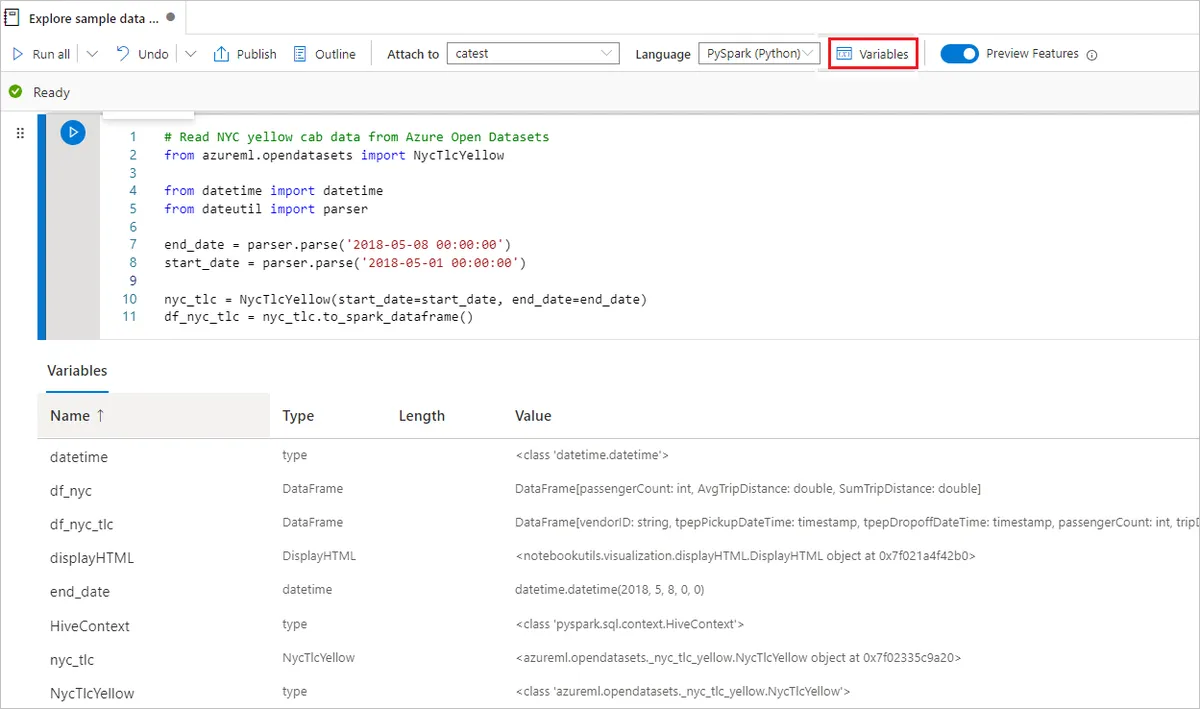
Azure Synapse Analytics
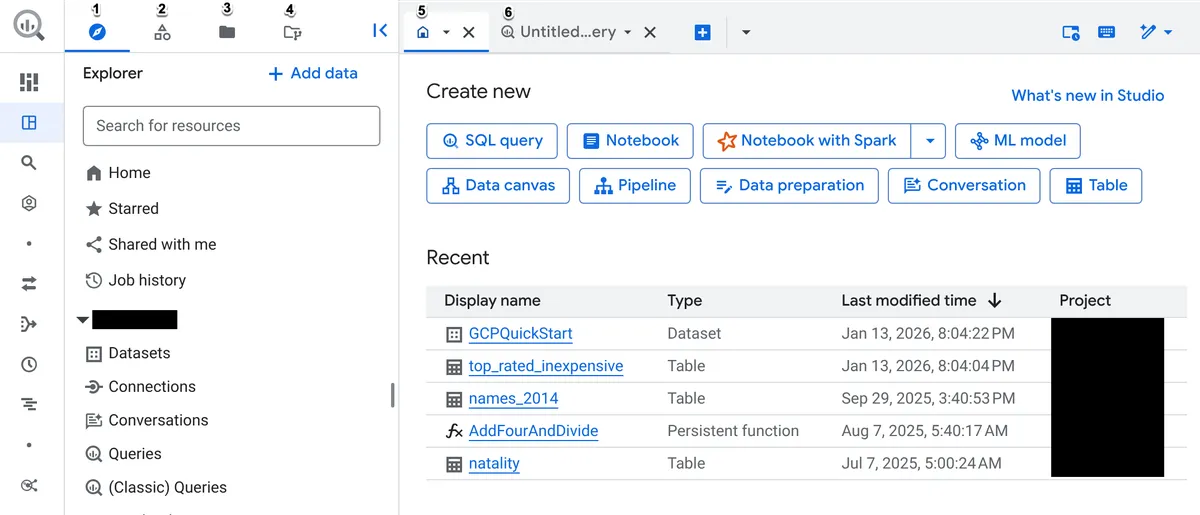
Google BigQuery
Feature Comparison
| Feature | Azure Synapse Analytics | Google BigQuery |
|---|---|---|
| Query | ||
| Standard SQL analytics | Full support | Full support |
| Serverless query option | Full support | Full support |
| Federated queries across sources | Full support | Full support |
| Materialised views | Full support | Full support |
| Processing | ||
| Built-in Spark | Full support | Not verified |
| Native streaming ingestion | Partial support | Full support |
| Built-in ML functions in SQL | Partial support | Full support |
| Data integration pipelines in the same product | Full support | Not verified |
| Operations | ||
| No cluster sizing required | Partial support | Full support |
| Automatic scaling | Partial support | Full support |
| Pause compute to stop charges | Full support | Full support |
| Reserved capacity pricing | Full support | Full support |
| Ecosystem | ||
| Native BI integration | Full support | Full support |
| Cloud-native identity and governance | Full support | Full support |
| Multi-cloud portability | Partial support | Partial support |
| Mature partner tooling | Full support | Full support |
Query
Standard SQL analytics
Serverless query option
Federated queries across sources
Materialised views
Processing
Built-in Spark
Native streaming ingestion
Built-in ML functions in SQL
Data integration pipelines in the same product
Operations
No cluster sizing required
Automatic scaling
Pause compute to stop charges
Reserved capacity pricing
Ecosystem
Native BI integration
Cloud-native identity and governance
Multi-cloud portability
Mature partner tooling
Which to choose
Azure Synapse and BigQuery are both central analytics stores and are chosen, in practice, by which cloud the organisation is on. Synapse bundles SQL warehousing, Spark and data integration in one Azure workspace, with provisioned pools you size or a serverless option. BigQuery is serverless by default with per-terabyte-scanned pricing and no cluster to manage. The technical differences are real but rarely outweigh the gravity of an existing cloud commitment.
Best-fit scenarios
Choose Azure Synapse Analytics if:
Choose Azure Synapse when your organisation is standardised on Azure and you want SQL warehousing, Spark processing and data integration pipelines in one workspace. Integration with Data Factory, Power BI, Azure ML and Entra identity removes real plumbing work, and provisioned pools give predictable cost for steady workloads. Pausing compute stops the charge when nothing is running.
Choose Google BigQuery if:
Choose BigQuery when you want serverless SQL analytics with nothing to size. There is no cluster, scaling is automatic, streaming inserts make data queryable shortly after arrival, and ML functions are available in SQL. Per-terabyte-scanned pricing rewards spiky workloads and punishes undisciplined queries, so flat-rate slots exist when predictability matters more.
These scenarios reflect the available product evidence. Your requirements, existing stack, and team expertise should guide the final decision.
Frequently Asked Questions
Does the cloud we are on really decide this?
Usually, and for good reasons rather than inertia. Egress charges make querying data across clouds expensive, identity and governance integrate natively within a cloud and awkwardly across them, and the BI and ML tools your organisation already licenses are generally from the same vendor. A cross-cloud warehouse can be right when there is a specific reason, but the default gravity is strong and mostly rational.
What does serverless actually save?
The sizing decision and the idle cost. With BigQuery there is no cluster to right-size, no scaling policy to tune and no compute running when nobody queries. Synapse's serverless SQL option offers a similar model, while its dedicated pools give you control over performance at the cost of managing capacity — and pausing them when idle is something you have to remember to do.
How should we think about query cost?
Per-terabyte-scanned pricing moves cost control to whoever writes the SQL. Partitioning and clustering reduce scanned bytes dramatically, and a query without a partition filter can scan an entire table and cost accordingly. That is fine with a disciplined team and expensive when hundreds of analysts have access — which is why both platforms offer committed-capacity pricing as an alternative that caps the bill and queues the users instead.
Is built-in Spark a significant advantage?
It is if you need Spark and want it in the same workspace with shared metadata and security. Synapse puts SQL and Spark side by side, which suits teams doing both warehouse-style analytics and data engineering. On GCP that work typically happens in Dataproc or Dataflow — capable, and a separate service to configure and secure. Whether that separation is a cost or a clean boundary depends on your team's shape.
What about streaming data?
BigQuery has native streaming inserts, so rows are queryable shortly after they arrive with no separate pipeline to maintain. Synapse handles streaming through other Azure services such as Event Hubs and Stream Analytics, which is a well-trodden path and is more moving parts. If near-real-time analytics is central rather than incidental, that difference is worth weighing.