In my last post, we assembled a modern data stack for 2026: ingestion, warehouse or lakehouse, transformation, orchestration, quality, analytics. A boring, reliable foundation that actually moves data from “SaaS silo” to “dashboard someone trusts”.
Today, everyone wants to know the next part: “Okay, but how do we put AI agents on top of this?”
Vendors will happily sell you “AI copilots” that promise to answer every question and automate every workflow. Under the hood, a surprising number of these products are still pointing a large language model at a half-baked data lake and hoping for the best.
Let’s do better than that.
If the modern data stack is your plumbing, the AI stack on top of it is the set of smart fixtures: assistants, agents, and automations that actually make use of all that water you’re piping around. In this post, I’ll outline a practical way to stack AI on top of the data stack we already designed — without reinventing everything from scratch.
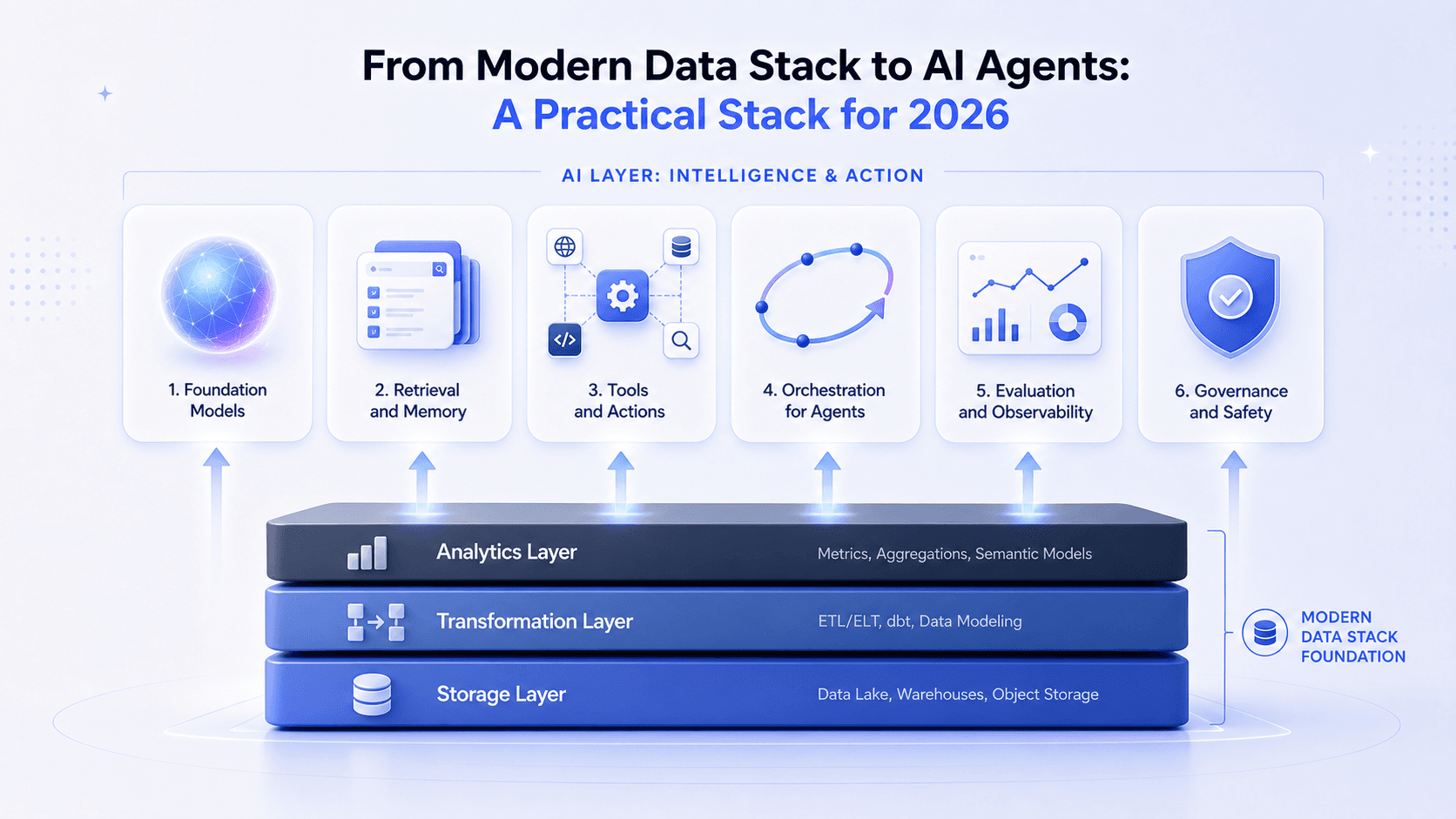
Why AI Agents Need a Boring Data Stack
Before we talk about models, vectors, or agents, it’s worth stating the obvious: AI doesn’t magically fix bad data.
Most successful “AI data lakehouse” architectures treat the lakehouse as the single source of truth for both BI and AI: same data, same governance, just new ways to consume it. The companies that are shipping real agents in 2026 have done the unglamorous work already — clean, modeled data, clear metrics, and a modern data stack that doesn’t fall over every weekend. So the philosophy here is simple:
- Don’t build a separate “AI data stack”.
- Extend your existing one with a small, deliberate AI layer.
- Reuse as much of your warehouse, transformation, and metrics layer as possible.
With that in mind, here’s how I’d stack AI on top of the modern data stack we built last time.
1. Foundation Models — Pick Your Engine, Don’t Worship It
At the bottom of your AI layer sits the model: the thing that turns text in into text out.
Today you have three realistic options:
-
Hosted APIs from hyperscalers or model vendors.
Think OpenAI, Anthropic, Google, or whatever your cloud provider is bundling by default. Databricks, for example, positions its Mosaic AI stack as a way to bring foundation models (like DBRX) directly into your lakehouse environment.- Pros: Fast to start, no infra to manage.
- Cons: Ongoing cost, data governance reviews, some vendor lock-in.
-
Models running in your own cloud.
You can now deploy reasonably capable open-source models (Llama-family, Mistral, etc.) into your own VPC, sometimes directly in the same environment as your lakehouse.- Pros: More control, better story for privacy/compliance.
- Cons: MLOps and infrastructure overhead, you own performance tuning; furthermore, typically the open-source LLMs have lower performance than the top models from hyperscalers.
-
A mix of the two.
Many teams are using hosted models for experimentation and niche capabilities, and a smaller, self-hosted model for the bulk of day-to-day internal queries, especially over proprietary data.
The important bit: whichever model you choose, treat it as replaceable infrastructure, not your “product”. The real value is in your data, your prompts, and the stack you build around the model.
2. Retrieval and Memory — Let the Agent See Your Data (Safely)
Raw models are generalists. To make them useful inside your company, they need access to your data — and that’s where retrieval comes in.
The fashionable term is RAG (retrieval-augmented generation): instead of asking the model to answer questions from its pretraining alone, you fetch relevant context from your own data and feed it to the model along with the question. In practice, that usually means:
- Indexing tables, documents, and logs from your warehouse or lakehouse into a vector store.
- Storing embeddings plus metadata so you can quickly pull back relevant chunks at query time.
- Combining that with your existing semantic or metrics layer, so the agent isn’t guessing how “active user” is defined this week.
The crucial point: in 2026, your AI-ready architecture and your data lakehouse architecture are converging. An “AI data lakehouse” is essentially your existing lakehouse plus vector search and some extra metadata to support AI workloads.
You don’t need a second, parallel data pipeline for AI. You need:
- Clean, modeled data in your warehouse or lakehouse.
- A way to embed and index the parts of that data you want agents to read.
- Permissions that mirror what humans are allowed to see.
Get this right and suddenly your agents can answer questions, draft analyses, or generate alerts using the same data your dashboards rely on — without duplicating pipelines.
3. Tools and Actions — Let the Agent Do More Than Chat
A chat assistant that explains dashboards is nice. An agent that can actually do things is where it gets interesting.
In the agentic world, “tools” are the functions the model is allowed to call: run an SQL query, send a Slack message, create a JIRA ticket, update a CRM record, kick off a dbt job, etc. This is where your existing modern data stack becomes an API surface:
- The warehouse becomes a query tool: “run this SQL against the metrics layer and return the result”.
- Your orchestrator (Dagster/Airflow/Prefect) becomes an action tool: “trigger this workflow with these parameters”.
- Your SaaS tools (Salesforce, Zendesk, HubSpot) become operational tools: “create or update records based on insights”.
The stack you already have defines which tools exist and how safe they are to use. Your job is to:
- Decide which tools you are comfortable exposing to an agent.
- Wrap them in stable, well-documented interfaces.
- Define guardrails: who can ask the agent to use which tools, on which data, and under what conditions.
Start small. A “data incident triage agent” that can read fresh data, compare it to expected ranges, and open a Jira ticket when it finds anomalies is both more realistic and more useful than a vague promise of “AI that runs the whole company”.
4. Orchestration for Agents — From Pipelines to Conversations
In the data stack, orchestration was about DAGs: “run these jobs in this order with this schedule.” In the AI layer, orchestration becomes “how do we manage conversations and decisions over time?”
New orchestration frameworks have emerged around this idea:
- Libraries like LangChain and LangGraph give you ways to define multi-step chains and agents that can choose tools, loop, and react to intermediate results.
- Lakehouse platforms are adding their own orchestration and serving layers for agents, integrating with existing MLOps tools.
- Some teams still roll their own orchestration with plain code and their existing workflow tools, treating the LLM as just another service.
Conceptually, you can think of an AI agent workflow as:
- Receive a request (question, alert, event).
- Decide which tools to call (SQL over metrics, RAG retrieval, external APIs).
- Call them in a loop until it has enough information.
- Produce an answer or action, and log everything.
This maps surprisingly well onto the mental model you already have for data pipelines — but the “tasks” are now LLM calls and tool invocations instead of Spark jobs.
The trick is to reuse your existing orchestration where possible instead of standing up an entirely separate “AI orchestrator” for no reason.
5. Evaluation and Observability — Testing Agents Like Pipelines
If you’ve ever shipped a flaky Airflow DAG to production, you already know why we need observability. For AI agents, the problem is weirder: we’re not just tracking latency and errors, we’re tracking the quality of non-deterministic outputs.
A set of AI observability platforms has emerged to tackle this:
- LangSmith, Langfuse, Arize, let you trace every step of an agent’s reasoning, log inputs/outputs, and run evaluations on top.
- You can define evaluation datasets (“golden questions” or workflows), run agents against them, and get automated quality scores.
- Cost tracking and rate limiting help you avoid discovering on Monday that your “experimental” agent spent the weekend burning through your API budget.
This is the AI-world equivalent of what Monte Carlo and similar tools do for data pipelines — except instead of checking nulls and freshness, you’re checking whether the agent hallucinated, ignored instructions, or took an unsafe action.
If you remember nothing else from this section, remember this:
You cannot improve what you cannot see, and that goes double for non-deterministic systems.
Don’t ship agents without a way to inspect individual traces, compare behaviors across versions, and roll back quickly when something weird happens.
6. Governance and Safety — Boring, Necessary, Non-Optional
The moment you let an agent touch production data or systems, you’ve expanded your blast radius.
The good news: your modern data stack already has many of the controls you need — identity and access management, role-based permissions, masking, and audit logs. The AI stack’s job is to inherit and respect those controls, not bypass them:
- Agent access to data should mirror human access: if I can’t see customer PII in the BI tool, my personal assistant agent shouldn’t either.
- Tool access should be scoped: maybe the agent can open Jira tickets but not close them, or draft emails but not send them without approval.
- Every agent action should be traceable back to a user, a request, and a version of the agent.
This is where your metrics/semantic layer and catalog become unexpectedly valuable: they give agents structured, documented concepts to work with instead of free-form table names and columns.
But even a good semantic layer only captures part of the context an agent needs. As Ahmed Elsamadisi argues in The Data Stack AI Problem, the meaning behind a metric is often distributed across transformation code, lineage, dashboards, data freshness, permissions, and the business decisions surrounding it. A useful agent therefore needs more than access to the right tables: it needs enough of this context to reconstruct why a number looks the way it does and decide what to do next.
The Meta-Lesson: Don’t Over-Stack (Again)
If the modern data stack taught us anything, it’s that you can absolutely drown a small team in tools.
The temptation now is to repeat the same mistake with AI: one platform for prompts, one for agents, one for vector search, one for evaluation, one for monitoring, one for guardrails… and suddenly you’ve built the AI equivalent of that seven-tool data stack you promised yourself you’d never do again.
So I’ll repeat the same advice as last time, just with a different accent:
- Start with the minimum viable AI stack: a model, a retrieval layer over your existing warehouse/lakehouse, and one or two carefully designed tools.
- Add agent orchestration when you have real multi-step workflows, not just because the demo looked cool.
- Add dedicated AI observability when you’re running agents in production for real users, not just experimenting in a notebook.
The best AI stack is the simplest one that lets your team reliably ship useful agents. Every additional component should earn its place by solving a pain you already feel, not a hypothetical pain you saw in someone’s conference talk.
In other words: reuse your modern data stack, add a thin, well-considered AI layer on top, and resist the urge to build an “AI Rube Goldberg machine” just because you can.
Want a concrete AI stack recommendation? I’m considering adding an “AI stack” mode to the recommendation wizard that suggests a minimal set of AI tools on top of your existing data stack. If that’s interesting, let me know — or try the current version to make sure your foundations are solid first.