Decision comparison
dbt (data build tool) vs Dataform vs SQLMesh
dbt, Dataform, and SQLMesh are all SQL-based data transformation frameworks, but they target different team profiles and infrastructure priorities. dbt is the industry standard with a sizable ecosystem, strong governance features, and extensive warehouse support. Dataform is the zero-cost choice for BigQuery-native teams that want serverless orchestration inside Google Cloud. SQLMesh is the efficiency-focused alternative that eliminates development environment costs with virtual data environments and delivers the most intelligent incremental processing. Your choice depends on your cloud platform, budget priorities, and whether you value ecosystem maturity, platform integration, or compute cost reduction.
Direct comparison. These are reviewed substitutes bought for the same job, so the differences below are the ones that decide between them.
All 3 are transformation frameworks.
Quick Comparison
| Decision factor | dbt (data build tool) | Dataform | SQLMesh |
|---|---|---|---|
| Best For | Analytics engineering teams that want version-controlled, tested SQL transformation pipelines with CI/CD governance across cloud warehouses | BigQuery-centric teams that need a free, serverless SQL transformation tool tightly integrated with the Google Cloud ecosystem | Data engineering teams that need zero-cost virtual environments, Terraform-style plan/apply workflows, and intelligent incremental processing to cut warehouse costs |
| Architecture | Open-source transformation framework compiling SQL SELECT statements into tables and views inside your cloud data warehouse via a dependency-based DAG | Google Cloud service using SQLX (SQL extended with JavaScript) for managing data pipelines with serverless orchestration directly in BigQuery Studio | Open-source transformation framework with virtual data environments, column-level lineage, SQL transpilation across 10+ dialects, and a built-in scheduler |
| Pricing Model | dbt Developer is free for one seat with 3,000 successful models per month. Starter is $100 per user/month for five seats, 15,000 models and 5,000 queried metrics, including $100/month in Wizard credits per account. Enterprise and Enterprise+ are custom priced, with $200/month in Wizard credits on Enterprise. Verified 2026-09-17 against getdbt.com/pricing; the retired Pro and Team names no longer appear. | Dataform is free to use within Google Cloud. You pay for the BigQuery compute and storage your workflows consume rather than for Dataform itself. New Google Cloud accounts include $300 in trial credit. | Self-hosted free (Apache-2.0 license) |
| Ease of Use | Accessible for SQL users; browser IDE, VS Code extension with Fusion engine for live error detection, and dbt Canvas drag-and-drop visual interface for analysts | Fully featured cloud development environment within BigQuery Studio; real-time error messages, visual dependency graphs, and Git integration from the browser | Pure SQL definitions without Jinja or YAML complexity; steeper initial learning curve but greater flexibility for complex workflows in the long run |
| Warehouse Support | Works with Snowflake, BigQuery, Redshift, Databricks, and more; cloud-agnostic transformation layer that runs inside any supported warehouse | Native BigQuery integration as the primary target; Dataform core is open source and can work with Snowflake and Redshift as secondary targets | Supports Snowflake, BigQuery, DuckDB, Databricks, Redshift, and more; transpiles SQL across 10+ dialects automatically at runtime |
| Community/Support | 100,000+ community members; 13,000+ GitHub stars; rated 4.8/5 on G2 with 97% customer satisfaction across 64 reviews | Backed by Google Cloud support and documentation; focused community compared to dbt; rated 7.3/10 from 2 reviews | 3,000+ GitHub stars; Linux Foundation project; growing Tobiko Slack community; backwards compatible with dbt projects for easier migration |
dbt (data build tool)
- Best For:
- Analytics engineering teams that want version-controlled, tested SQL transformation pipelines with CI/CD governance across cloud warehouses
- Architecture:
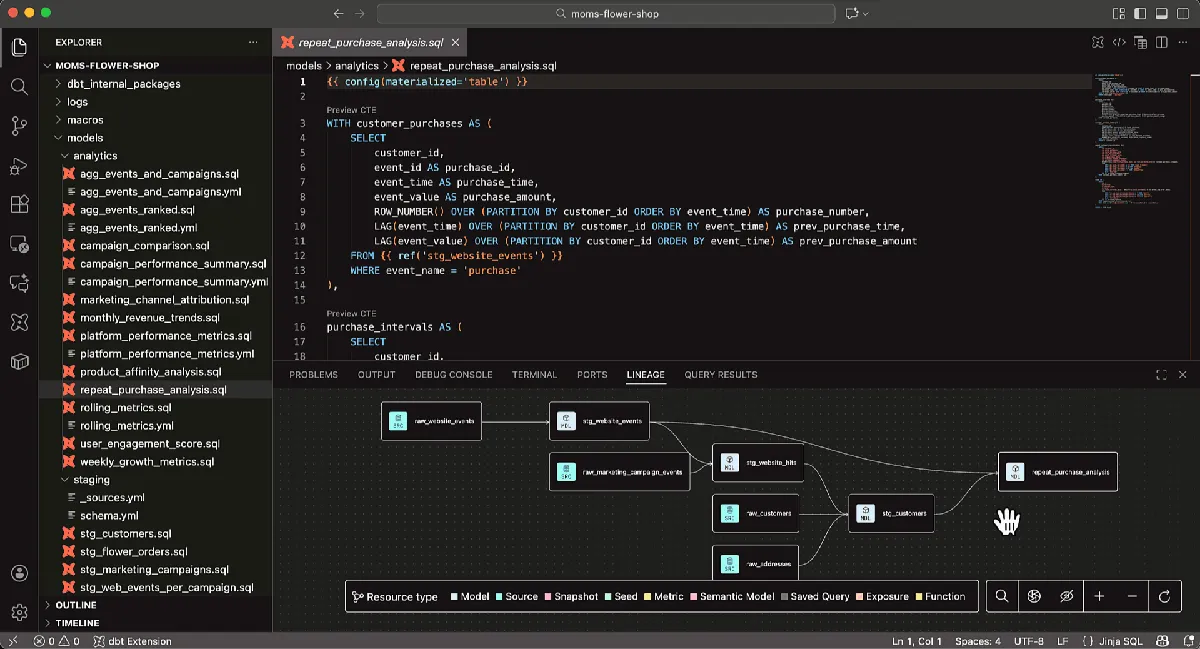
- Open-source transformation framework compiling SQL SELECT statements into tables and views inside your cloud data warehouse via a dependency-based DAG
- Pricing Model:
- dbt Developer is free for one seat with 3,000 successful models per month. Starter is $100 per user/month for five seats, 15,000 models and 5,000 queried metrics, including $100/month in Wizard credits per account. Enterprise and Enterprise+ are custom priced, with $200/month in Wizard credits on Enterprise. Verified 2026-09-17 against getdbt.com/pricing; the retired Pro and Team names no longer appear.
- Ease of Use:
- Accessible for SQL users; browser IDE, VS Code extension with Fusion engine for live error detection, and dbt Canvas drag-and-drop visual interface for analysts
- Warehouse Support:
- Works with Snowflake, BigQuery, Redshift, Databricks, and more; cloud-agnostic transformation layer that runs inside any supported warehouse
- Community/Support:
- 100,000+ community members; 13,000+ GitHub stars; rated 4.8/5 on G2 with 97% customer satisfaction across 64 reviews
Dataform
- Best For:
- BigQuery-centric teams that need a free, serverless SQL transformation tool tightly integrated with the Google Cloud ecosystem
- Architecture:
- Google Cloud service using SQLX (SQL extended with JavaScript) for managing data pipelines with serverless orchestration directly in BigQuery Studio
- Pricing Model:
- Dataform is free to use within Google Cloud. You pay for the BigQuery compute and storage your workflows consume rather than for Dataform itself. New Google Cloud accounts include $300 in trial credit.
- Ease of Use:
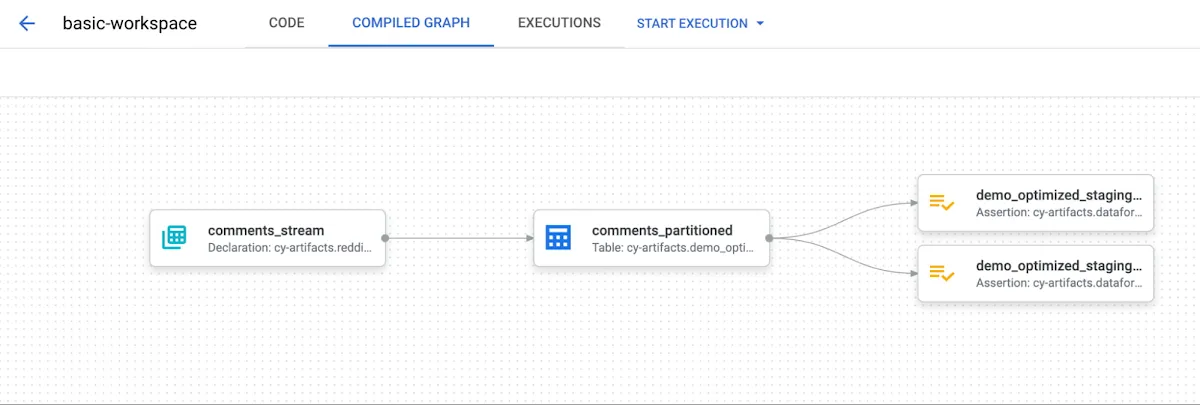
- Fully featured cloud development environment within BigQuery Studio; real-time error messages, visual dependency graphs, and Git integration from the browser
- Warehouse Support:
- Native BigQuery integration as the primary target; Dataform core is open source and can work with Snowflake and Redshift as secondary targets
- Community/Support:
- Backed by Google Cloud support and documentation; focused community compared to dbt; rated 7.3/10 from 2 reviews
SQLMesh
- Best For:
- Data engineering teams that need zero-cost virtual environments, Terraform-style plan/apply workflows, and intelligent incremental processing to cut warehouse costs
- Architecture:
- Open-source transformation framework with virtual data environments, column-level lineage, SQL transpilation across 10+ dialects, and a built-in scheduler
- Pricing Model:
- Self-hosted free (Apache-2.0 license)
- Ease of Use:
- Pure SQL definitions without Jinja or YAML complexity; steeper initial learning curve but greater flexibility for complex workflows in the long run
- Warehouse Support:
- Supports Snowflake, BigQuery, DuckDB, Databricks, Redshift, and more; transpiles SQL across 10+ dialects automatically at runtime
- Community/Support:
- 3,000+ GitHub stars; Linux Foundation project; growing Tobiko Slack community; backwards compatible with dbt projects for easier migration
Public signals
Verified factual signals only. Bars appear only for like-for-like metrics with five weekly assessments for every tool; missing evidence stays explicit. These signals do not establish enterprise adoption, product quality, or total cost.
| Metric | dbt (data build tool) | Dataform | SQLMesh |
|---|---|---|---|
| GitHub commits, 90d(Product adoption) | 1.0k | 106 | 93 |
| GitHub stars(Product adoption) | 13,000+ | 997 | 3,000+ |
| Search interest(Market interest) | 33 | Unavailable | 0 |
| Hacker News mentions, 90d(Community interest) | 12 | Not available | 0 |
| PyPI weekly downloads(Product adoption) | 5.4M | Not available | 119.6k |
| Stack Overflow questions(Community interest) | 1.6k | 4 | 1 |
| npm weekly downloads(Developer adoption) | Not available | 739.4k | Not available |
| Product Hunt comments(Community interest) | Not available | 5 | Not available |
| Product Hunt reviews(Community interest) | Not available | 0 | Not available |
| Product Hunt votes(Community interest) | Not available | 8 | Not available |
| PyPI weekly downloads(Developer adoption) | Not available | 1.8M | Not available |
As of October 12, 2026 — updated weekly.
Health & risk evidence
Observed public-source checks for mapped package versions and repositories.
dbt (data build tool)
October 12, 2026Package vulnerabilities
PyPI · dbt-core@1.12.5
0 vulnerabilities
across 1 package
Repository security score
github.com/dbt-labs/dbt-core
6.0/10
Dataform
October 12, 2026Package vulnerabilities
npm · @dataform/core@3.0.71 · PyPI · google-cloud-dataform@0.11.4
0 vulnerabilities
across 2 packages
Repository security score
github.com/dataform-co/dataform
6.2/10
SQLMesh
October 12, 2026Package vulnerabilities
PyPI · sqlmesh@0.236.3
0 vulnerabilities
across 1 package
Repository security score
Not available
Interface Preview
dbt (data build tool)
Dataform
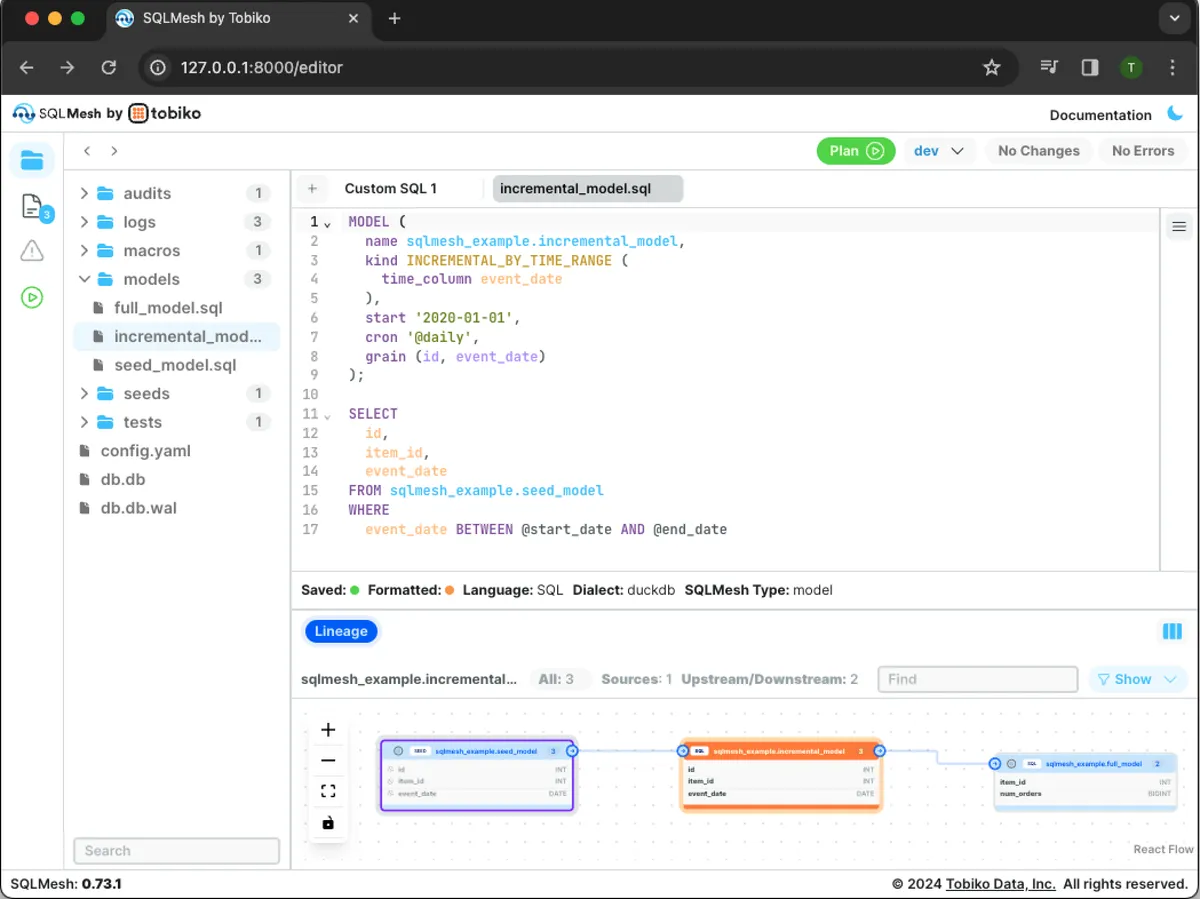
SQLMesh
Feature Comparison
| Feature | dbt (data build tool) | Dataform | SQLMesh |
|---|---|---|---|
| Data Transformation & Modeling | |||
| SQL-Based Transformations | Core strength: compiles SQL SELECT statements into tables and views with a modular, dependency-based DAG and automatic ordering | SQLX language extends SQL with JavaScript for table definitions, dependencies, and assertions in a single repository | Pure SQL model definitions without Jinja or YAML; supports both SQL and Python transformations with automatic dependency detection |
| Incremental Processing | Incremental models with timestamp-based strategies and configurable merge logic inside the warehouse | Incremental table support for appending or merging new data without full table rebuilds | Partition-level tracking that identifies exactly which data segments changed and processes only the affected downstream partitions |
| Multi-Dialect SQL Support | Jinja macros and adapter plugins handle cross-warehouse SQL differences; requires adapter-specific adjustments | SQLX compiles to the target warehouse dialect; primarily optimized for BigQuery SQL syntax | Built-in SQL transpilation across 10+ dialects at runtime; write SQL once and deploy to any supported warehouse |
| Development Environments & CI/CD | |||
| Development Environments | Separate dev/staging/prod schemas requiring physical data copies; dbt Cloud manages environment promotion | Workspace-level environments within BigQuery Studio; dev and production releases managed through Git branches | Virtual data environments that create logical clones without copying data, eliminating development warehouse costs entirely |
| CI/CD & Deployment | Git-native workflows with pull requests, environment promotion, and CI/CD built into dbt Cloud; Core requires external orchestration | Git-based version control with GitHub and GitLab integration; trigger workflows manually or schedule via Cloud Composer and BigQuery Studio pipelines | Plan/Apply workflow like Terraform that previews all changes before execution; native CI/CD bot for true blue-green deployments |
| Change Impact Analysis | Documentation and lineage graph generated from the project; shows model dependencies but limited pre-run impact preview | Visual dependency graphs in the cloud IDE showing table relationships and downstream effects | Column-level lineage with full impact analysis before execution; see exactly which tables and columns are affected by every change |
| Testing & Data Quality | |||
| Unit Testing | Built-in testing framework for schema tests and data quality checks; tests run against the warehouse | Data quality assertions and tests defined alongside table definitions in SQLX files | Free unit tests that run against a local simulator without warehouse compute; define inputs and expected outputs in YAML |
| Data Audits & Validation | Schema and data quality tests with proactive observability signals in dbt Cloud; package ecosystem extends testing | Built-in assertion framework for validating data quality inline with transformation definitions | Parameterized audits that can be applied dynamically across multiple models; built-in audits for not_null, unique, and accepted values |
| Pre-Run Validation | Compile and parse checks before execution; live error detection via the VS Code Fusion extension | Real-time error messages in the cloud development environment during SQL authoring | Debug transformation errors before running them in your warehouse; sqlmesh plan previews all changes and their impact before spending compute |
| Governance & Documentation | |||
| Documentation Generation | Automatic documentation and lineage graph generation; dbt Catalog for browsing metadata and data products | Automatic documentation generation with column descriptions defined alongside table definitions in SQLX | Column-level lineage visualization and model documentation; metadata tracked through the Plan/Apply workflow |
| Semantic Layer / Metrics | dbt Semantic Layer defines consistent metrics and delivers them to any dashboard or LLM from a single source of truth | No dedicated semantic layer; metric definitions managed through standard SQL views and table documentation | No dedicated semantic layer; focuses on transformation correctness and efficiency rather than metric standardization |
| Cross-Team Collaboration | dbt Mesh enables governed cross-team data product sharing; dbt Canvas provides drag-and-drop visual modeling for non-engineers | Shared Git repositories within BigQuery Studio; collaboration follows standard software development practices with code reviews | Shared virtual environments allow teams to develop and test independently without duplicating data or interfering with production |
| Platform & Ecosystem | |||
| Orchestration | dbt Cloud includes a built-in scheduler and orchestration; dbt Core requires external orchestrators like Airflow, Dagster, or Prefect | Fully managed serverless orchestration; schedule via Cloud Composer, Workflows, BigQuery Studio pipelines, or third-party services | Built-in scheduler with cron-based model definitions; integrates with external orchestrators like Airflow when needed |
| Open Source & Licensing | dbt Core is open source; dbt Fusion engine is source-available but maintained by dbt Labs; dbt Cloud is proprietary SaaS | Dataform core is open source for local use; the managed service is part of Google Cloud with no separate licensing cost | Fully open source under Apache-2.0 license; Linux Foundation project; Tobiko Cloud is the optional managed commercial layer |
| Migration Path | Industry standard with a sizable ecosystem of packages, integrations, and community resources for adoption | Straightforward for teams already on Google Cloud and BigQuery; migration from dbt requires rewriting models in SQLX | Backwards compatible with dbt projects; existing dbt models can migrate with minimal rewriting for a smooth transition |
Data Transformation & Modeling
SQL-Based Transformations
Incremental Processing
Multi-Dialect SQL Support
Development Environments & CI/CD
Development Environments
CI/CD & Deployment
Change Impact Analysis
Testing & Data Quality
Unit Testing
Data Audits & Validation
Pre-Run Validation
Governance & Documentation
Documentation Generation
Semantic Layer / Metrics
Cross-Team Collaboration
Platform & Ecosystem
Orchestration
Open Source & Licensing
Migration Path
Which to choose
dbt, Dataform, and SQLMesh are all SQL-based data transformation frameworks, but they target different team profiles and infrastructure priorities. dbt is the industry standard with a sizable ecosystem, strong governance features, and extensive warehouse support. Dataform is the zero-cost choice for BigQuery-native teams that want serverless orchestration inside Google Cloud. SQLMesh is the efficiency-focused alternative that eliminates development environment costs with virtual data environments and delivers the most intelligent incremental processing. Your choice depends on your cloud platform, budget priorities, and whether you value ecosystem maturity, platform integration, or compute cost reduction.
Best-fit scenarios
Choose dbt (data build tool) if:
Choose dbt when your team needs a mature transformation ecosystem with extensive warehouse support and strong governance capabilities. dbt is the right pick for analytics engineering teams that want version-controlled, tested, documented SQL pipelines with a managed IDE, scheduler, and Semantic Layer. Over 60,000 teams rely on dbt, and it is recognized as both Snowflake Partner of the Year and Databricks Customer Impact Partner of the Year. The Starter plan at $100/user/month gives growing teams access to five developer seats, 15,000 model builds per month, and dbt Copilot for AI-assisted code generation. Organizations report 194% ROI within six months according to Forrester Research. If your team uses multiple warehouses or needs cross-team data governance through dbt Mesh, dbt is the strongest foundation.
Choose Dataform if:
Choose Dataform when your team is fully committed to Google Cloud and BigQuery as the primary data platform. Dataform is a free service with no licensing cost -- you only pay for the BigQuery compute and storage you consume. It integrates directly into BigQuery Studio, giving data analysts a fully featured cloud development environment with real-time error messages, visual dependency graphs, and Git integration without leaving the browser. The SQLX language extends SQL with JavaScript for flexible table definitions and assertions. Dataform is the simplest path for BigQuery-native teams that want managed serverless orchestration, built-in version control through GitHub and GitLab, and production-grade SQL pipelines without adding another vendor to the stack.
Choose SQLMesh if:
Choose SQLMesh when reducing warehouse compute costs and achieving zero-cost development environments are top priorities. SQLMesh's virtual data environments create logical clones of production without copying data, so your dev and staging environments cost nothing extra. The Plan/Apply workflow, inspired by Terraform, shows exactly which tables and columns will be affected before you spend a single dollar on compute. SQLMesh is fully open source under the Apache-2.0 license and now a Linux Foundation project, giving you freedom from vendor lock-in. It transpiles SQL across 10+ dialects at runtime, supports both SQL and Python transformations, and is backwards compatible with dbt projects for a smooth migration path. Teams managing complex incremental pipelines will benefit most from its partition-level change tracking that processes only what actually changed.
These scenarios reflect the available product evidence. Your requirements, existing stack, and team expertise should guide the final decision.
Frequently Asked Questions
Can I migrate from dbt to SQLMesh without rewriting my models?
Yes. SQLMesh is backwards compatible with dbt projects, which means existing dbt SQL models can migrate with minimal rewriting. SQLMesh was deliberately designed to smooth this transition path. You can run your existing dbt models inside SQLMesh and incrementally adopt SQLMesh-specific features like virtual data environments, the Plan/Apply workflow, and parameterized audits. The main changes involve replacing Jinja macros with SQLMesh's native SQL syntax and adapting configuration files. Teams report that the migration cost is minimal compared to adopting an entirely new framework from scratch.
Is Dataform only for BigQuery, or does it work with other warehouses?
Dataform's primary and most mature integration is with BigQuery, where it runs as a fully managed, serverless Google Cloud service embedded directly in BigQuery Studio. The open-source Dataform core can also work with Snowflake and Redshift as secondary targets, but the managed orchestration, cloud IDE, and deepest feature support are all built around BigQuery. If BigQuery is your warehouse, Dataform gives you the tightest integration with zero additional licensing cost. If you use multiple warehouses or a non-Google platform, dbt or SQLMesh will provide broader and more consistent multi-warehouse support.
How do the pricing models compare across all three tools?
Dataform is free as a Google Cloud service -- you only pay for BigQuery compute and storage. SQLMesh is fully open source under the Apache-2.0 license with no licensing cost for self-hosted usage; Tobiko Cloud is available as an optional managed service. dbt Core is free and open source, but dbt Cloud starts at $100/user/month for the Starter plan with five developer seats and 15,000 model builds per month; Enterprise and Enterprise+ tiers require contacting sales. The cost difference is significant: Dataform and SQLMesh have zero tool licensing cost, while dbt Cloud adds per-seat charges on top of your warehouse spend.
What are virtual data environments in SQLMesh, and why do they matter?
Virtual data environments are SQLMesh's approach to creating isolated development and staging environments without physically copying any data. Traditional tools like dbt require you to duplicate datasets across dev, staging, and production schemas, which means paying for storage and compute in each environment. SQLMesh creates logical clones that reference your production data using views, so you get perfect isolation for testing changes while the environment itself costs nothing. When you promote changes to production, SQLMesh performs a blue-green deployment by switching pointers rather than rebuilding tables. This can reduce development environment costs by 70-90% for teams with large datasets.
Which tool has the best testing and data quality capabilities?
SQLMesh provides the most advanced testing workflow. Its unit tests run against a local simulator without consuming any warehouse compute, and parameterized audits can be applied dynamically across multiple models. The Plan/Apply workflow catches errors before they reach the warehouse. dbt offers a mature built-in testing framework with schema and data quality checks, a rich package ecosystem that extends testing capabilities, and proactive observability signals in dbt Cloud. Dataform provides inline assertions and data quality tests defined alongside table definitions in SQLX, which is effective but less extensible. For teams where testing rigor and cost efficiency are paramount, SQLMesh has the edge. For teams that value ecosystem breadth and community-maintained test packages, dbt is stronger.