Decision comparison
Lightdash vs Looker
Lightdash is the stronger pick for dbt-centric data teams that want open-source flexibility, code-first workflows, and unlimited seats without per-user pricing. Looker is the better fit for large enterprises already invested in Google Cloud that need deep embedded analytics, a mature marketplace ecosystem, and enterprise-grade governance at scale.
Direct comparison. These are reviewed substitutes bought for the same job, so the differences below are the ones that decide between them.
All 2 are BI platforms.
Quick Comparison
| Decision factor | Lightdash | Looker |
|---|---|---|
| Best For | dbt-centric data teams wanting open-source, code-first BI | Enterprise teams needing governed BI with deep Google Cloud integration |
| Pricing Model | Open Source Self-hosted (free), Cloud Pro $3000/month, Enterprise (contact for pricing) | Looker (Google Cloud core) publishes no platform or per-user price. It offers three platform editions — Standard for organisations under 50 users, Enterprise, and Embed — each including one production instance, 10 Standard Users and 2 Developer Users, and each requiring a custom quote. Data-token overages beyond an instance's monthly allocation are published, at $3.00 per 1M input tokens and $20.00 per 1M output tokens. |
| Semantic Layer | dbt-native metrics layer with YAML-defined dimensions and metrics | LookML-based semantic modeling with version-controlled Git integration |
| Deployment | Self-hosted (open source) or Lightdash Cloud | Cloud-only (Google Cloud Platform hosted) |
| AI Capabilities | Agentic BI with AI-built dashboards, Slack-based AI agents, MCP integration | Gemini-powered Conversational Analytics, Vertex AI extensions |
| Ecosystem | dbt-native, open semantic layer, iframe and ReactSDK embedding | Google Cloud native, Looker Marketplace, 1,000+ data source connectors |
Lightdash
- Best For:
- dbt-centric data teams wanting open-source, code-first BI
- Pricing Model:
- Open Source Self-hosted (free), Cloud Pro $3000/month, Enterprise (contact for pricing)
- Semantic Layer:
- dbt-native metrics layer with YAML-defined dimensions and metrics
- Deployment:
- Self-hosted (open source) or Lightdash Cloud
- AI Capabilities:
- Agentic BI with AI-built dashboards, Slack-based AI agents, MCP integration
- Ecosystem:
- dbt-native, open semantic layer, iframe and ReactSDK embedding
Looker
- Best For:
- Enterprise teams needing governed BI with deep Google Cloud integration
- Pricing Model:
- Looker (Google Cloud core) publishes no platform or per-user price. It offers three platform editions — Standard for organisations under 50 users, Enterprise, and Embed — each including one production instance, 10 Standard Users and 2 Developer Users, and each requiring a custom quote. Data-token overages beyond an instance's monthly allocation are published, at $3.00 per 1M input tokens and $20.00 per 1M output tokens.
- Semantic Layer:
- LookML-based semantic modeling with version-controlled Git integration
- Deployment:
- Cloud-only (Google Cloud Platform hosted)
- AI Capabilities:
- Gemini-powered Conversational Analytics, Vertex AI extensions
- Ecosystem:
- Google Cloud native, Looker Marketplace, 1,000+ data source connectors
Public signals
Verified factual signals only. Bars appear only for like-for-like metrics with five weekly assessments for every tool; missing evidence stays explicit. These signals do not establish enterprise adoption, product quality, or total cost.
| Metric | Lightdash | Looker |
|---|---|---|
| Docker Hub pulls(Product adoption) | 2.8M | Not available |
| GitHub commits, 90d(Product adoption) | 4.7k | Not available |
| GitHub stars(Product adoption) | 6,000+ | Not available |
| Search interest(Market interest) | 0 | 2 |
| Hacker News mentions, 90d(Community interest) | 1 | 2 |
| npm weekly downloads(Developer adoption) | 30.0k | 104.6k |
| PyPI weekly downloads(Developer adoption) | 53 | 2.0M |
| Product Hunt comments(Community interest) | Not available | 5 |
| Product Hunt reviews(Community interest) | Not available | 0 |
| Product Hunt votes(Community interest) | Not available | 83 |
| Stack Overflow questions(Community interest) | Not available | 226 |
As of September 21, 2026 — updated weekly.
Health & risk evidence
Observed public-source checks for mapped package versions and repositories.
Lightdash
September 21, 2026Package vulnerabilities
npm · @lightdash/common@2.274.1 · PyPI · lightdash@1.1.0
0 vulnerabilities
across 2 packages
Repository security score
Not available
Looker
September 21, 2026Package vulnerabilities
npm · @looker/sdk@26.12.0 · PyPI · looker-sdk@26.12.0
0 vulnerabilities
across 2 packages
Repository security score
Not available
Interface Preview
Lightdash
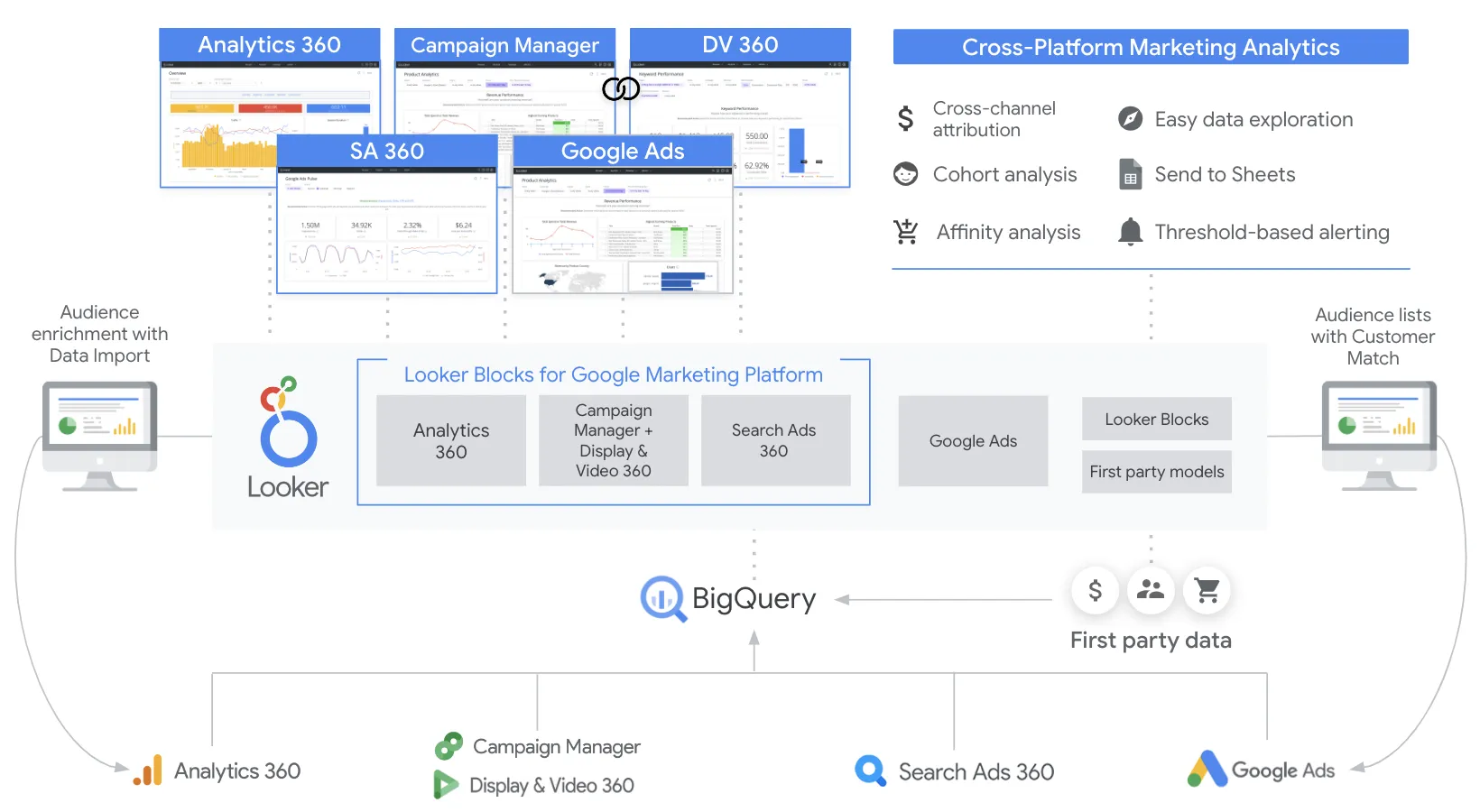
Looker
Feature Comparison
| Feature | Lightdash | Looker |
|---|---|---|
| Data Modeling | ||
| Semantic Layer | dbt-native YAML metrics definitions synced from dbt project | LookML modeling language for reusable metrics, joins, and derived tables |
| Version Control | BI-as-code with CI/CD, automated testing, and preview environments | Git-integrated LookML models with version history |
| Data Lineage | Upstream and downstream dependency visualization from dbt models | Model-level lineage through LookML project structure |
| Analytics & Visualization | ||
| Self-Service Exploration | Metrics catalog and explorer for governed self-serve analytics | Explores and dashboards with drill-down to row-level detail |
| Dashboard Building | AI agents assemble metrics, charts, and layouts into dashboards | Enterprise dashboards with real-time data, filters, and tile exploration |
| Natural Language Querying | AI agents in UI and Slack answer questions without SQL | Gemini-powered Conversational Analytics for natural-language data queries |
| Platform & Deployment | ||
| Open Source | Fully open-source core with 5,500+ GitHub stars | Proprietary — closed-source platform owned by Google Cloud |
| Hosting Options | Self-hosted on own infrastructure or Lightdash-managed cloud | Google Cloud hosted only, with private networking and IAM integration |
| Embedding | Embedding via iframe and ReactSDK (add-on for Cloud Pro) | Robust embedded analytics with white-labeling and full API coverage |
| Governance & Security | ||
| Access Control | Private spaces, user management, and organization-level permissions | Row-level and column-level security with role-based access control |
| Compliance | SOC 2 Type II certified, HIPAA compliant | Enterprise governance with audit features, SSO, SAML, and SCIM 2.0 |
| Usage Analytics | Built-in usage analytics to track adoption across the organization | Admin analytics with user activity tracking and content management |
| Integration & Ecosystem | ||
| dbt Integration | Native dbt integration — auto-creates dimensions, syncs descriptions and metadata | Indirect dbt support — LookML is a separate modeling layer from dbt |
| API & Extensibility | API, webhooks, Google Sheets sync, and Slack integration | REST APIs, SDKs, Looker Marketplace with blocks, extensions, and plug-ins |
| Warehouse Connectivity | Connects to warehouses supported by dbt (Snowflake, BigQuery, Redshift, etc.) | Direct query against warehouses with no data storage — always-fresh results |
Data Modeling
Semantic Layer
Version Control
Data Lineage
Analytics & Visualization
Self-Service Exploration
Dashboard Building
Natural Language Querying
Platform & Deployment
Open Source
Hosting Options
Embedding
Governance & Security
Access Control
Compliance
Usage Analytics
Integration & Ecosystem
dbt Integration
API & Extensibility
Warehouse Connectivity
Which to choose
Lightdash is the stronger pick for dbt-centric data teams that want open-source flexibility, code-first workflows, and unlimited seats without per-user pricing. Looker is the better fit for large enterprises already invested in Google Cloud that need deep embedded analytics, a mature marketplace ecosystem, and enterprise-grade governance at scale.
Best-fit scenarios
Choose Lightdash if:
We recommend Lightdash for data teams that run dbt as their transformation layer and want their BI tool to natively leverage dbt models, metrics, and metadata. It is particularly strong for organizations that value open-source flexibility, want to avoid per-seat licensing costs, and prefer a developer-friendly BI-as-code workflow with CI/CD and preview environments. Teams that want AI-driven dashboard creation and Slack-based analytics without SQL will find Lightdash compelling.
Choose Looker if:
We recommend Looker for enterprise organizations that need a proven, fully managed BI platform with deep integration into Google Cloud. Looker excels when you need robust embedded analytics for customer-facing products, a mature semantic modeling layer in LookML, and an extensive marketplace of pre-built blocks and extensions. It is the right choice for companies that require advanced security controls, Gemini-powered conversational analytics, and a platform backed by Google's infrastructure and support.
These scenarios reflect the available product evidence. Your requirements, existing stack, and team expertise should guide the final decision.
Frequently Asked Questions
Is Lightdash a good alternative to Looker for dbt teams?
Lightdash was purpose-built for dbt users, making it one of the most natural alternatives for teams already running dbt. It connects directly to your dbt project and automatically syncs dimensions, metrics, and descriptions. While Looker has its own LookML modeling layer that operates separately from dbt, Lightdash eliminates the need to maintain a second semantic layer by using dbt as the single source of truth for metric definitions.
How do Lightdash and Looker compare on pricing?
Lightdash offers a free open-source self-hosted option, with its managed Cloud Pro plan at $3,000 per month with unlimited user seats. Looker uses an annual-commitment, contact-sales pricing model that historically scales with user count. For organizations looking to avoid per-seat costs and give unlimited stakeholders access to dashboards and reports, Lightdash's flat pricing structure can represent significant savings.
Can Lightdash handle enterprise-level security requirements?
Lightdash's Enterprise tier includes SOC 2 Type II certification, HIPAA compliance with BAA support, SSO with SAML and SCIM 2.0, and custom role-based access control. It also offers deployment flexibility, allowing enterprises to host on their own infrastructure or use the managed cloud. Looker provides comparable enterprise security through Google Cloud's infrastructure, including private networking and IAM integration.
Which tool has better AI and natural language capabilities?
Both tools offer AI-powered analytics but take different approaches. Lightdash focuses on agentic BI where AI agents build dashboards, answer questions via Slack, and operate through a governed semantic layer to prevent hallucinations. Looker leverages Google's Gemini models for Conversational Analytics, letting users ask data questions in natural language, and integrates with Vertex AI for custom AI workflows. Looker's AI capabilities benefit from Google's broader AI infrastructure, while Lightdash's approach is more tightly integrated with the dbt workflow.