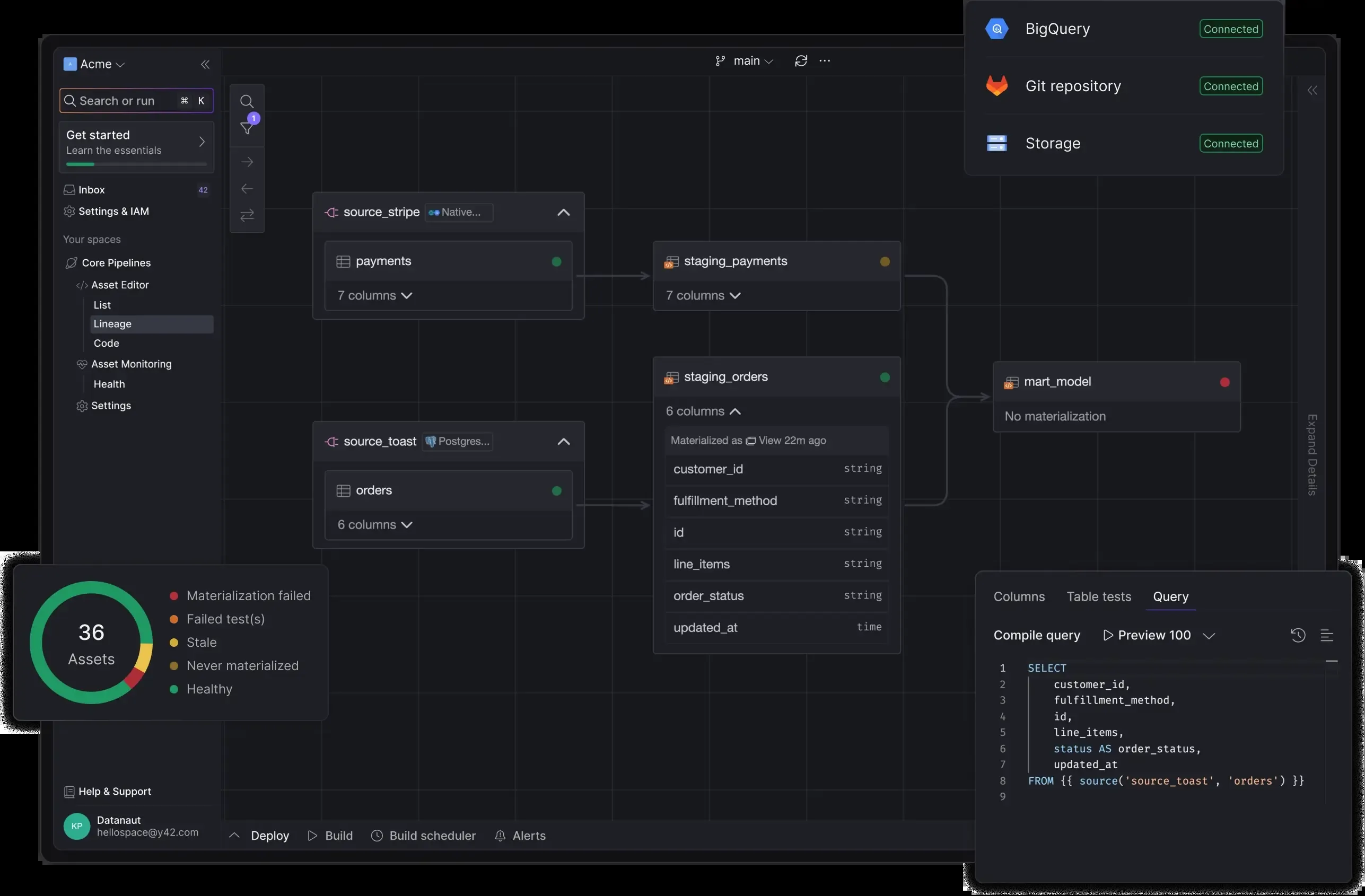
Y42: product and architecture
Our verdict: Y42 is best evaluated as a unified, turnkey data-workspace product for teams that want orchestration, transformation, and visualization in one place rather than an independently assembled stack. This Y42 review recommends it for data practitioners who value a single operating surface and can work within its published Business-plan allowance of two spaces and three users. The product’s positioning is unusually clear—“The Data Must Flow. Reliably.”—but the supplied material leaves important operational evidence unaddressed, including supported connectors, warehouse coverage, orchestration semantics, and performance benchmarks.
Overview
Y42 is a data-pipeline product positioned as a modern data platform that combines data orchestration, transformation, and visualization. Its stated goal is to provide one unified workspace where a data team can build, monitor, and maintain the data flows that power the business. The company calls this a “Turnkey Data Orchestration Platform,” which is a meaningful positioning choice: Y42 is selling an integrated environment, not merely an isolated scheduler or a transformation package.
The strongest reason to consider Y42 is consolidation. The supplied product description explicitly frames the alternative as fragmented data flows spread across a “galaxy of tools,” with examples that include an Airflow-style BashOperator, Git rebasing, Python, and dbt-style SQL source definitions. Y42’s answer is a shared workspace intended to reduce the day-to-day coordination burden created when those responsibilities are distributed across separate systems.
The platform includes SQL/dbt Core and Python assets., placing it across three adjacent stages of the data lifecycle: coordinating work, transforming data, and presenting outputs. That can be attractive for an analytics engineering function that already treats dbt as part of its core workflow and does not want dashboarding to become a separate ownership boundary. It also means teams should assess Y42 as a broader platform decision, not as a narrow replacement for a single orchestration component.
We recommend Y42 for teams seeking a more opinionated, integrated data environment and willing to evaluate its boundaries carefully. Avoid selecting it solely because “turnkey” sounds simpler: the supplied information does not establish what sources it connects to, what execution engine it uses, how it handles failures, or how it fits into an existing deployment and governance model. Those omissions do not make the product unsuitable, but they do make a proof of concept essential before standardizing on it.
Y42 is aimed directly at data practitioners, and its official website invites users to start for free or request a demo. It also promotes a Community Kickstart Hackathon, Discord sign-up, and prizes including a MacBook; these are community and awareness activities, not evidence of production scale or enterprise adoption. We treat such public activity as an adoption signal at most, not proof that Y42 meets a particular organization’s reliability, security, or scale requirements.
Key Features and Architecture
Y42’s architecture is defined by a unified workspace that brings together orchestration, transformation, visualization, monitoring, and maintenance. The practical value is the intended reduction in handoffs between tools and interfaces: a team can work from a common environment instead of navigating separately between a scheduler, transformation workflow, and BI layer. The trade-off is architectural concentration—adopting Y42 for several functions makes the platform more central to the team’s daily operation.
Key capabilities stated for Y42 include:
-
Unified orchestration workspace: Y42 provides a single space to build, monitor, and maintain data flows. This is the core technical promise of the product: orchestration is not presented as a standalone scheduling utility, but as part of a broader workspace for operating data work.
-
Data transformation: The platform explicitly combines orchestration with transformation. The provided material does not define Y42’s transformation execution model, supported SQL dialects, testing behavior, or deployment workflow, so teams should validate those areas instead of assuming equivalence with a dedicated transformation tool.
-
dbt integration: Y42 includes dbt integration, making it relevant where dbt models are already central to analytics engineering. This is a concrete differentiator in the product description, although the supplied information does not specify which dbt features are integrated or how dbt projects are configured, run, or monitored.
-
SQL/dbt Core and Python assets: Y42 lists SQL/dbt Core and Python assets. That can shorten the distance between managed data flows and visualization, but it also requires teams to decide whether a unified BI layer is preferable to retaining their existing reporting standard.
-
Monitoring and maintenance focus: The official product copy says the platform is designed to help teams monitor and maintain robust data flows. This is operationally important because it places reliability work in Y42’s stated scope; however, the data does not provide alerting methods, observability metrics, incident workflows, service-level objectives, or recovery behavior.
-
Free entry point: Y42’s official site describes getting started “for free,” while its pricing copy says teams can start building for their data warehouse at zero cost. That lowers evaluation friction, though the supplied information does not specify free-plan limits, included users, spaces, or feature restrictions.
The official site also describes Y42 as “designed for data practitioners” and calls it the “only Turnkey Data Orchestration Platform.” The former identifies the intended working audience; the latter is vendor positioning rather than an independently established market fact. We would use it as a cue to test whether Y42 genuinely replaces enough of a current toolchain to justify adoption, rather than accepting the claim as proof of uniqueness.
Technically, Y42’s appeal is the integration boundary: dbt integration and built-in BI can make a single workspace useful for teams that want fewer disconnected operating surfaces. Its weakness is the same boundary when a team needs detailed assurance about individual components. The provided material contains no named data-source integrations, no warehouse list, no API details, no version numbers, and no performance metrics, so a technically rigorous buyer should make those demonstration requirements explicit.
Ideal Use Cases
Y42 is a sensible candidate for a small data team that wants to operate from a common environment instead of assembling orchestration, transformation, and visualization workflows across several products. A concrete fit is a three-user team using the Business plan, because that tier includes three users and two spaces for $500 per month. In that setting, orchestration, SQL/dbt Core and Python assets, monitoring, and maintenance maps directly to a desire for fewer tool boundaries.
A second fit is an analytics engineering group whose work already depends on dbt and whose reporting process would benefit from being adjacent to the transformation and orchestration workflow. Y42 explicitly includes dbt integration and built-in BI, so it deserves evaluation when those two capabilities are currently managed apart. The value proposition is not simply “use dbt”; it is to place dbt-related work in a platform whose stated scope also includes building, monitoring, and maintaining flows.
A third fit is a data leader trying to reduce operational fragmentation before growing the team beyond a small initial group. The product’s own description highlights the maintenance burden of scattered tooling, and the Business plan’s two spaces can support a limited, deliberate evaluation across separated work areas. We recommend beginning with a bounded workflow that crosses orchestration, transformation, and visualization so the team can test Y42’s integrated proposition rather than evaluating only one component.
Y42 can also suit practitioners who prefer a guided, turnkey platform to managing the seams between a scheduler, source-control workflow, Python jobs, SQL models, and BI delivery. The official copy uses precisely those kinds of fragmented work patterns to establish the problem Y42 is meant to address. That does not prove that every existing stack should be replaced, but it does make the product relevant where tool coordination itself is the main source of maintenance work.
Don’t use Y42 if your decision requires confirmed details about specific connectors, supported warehouses, execution performance, deployment controls, or reliability guarantees before a pilot. The supplied evidence does not establish those facts, and a platform combining several functions should be held to a high standard on each one. Likewise, teams that need more than three named users or more than two spaces should not assume the $500-per-month Business tier will fit; those limits are explicit, while Enterprise pricing is custom.
Strengths & Trade-offs
Y42’s advantages are concentrated around integration and a clearly defined small-team entry tier. Its limitations are equally important: the supplied information gives the product’s broad scope and price, but not enough technical proof to support an unqualified platform commitment. A candid evaluation should give both sides equal weight.
Pros
-
One stated workspace for build, monitoring, and maintenance work. Y42 is explicitly designed to unify those operating responsibilities, which can reduce the coordination cost of maintaining data flows across disconnected products.
-
It combines orchestration, transformation, and visualization. This is more specific than generic “all-in-one” language: the product description names all three disciplines, giving teams a coherent scope to evaluate.
-
dbt integration is explicitly included. For analytics engineers already using dbt, that makes Y42 more relevant than a platform described only as a generic pipeline product.
-
Built-in BI is part of the platform. Teams can evaluate pipeline operations and visualization together instead of assuming reporting must be purchased and administered separately.
-
The Business plan is concrete for small teams. At $500 per month, it includes two spaces and three users, which creates a clear initial cost and capacity boundary.
-
A free plan exists. The official pricing language says users can start at zero cost, making it possible to investigate the platform before immediately committing to the $500-per-month Business tier.
Cons
-
Free-plan limits are not stated. Y42 advertises a free plan, but the supplied material does not define user limits, space limits, feature access, or usage caps, making meaningful evaluation planning harder.
-
Enterprise pricing is custom without a published amount. Organizations with needs beyond the three-user, two-space Business tier cannot derive a reliable budget from the information provided.
-
The product data names no source or destination integrations. For a data-pipeline platform, buyers cannot confirm connector fit from this material and must not assume coverage for their warehouse or operational systems.
-
No execution, performance, or reliability metrics are provided. Y42 emphasizes reliable flow maintenance, but the evidence supplied does not include runtimes, throughput, availability commitments, retry behavior, or recovery details.
-
The integrated scope can increase platform dependency. Choosing Y42 for orchestration, transformation, and BI means several workflow layers depend on one vendor environment; that may be worthwhile, but it is a material architectural trade-off.
-
No licensing or deployment detail is supplied. The freemium model and plan names are clear, but the material does not establish contract terms, deployment options, or administrative controls.