That stack gives you clean data in a warehouse or lakehouse, a metrics layer people mostly agree on, and a way to safely point large language models at that data without burning the company down.
So the obvious next question is: what should you actually build with it?
The AI vendor answer is “everything.” AI copilots for sales, for marketing, for HR, for finance, for your dog. The reality inside most companies is more modest: nobody has time to build ten agents properly, and most teams don’t have the maturity to run them safely in production.
This post is the opposite of a shopping list. It’s three concrete agents that are actually worth building once your data stack doesn’t suck.
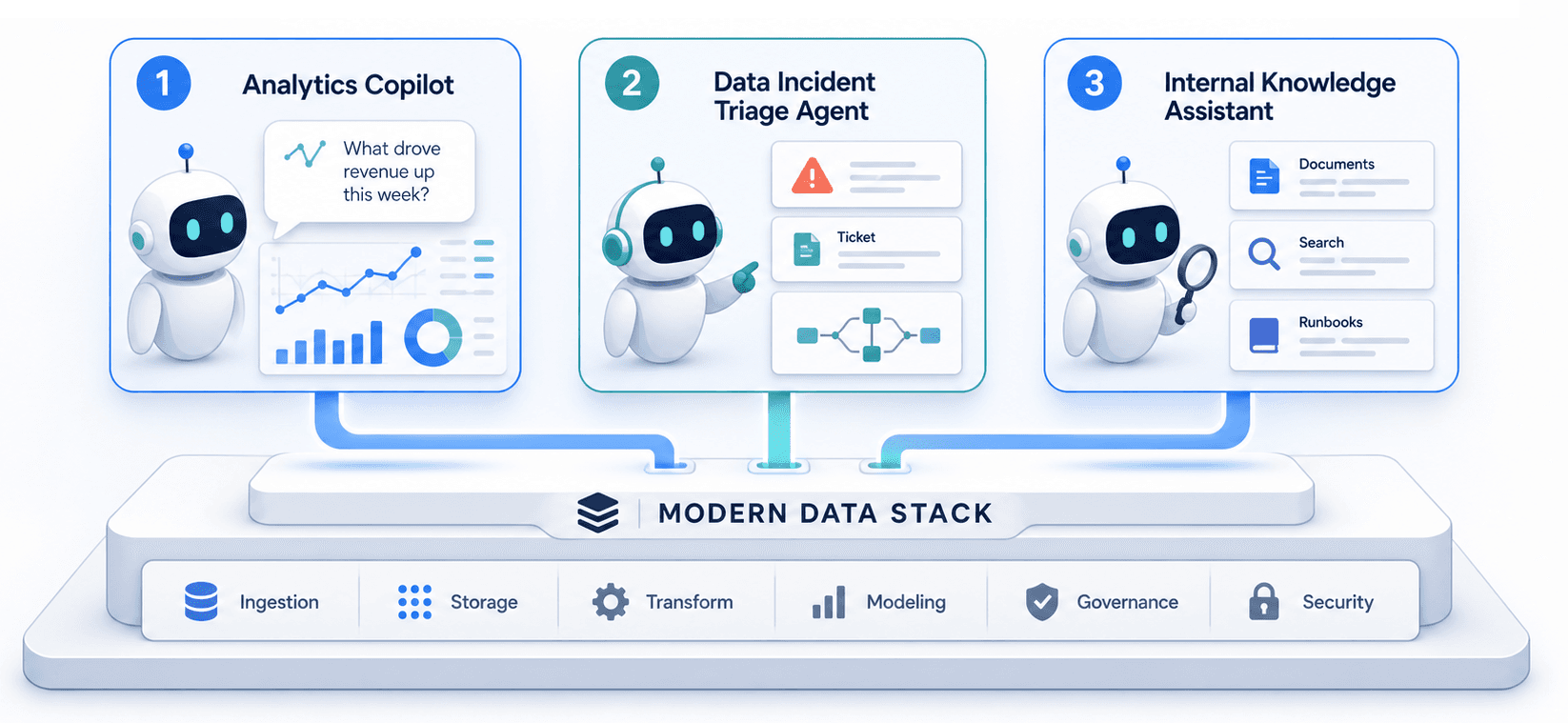
Agent #1: The Analytics Copilot That Sits Next to Your Dashboards
Dashboards are very good at answering “what changed?” and very bad at answering “why?” or “what should we do about it?”
An analytics copilot closes that gap. It sits next to the dashboards your team already uses and does three things well:
Plain-English explanations of metrics.
Instead of forcing people to reverse-engineer SQL, the copilot can answer questions like “Why did weekly active users drop last week?” by pulling the right metric definitions, slicing by the right dimensions, and narrating the story in human language.
KPI narratives on a schedule.
Every Monday morning, it can post a short summary into Slack: what moved, what’s unusual, and where to look next. Think of it as a written version of your weekly metrics review, generated automatically.
Context and citations.
When it explains something, it can link back to the underlying charts and docs: the dashboard slices, the PRD/BRD that defined the metric, the experiments that touched it. No more “where did this number come from?”.
Under the hood, this is not magic:
Data: your warehouse or lakehouse, with modeled tables and a metrics layer.
Retrieval: a RAG layer over metric definitions, documentation, and maybe past weekly reports.
Model: a hosted LLM or in-cloud model that’s good at summarization and following instructions.
Interface: a small “Ask” box next to your BI tool and a bot in Slack or Teams.
If you already have a modern data stack, you’re 80% of the way there. You’re not “teaching AI about your business” from scratch; you’re letting a model read the semantic layer you’ve already built.
Start small: one or two key dashboards, a limited set of questions, and strict scoping. The goal is not to solve analytics forever. The goal is to make the dashboards you already have dramatically more useful.
Agent #2: The Data Incident Triage Agent
If you’ve ever been paged because “all the numbers look wrong”, you already know why this matters.
Most data teams live in a weird half-incident world:
We have pipeline failures, schema changes, and silent data issues.
We have monitoring tools that scream at us.
We have humans who triage incidents by hand: check logs, open tickets, ping owners, write updates.
A data incident triage agent doesn’t replace observability. It sits on top of it and does the glue work:
Explain the problem in human terms.
When your data quality or observability tool fires an alert, the agent reads the metadata, checks recent deployments, looks at impacted tables and dashboards, and writes a one-paragraph summary: what broke, who’s affected, and how urgent it is.
Open and enrich tickets automatically.
Instead of a human copying error messages into Jira, the agent can create the incident, add relevant links (failed jobs, affected datasets, lineage graphs), and assign it to the right team based on tags.
Draft incident updates and postmortems.
Once someone fixes the issue, the agent can turn the timeline of events into an internal update or a first draft of a postmortem that the on-call can edit rather than write from scratch.
The nice part is that your modern data stack already has most of the signals this agent needs:
Data quality alerts from dbt tests, Soda, or an observability platform like Monte Carlo.
Lineage and ownership from your catalog and metrics layer.
You don’t need complex autonomy here. A simple pattern works well:
Trigger: a data incident alert.
Tools: “fetch recent job runs”, “get lineage for this table”, “search past incidents for similar errors”, “create/update incident ticket”.
Output: summaries, tickets, and updates that humans can read and act on.
If you only build one operational agent this year, make it this one. It pays off the first time it turns a 45-minute “what is going on?” scramble into a 5-minute “oh, it’s that again” fix.
Agent #3: The Internal Knowledge & Runbook Assistant
Every company has the same problem: institutional knowledge lives in a mix of docs, dashboards, Slack threads, and the heads of several senior people who are always in meetings.
You can attack this with two separate products — a generic enterprise Copilot and a separate custom RAG stack — or you can do the sane thing and put a scoped assistant on top of your existing data and documentation.
The internal knowledge & runbook assistant has a simple job:
Answer “how do we…” questions.
“How do we define churn for self-serve customers?”
“Which dashboards should I look at for marketing performance?”
“What’s the runbook for fixing ‘orders_not_syncing_to_crm’?”
Navigate people to the right assets.
It doesn’t just answer; it links to the canonical doc, the canonical dashboard, or the latest experiment writeup. Over time, this has a side-effect: docs that are wrong get surfaced and fixed because people keep seeing them.
Help keep knowledge bases clean.
Many teams discover that building a RAG assistant forces them to actually curate which docs should be in scope, how they’re tagged, and when they’re reviewed. That’s a feature, not a bug.
Architecturally, this looks a lot like the analytics copilot:
Data: your warehouse/lakehouse for metrics; your documentation spaces (Confluence, Notion, Google Docs, SharePoint, GitHub wikis) for process and runbooks.
Retrieval: a vector index over docs and, optionally, dashboard metadata, with filters by team, topic, or product.
Model: tuned prompts that force the assistant to answer “I don’t know” when the retrieved context doesn’t actually contain an answer.
Interface: a chat entry point in Slack/Teams and a widget in your internal portal.
The key is scoping. Don’t try to build a company-wide oracle on Day 1. Start with one domain — “data team knowledge”, “support runbooks”, or “growth analytics” — and expand once you’re confident people trust the answers.
Putting It Together: One Stack, Few Agents, Real Value
You’ll notice a pattern across all three agents:
None of them require a brand-new AI infrastructure team.
All of them reuse the modern data stack you already built: warehouse or lakehouse, transformation, metrics layer, orchestration, quality, and catalog.
All of them are narrow by design. They solve a specific pain: understanding metrics, handling data incidents, or finding internal knowledge.
You can absolutely spend the rest of 2026 evaluating twenty different agent frameworks, observability platforms, and orchestration layers. But if your goal is to deliver something useful this quarter, a better strategy is:
Ship one analytics copilot next to your core dashboards.
Ship one data incident triage agent for the pipelines that hurt the most.
Ship one internal assistant for the team that’s drowning in “how do we…” questions.
Then stop. Watch how people use them. Fix the rough edges. Fold what you learn back into your data models, your metrics layer, and your documentation.
The agents you actually run in production will teach you more about your stack — and your organization — than any architecture diagram.
And if you find yourself drawing a seven-layer AI stack diagram with six vendors per box, remember the meta-lesson from the modern data stack:
The best stack is the simplest one that reliably solves your actual problems.
Start there. Everything else is optional.
EB
Written by Egor Burlakov
Engineering and Science Leader with experience building scalable data infrastructure, data pipelines and science applications. Sharing insights about data tools, architecture patterns, and best practices.
Explore Further
Dive deeper into the tools and categories mentioned in this article.