Decision comparison
Azure Monitor vs Datadog
Choose Azure Monitor when Azure services, Azure SLAs, hybrid-resource coverage, centralized Azure telemetry, and autoscaling response are central to operations. Choose Datadog when a team needs a broad SaaS suite spanning APM, logs, network monitoring, synthetic monitoring, real-user monitoring, and security monitoring across cloud environments.
Architecture choice. These take different approaches to the same problem. Read the table as a fit question rather than a feature race.
These are different kinds of product — Cloud-Native Monitoring and Observability Platform.
Quick Comparison
| Decision factor | Azure Monitor | Datadog |
|---|---|---|
| Best For | Azure-centered organizations monitoring applications, virtual machines, Kubernetes, networks, and hybrid or multicloud resources through Microsoft-managed observability services. | DevOps and SRE teams needing SaaS observability across applications, infrastructure, logs, networks, frontend journeys, and cloud environments. |
| Architecture | Azure-native telemetry platform combining centralized logs, distributed tracing, curated visualizations, alerts, autoscaling, and open-source integrations for hybrid environments. | Unified SaaS platform correlating infrastructure monitoring, log management, APM, network monitoring, synthetic monitoring, real-user monitoring, and security monitoring. |
| Pricing Model | Billing is primarily based on the volume of data ingested into Azure Monitor. Use capacity reservation tiers to save up to 36 percent on data ingestion costs as compared to pay-as-you-go pricing. Some functionalities have additional charges. | Free: up to 5 hosts, 1-day metric retention. Infrastructure Monitoring: Pro $15 per host per month billed annually or $18 on-demand; Enterprise $23 billed annually or $27 on-demand. DevSecOps: Pro $22 billed annually or $27 on-demand; Enterprise $34 or $41. APM with Infrastructure Monitoring attached, per host per month billed annually: APM $31, APM Pro $35, APM Enterprise $40. Standalone APM: $36, $41 and $47. Other products, such as Log Management, are priced separately. Verified 2026-10-05 against https://www.datadoghq.com/pricing/. Log ingestion is $0.10 per GB per month, and indexed logs with 15-day retention are $1.70 per million per month billed annually ($2.04 month-to-month, $2.55 on-demand). Custom metrics are $5 per 100 per month; Synthetic API tests are $5 per 10K runs and browser tests $12 per 1K runs per month billed annually; RUM Measure is $0.15 per 1,000 sessions per month billed annually. Verified 2026-10-05 against https://www.datadoghq.com/pricing/list/. |
| Ease of Use | Curated insights and service-focused monitoring provide minimal-configuration onboarding, while a single-pane visualization consolidates distributed telemetry for operations teams. | Auto-generated service overviews, automated tagging, and correlation speed investigation, though users report setup complexity and a learning curve. |
| Scalability | Supports Azure, multicloud, and hybrid resources, with near-real-time alerts and autoscaling capabilities when monitored resource load increases. | Designed for applications at scale across cloud environments; costs can expand with hosts, metrics, logs, and indexed traces. |
| Community/Support | Backed by Azure SLAs and Microsoft ecosystem support; ApplicationInsights-dotnet has 610 GitHub stars, MIT licensing, and C# implementation. | User rating is 8.6/10 from 346 reviews; users cite responsive support. Datadog Agent has 3,713 GitHub stars and Apache-2.0 licensing. |
Azure Monitor
- Best For:
- Azure-centered organizations monitoring applications, virtual machines, Kubernetes, networks, and hybrid or multicloud resources through Microsoft-managed observability services.
- Architecture:
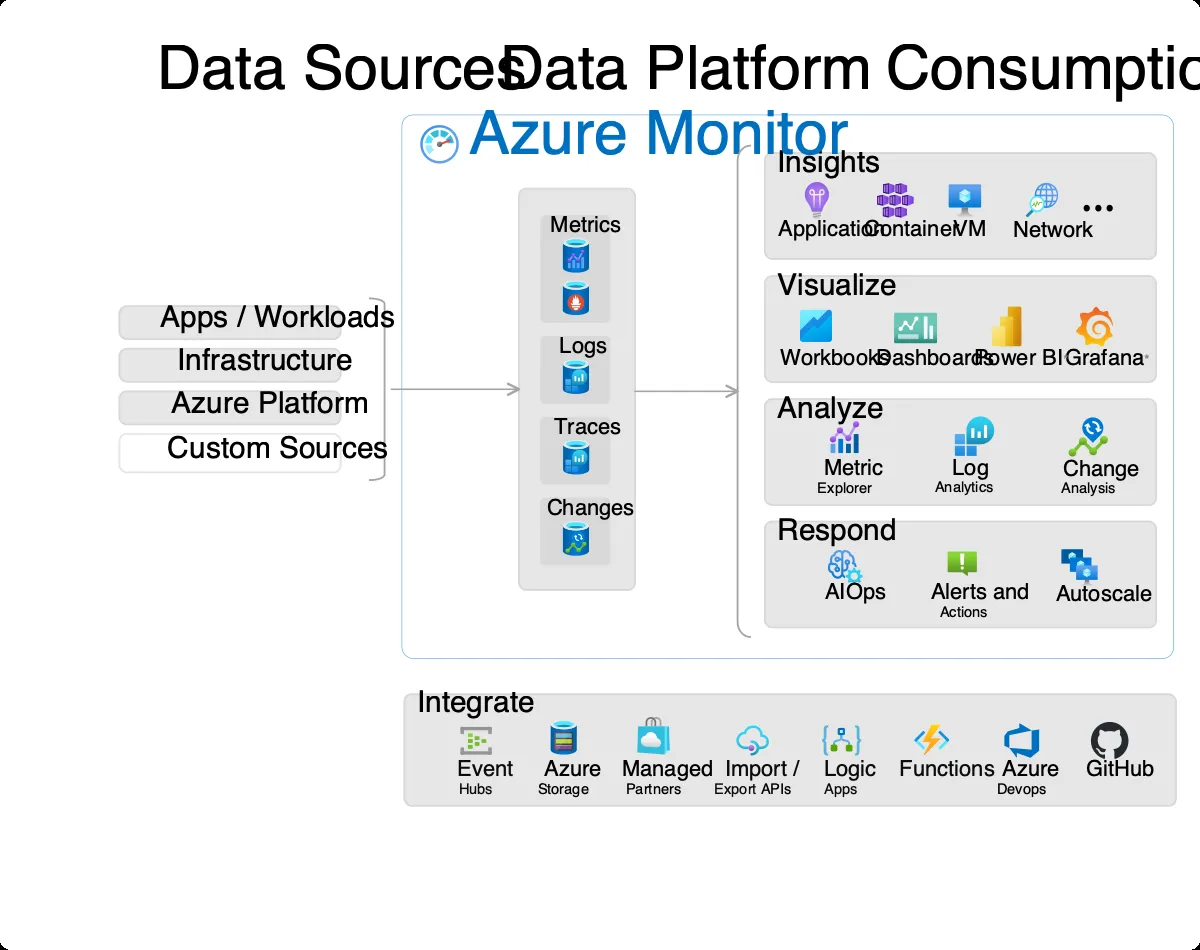
- Azure-native telemetry platform combining centralized logs, distributed tracing, curated visualizations, alerts, autoscaling, and open-source integrations for hybrid environments.
- Pricing Model:
- Billing is primarily based on the volume of data ingested into Azure Monitor. Use capacity reservation tiers to save up to 36 percent on data ingestion costs as compared to pay-as-you-go pricing. Some functionalities have additional charges.
- Ease of Use:
- Curated insights and service-focused monitoring provide minimal-configuration onboarding, while a single-pane visualization consolidates distributed telemetry for operations teams.
- Scalability:
- Supports Azure, multicloud, and hybrid resources, with near-real-time alerts and autoscaling capabilities when monitored resource load increases.
- Community/Support:
- Backed by Azure SLAs and Microsoft ecosystem support; ApplicationInsights-dotnet has 610 GitHub stars, MIT licensing, and C# implementation.
Datadog
- Best For:
- DevOps and SRE teams needing SaaS observability across applications, infrastructure, logs, networks, frontend journeys, and cloud environments.
- Architecture:
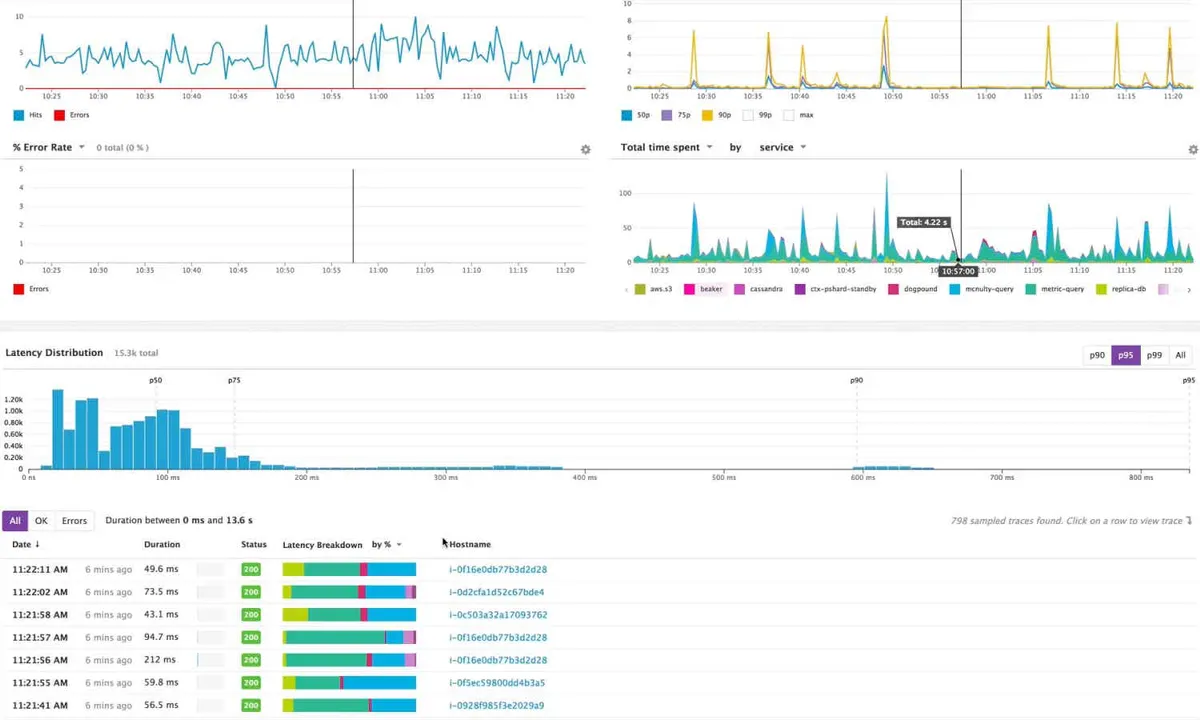
- Unified SaaS platform correlating infrastructure monitoring, log management, APM, network monitoring, synthetic monitoring, real-user monitoring, and security monitoring.
- Pricing Model:
- Free: up to 5 hosts, 1-day metric retention. Infrastructure Monitoring: Pro $15 per host per month billed annually or $18 on-demand; Enterprise $23 billed annually or $27 on-demand. DevSecOps: Pro $22 billed annually or $27 on-demand; Enterprise $34 or $41. APM with Infrastructure Monitoring attached, per host per month billed annually: APM $31, APM Pro $35, APM Enterprise $40. Standalone APM: $36, $41 and $47. Other products, such as Log Management, are priced separately. Verified 2026-10-05 against https://www.datadoghq.com/pricing/. Log ingestion is $0.10 per GB per month, and indexed logs with 15-day retention are $1.70 per million per month billed annually ($2.04 month-to-month, $2.55 on-demand). Custom metrics are $5 per 100 per month; Synthetic API tests are $5 per 10K runs and browser tests $12 per 1K runs per month billed annually; RUM Measure is $0.15 per 1,000 sessions per month billed annually. Verified 2026-10-05 against https://www.datadoghq.com/pricing/list/.
- Ease of Use:
- Auto-generated service overviews, automated tagging, and correlation speed investigation, though users report setup complexity and a learning curve.
- Scalability:
- Designed for applications at scale across cloud environments; costs can expand with hosts, metrics, logs, and indexed traces.
- Community/Support:
- User rating is 8.6/10 from 346 reviews; users cite responsive support. Datadog Agent has 3,713 GitHub stars and Apache-2.0 licensing.
Need the cost answer?
Compare Datadog, Dynatrace and New Relic using your workload.
Public signals
Verified factual signals only. Bars appear only for like-for-like metrics with five weekly assessments for every tool; missing evidence stays explicit. These signals do not establish enterprise adoption, product quality, or total cost.
| Metric | Azure Monitor | Datadog |
|---|---|---|
| GitHub commits, 90d(Developer adoption) | 17 | 2.9k |
| GitHub stars(Developer adoption) | 615 | 3,500+ |
| Search interest(Market interest) | 1 | 13 |
| Hacker News mentions, 90d(Community interest) | 0 | 17 |
| npm weekly downloads(Developer adoption) | 726.3k | 6.2M |
| Stack Overflow questions(Community interest) | 207 | 1.1k |
| Hugging Face downloads(Product adoption) | Not available | 153.8k |
| Hugging Face likes(Product adoption) | Not available | 225 |
| Product Hunt comments(Community interest) | Not available | 1 |
| Product Hunt rating(Community interest) | Not available | 5.0/5 |
| Product Hunt reviews(Community interest) | Not available | 13 |
| Product Hunt votes(Community interest) | Not available | 75 |
| PyPI weekly downloads(Developer adoption) | Not available | 12.8M |
As of October 26, 2026 — updated weekly.
Health & risk evidence
Observed public-source checks for mapped package versions and repositories.
Azure Monitor
October 26, 2026Package vulnerabilities
npm · @azure/monitor-opentelemetry@1.20.1
0 vulnerabilities
across 1 package
Repository security score
Not available
Datadog
October 26, 2026Package vulnerabilities
PyPI · datadog@0.55.0 · npm · dd-trace@6.21.0
0 vulnerabilities
across 2 packages
Repository security score
github.com/DataDog/datadog-agent
5.9/10
Interface Preview
Azure Monitor
Datadog
Feature Comparison
| Feature | Azure Monitor | Datadog |
|---|---|---|
| Telemetry and Diagnostics | ||
| Centralized log analysis | Centralized logs platform supports diagnostics and telemetry troubleshooting. | Log Management analyzes and explores logs for rapid troubleshooting. |
| Distributed tracing | Distributed tracing accompanies curated visualizations and centralized diagnostics. | APM monitors, optimizes, and investigates application performance. |
| Telemetry analysis | Powerful data platform enables deeper telemetry diagnosis and analysis. | Time-series data and application data become actionable operational insight. |
| Monitoring Scope | ||
| Hybrid and multicloud monitoring | Monitors Azure, multicloud, and hybrid resources with Azure SLA backing. | Analyzes cloud-network traffic patterns across cloud environments. |
| Infrastructure monitoring | Monitors virtual machines and Kubernetes clusters through Azure monitoring tools. | Infrastructure product moves from overview to deep operational details. |
| Network visibility | Provides application, infrastructure, and network end-to-end observability. | Unifies network visibility across clouds, applications, and devices. |
| Application Experience | ||
| Application performance monitoring | Uses distributed tracing and telemetry diagnostics for application investigation. | APM monitors, optimizes, and investigates application performance. |
| End-user monitoring | Website data does not specify real-user or frontend journey monitoring. | Real User Monitoring tracks user journeys and frontend performance together. |
| Synthetic testing | Web tests are available as an additionally charged Azure Monitor function. | Synthetic Monitoring proactively monitors critical application features using AI-driven capabilities. |
| Operations and Response | ||
| Alerting | Near-real-time alerts support response to critical monitoring situations. | Graphs and alerts on error rates or latency percentiles. |
| Capacity response | Can autoscale resources when monitored load increases. | Focuses on investigation and monitoring; autoscaling is not specified. |
| Service context | Curated insights customize monitoring for selected services with minimal configuration. | Auto-generated service overviews provide application service context. |
| Commercial and Ecosystem Model | ||
| Primary billing meter | Bills primarily by Azure Monitor data-ingestion volume. | Combines per-host pricing with usage and feature-based charges. |
| Cost optimization | Capacity reservation tiers can save up to 36% on ingestion. | Offers multi-year and volume discounts for scaled commitments. |
| Open-source agent ecosystem | ApplicationInsights-dotnet is an MIT-licensed C# telemetry SDK repository. | Datadog Agent is an Apache-2.0-licensed Go repository for monitoring telemetry. |
Telemetry and Diagnostics
Centralized log analysis
Distributed tracing
Telemetry analysis
Monitoring Scope
Hybrid and multicloud monitoring
Infrastructure monitoring
Network visibility
Application Experience
Application performance monitoring
End-user monitoring
Synthetic testing
Operations and Response
Alerting
Capacity response
Service context
Commercial and Ecosystem Model
Primary billing meter
Cost optimization
Open-source agent ecosystem
Which approach fits
Choose Azure Monitor when Azure services, Azure SLAs, hybrid-resource coverage, centralized Azure telemetry, and autoscaling response are central to operations. Choose Datadog when a team needs a broad SaaS suite spanning APM, logs, network monitoring, synthetic monitoring, real-user monitoring, and security monitoring across cloud environments.
When each approach fits
Choose Azure Monitor if:
Choose Azure Monitor for Azure-heavy estates that need curated service insights, virtual machine and Kubernetes monitoring, ingestion-based billing, and alert-driven Azure autoscaling.
Choose Datadog if:
Choose Datadog for DevOps or SRE teams that want one SaaS interface for logs, APM, infrastructure, network traffic, synthetic tests, frontend journeys, and security signals.
These scenarios reflect the available product evidence. Your requirements, existing stack, and team expertise should guide the final decision.
Frequently Asked Questions
What is the main difference between Azure Monitor and Datadog?
Azure Monitor is positioned as an Azure-managed observability platform for applications, infrastructure, and networks across Azure, multicloud, and hybrid resources. Its documented capabilities emphasize curated Azure service insights, centralized logs, distributed tracing, telemetry analysis, near-real-time alerts, and autoscaling. Datadog is a SaaS observability platform aimed at IT, development, and operations teams, unifying infrastructure monitoring, logs, APM, network monitoring, synthetic monitoring, real-user monitoring, serverless monitoring, and security monitoring.
Which is better for small teams?
For a small team operating primarily on Azure, Azure Monitor can be the more direct fit because curated insights provide service-specific monitoring with minimal configuration and its platform is designed around Azure resources. Its costs should still be modeled against expected data ingestion, alerting, web tests, notifications, and data-export usage. Datadog can suit small teams that need broad cross-environment visibility, but users report setup complexity and a learning curve, while usage-based observability costs need careful monitoring as telemetry expands.
Can I migrate from Azure Monitor to Datadog?
A migration is feasible as an operational project, but it requires deliberate telemetry, dashboard, alert, retention, and cost planning. Azure Monitor uses centralized logs, distributed tracing, curated insights, and Azure-oriented alerting, while Datadog organizes observability around products such as Infrastructure Monitoring, Log Management, APM, Network Monitoring, Synthetic Monitoring, and Real User Monitoring. Map existing Azure alerts and visualizations to Datadog monitors and dashboards, validate application instrumentation and tagging, then run both systems in parallel before changing incident workflows.
What are the pricing differences?
Azure Monitor is primarily billed by data volume ingested. Capacity reservation tiers can save up to 36% on data-ingestion costs relative to pay-as-you-go pricing, while alerts, notifications, web tests, and data export can carry additional charges. The official pricing page identifies a free trial plus usage-based model. Datadog provides a free tier and paid plans starting at $15 per host per month (Infrastructure Pro, billed annually), with further charges based on usage and enabled features; multi-year and volume discounts are available.