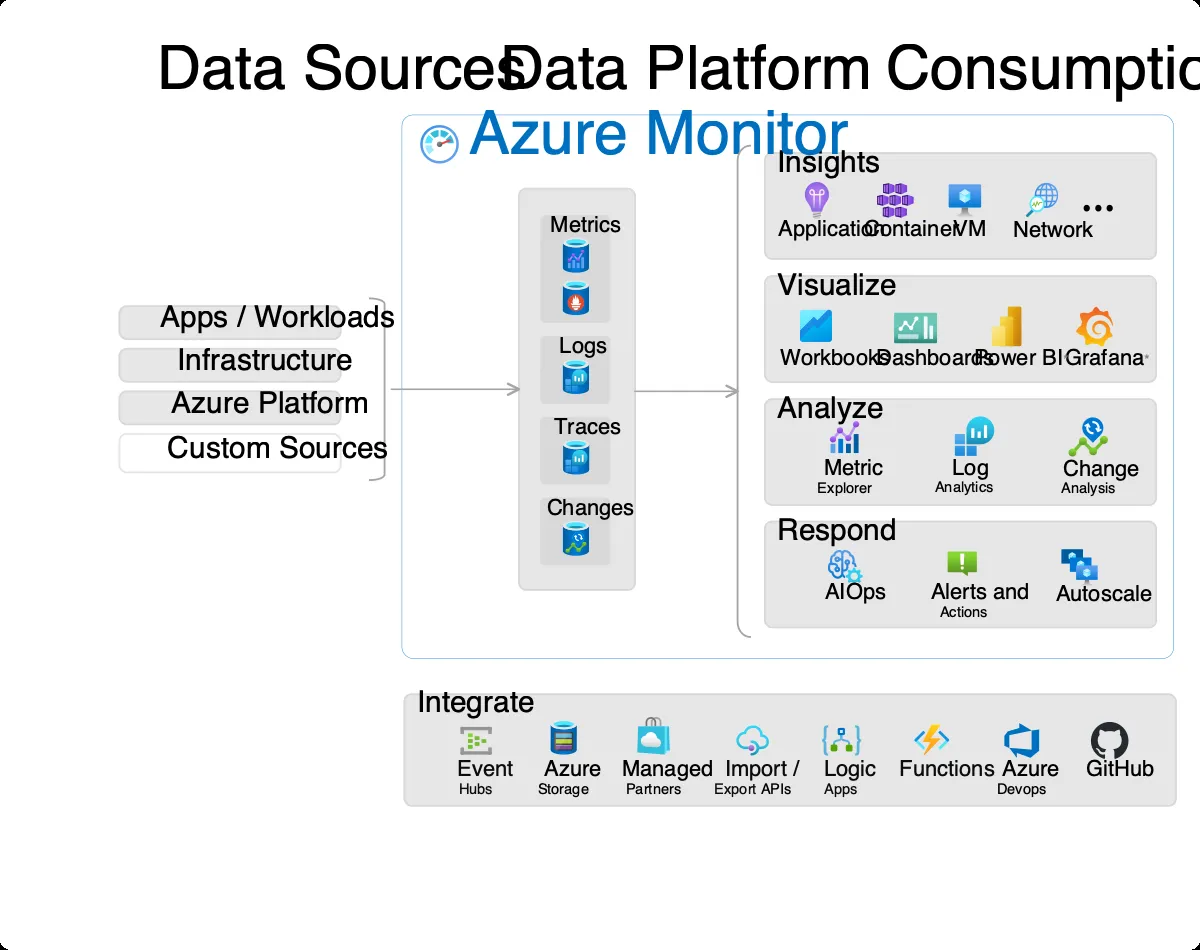
Azure Monitor: product and architecture
This Azure Monitor review covers Microsoft's native observability service for teams running workloads on Azure, hybrid cloud, or multicloud environments. Azure Monitor is the default monitoring layer for every Azure resource — metrics, logs, traces, and alerts for VMs, App Service, AKS, Functions, SQL Database, and nearly every other Azure service. We evaluated it against the observability stack most data teams actually assemble (Datadog, New Relic, Grafana, CloudWatch) to answer the real question: when is Azure Monitor enough, and when does it need help?
Overview
Azure Monitor is Microsoft's built-in observability platform, positioned as the foundation of the Observability & Monitoring category for Azure users. It ingests metrics from Azure resources automatically, accepts custom telemetry via APIs, stores application and infrastructure logs in Log Analytics workspaces, and triggers alerts and automated responses. For any team running on Azure, it's configured by default — every VM, every App Service, every storage account emits to Azure Monitor whether you notice or not.
The service matters because it's the fastest and lowest-friction way to get observability on Azure. There's no agent to deploy for Azure-native metrics, Azure AD integration handles auth out of the box, and it's billed on the same Azure invoice as the rest of your infrastructure. Microsoft positions Azure Monitor as a unified observability platform covering hybrid and multicloud environments — in practice, it's most compelling when Azure is your primary cloud, and less compelling the further you move outside the Azure ecosystem. Azure Monitor bundles several originally-separate products: Log Analytics, Application Insights, and the original Azure Monitor metrics service are all part of the same umbrella now.
Key Features and Architecture
Azure Monitor organizes its capabilities around four primitives: metrics, logs, traces, and alerts. Azure services push metrics and logs in automatically; for workloads outside Azure or for custom application telemetry, you push via the Azure Monitor Agent or the Application Insights SDKs (available for .
NET, Java, Node.js, Python).
The feature set beyond the primitives is where Azure Monitor has matured. Application Insights provides APM for web apps, services, and functions — it auto-instruments major .
NET workloads and offers SDK-based instrumentation for other languages. Log Analytics is the log storage and query layer, using KQL (Kusto Query Language) — a SQL-derivative designed for log and telemetry analysis. KQL is more powerful than CloudWatch Logs Insights and closer in capability to Splunk's SPL. Container Insights gives visibility into AKS clusters — pod-level CPU, memory, and network without sidecars. Workbooks are the dashboard primitive — less polished than Grafana but deeply integrated with Azure resources.
Data lands in Log Analytics workspaces, which are also the billing unit. Workspace data retention is configurable per table (30-730 days), and retention length is a primary cost lever — default retention is 31 days, but ingestion volume and retention length together drive the bill. Azure Monitor also integrates with Microsoft Sentinel for SIEM workflows, sharing the same Log Analytics workspace. For hybrid workloads, the Azure Monitor Agent runs on on-prem or non-Azure machines; for multicloud, AWS data can be forwarded in via connectors.
Ideal Use Cases
Best for:
- Azure-centric data teams and SRE organizations running VMs, App Service, AKS, Functions, or Azure SQL as their primary platform. Azure Monitor captures the default metrics every team needs with zero configuration.
- Microsoft-stack shops using Azure AD, Microsoft Sentinel, or Microsoft 365 — the integration points across the stack make Azure Monitor meaningfully more valuable than a third-party tool.
- Hybrid cloud teams where Azure is the primary cloud and on-prem workloads need a monitoring destination. The Azure Monitor Agent runs on Windows and Linux VMs anywhere.
- Teams needing KQL-based log analytics for ad-hoc troubleshooting. KQL is genuinely good at log analysis and transferable to Microsoft Sentinel if you later add security analytics.
Not suitable for:
- Teams with AWS or GCP as primary cloud — Azure Monitor can ingest external metrics, but you lose the zero-config advantage that's the whole point.
- Teams wanting polished real-user monitoring (RUM) or frontend-heavy APM — Application Insights is solid for backend services but weaker than Datadog or New Relic for frontend user-journey tracking.
- Cost-sensitive teams with very high log volumes who haven't tuned retention and sampling. The pay-as-you-go model can scale into thousands of dollars per month fast on verbose workloads without discipline.
Pros and Cons
Pros:
- Zero-config coverage for Azure resources — VMs, App Service, AKS, Functions, SQL Database all emit metrics and logs automatically.
- KQL is genuinely powerful for log analytics — more expressive than CloudWatch Logs Insights, comparable to Splunk SPL.
- Azure AD-native access control — no separate auth system, IAM integrates with existing Azure roles.
- Hybrid monitoring works well via the Azure Monitor Agent — on-prem Windows and Linux VMs slot in cleanly.
- Capacity reservations give real savings (up to 36% per Microsoft) when you can forecast ingestion volume.
- Integrates with Microsoft Sentinel for SIEM workflows without moving data.
Cons:
- Cost model is opaque — "GB per day" is harder to forecast than per-host or per-seat pricing, and bills can surprise teams that don't pre-tune retention.
- Documentation quality varies — Azure Monitor absorbed several older products (Application Insights, Log Analytics, original Azure Monitor) and the docs still have rough edges.
- Less useful outside Azure — hybrid works; true multicloud fights the tool.
- Workbooks are serviceable, not inspiring — dashboarding UX lags Grafana and Datadog materially.