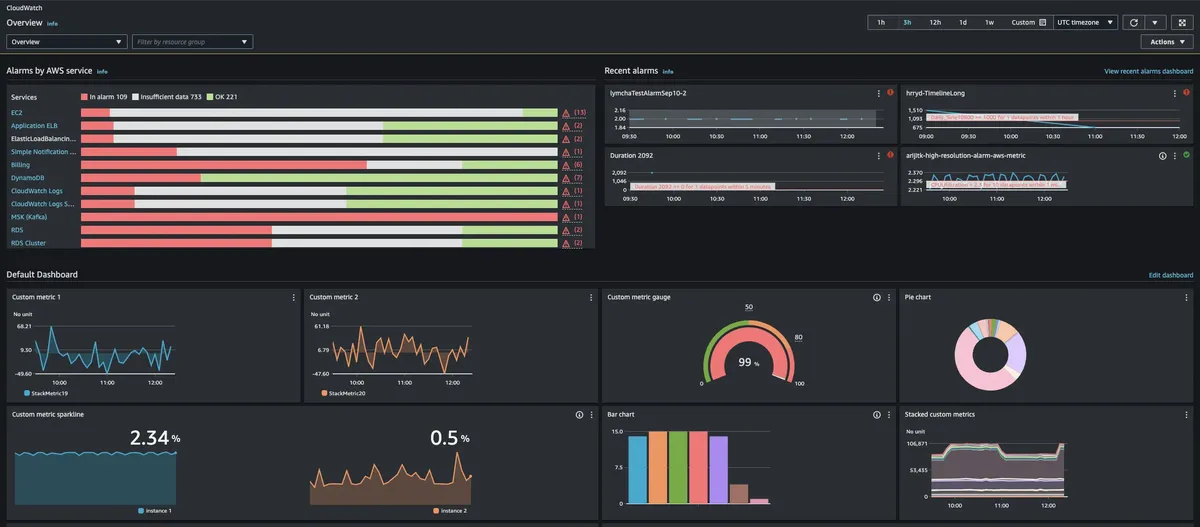
Amazon CloudWatch: product and architecture
Our verdict in this Amazon CloudWatch review: it is the right observability foundation for teams already committed to AWS that want a fully managed service for monitoring applications and infrastructure, but it is a weak choice for buyers seeking a clearly packaged, predictable observability product. CloudWatch positions itself around visibility into performance, availability, and security, and it is built for DevOps engineers, developers, SREs, IT managers, and product owners. We recommend it when AWS operational context and managed delivery matter more than a simple, fixed subscription.
Overview
Amazon CloudWatch is an AWS observability service designed to help teams observe and optimize workloads at scale. Its stated scope covers applications and infrastructure, with actionable insights intended to speed issue resolution and improve reliability. The product’s positioning is broad: it targets not only hands-on operators such as SREs and DevOps engineers, but also IT managers and product owners who need visibility into system health.
The practical appeal is that CloudWatch is presented as a fully managed service with AWS operational expertise and scalability built into the offering. That makes it a natural fit when the monitoring decision is inseparable from the AWS operating model. Instead of adopting a separate monitoring platform as the central product, a team can use Amazon CloudWatch as part of its AWS management and governance environment.
CloudWatch also emphasizes complete visibility across performance, availability, and security. Those are useful operational categories, but buyers should distinguish product positioning from a detailed implementation checklist. The supplied product information does not specify retention periods, data-volume limits, alerting limits, dashboard limits, or a complete list of supported sources. Teams with firm requirements in those areas should validate them before standardizing on the service.
The service supports fully managed solutions enhanced with generative AI and can be integrated through OpenTelemetry with open-source tooling. That combination is strategically meaningful: it gives AWS-centric teams a managed path while retaining an integration route through OpenTelemetry. The trade-off is clear: CloudWatch’s strongest value proposition is tied to AWS’s operational environment, so organizations pursuing a deliberately cloud-neutral observability strategy should evaluate alternatives carefully.
Key Features and Architecture
Amazon CloudWatch is architected as an intelligent observability service spanning applications and infrastructure. Its core promise is not merely collecting operational information; it is turning visibility into actionable insights for troubleshooting and reliability work. For a data engineering or analytics engineering team, that framing matters because production pipelines, operational services, and their supporting infrastructure need to be evaluated together rather than as isolated telemetry streams.
Key capabilities described for Amazon CloudWatch include:
-
Application and infrastructure observability. CloudWatch is positioned to provide visibility across both application behavior and infrastructure conditions. This is useful when a production data service’s symptoms must be interpreted alongside the environment in which it runs.
-
Performance visibility. Performance is explicitly within the service’s stated observability scope. This makes CloudWatch relevant to teams responsible for operational workloads where degraded behavior must be detected and investigated.
-
Availability visibility. CloudWatch is intended to surface availability concerns alongside other operational signals. That is important for data leaders accountable for reliable access to production analytics and data-dependent applications.
-
Security visibility. The product description includes security as part of the visibility model. Buyers should not translate that statement into a claim about particular security controls, because the provided information does not enumerate them.
-
Actionable insights and troubleshooting. CloudWatch is described as providing actionable insights to help resolve issues faster. AWS operational expertise and scalability are described as built into CloudWatch, giving the service a managed-service orientation rather than a self-operated observability stack.
-
Generative-AI-enhanced managed solutions. The product description states that fully managed solutions enhanced with generative AI are available. The supplied data does not name those solutions or describe their exact workflows, so teams should assess their operational usefulness directly rather than assume broad automation.
-
OpenTelemetry integration. CloudWatch can integrate through OpenTelemetry with open-source tooling. This is the clearest interoperability signal in the available data and is valuable for teams that want an open telemetry integration path.
The architecture trade-off is that CloudWatch is designed around AWS’s operational expertise and scale. That can reduce operational burden for AWS users, but it also means the service is not presented as an independent, vendor-neutral observability layer. The provided data does not document the detailed architecture, data model, configuration model, or supported deployment patterns, so those are decision-critical areas to verify in a technical evaluation.
Ideal Use Cases
Amazon CloudWatch is best for AWS-centered engineering organizations that want a managed observability service connected to their workload operations. A 5-to-15-person platform, data engineering, or SRE group can use that positioning to avoid making a separate observability platform its next major operating responsibility. The value is strongest when the team wants visibility into application and infrastructure performance, availability, and security within the same AWS-oriented service.
A second fit is a data platform team supporting production workloads whose reliability depends on both application behavior and underlying infrastructure. For example, a team operating customer-facing analytics services can use CloudWatch’s stated cross-stack visibility to structure incident investigation around the whole workload rather than treating infrastructure and application health as unrelated conversations. The supplied information does not define supported data volumes, so we would not use an assumed scale threshold as a buying criterion; validate scale requirements with the vendor.
A third fit is an organization that wants to preserve an OpenTelemetry integration route while using a fully managed AWS service. This can be particularly sensible for teams that already use open-source tooling through OpenTelemetry but prefer AWS to operate the surrounding observability service. The trade-off is that an open integration does not, by itself, make the overall tool selection cloud-neutral.
CloudWatch can also suit IT managers and product owners who need a common view of performance, availability, and security concerns without operating a separate monitoring platform. Its audience explicitly includes those roles, which signals that the product is not framed only for specialist observability engineers. Still, teams should avoid treating a broad target audience as proof that every stakeholder workflow is equally mature.
Don’t use Amazon CloudWatch if your primary requirement is a clearly named set of fixed-price plans with detailed inclusions published in the supplied pricing data. Its pricing is freemium and usage-based, with charges depending on usage rather than a simple packaged plan structure. Also look elsewhere if your evaluation requires confirmed details on data retention, exact integration coverage beyond OpenTelemetry, or documented performance benchmarks; that evidence is not included here.
Pros and Cons
Amazon CloudWatch has a strong strategic fit, but only in a defined operating context. Its advantages derive from being a fully managed AWS observability service with a stated focus on applications and infrastructure. Its drawbacks are primarily evidence and commercial-model limitations: the available information supports broad capabilities, but not the detailed operational and pricing guarantees that many platform teams require.
Pros
-
AWS-oriented managed observability. CloudWatch is explicitly described as fully managed and as incorporating AWS operational expertise and scalability. That is valuable for teams that want to spend less effort operating an observability platform itself.
-
Broad operational scope. The service covers visibility into performance, availability, and security across applications and infrastructure. This creates a coherent evaluation frame for teams responsible for end-to-end workload reliability.
-
Troubleshooting focus. CloudWatch’s stated goal is to provide actionable insights that help resolve issues faster. For incident-driven operations, that is more useful than a tool positioned only as a passive monitoring data store.
-
OpenTelemetry integration path. The product can integrate through OpenTelemetry with open-source tooling. This gives teams a specific interoperability option rather than requiring every workflow to be framed as a closed AWS-only interface.
-
Low-cost entry point. The free tier is free and its allowances are published: 10 custom metrics, 1 million API requests, 5 GB of Logs data, 3 dashboards, 10 alarm metrics and 1,800 Live Tail minutes a month. Many small workloads fit inside it, which lowers the barrier to an initial evaluation compared with a mandatory upfront subscription.
Cons
-
Usage-based cost is unpredictable by construction. AWS publishes a rate per unit of telemetry and no monthly plan, so there is no floor above the free tier and no ceiling at all. A monthly figure exists only once you apply the rates to your own metric, log and query volume, and AWS's own examples run from cents to five figures a month for the same service. Budget owners need a volume forecast, not a price.
-
The free tier is small once a workload is real. Its allowances are published, and 10 custom metrics, 10 alarm metrics and 5 GB of Logs data a month cover an evaluation rather than a production environment. Three always-charged API operations sit outside it: GetMetricData, GetInsightRuleReport and GetMetricWidgetImage.
-
Detailed technical limits are absent. The tool data does not provide retention periods, throughput figures, performance benchmarks, source limits, or configuration limits. That makes it difficult to validate CloudWatch against a precise data-platform requirement.
-
The strongest rationale is AWS-specific. CloudWatch is presented as an AWS service with AWS operational expertise. That is a strength for AWS workloads but a limitation for organizations that need their primary observability decision to be independent of one cloud operating model.
-
Generative AI capabilities are underspecified. The description says fully managed solutions are enhanced with generative AI, but does not identify the solutions, features, limits, or operating controls. Treat that as an evaluation topic, not a purchase justification.