Buying snapshot
Scroll sideways to see all columns. With a keyboard, focus this table and use the arrow keys.
| Decision point | What Grafana Labs states |
|---|---|
Deployment | Run by Grafana Labs with 24x7, follow-the-sun on-call coverage, an SLA and automatic upgrades. The Enterprise plan offers Public Cloud, Federal Cloud or Bring Your Own Cloud. |
Support | Free: community support. Pro: 8x5 email support. Enterprise: premium support. |
Compliance | SOC 2, GDPR and PCI. FedRAMP High and DoD IL5 authorization are available with Grafana Federal Cloud. |
Data collection | Grafana Alloy, an open source OpenTelemetry collector, ingests metrics, logs, traces and profiles in Prometheus, OpenTelemetry, Loki, Tempo and Pyroscope formats. |
Automation access | The gcx command-line tool gives scripts and AI coding agents access to dashboards, alerts, SLOs and signal queries. Grafana also hosts a Grafana Cloud MCP server, with access authorized through OAuth. |
Our take
Grafana Cloud is a good buy if your telemetry already speaks Prometheus, Loki or OpenTelemetry and you can estimate volume for each product you plan to use. If those volumes are still unknown, start on the Free plan, which has no charges, and measure real usage before committing to Pro.
Evaluate Grafana Cloud
Popular comparisons
Where it stands out
Works with data where it lives. Grafana can query, visualize and alert on metrics wherever they are stored, and external data source plugins connect existing tools, so teams can adopt it without moving every dataset first.
Open query languages. Metrics answer both PromQL and Graphite queries, and logs use LogQL, which applies what teams already know from PromQL.
Enterprise-style features in Pro. Grafana Labs says the Pro plan includes features once reserved for Grafana Enterprise customers, such as data source permissions, reporting and usage insights.
Built-in cost controls. Adaptive Metrics aggregates unused time series and Adaptive Logs recommends log patterns to drop; Grafana Labs says these optimize metrics by up to 80% and log ingest by up to 50%.
Tracing without sampling. Tempo does not index traces, which Grafana Labs says lets you store far more trace data for the same cost and skip sampling; you find traces through linked logs and metrics instead.
Machine learning on metrics. Grafana Machine Learning offers adaptive alerting, anomaly detection and capacity planning on Grafana Cloud metrics.
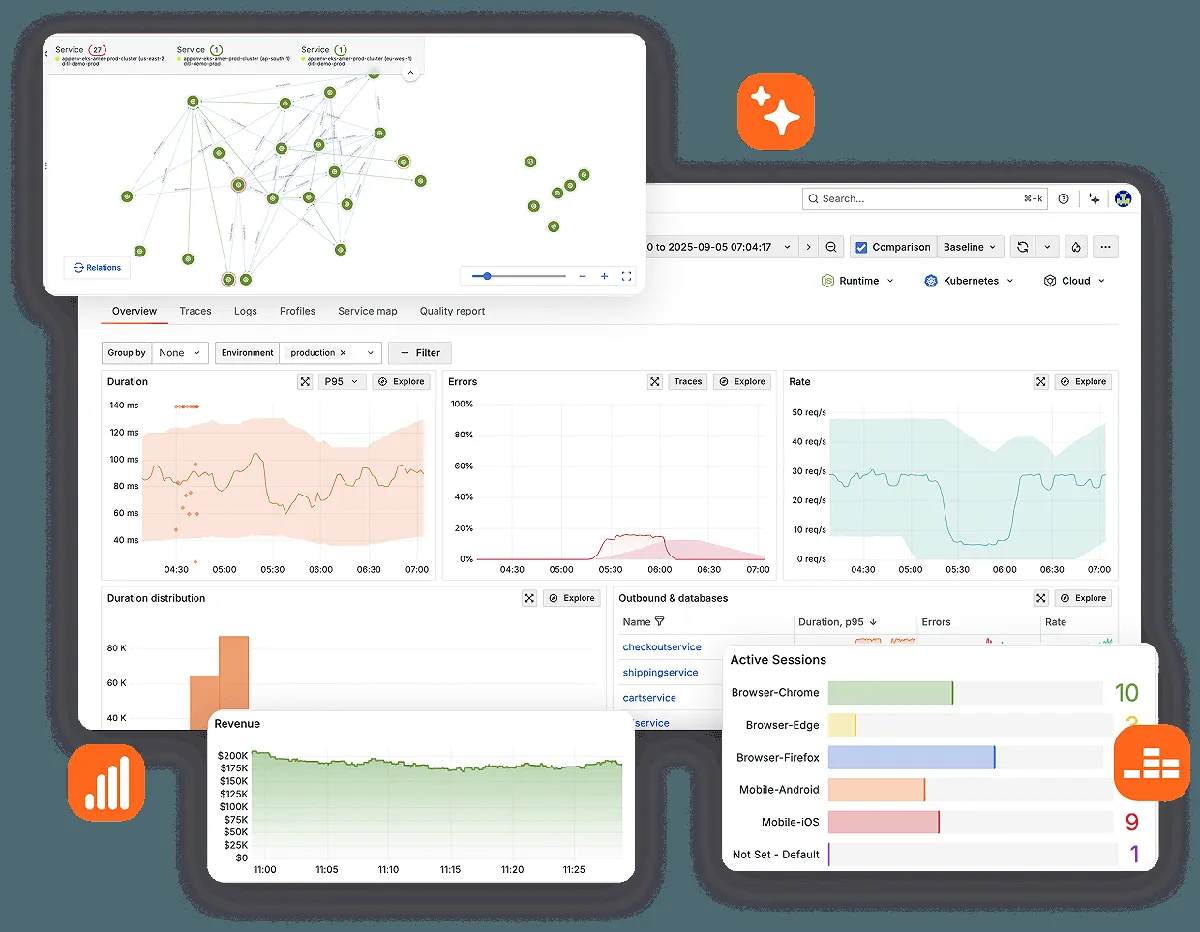
Product screenshot

Trade-offs to weigh
Labels drive the metrics bill. Metrics are billed per active series, so a high-cardinality label grows cost quickly. gcx can query the
grafanacloud_org_metrics_billable_seriesusage metric, which makes daily checks easy to script.Many separate meters. Series, gigabytes, host hours, sessions, AI users, tokens and test runs are each billed on their own, and Database Observability bills its telemetry separately, so a forecast needs one estimate per product.
Longer log history means Enterprise. Pro keeps logs, traces and profiles for 30 days; custom retention is listed only under Enterprise, which carries a yearly spend commit.
Some products exist only in the cloud. gcx lists SLO, Synthetic Monitoring, IRM, k6, Fleet, Adaptive Telemetry and Assistant as Cloud-only, so workflows built on them will not move to self-hosted Grafana. Automating them also needs a separate Grafana Cloud credential, such as a Cloud Access Policy token, on top of instance login.
Pricing and plan conditions
On Pro, the platform fee covers the plan itself; each product is then billed pay as you go only after usage passes the monthly allowances below. Grafana Labs describes pricing as volume-based and tiered, so the effective rate drops automatically as volume grows. On Enterprise, unit prices depend on the size of the annual commit. Investigations has no separate subscription; you pay only for the tokens it uses.
Scroll sideways to see all columns. With a keyboard, focus this table and use the arrow keys.
| Plan | Published price | What it adds |
|---|---|---|
Free | $0 | All Grafana Cloud services, with usage limits; Adaptive Telemetry and AI Assistant; 14 days retention for metrics, logs, traces, profiles and k6 performance tests |
Pro | From $19 / month + usage | Everything in Free plus: unlimited access to all Grafana Cloud services, pay as you go above the free tier; 13 months retention for metrics; 30 days for logs, traces, profiles and k6 performance tests |
Enterprise | Starts at $25,000 / year spend commit | Custom retention; metrics unit price "as low as $3" per 1k series, based on annual commit and volume discounts |
Scroll sideways to see all columns. With a keyboard, focus this table and use the arrow keys.
| Product | Included each month | Rate above the allowance |
|---|---|---|
Metrics | 10k active series | $6.50 / 1k series |
Logs | 50 GB ingested | $0.050/GB process, $0.400/GB write, $0.100/GB retain |
Traces and Profiles | 50 GB ingested each | $0.05/GB process, $0.40/GB write, $0.10/GB retain |
Kubernetes Monitoring | 2,232 host hours and 37,944 container hours | $0.01 / host hour ($7.20/host); $0.0007 / container hour ($0.50/container) |
Application Observability | Free tier: limited to 2,232 host hours | $0.025 / host hour ($18/host) |
Frontend Observability | 50k sessions | $0.75 / 1k sessions |
Database Observability | 2,232 database host hours (3 database hosts) | $0.07 / host hour (~$51 / host); telemetry billed separately |
Grafana Assistant | 3 active AI users (40M tokens per user) and 25M tokens for service account usage | $20 / active AI user (includes 40M tokens); $2 / 1M additional tokens |
Agent Observability | 30k generations and 25M tokens for Evals & Guards | $1.50 / 1k generations; $2 / 1M tokens for Evals & Guards; telemetry billed separately |
Synthetics testing | 100k API and 10k browser test executions | $5 / 10k API test executions; $50 / 10k browser test executions |
Public signals
About these signals
Verified factual signals from public sources. They indicate observable activity or interest, not total adoption, product quality, or cost.
288 GitHub commits 90d798 GitHub stars
See all signals from 4 sources
Alternatives to Grafana Cloud
The reviewed substitutes for Grafana Cloud among the observability platforms, and what would make each one the better answer.
Direct alternatives
Reviewed substitutes: products bought for the same job, where a team picks one.
- Elastic Observability
- Grafana Cloud and Elastic Observability both rest on open-source software and offer metrics, logs and traces in one place. Grafana Cloud is a fully managed service built on Grafana, Prometheus-style metrics and Loki logs, while Elastic Observability builds on Elasticsearch and is strongest at search, whether self-managed or in Elastic Cloud.Applies to: Choosing between these two for the apm observability decision.
- Dynatrace
- Dynatrace and Grafana Cloud are managed services for monitoring metrics, logs and traces across an application stack. Grafana Cloud is built on open-source tools such as Prometheus and Loki, so dashboards and queries carry over to self-run setups, while Dynatrace is a proprietary platform that leans on automatic instrumentation and AI analysis.Applies to: Choosing between these two for the apm observability decision.
- Observe
- Observe and Grafana Cloud are managed observability services for metrics, logs and traces. Grafana Cloud assembles open-source tools behind Grafana dashboards, while Observe is a proprietary platform that keeps all telemetry in one data lake with a context graph to speed up correlation.Applies to: Choosing between these two for the apm observability decision.
- Uptrace
- Grafana Cloud and Uptrace both store and query traces, metrics and logs collected with OpenTelemetry. Grafana Cloud is a fully managed service that joins several open-source projects behind Grafana dashboards, while Uptrace is one OpenTelemetry-native application on ClickHouse that a team can also host itself.Applies to: Choosing the observability backend that will receive OpenTelemetry data and carry on-call.
- Better Stack
- Grafana Cloud and Better Stack both collect logs and metrics, alert on problems and show the health of production systems. Grafana Cloud covers metrics, logs, traces and profiles on open-source foundations with flexible Grafana dashboards, while Better Stack packages logs with uptime checks, on-call alerts and status pages.Applies to: Choosing the observability backend that will receive OpenTelemetry data and carry on-call.
Other approaches
A different approach to the same problem. Each substitutes only for the workload named beside it.
- Datadog
- Same four signals, one managed open-source, one proprietary usage-based.Applies to: Managed metrics, logs and traces for a production estate.
- New Relic
- Both are managed observability platforms with free tiers and usage-based pricing above them.Applies to: Managed observability for a team starting on a free tier and growing into usage-based billing.
- Splunk
- Splunk and Grafana Cloud both collect, search and alert on logs and monitoring data, and teams move those workloads from one to the other. Splunk indexes machine data into its own searchable repository; Grafana Cloud is a managed platform built on open-source tools for metrics, logs, traces and profiles, with Grafana dashboards on top.Applies to: Storing, searching and alerting on logs and monitoring data. Splunk stands in where log search and analysis lead; Grafana Cloud stands in where open-source tooling and Grafana dashboards are already the team's standard.
- AppDynamics
- Cisco's full-stack observability and APM platform for monitoring business-critical applications across cloud and on-prem environments.Applies to: Metrics, logs and traces for a production estate, where the team will either run or buy an open-source stack.