Decision comparison
Easy Data Transform vs Kramata
These two tools are close alternatives: both run on your own computer, both save a cleanup and re-run it, and both are sold as a one-time licence instead of a subscription. The real difference is the shape of the work. Easy Data Transform is a visual graph with a wide transform and file-format set, built for analysts who reconcile and convert many kinds of files, and it runs on Mac. Kramata is a linear, plain-language recipe for one recurring spreadsheet cleanup, and its free edition covers every cleaning rule. We compared them on each vendor's published product and pricing pages, checked on 27 September 2026: workflow model, data preparation features, file formats, automation, platforms and licence terms.
Direct comparison. These are reviewed substitutes bought for the same job, so the differences below are the ones that decide between them.
All 2 are data preparation tools.
Quick Comparison
| Decision factor | Easy Data Transform | Kramata |
|---|---|---|
| Best For | Analysts and business users who prepare, reconcile and convert file-based data on their own computer and want a visible record of every step. It suits work that mixes many file types or needs joins, fuzzy matching and statistics, and buyers who run macOS as well as Windows. | Operations, finance and small-business staff on Windows who clean the same CSV or Excel export every week or month and want a colleague without technical training to re-run the cleanup. It suits a single recurring job better than a web of many different files. |
| Workflow Model | A visual graph: inputs, transformations and outputs are placed on a canvas and connected, and the result of each node can be inspected before export. The graph is saved as a reusable transform, so branching flows — one input feeding several outputs, or several inputs joined — are drawn rather than written. | A linear recipe: a list of plain-language steps applied in order, with the table updating live as each step is added. The recipe is saved as a portable .json file and re-run on the next file in one click. There is no canvas to lay out; the trade-off is simplicity against branching. |
| Platforms | Downloadable desktop application for Windows and macOS. Processing happens in memory on the user's machine; the vendor describes use with millions of rows, and version 2.14.1 was current when we checked. | Windows 10 and 11 (x64) desktop app, installed from the Microsoft Store or a direct installer. Processing uses DuckDB, an in-process database, so large CSVs load and scroll smoothly. No account; files never leave the machine. Current version 1.0.3, first released in June 2026. |
| Pricing | Core costs $99 as a one-time perpetual license and includes unlimited transform files, inputs, transforms, outputs, batch processing, command-line use, and support. Advanced costs $198 one time and adds unlimited charts. Standard licenses cover one named, non-transferable user on up to three PCs or Macs and include all version 2 updates. Organizational licenses with transferable seats and volume discounts are available from the vendor on request. | Free costs $0 and includes all cleaning rules, saving and re-running recipes, single-file cleaning, and CSV and Excel export. Pro is $29 one-time, listed on kramata.com as $29/lifetime and marked Early Access, and adds batch processing: clean whole folders, unlimited files. Pro is a one-time purchase, not a subscription; the licence key is sold through Gumroad, checked once with Gumroad on activation, then stored on the user's machine. |
| File Formats | Inputs: Excel XLS and XLSX, CSV, TSV, JSON, XML, fixed-width, plain text and vCard. Outputs: Excel, CSV, TSV, JSON, XML, YAML, HTML, Markdown, plain text and vCard. That breadth is what makes it a conversion and reconciliation tool as well as a cleaner. | Inputs: CSV, .xlsx, .xlsm and legacy .xls, including files with messy multi-row headers. Outputs: CSV and Excel. The narrower list matches its job: the spreadsheet exports operations and finance teams receive. |
| Automation and Batch | Saved transforms re-run, apply across a folder in batch, or run from the command line, which lets a desktop workflow be scheduled on a controlled machine without being rewritten as code. | Pro runs a recipe across a whole folder and returns each file cleaned separately or all of them merged into one. Runs start from the desktop app; the vendor states that the same input and the same recipe produce byte-identical output. |
Easy Data Transform
- Best For:
- Analysts and business users who prepare, reconcile and convert file-based data on their own computer and want a visible record of every step. It suits work that mixes many file types or needs joins, fuzzy matching and statistics, and buyers who run macOS as well as Windows.
- Workflow Model:
- A visual graph: inputs, transformations and outputs are placed on a canvas and connected, and the result of each node can be inspected before export. The graph is saved as a reusable transform, so branching flows — one input feeding several outputs, or several inputs joined — are drawn rather than written.
- Platforms:
- Downloadable desktop application for Windows and macOS. Processing happens in memory on the user's machine; the vendor describes use with millions of rows, and version 2.14.1 was current when we checked.
- Pricing:
- Core costs $99 as a one-time perpetual license and includes unlimited transform files, inputs, transforms, outputs, batch processing, command-line use, and support. Advanced costs $198 one time and adds unlimited charts. Standard licenses cover one named, non-transferable user on up to three PCs or Macs and include all version 2 updates. Organizational licenses with transferable seats and volume discounts are available from the vendor on request.
- File Formats:
- Inputs: Excel XLS and XLSX, CSV, TSV, JSON, XML, fixed-width, plain text and vCard. Outputs: Excel, CSV, TSV, JSON, XML, YAML, HTML, Markdown, plain text and vCard. That breadth is what makes it a conversion and reconciliation tool as well as a cleaner.
- Automation and Batch:
- Saved transforms re-run, apply across a folder in batch, or run from the command line, which lets a desktop workflow be scheduled on a controlled machine without being rewritten as code.
Kramata
- Best For:
- Operations, finance and small-business staff on Windows who clean the same CSV or Excel export every week or month and want a colleague without technical training to re-run the cleanup. It suits a single recurring job better than a web of many different files.
- Workflow Model:
- A linear recipe: a list of plain-language steps applied in order, with the table updating live as each step is added. The recipe is saved as a portable .json file and re-run on the next file in one click. There is no canvas to lay out; the trade-off is simplicity against branching.
- Platforms:
- Windows 10 and 11 (x64) desktop app, installed from the Microsoft Store or a direct installer. Processing uses DuckDB, an in-process database, so large CSVs load and scroll smoothly. No account; files never leave the machine. Current version 1.0.3, first released in June 2026.
- Pricing:
- Free costs $0 and includes all cleaning rules, saving and re-running recipes, single-file cleaning, and CSV and Excel export. Pro is $29 one-time, listed on kramata.com as $29/lifetime and marked Early Access, and adds batch processing: clean whole folders, unlimited files. Pro is a one-time purchase, not a subscription; the licence key is sold through Gumroad, checked once with Gumroad on activation, then stored on the user's machine.
- File Formats:
- Inputs: CSV, .xlsx, .xlsm and legacy .xls, including files with messy multi-row headers. Outputs: CSV and Excel. The narrower list matches its job: the spreadsheet exports operations and finance teams receive.
- Automation and Batch:
- Pro runs a recipe across a whole folder and returns each file cleaned separately or all of them merged into one. Runs start from the desktop app; the vendor states that the same input and the same recipe produce byte-identical output.
Public signals
Verified factual signals only. Bars appear only for like-for-like metrics with five weekly assessments for every tool; missing evidence stays explicit. These signals do not establish enterprise adoption, product quality, or total cost.
| Metric | Easy Data Transform | Kramata |
|---|---|---|
| Hacker News mentions, 90d(Community interest) | 0 | 0 |
| Product Hunt comments(Community interest) | 3 | Not available |
| Product Hunt reviews(Community interest) | 0 | Not available |
| Product Hunt votes(Community interest) | 11 | Not available |
As of October 12, 2026 — updated weekly.
Interface Preview
Easy Data Transform
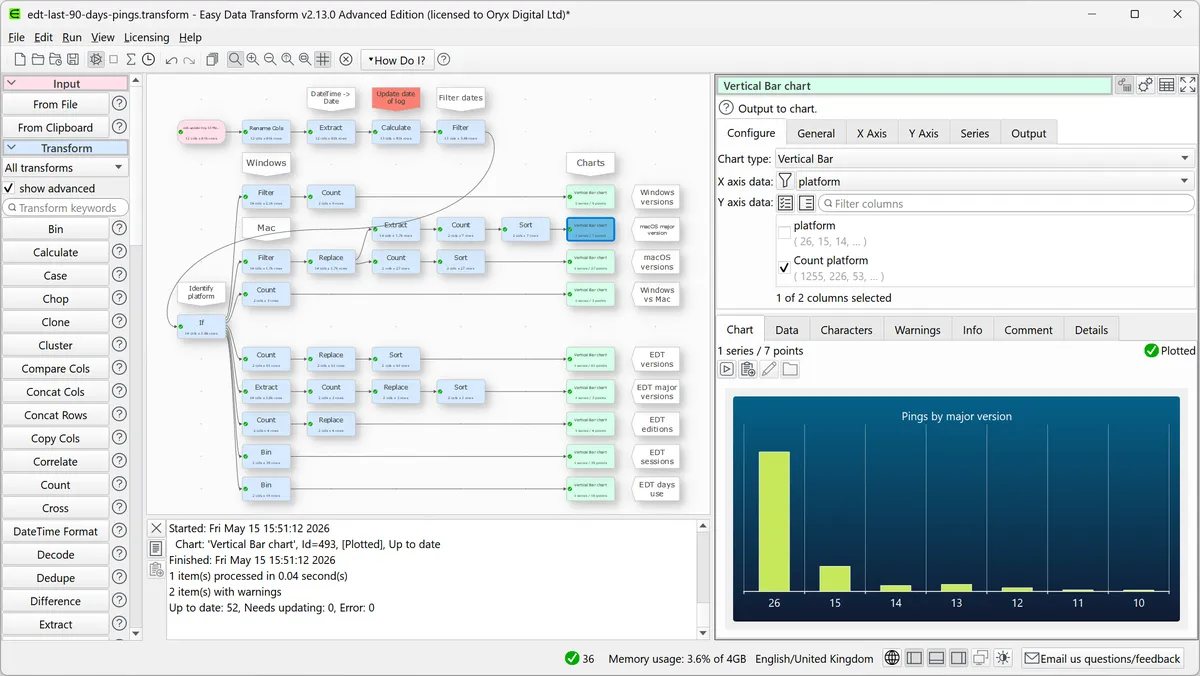
Feature Comparison
| Feature | Easy Data Transform | Kramata |
|---|---|---|
| Workflow Design | ||
| How steps are built | Nodes connected on a visual canvas | Plain-language steps in a single ordered list |
| Seeing results while building | Inspect the output table of any node | The table updates live as each step is added |
| Reusable workflow | Saved transform file, re-run or batch-applied | Recipe saved as a portable .json file |
| Branching and multiple outputs | Several inputs and outputs in one graph | One recipe produces one cleaned result per file |
| Data Preparation | ||
| Combining two files | Joins and lookups | Merge by key, keeping the first match per key so the row count never grows |
| Duplicates | Deduplication transform | Remove duplicates on any chosen columns |
| Reshaping | Pivoting and reshaping transforms | Pivot and group (sum, count, average) and unpivot wide columns into rows |
| Near-matches and text | Fuzzy matching, text clustering and regular expressions | Exact key matching; trim, fix case, find and replace |
| Rows that fail a check | Schema verification | Sent to a separate Flagged list to review and export |
| Statistics and gaps | Statistics, interpolation and missing-value imputation | Calculated columns and fill blanks |
| Files and Output | ||
| Input formats | XLS, XLSX, CSV, TSV, JSON, XML, fixed-width, text, vCard | CSV, XLSX, XLSM, legacy XLS |
| Output formats | Excel, CSV, TSV, JSON, XML, YAML, HTML, Markdown, text, vCard | CSV and Excel |
| Charts | Advanced edition: scatter, line, area, bar, pie and donut | Pivot and group summaries; charts are left to Excel or a BI tool |
| Automation and Licensing | ||
| Folder batch processing | Included in Core | Pro ($29 one-time) |
| Command-line use | Included in Core | Runs start from the desktop app |
| Operating systems | Windows and macOS | Windows 10 and 11 (x64) |
| Free use | Seven-day fully functional trial | Free edition with every cleaning rule, one file at a time |
| Licence scope | One named user on up to three PCs or Macs; organisational licences on request | Gumroad licence key, checked once on activation, stored locally |
Workflow Design
How steps are built
Seeing results while building
Reusable workflow
Branching and multiple outputs
Data Preparation
Combining two files
Duplicates
Reshaping
Near-matches and text
Rows that fail a check
Statistics and gaps
Files and Output
Input formats
Output formats
Charts
Automation and Licensing
Folder batch processing
Command-line use
Operating systems
Free use
Licence scope
Which to choose
These two tools are close alternatives: both run on your own computer, both save a cleanup and re-run it, and both are sold as a one-time licence instead of a subscription. The real difference is the shape of the work. Easy Data Transform is a visual graph with a wide transform and file-format set, built for analysts who reconcile and convert many kinds of files, and it runs on Mac. Kramata is a linear, plain-language recipe for one recurring spreadsheet cleanup, and its free edition covers every cleaning rule. We compared them on each vendor's published product and pricing pages, checked on 27 September 2026: workflow model, data preparation features, file formats, automation, platforms and licence terms.
Best-fit scenarios
Choose Easy Data Transform if:
Choose Easy Data Transform when the job is broader than one recurring export. Its graph lets several inputs feed several outputs, its transformation set includes fuzzy matching, text clustering, regular expressions, statistics and schema verification, and it reads and writes formats Kramata does not touch — JSON, XML, TSV, fixed-width, YAML, HTML and Markdown. It is also the only one of the two for a team with Mac users, and its Core licence already includes batch and command-line runs, so a workflow can be scheduled on a controlled desktop. The cost is a steeper first hour: a canvas of nodes asks more of a non-technical user than a list of steps, and the seven-day trial means paying before long-term use. For an analyst who owns many file workflows, the $99 Core licence buys more capability than Kramata offers at any price.
Choose Kramata if:
Choose Kramata when one person, or a small Windows team, cleans the same CSV or Excel export on a schedule and wants a colleague to run it without training. Every step reads in plain language, the table updates as you build, and the recipe is a .json file you can hand over. Its merge keeps the main file's row count by taking the first match per key, which avoids the duplicate rows a careless join creates, and rows that fail a check go to a Flagged list instead of vanishing — both matter in finance and operations work. The free edition covers every cleaning rule for one file at a time, and batch processing is $29 once. It loses on breadth: no Mac, CSV and Excel only, exact rather than fuzzy matching, and a product first released in June 2026 whose Pro edition is still marked Early Access.
These scenarios reflect the available product evidence. Your requirements, existing stack, and team expertise should guide the final decision.
Frequently Asked Questions
What is the main difference between Easy Data Transform and Kramata?
The workflow model. Easy Data Transform builds a visual graph of connected nodes with a wide set of transforms and file formats. Kramata builds a single list of plain-language steps, called a recipe, aimed at re-running the same spreadsheet cleanup. Both run locally and both are one-time purchases.
Which is cheaper, Easy Data Transform or Kramata?
Kramata's free edition includes every cleaning rule for single files, and Pro costs $29 one-time for folder batch processing. Easy Data Transform Core costs $99 one-time and includes batch processing and command-line use; Advanced costs $198 one-time and adds charts. Easy Data Transform's licence covers one named user on up to three PCs or Macs; Kramata does not publish how many PCs a key covers.
Do Easy Data Transform and Kramata upload my data?
No. Both process files on your own computer. Kramata sends a few anonymous usage events, such as that the app opened or an error code, and you can switch them off under Settings & privacy.
Can I use either tool on a Mac?
Easy Data Transform runs on Windows and macOS. Kramata runs on Windows 10 and 11 (x64).
Which handles messy matching better?
Easy Data Transform, which offers fuzzy matching and text clustering for near-duplicate values. Kramata matches keys exactly and takes the first match per key, which is safer for a lookup but will not pair 'Acme Inc' with 'ACME Inc.'.