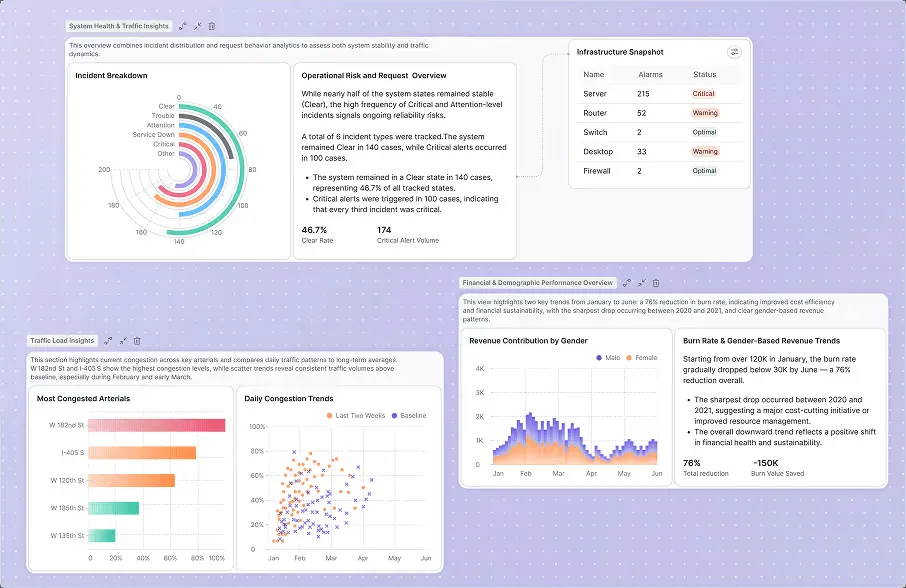
Fusedash: product and architecture
Fusedash review verdict: this is a practical AI dashboard-generation product for business teams that want to turn a CSV, REST API, database connection, or MCP-compatible AI model into a decision-ready view without building a traditional BI implementation. We recommend Fusedash for small data teams and operational leaders who need fast KPI communication, but not for organizations that require proven enterprise governance, warehouse-centric modeling, or detailed evidence of scale and security controls.
Overview
Fusedash is an AI data visualization platform that generates interactive dashboards, AI charts, and real-time KPI views from connected data. Its core proposition is unusually direct: describe the result you want and let the product generate the interface, rather than manually assembling every chart, filter, and dashboard component. The stated workflow begins with a CSV upload, REST API connection, database connection, or an MCP-compatible AI model.
The product type matters here: Fusedash is an AI dashboard-generation and reporting product, not a data warehouse or a general-purpose analytics engineering platform. It is designed to produce decision-ready reporting from a dataset, including dashboards, charts, maps, and storytelling reports. That makes it relevant when the bottleneck is presenting operational information, not ingesting, transforming, or governing data across an enterprise estate.
A notable architectural choice is that one data connection can power the entire Fusedash workspace. The company also states that no data warehouse or engineering support is required for its three-step dashboard workflow. That can reduce time to a usable KPI view, but it also means buyers should be precise about what Fusedash is replacing: it can accelerate reporting delivery, but the available product information does not establish that it replaces a governed transformation layer or an enterprise semantic layer.
Fusedash is strongest when speed and accessibility matter more than exhaustive configuration. Its usage-based pricing begins with a $0.00 free tier and offers $5, $15, and $25 token-pack options, so teams can test AI-assisted reporting without an annual platform commitment. Public product messaging is focused on business teams, which is appropriate: data engineers should treat it as a downstream presentation and analysis tool, while analytics engineers should assess whether its reusable KPI definitions meet their internal metric-governance needs.
Key Features and Architecture
Fusedash starts with several supported connection paths: upload a CSV, connect an API, connect a database, or plug in an MCP-compatible AI model. The product specifically identifies REST APIs in its dashboard-generation workflow. This is valuable for teams with an operational dataset that needs to become visible quickly, although the supplied information does not enumerate specific database vendors, API authentication methods, or connector-management controls.
The product’s central feature is generated interface construction. Rather than requiring users to configure dashboards component by component, Fusedash generates dashboards, charts, and real-time KPI views from a description of the desired outcome. The trade-off is clear: generated interfaces reduce manual dashboard work, but teams that need exact layout control or deeply bespoke visual standards should validate the output against their reporting requirements before standardizing on it.
Fusedash supports reusable KPIs and dimensions so that dashboards, charts, and reports can use consistent definitions. It also supports standardized time comparisons, segments, and metric definitions. For analytics engineers, this is the most consequential capability in the product: a reusable metric definition is more valuable than a fast one-off chart because it reduces conflicting interpretations of the same business measure.
The reporting layer is intentionally multi-format. Users can switch from interactive dashboards to charts, maps, and report-style storytelling from the same dataset, without duplicating work. Filters, drilldowns, and comparisons provide the interaction model for investigating a KPI after a dashboard is generated, while map support gives geographically oriented reporting a distinct output option.
Fusedash also provides AI data chat, which lets users ask questions in plain language against connected data. Its MCP workflows allow teams to connect an MCP-compatible model of their choice for data chat, summaries, dashboard generation, anomaly highlighting, and executive reviews. This is more flexible than a product tied to a single embedded model, but it introduces an evaluation burden: teams must decide which MCP-compatible model they trust, connect it appropriately, and validate AI-generated explanations before using them in executive decisions.
Finally, Fusedash includes historical context, refresh schedules, and dataset preparation for reporting, monitoring, and analysis. Those features position the product for recurring KPI use rather than one-time visualization alone. However, the available information does not provide refresh-frequency limits, latency benchmarks, dataset-size limits, retention policies, or evidence of enterprise-scale operation; those are material questions for production deployment.
Ideal Use Cases
Fusedash is a good fit for a five-to-20-person operating team that has recurring KPI questions but no appetite to dedicate an analyst to maintaining a traditional dashboard estate. For example, a SaaS operations group could connect a REST API or CSV export, define reusable KPIs and segments, then use generated dashboards and drilldowns for weekly revenue, pipeline, support, or product-adoption conversations. The value comes from reducing configuration work and allowing nontechnical stakeholders to move between a dashboard, a chart, and a narrative report from one dataset.
It is also well suited to a lean analytics function supporting multiple business audiences. An analytics engineer can define consistent dimensions, time comparisons, and KPI definitions once, while executives receive report-style storytelling and managers receive interactive filters and drilldowns. In this scenario, Fusedash’s ability to generate executive reviews and summaries through MCP-compatible workflows is useful, provided the team keeps human review over material conclusions and anomaly explanations.
A third strong scenario is a data leader creating a fast reporting layer for an operational data source before a warehouse program is justified. The product explicitly supports CSV uploads and REST API connections, and states that its initial workflow needs no data warehouse or engineering support. That makes Fusedash appropriate for a business unit that needs a usable KPI view now, while retaining the option to mature its data architecture later.
We recommend Fusedash for teams whose primary problem is dashboard production speed and stakeholder self-service. The $0.00 entry point and $5, $15, and $25 usage-based token packs make it reasonable to pilot on a bounded reporting workflow, such as one dataset and one executive KPI review. Start with metrics whose definitions can be independently checked, rather than using AI-generated analysis as the first source of truth.
Do not use Fusedash as the primary analytics platform if your requirement is a documented enterprise data model, controlled transformation pipelines, or demonstrated performance at large and complex data volumes. The available product data does not specify data-volume limits, user limits, compliance capabilities, role controls, audit trails, or supported warehouse ecosystems. Avoid it as a substitute for those capabilities until the vendor provides evidence that matches your organization’s operating and governance requirements.
Strengths & Trade-offs
Fusedash has a credible advantage for teams that need to produce reporting assets quickly, but its strength is not universal. In our evaluation, the strongest case is rapid creation of decision-ready dashboards and supporting narratives from a connected dataset. Its weaknesses are mainly around the missing operational evidence that mature data organizations need before making it a standard platform.
Pros
- Fusedash generates the reporting interface instead of requiring manual dashboard configuration. This directly addresses the repetitive work of assembling charts, filters, and KPI layouts in conventional dashboard tools.
- It supports multiple inputs: CSV uploads, REST APIs, database connections, and MCP-compatible AI models. That gives teams several practical starting points rather than forcing an immediate warehouse-first implementation.
- Reusable KPIs and dimensions can keep dashboards, charts, and reports aligned on the same metric definitions. Standardized time comparisons and segments are specifically useful when business users would otherwise recreate inconsistent measures.
- One dataset can support interactive dashboards, charts, maps, and report-style storytelling without duplicating work. This is a concrete benefit for teams serving executives, operators, and geographically focused stakeholders from the same reporting source.
- MCP-compatible workflows let teams select an MCP-compatible model for data chat, summaries, executive reviews, anomaly highlighting, and faster dashboard building. That flexibility is meaningful for organizations that do not want a reporting workflow locked to one model.
- The $0.00 free tier and $5, $15, and $25 usage-based token packs make a limited evaluation financially accessible. A small team can test actual reporting output before escalating to a contact-sales conversation.
Cons
- Published pricing lacks the free-tier token limit, token-pack quantities, token-expiration rules, and per-action token consumption. That makes it difficult to forecast the monthly cost of routine data chat and dashboard generation.
- The available information does not list supported database vendors, data-volume limits, refresh-frequency limits, or latency metrics. This is a real limitation for data engineers assessing production suitability.
- Fusedash does not provide supplied evidence of enterprise governance features such as access controls, audit trails, compliance support, or data-retention policies. Regulated teams should not assume those controls exist.
- AI-generated charts, summaries, anomaly highlights, and executive reviews require validation against the underlying data. Faster generation is useful, but it creates a review responsibility that cannot be delegated to the tool.
- The product’s no-engineering-support positioning can be a poor fit for organizations where reporting must be tightly coupled to version-controlled transformations and centrally managed semantic definitions. Reusable KPIs help, but the provided information does not demonstrate those broader lifecycle controls.