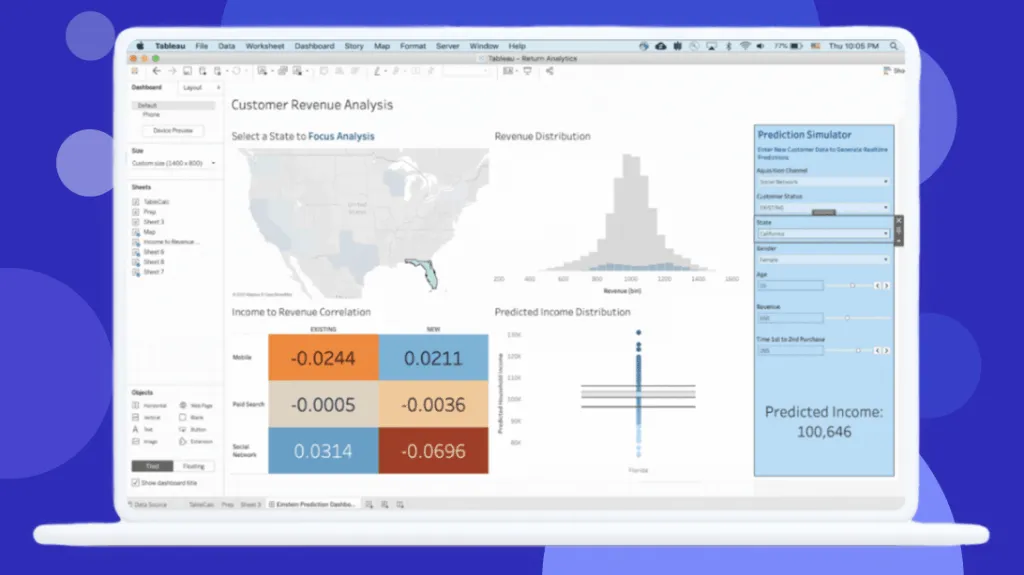
Tableau: product and architecture
Our decision: Tableau is a strong tableau bi platform for organizations that prioritize interactive dashboards, visual exploration, and governed sharing over the lowest possible per-user cost. We recommend it for data leaders who need a broadly accessible analytics layer and can support a license mix of Creators, Explorers, and Viewers. Its 8.4/10 user rating across 2,320 reviews supports the core value proposition—visual analysis is a real strength—but the same feedback flags cost, large datasets, calculated fields, data cleaning, and security configuration as meaningful operational trade-offs.
Overview
Tableau is a business-intelligence platform focused on visual analytics and interactive dashboards. Its stated portfolio includes Tableau Cloud, a fully hosted cloud analytics platform, and Tableau Server, a self-hosted option for teams that need control over their analytics deployment. This gives organizations a clear deployment choice: reduce infrastructure management with Tableau Cloud or accept responsibility for self-hosting in exchange for more direct deployment control.
The product is best understood as an analytics consumption and exploration layer. Teams connect data, build visual analyses, and securely share insights with other users. Tableau’s visual interface and drag-and-drop workflow are central to its appeal; users specifically cite data visualization, data sources, user friendliness, real-time use, and ease of use among its strengths. That matters for data organizations trying to extend analytics beyond specialists without making every stakeholder write queries or learn a technical semantic layer.
Tableau is not a complete substitute for disciplined data engineering. The user feedback identifies data cleaning and calculated fields as weaknesses, which is a practical warning: do not expect dashboard authors to solve upstream modeling, data quality, and business-definition problems inside the BI tool. We recommend Tableau when a team already has trusted data assets and wants a powerful interface for exploring and presenting them. Avoid treating it as the place where raw operational data becomes reliable analytics data.
The platform is actively positioned around Tableau Next and agentic analytics. Tableau+ is described as bringing agentic analytics to an organization, while Tableau Next is associated with trusted insights and autonomous action. These capabilities may be strategically relevant, but the supplied material does not provide implementation details, service limits, or measurable outcomes. Decision-makers should therefore assess them directly during evaluation rather than buying Tableau solely on AI positioning.
Key Features and Architecture
Tableau’s architecture centers on two deployment models. Tableau Cloud is fully hosted and is designed to let teams connect to data, analyze it through visual analytics, and share insights securely without managing servers or infrastructure. Tableau Server is self-hosted, giving an organization control over its data and analytics deployment. This distinction is not cosmetic: Cloud shifts infrastructure management away from the customer, while Server makes deployment control part of the customer’s operating responsibility.
The platform’s core feature set is visual analysis through interactive dashboards. Tableau is specifically known for strong data visualization capabilities, and users identify data visualization, drag and drop, and the user interface as recurring strengths. In practical terms, the value is that analysts can assemble visual views and dashboards through a graphical workflow rather than relying exclusively on manually authored code. The trade-off is governance: a flexible authoring experience can create inconsistency if teams do not define standards for metrics, calculations, ownership, and publication.
Key capabilities supported by the supplied product information include:
- Interactive dashboards: Tableau supports dashboards designed for exploration and visual communication. The cited e-commerce sales and RFM dashboard example tracks total sales and quantity across international markets, illustrating the platform’s fit for performance monitoring across dimensions such as market and metric.
- Visual analytics authoring: The product emphasizes powerful visual analytics, while user feedback specifically credits data visualization and drag-and-drop interaction. This makes Tableau particularly useful when analysts need to iterate quickly on how data is presented and explored.
- Cloud-hosted analytics: Tableau Cloud provides a hosted environment for connecting to data, analyzing it, and sharing insights securely. It is the direct choice for teams that do not want to manage analytics servers or related infrastructure.
- Self-hosted deployment: Tableau Server provides a self-hosted deployment option. Organizations selecting it retain more control over the deployment, but should plan for the operational responsibilities that Tableau Cloud is intended to remove.
- Role-based licensing: Tableau Cloud uses Creator, Explorer, and Viewer license types, and every deployment requires at least one Creator license. This is an architectural operating model as much as a billing model: teams can separate content creation, exploration, and consumption by role.
- Agentic analytics positioning: Tableau+ provides access to Tableau Next and agentic analytics capabilities. The platform presents this as a way to extend trusted insights toward autonomous action, but the available information does not establish technical prerequisites, controls, or usage limits.
Tableau’s strongest architecture is therefore a governed publishing environment around visual analysis, with distinct author and consumer roles. It is weaker as a catch-all workspace for data preparation and complex calculation logic, because users directly flag data cleaning and calculated fields as pain points. We would keep transformation and metric-definition work upstream, then use Tableau to deliver well-modeled data to visual consumers.
Ideal Use Cases
Tableau fits a central analytics team serving many business stakeholders who need dashboards rather than direct access to underlying data systems. A practical example is a 10-person analytics organization with a smaller group of dashboard builders and a wider internal audience. The Creator, Explorer, and Viewer model maps naturally to that arrangement: at least one Creator is required, while Explorers and Viewers can be assigned according to how much interaction each audience needs.
It is also a good fit for commercial and operational performance monitoring. The supplied e-commerce sales and RFM dashboard example uses total sales, quantity, and international-market views, which makes Tableau appropriate for teams that need to inspect business performance through multiple visual cuts. Retail, e-commerce, and international operating teams can use that style of dashboard to give leaders a common visual view of sales activity without requiring every reader to work directly in raw data.
A third use case is an organization deciding between hosted convenience and self-hosted control. Teams with limited appetite for managing analytics infrastructure should favor Tableau Cloud, which is explicitly positioned as fully hosted and does not require server or infrastructure management. Organizations with a clear requirement for control over their analytics deployment can evaluate Tableau Server instead. The trade-off is direct: Cloud reduces operational overhead, while Server puts more deployment responsibility back on the organization.
Tableau can also work for organizations that want to make visual analysis available to less technical users. User feedback repeatedly identifies ease of use, drag and drop, and a user-friendly interface as strengths. That does not mean onboarding disappears; “new users” is also cited as a weakness, so a team should provide training, curated dashboards, and clear publishing rules rather than assuming visual tooling alone creates analytical literacy.
Don’t use Tableau as the primary answer if your immediate problem is cleaning inconsistent source data, handling problematic large datasets, or centralizing complex calculated-field logic inside the BI layer. Those are specific areas users identify as weak points. Choose Tableau after a data engineering or analytics engineering team has established reliable datasets and definitions; otherwise, attractive dashboards can accelerate the distribution of unreliable numbers.
Strengths & Trade-offs
Tableau’s strongest advantages are concrete and closely tied to how analytics teams deliver dashboards:
- Strong interactive visualization capability. Tableau is explicitly known for interactive dashboards and strong data visualization, and users list data visualization as a leading strength. This is valuable when executives and operational teams need to inspect metrics visually instead of consuming static reports.
- Graphical, drag-and-drop analysis workflow. Users specifically call out drag and drop, user friendliness, and ease of use. For analytics teams, that can shorten the path from a trusted dataset to a stakeholder-facing dashboard.
- Deployment flexibility. Tableau Cloud is fully hosted and removes the need to manage servers or infrastructure, while Tableau Server supports self-hosted analytics deployment. This gives data leaders a real choice between managed operations and tighter deployment control.
- Role-based access to analytics work. Creator, Explorer, and Viewer licenses provide a practical way to separate dashboard builders, active explorers, and consumers. Every deployment requires at least one Creator, making the content-creation responsibility explicit.
- Positive public user signal. Tableau has an 8.4/10 rating from 2,320 reviews. That is not proof that it will fit every organization, but it is a substantial public feedback signal supporting its established usability and visualization reputation.
The limitations are equally important and should affect implementation scope:
- Large datasets are a user-reported weakness. Teams working with substantial volumes should not assume that a visualization-first workflow eliminates data-performance constraints. Validate representative datasets and dashboard patterns before committing to broad adoption.
- Calculated fields can become a pain point. Users cite calculated fields as a weakness. This makes Tableau a poor place to concentrate highly complex business logic; keep critical transformations and reusable definitions in governed upstream data assets.
- Data cleaning is not its strongest role. User feedback names data cleaning as a weakness. Tableau should consume prepared, validated data rather than become the primary environment for repairing source-data issues.
- Cost is a recurring objection. Users identify high cost as a weakness, and the annual-billing price range runs from $15 to $115 per user per month for the listed Cloud license types. License architecture deserves ongoing governance, not just an initial procurement review.
- Security configuration needs attention. “Level security” appears among user-reported weaknesses. Teams with sensitive data should test their intended access model early instead of assuming sharing controls will be effortless.