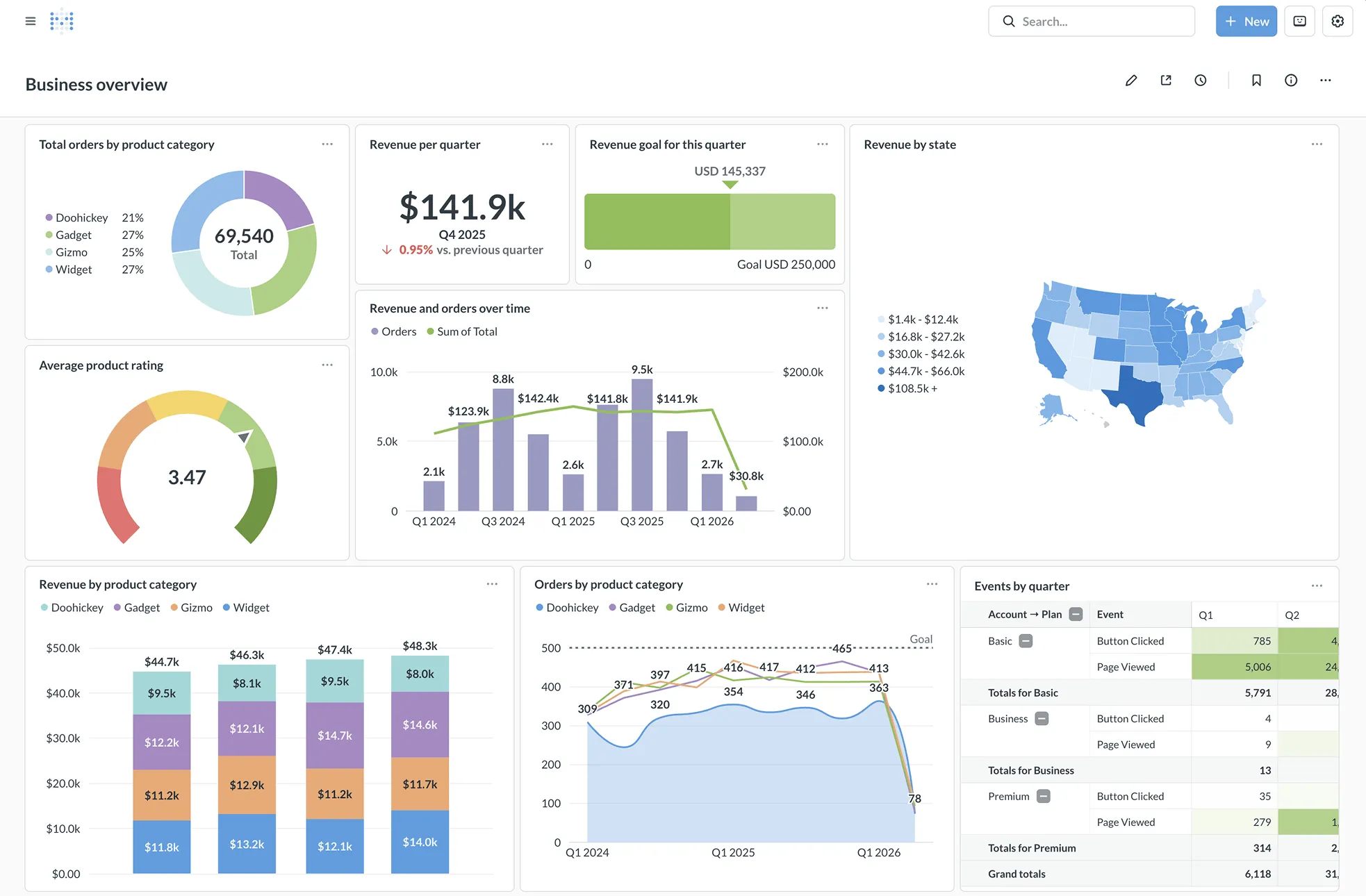
Metabase: product and architecture
Metabase is a strong choice for teams that need practical self-service business intelligence without building an analytics interface from scratch. In this metabase review, our verdict is clear: we recommend Metabase for data teams that want an open-source BI and embedded analytics option with a visual query path, SQL escape hatch, and controlled distribution—but we would avoid it when polished visualization breadth or dependable natural-language analysis is the primary requirement.
Overview
Metabase is an open-source business intelligence tool designed to let people ask questions of data and receive answers in appropriate visual formats. Its stated positioning is fast, easy data exploration, and that is the right lens for evaluating it: Metabase is built to reduce routine reporting requests by giving nontechnical users a path into governed questions, dashboards, and reports.
The product serves two adjacent needs. First, it supports internal analytics teams that want to expose data without requiring every stakeholder to write SQL. Second, it supports software companies that need embedded dashboards, visualizations, or self-service reporting inside a SaaS product. For embedding, Metabase offers iframes for speed and a React SDK for customization and control.
That split is important because Metabase is not only a dashboarding layer. It is also intended to be a managed analytics experience that data teams can shape through permissions, content organization, and reusable definitions. The product description explicitly calls out white-labeling, dynamic styling, and interactive controls ranging from view-only reporting to full data discovery.
Public project signals show meaningful ongoing activity, but they should be treated as adoption proxies rather than proof of enterprise deployment. The Metabase repository has 48,745 GitHub stars, uses Clojure as its primary language, was last pushed on 2026-08-13, and lists v0.63.2 as its latest release on 2026-07-29. Its repository license is recorded as NOASSERTION, so teams making licensing decisions should validate the applicable terms directly rather than treating the “open-source” positioning as a complete legal answer.
Key Features and Architecture
Metabase’s core architecture is a querying and visualization layer positioned between users and operational databases or data warehouses. It supports connections to 20+ data sources, with the stated range extending from a startup’s production database to massive data warehouses. That broad positioning is useful for organizations that need one interface across mixed data estates, although the supplied evidence does not enumerate the individual connectors.
The visual query builder is the primary self-service mechanism. Users can create queries and reports without SQL, while analytics teams can template recurring questions and calculations through models and metrics. This gives Metabase a practical governance pattern: analysts can define reusable concepts, while business users work from those concepts rather than rebuilding the same logic repeatedly.
For more advanced work, Metabase includes a SQL editor. The product explicitly presents SQL as an escape hatch when the visual builder is insufficient—for example, when a user needs raw queries, custom logic, or joins. This is a worthwhile design choice for analytics engineering teams because it avoids forcing one interaction model on every use case; the cost is that complex analysis still depends on people who understand the underlying schema and SQL.
Content management is another substantive feature. Collections organize dashboards, models, metrics, and questions, while verified items can be marked as official. This matters because self-service systems fail when users cannot distinguish an approved metric from an experimental chart; Metabase addresses discoverability and trust at the content layer rather than leaving dashboard sprawl entirely to process.
Metabase also provides alerts and scheduled report distribution. Reports can be sent by Slack or email, including to people outside the organization, and alerts can make selected data changes actionable in real time. That capability is valuable for operational reporting, but it introduces a governance responsibility: teams must control which content can be sent externally and who is entitled to receive it.
Security and access controls are central to the enterprise-oriented feature set. Metabase describes granular permissions and multi-tenant data segregation so users see what they need and nothing else. It also supports SSO identity providers through SAML, LDAP, JWT, and Google, with identity mapping into Metabase groups. These are concrete integration points for organizations that need access aligned with existing identity systems rather than manually managed account lists.
Performance and deployment controls round out the platform. Metabase uses result and model caching to keep dashboards responsive, and it states that this does not require schedulers or pipelines. Teams can also create staging environments without touching production, then export configurations, models, and dashboards for testing or scaling across instances. For a free self-hosted start, the official instruction is docker run -d -p 3000:3000 metabase/metabase, which makes initial evaluation straightforward but does not eliminate the operational work of owning a production deployment.
Ideal Use Cases
Metabase is best for a data team that needs to move from analyst-mediated reporting toward controlled self-service without abandoning SQL. A team of five to fifteen data engineers and analytics engineers can define trusted models, metrics, and verified dashboard content, then let finance, operations, product, or sales users explore recurring questions in the visual query builder. The value comes from reducing repeat requests while preserving an approved layer of reusable definitions.
It is also a credible option for a SaaS company embedding analytics into its own application. A product team can start with iframe-based embedded dashboards when time to market matters, then use the React SDK when it needs greater customization and control. The ability to offer white-labeling, dynamic styling, and different levels of interactive access makes Metabase suitable for customer-facing reporting where the application must feel integrated rather than bolted on.
A third fit is an organization that needs to support both a production database and warehouse-scale analytics sources through a single BI interface. Metabase’s stated support for 20+ data sources and its positioning from startup production databases to massive data warehouses make it useful when teams are evolving their data architecture rather than operating a single homogeneous stack. In this setting, we recommend treating the visual builder as the broad-access layer and SQL as the route for controlled advanced work.
Metabase can also suit teams that want self-hosting as an option rather than a mandatory operating model. The open-source self-hosted entry point is concrete and quick to evaluate, while Pro and Enterprise explicitly support cloud or self-hosted deployment. That flexibility is valuable for organizations with deployment constraints, but it also means leaders must decide who owns upgrades, configuration management, access policy, and environment promotion.
Don’t use Metabase if your decision depends primarily on highly capable natural-language querying or a particularly deep data-visualization experience. Real-user feedback identifies natural language and data visualization as weaknesses, so these are not areas where we would ask the tool to carry the evaluation. Also avoid treating it as a substitute for data modeling discipline: models and metrics can standardize questions, but they do not repair undocumented schemas or inconsistent source data.
Strengths & Trade-offs
Metabase’s strengths are concrete and aligned with its self-service BI focus.
-
The visual query builder gives non-SQL users a direct way to run queries and reports, while models and metrics can template recurring calculations. This is more useful than a generic “easy to use” claim because it creates a workable division between governed definitions and business-led exploration.
-
The SQL editor prevents the visual interface from becoming a dead end. Analysts can use raw SQL for more complex logic and joins instead of moving the work into a separate reporting tool.
-
Embedded analytics is a genuine product capability rather than an afterthought. Teams can use iframes for a fast implementation or the React SDK for a more controlled integration, with white-labeling and dynamic styling called out for SaaS use cases.
-
Identity and access controls are specific enough for serious evaluation. Metabase supports SAML, LDAP, JWT, and Google SSO integrations, maps users to groups, and describes granular permissions and multi-tenant data segregation.
-
Content governance has useful operational detail. Collections and verified items help teams make approved dashboards, models, metrics, and questions easier to find, while dashboard-usage tracking can identify underused content.
-
Real users gave Metabase an 8.4/10 rating across 66 reviews. Their reported strengths include ease of use, data storage, open-source availability, and a simple UI; this is evidence of user sentiment, not a guarantee that every deployment will be simple.
The limitations are equally important.
-
Natural language is a user-reported weakness. Teams looking for a conversational analytics experience should not make Metabase their primary bet without validating that workflow against real business questions.
-
Data visualization is also a user-reported weakness. Metabase can display answers and build dashboards, but organizations that judge BI primarily on visualization sophistication should assess it against their exact charting and presentation requirements.
-
Users specifically report that editing could be easier. This is a practical friction point for teams with many dashboard authors, where frequent iteration and refinement are part of daily work.
-
The supplied connector claim is broad—20+ data sources—but it does not list individual data-source names. A platform team should validate every required source, authentication method, and deployment constraint before making Metabase the standard interface.
-
The project’s repository license is listed as
NOASSERTION. For organizations with legal, procurement, or redistribution requirements, that missing repository-level clarity is a real decision blocker until the applicable license terms are confirmed.