Amazon QuickSight: product and architecture
Amazon QuickSight is a strong choice for organizations already invested in AWS that need cloud-based business intelligence, interactive dashboards, and AI-assisted analysis without operating separate BI infrastructure. In our Amazon QuickSight review, the decisive trade-off is clear: it offers meaningful AWS integration, SPICE in-memory analysis, and scalable dashboard delivery, but teams needing sophisticated real-time reporting, highly complex reports, or consistently polished mobile experiences should evaluate alternatives carefully.
Overview
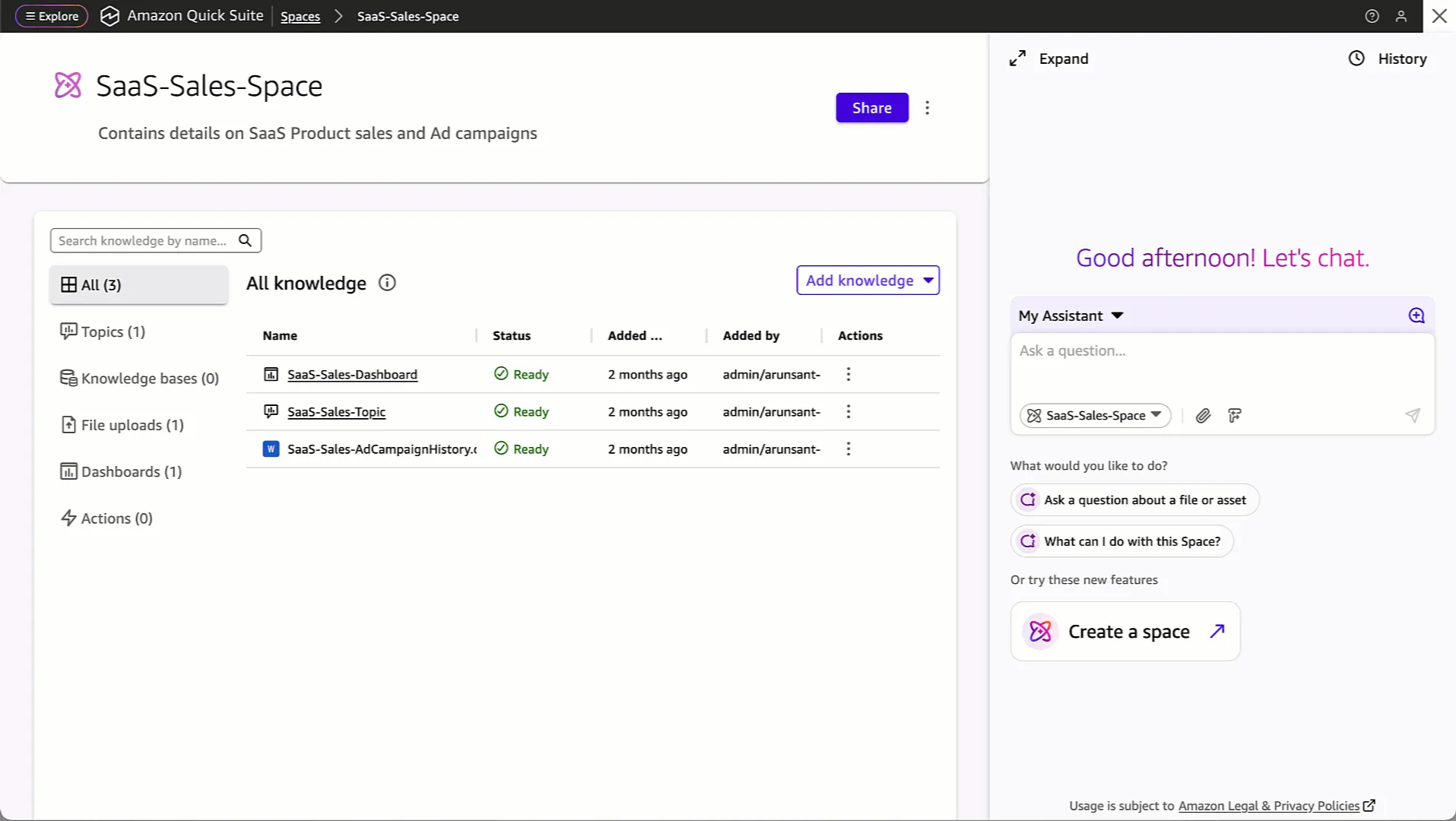
Amazon QuickSight is an AI-powered business-intelligence product positioned around unified intelligence, actionable analytics, and wider access to data. Its stated goal is to turn scattered enterprise data into strategic insight, shorten the distance between a dashboard finding and an operational action, and make analytics available beyond a small centralized reporting team. That is a useful direction for data leaders trying to democratize governed reporting without asking every business user to work directly in data systems.
The product description emphasizes conversational exploration, dashboard-driven actions, and built-in agents for research and automation. It also states that QuickSight supports more than 40 application integrations, although the supplied evidence does not identify those applications individually. This makes the platform’s broad integration claim relevant, but not sufficient by itself to validate a specific source-system requirement.
QuickSight’s practical identity is closely tied to AWS. The available product information specifically names Amazon S3, Amazon RDS, and Amazon Redshift as connected AWS services. For AWS-native data teams, that is a concrete advantage: the BI layer can sit close to existing cloud data assets instead of introducing a separate analytics ecosystem solely for dashboarding.
User sentiment is favorable but not unequivocal. The supplied user-feedback set gives Amazon QuickSight an 8.1/10 rating across 53 reviews, while a separate external review source lists a 4.2/5 score. These are useful public signals of user experience, not proof that the product will meet every enterprise requirement. The recurring strengths—business insights, report building, power, setup, and cloud-based delivery—also align with the product’s central value proposition.
We recommend Amazon QuickSight for AWS-centric organizations that value managed analytics delivery and need a practical route from cloud data to dashboards. Choose another platform if your evaluation depends on confirmed advanced reporting features beyond what the supplied QuickSight evidence supports, especially for real-time needs, complex reports, mobile use, time-zone handling, or particular business-user workflows.
Key Features and Architecture
Amazon QuickSight’s most technically important capability is SPICE, short for Super-fast, Parallel, In-memory Calculation Engine. The supplied feature data describes SPICE as a memory calculation engine that enables analysis without requiring teams to manage database infrastructure. This matters for data engineers because it shifts part of the analytics-performance responsibility into the service rather than asking teams to build and operate dedicated reporting databases for every dashboard workload.
The architecture is also designed around AWS-connected data access. The source material specifically identifies integrations with Amazon S3, Amazon RDS, and Amazon Redshift, giving teams an established path from object storage, relational databases, and a cloud data warehouse into BI consumption. That is not merely a connector checklist: it creates a tighter operational fit for teams whose pipelines, governance practices, and core data locations are already centered on AWS services.
Key capabilities include:
- SPICE in-memory analysis: QuickSight uses the Super-fast, Parallel, In-memory Calculation Engine to support fast analysis while avoiding customer-managed database infrastructure for that calculation layer.
- Interactive dashboards: Teams can create customized, dynamic dashboards and share them in public or private environments. This supports a range of distribution models, but the supplied evidence does not define the controls or publishing requirements for each environment.
- Machine-learning functionality in the interface: The available review data identifies anomaly detection and forecasting as machine-learning services integrated directly into the user interface. This is valuable for teams that want analytical signals available within dashboard workflows instead of creating a separate ML-facing experience for every user.
- Conversational and agentic workflows: QuickSight’s product description says users can explore data conversationally, use built-in agents for research and automation, and take actions directly from dashboards. The operational appeal is obvious: a dashboard can become a working surface rather than a static report destination.
- Scalable delivery: External feature information states that QuickSight can automatically scale to support thousands of users without performance issues. That is a product capability claim, not an independently supplied benchmark, but it is relevant for large dashboard audiences.
- Cloud-managed setup: User feedback and external descriptions characterize setup and management as not requiring a complex setup. This lowers the operational burden compared with BI environments that require separate infrastructure management, although that simplicity comes with closer dependence on the AWS platform.
QuickSight’s AI positioning should be evaluated in context. The supported facts are anomaly detection, forecasting, conversational exploration, and agents for research and automation; those are real capabilities described in the source material. The evidence does not establish model customization options, evaluation controls, governance details for AI outputs, or the exact operational scope of every agent workflow. Data leaders should treat those as validation questions rather than assume they are solved by the product’s AI branding.
The product’s scale claim also has a practical cost. Automatic scaling and a managed in-memory engine reduce operational work, but the architecture concentrates BI delivery within the Amazon ecosystem. That can be exactly right for organizations standardized on AWS, yet it increases platform dependence for teams that want their analytics layer to remain more independent from a single cloud provider.
Ideal Use Cases
Amazon QuickSight fits best when an AWS data platform already exists and the organization needs to broaden access to governed dashboards. A data team storing raw or prepared data in Amazon S3, serving operational data from Amazon RDS, and centralizing analytical workloads in Amazon Redshift has a direct set of named integration paths into QuickSight. In that scenario, the platform’s managed nature and SPICE engine can help the team spend less time operating BI infrastructure and more time defining trustworthy datasets, reports, and dashboard experiences.
A second strong use case is large-scale internal or embedded dashboard distribution. The supplied pricing material explicitly calls Reader Capacity pricing appropriate for embedded applications or large-scale BI deployments, where organizations buy Reader sessions or Amazon Q question capacity in bulk instead of provisioning individual users. Combined with the stated ability to scale to thousands of users, this makes QuickSight worth evaluating when a small analytics team needs to serve a much larger reader population.
A third use case is business reporting that benefits from built-in anomaly detection, forecasting, and conversational exploration. For example, an operations, finance, or commercial analytics team can use interactive dashboards as a common decision surface and apply AI-enabled analysis inside the product interface. This can be especially useful where business users need faster access to trends and exceptions but should not be expected to build their own data infrastructure.
QuickSight is also a reasonable option for teams that want public or private dashboard sharing. The evidence specifically supports customized and dynamic dashboards that can be shared in both contexts. The decision still needs governance review: public sharing, private sharing, embedded delivery, and reader-capacity procurement all introduce distinct access and cost-management questions that should be resolved before rollout.
Don’t use Amazon QuickSight if real-time analytics is a non-negotiable requirement and the organization cannot validate the required behavior in a proof of concept. “Real time” is explicitly included among user-reported weaknesses, alongside complex reports, mobile-device experience, time zones, and business-user concerns. Similarly, avoid selecting it solely because it is easy to set up if your reporting program depends on unusually complex report construction; user feedback identifies complex reports and missing features as real areas of concern.
For a practical rollout, we recommend starting with a contained AWS-native reporting domain and a clearly defined reader audience. Validate the required dashboards, time-zone behavior, mobile experience, and any real-time expectation before expanding to a company-wide deployment. That approach takes advantage of QuickSight’s managed delivery while preventing its weaker areas from becoming expensive organization-wide constraints.
Strengths & Trade-offs
Amazon QuickSight’s strengths are real, especially for AWS-aligned analytics teams, but the negative feedback points to specific limits that should influence selection. The 8.1/10 score from 53 reviews suggests generally positive sentiment, while the 4.2/5 external score reinforces that QuickSight is respected rather than universally loved. The right conclusion is not that the product is effortless; it is that its managed cloud BI model works well when its constraints match the organization’s requirements.
Pros
- SPICE reduces infrastructure overhead for analysis. Its Super-fast, Parallel, In-memory Calculation Engine supports analysis without requiring the customer to manage database infrastructure for that calculation function.
- It has direct relevance for AWS data estates. Amazon S3, Amazon RDS, and Amazon Redshift are specifically named integrations, giving AWS-centric teams concrete connections to common storage, operational, and warehouse layers.
- Dashboard delivery is flexible. QuickSight supports customized, dynamic dashboards that can be shared in public or private environments, which is useful when internal reporting and broader distribution coexist.
- AI-assisted analysis is integrated into the product experience. Anomaly detection and forecasting are described as available directly in the user interface, while the product description adds conversational exploration and agents for research and automation.
- It is designed for large audiences. The feature data says QuickSight can automatically scale to support thousands of users, and Reader Capacity pricing is explicitly positioned for large-scale BI and embedded applications.
- Users recognize its practical BI value. Real-user strengths include business insights, reports built, being “incredibly powerful,” setup, building new content, cloud delivery, and use alongside AWS services.
Cons
- Real-time requirements are a stated weakness. “Real time” appears in user-reported weaknesses, so teams should not assume QuickSight satisfies live-data expectations without workload-specific validation.
- Complex reporting can be a problem. Users explicitly identify complex reports as a weakness; organizations with demanding report layouts or specialized reporting requirements should test their hardest examples first.
- Feature gaps are part of the user feedback. “Features are missing” is a direct weakness signal and means that a feature checklist should be tied to actual workflows rather than generic BI expectations.
- Mobile-device experience is a reported concern. Mobile device use appears in the user-reported weakness list, making QuickSight a less confident default when field or executive mobile consumption is central.
- Time-zone handling is a reported pain point. Time zones appear in the weakness data, which is especially relevant for globally distributed operations, finance, or customer reporting.
- Business-user fit is not automatic. Business users are named among user-reported weaknesses. Despite the product’s democratized-access positioning, teams should validate whether their nontechnical audience can complete the intended tasks independently.
The core trade-off is straightforward: QuickSight can make managed, AWS-connected analytics easier to operate, but it does not remove the need for careful product validation. Its advantages in setup, cloud delivery, scaling, and AWS connectivity can be offset by real-time, complexity, mobile, time-zone, and business-user limitations. We recommend treating those weaknesses as acceptance criteria in a proof of concept, not as minor edge cases to revisit after adoption.