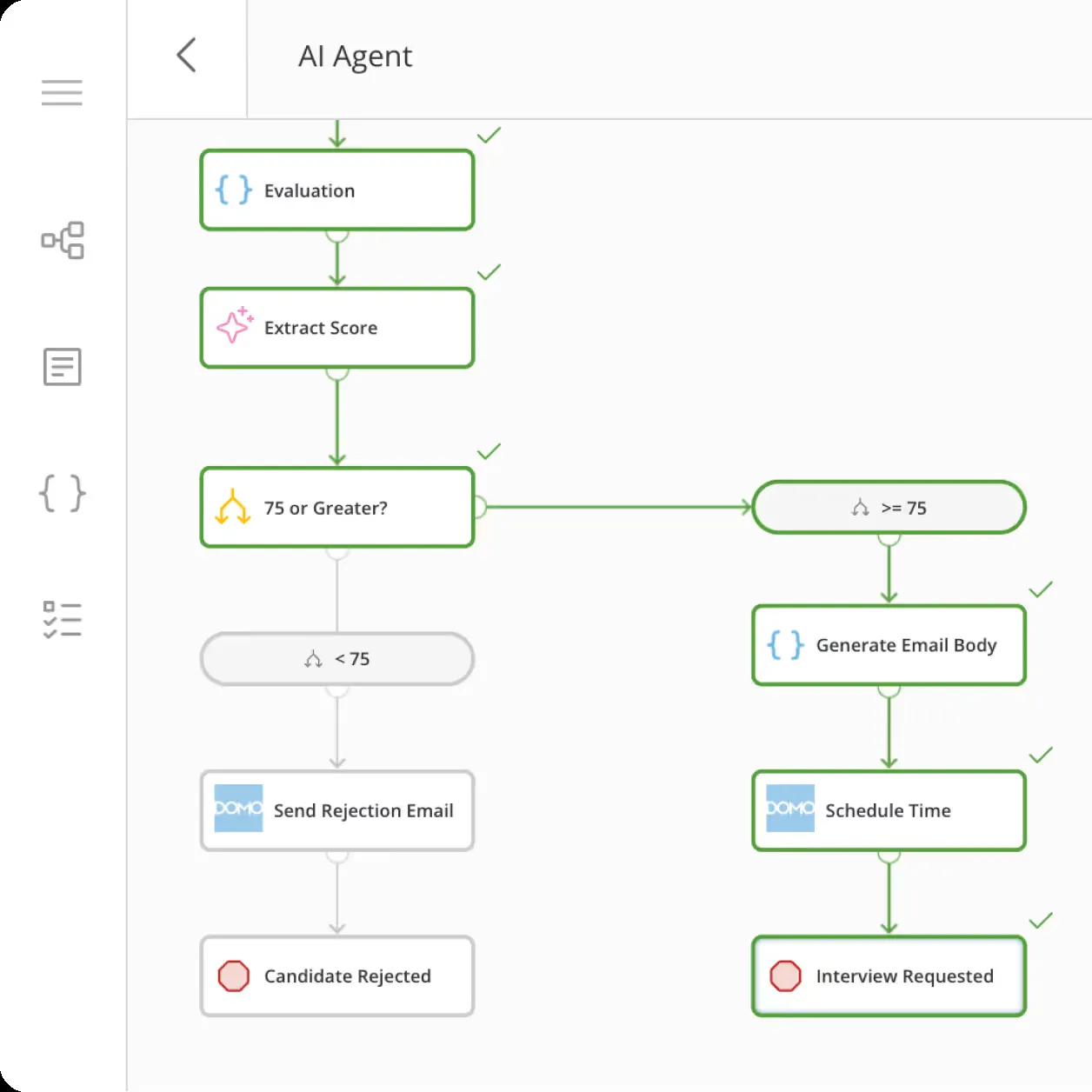
Domo: product and architecture
Our Domo review verdict: Domo is a strong choice for data leaders who want a single, business-facing platform for connecting data, building visual reporting, and distributing operational insights without making every stakeholder depend on an analytics engineer. Its major advantage is breadth: Domo combines integration, preparation, business intelligence, real-time messaging, project management, and app development in one product. The trade-off is that this breadth creates a real learning curve and can make navigation and data management more complicated than teams expect.
We recommend Domo for organizations willing to pay for a governed, broad self-service environment and give users structured onboarding. It is not the best fit for teams seeking a narrowly focused BI layer, a simple product-analytics tool, or a low-cost deployment with transparent seat-based pricing. Domo’s public adoption signals include an 8.5/10 user rating across 253 reviews, while its official materials position the platform around AI, integration, and business intelligence rather than a single analytics specialty.
Overview
Domo is a platform for connecting data, visualizing insights, and using AI for business decisions. Its documented scope spans data integration, BI and analytics, embedded analytics, app creation, and security and governance. For teams that need to bring varied sources into a business-facing analytics environment, Domo lists more than 1,000 pre-built cloud connectors, with Salesforce, Google Analytics, and Snowflake among the examples. It also supports file uploads, email attachment imports, CSV SFTP ingestion, and community-built connectors.
The platform supports several paths for working with existing data systems. Domo Workbench can synchronize or move on-premises data while keeping sensitive information stored where it belongs. APIs, SDKs, and webhooks provide integration paths for proprietary or legacy systems. For warehouse-oriented deployments, Domo documents federated access that lets users view and analyze live data from Redshift or BigQuery without duplication. It also documents federated queries for Snowflake, BigQuery, and other warehouses.
Domo combines these connection paths with dashboards, visualizations, alerts, scheduled reports, exports, and mobile access. Its pricing page presents a 30-day free trial with no credit card required and custom pricing. The commercial model is credit-based: credits are consumed for actions such as data storage, table updates, workflow runs, and advanced capabilities including ML inference in the data pipeline. The supplied pricing evidence does not publish a monetary amount, currency, contract term, or included credit quantity for custom pricing.
Key Features and Architecture
Domo’s documented integration layer includes more than 1,000 pre-built cloud connectors, including Salesforce, Google Analytics, and Snowflake. Magic ETL provides visual pipeline building for transforming, cleaning, and joining data without code. SQL DataFlows support MySQL or Redshift queries for custom transformation pipelines, while DataSet Views let users apply visual filters or joins and save reusable datasets. Partitioned data refreshes new or changed records and archives old data. Domo also supports direct file uploads, automated email-attachment processing, and CSV SFTP ingestion.
For data that remains in a warehouse, Domo documents federated data for live analysis from Redshift or BigQuery without duplication, as well as federated queries across Snowflake, BigQuery, and other warehouses. Adrenaline DataFlows are described as running instant queries across billions of rows through an in-memory cache. The platform also documents cloud-native massively parallel processing and dynamic backend scaling, but the supplied evidence does not specify workload limits, throughput, or service-level commitments.
The analytics layer includes more than 150 chart types, more than 7,000 custom maps, drag-and-drop dashboard creation in Analyzer, Beast Modes for formulas, Variables for what-if inputs, filters, drilldowns, Smart Text, and alerts through web, email, or mobile. Reports can be scheduled and dashboards or raw data exported to CSV, Excel, PDF, or PowerPoint. Domo documents natural-language queries and automated discovery of trends and anomalies. Domo AI is the named AI suite for chat-based data exploration, model management, and secure deployment at scale.
For embedding and application development, Domo documents role-relevant personalized access, branding controls, mobile-optimized interfaces, bi-directional filter parameters, and iFrame or JavaScript embedding. Its App Dev Framework uses HTML, CSS, and JavaScript; Java and Python SDKs are listed alongside Connector Dev Studio, AppDB, Phoenix, Workflows, and Domo Bricks. Governance features include data lineage, row-level permissions for users and groups, attribute-based policies, custom roles, APIs for user management, certified content, sandbox environments, SSO, MFA, BYOK encryption, and audit logs.
Ideal Use Cases
Domo is suited to organizations that need to connect a wide range of cloud, file-based, on-premises, proprietary, or legacy data sources and make the resulting data available for analysis. Its connector library includes more than 1,000 pre-built cloud connectors, while Domo Workbench supports on-premises synchronization or movement. APIs, SDKs, and webhooks provide documented routes for proprietary and legacy systems. Teams that need to reduce manual file handling can also evaluate its file upload, email attachment import, and CSV SFTP capabilities.
It is also relevant when a team wants business-facing analytics while retaining live warehouse data. Domo documents federated data access for Redshift and BigQuery without duplication, and federated queries for Snowflake, BigQuery, and other warehouses. Dashboard builders can use Analyzer, filters, drilldowns, Variables, Beast Modes, alerts, scheduled reports, and exports. Teams that need analytics to inform operational work can assess Domo’s writeback capability, which pushes updates or decisions into business tools, and its built-in projects and tasks.
Embedded analytics and custom app scenarios are another fit. The platform documents personalized data access, role-based controls, branding, responsive mobile interfaces, iFrame and JavaScript embedding, self-service visualization editing, and bi-directional filter parameters. For teams with developers, Domo documents an HTML, CSS, and JavaScript App Dev Framework, Java and Python SDKs, Connector Dev Studio, AppDB, and Phoenix. For teams requiring governance, the documented controls include lineage, row-level permissions, trusted attributes, custom roles, SSO, MFA, BYOK encryption, audit trails, and sandbox environments.
A prospective buyer should use the 30-day no-card trial to test the specific connectors, warehouse access pattern, transformations, dashboards, permissions, writeback workflow, and app or embedding requirements that matter to its deployment. The supplied evidence does not establish user-count suitability, implementation duration, performance limits, or comparative fit against another product.
Strengths & Trade-offs
The official evidence documents a broad platform surface that can be useful when integration, analytics, embedded experiences, applications, and governance are evaluated together. It does not provide independent customer-review scores, implementation outcomes, comparative benchmarks, or product limitations. The following points are therefore a feature-based assessment of what Domo documents, rather than claims about measured customer experience.
Documented strengths
- More than 1,000 pre-built cloud connectors are listed, including Salesforce, Google Analytics, and Snowflake; Domo also documents on-premises, proprietary, legacy, file, email-attachment, and CSV SFTP connection paths.
- Federated data supports live analysis from Redshift or BigQuery without duplication, and federated queries are documented for Snowflake, BigQuery, and other warehouses.
- Magic ETL, SQL DataFlows, DataSet Views, partitioned data, and data writeback cover transformation, reusable views, incremental refresh and archiving, and pushing updates or decisions into business tools.
- Analytics capabilities include more than 150 chart types, more than 7,000 maps, dashboards, filters, drilldowns, alerts, scheduled reports, exports, mobile access, natural-language queries, and automated discovery of trends and anomalies.
- Domo documents granular governance and security capabilities, including lineage, row-level permissions, attribute-based policies, custom roles, SSO, MFA, BYOK encryption, audit trails, and sandbox environments.
Questions to validate
- The official materials do not provide benchmarks for query performance, refresh duration, concurrency, dataset limits, or implementation time.
- The pricing evidence does not publish a monetary custom-pricing amount, currency, contract term, included credits, or overage pricing. Credits can be consumed by storage, table updates, workflows, and ML inference, so those planned activities need explicit commercial review.
- Although Domo documents many integration and application-development paths, the evidence does not specify the maintenance effort, connector availability for a particular source, or implementation requirements for a custom connector, API, SDK, webhook, or embedded deployment.
- The evidence lists security and compliance features, including GDPR, HIPAA, SOC 1/2, and ISO standards, but it does not state which commercial offering, configuration, or region applies to a particular buyer.
The 30-day no-card trial can help a team validate these questions against its own sources, workflows, warehouse access pattern, dashboards, governance design, and credit-use assumptions.