Decision comparison
Fusedash vs Metabase
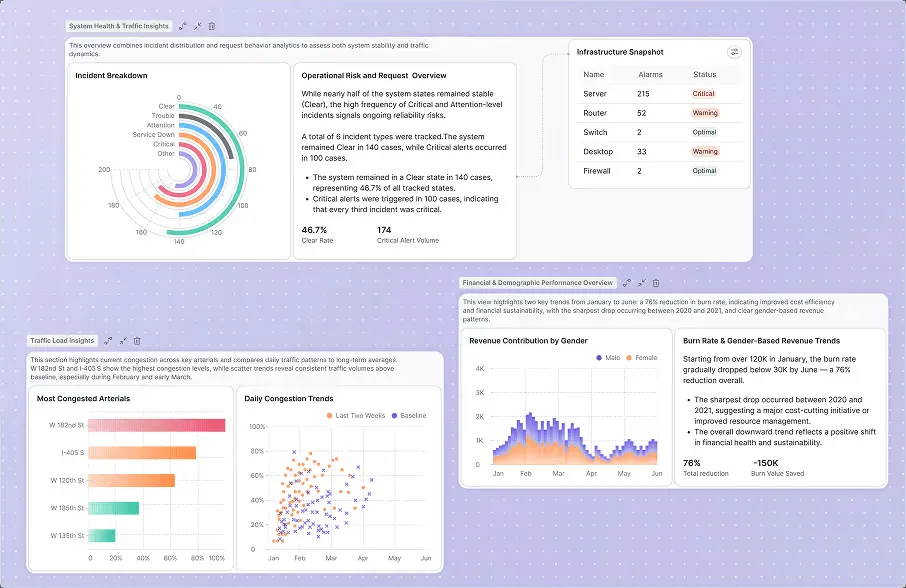
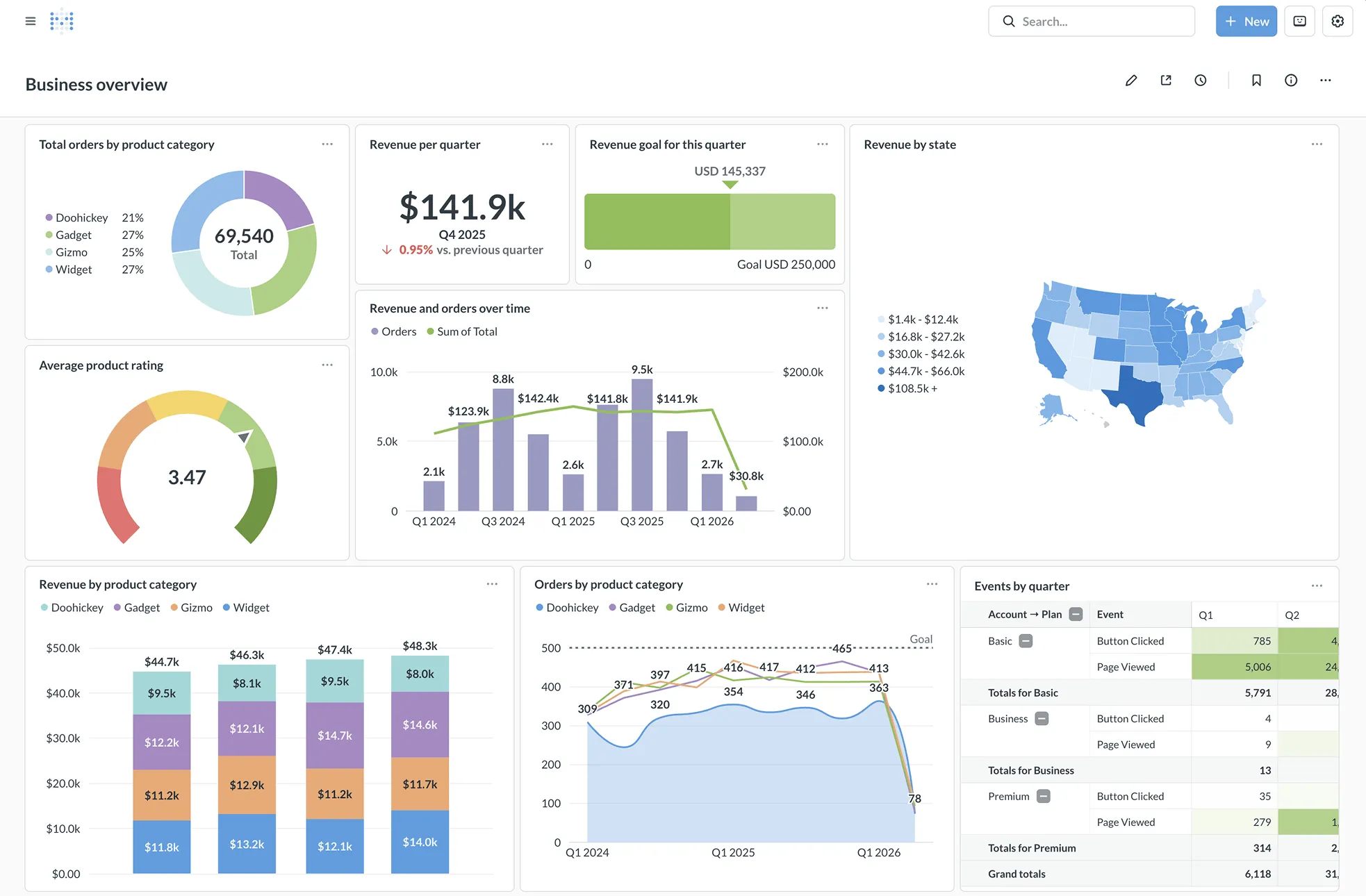
Fusedash and Metabase target fundamentally different analytics workflows. Fusedash excels at AI-generated dashboards and narrative reporting for business teams who want speed without technical setup. Metabase is the stronger choice for data teams needing open-source flexibility, deep SQL access, granular permissions, and embedded analytics at scale. Your decision should hinge on whether you value AI-driven speed or open-source control and enterprise governance.
Direct comparison. These are reviewed substitutes bought for the same job, so the differences below are the ones that decide between them.
All 2 are BI platforms.
Quick Comparison
| Decision factor | Fusedash | Metabase |
|---|---|---|
| Best For | Business teams needing AI-generated dashboards, storytelling reports, and KPI views from CSV or API data without BI expertise | Data teams and developers needing open-source self-service BI with embedded analytics, SQL access, and granular permissions |
| Architecture | Cloud-hosted generative analytics platform using MCP protocol; connects Claude, GPT, or any MCP-compatible AI model | Open-source Clojure application (48,000+ GitHub stars); self-hosted via Docker or Metabase Cloud; sits as query layer on your database |
| Pricing Model | Free tier with $0.00, then $5, $15, $25 for token packs (usage-based) | Community Edition is free, open-source and self-hosted, with unlimited users. Paid Metabase Cloud plans start with Starter at $100/month, or $90/month billed annually, including the first 5 users, then $6 per user/month. Pro is $575/month, or $517.50/month annually, including the first 10 users, then $12 per user/month. Enterprise is custom pricing starting at $20,000/year. Both paid plans offer a 14 days free trial. |
| Ease of Use | Describe what you need in plain language and Fusedash generates dashboards, charts, and reports automatically with no configuration | Visual query builder for non-technical users; rated 8.4/10 across 66 reviews; users praise easy setup and simple UI |
| Scalability | Single dataset powers dashboards, maps, storytelling, and real-time monitoring views for different audiences across teams | 20+ database connectors; result and model caching; staging environments; multi-tenant data segregation; trusted by 90,000+ companies |
| Community/Support | Newer platform with free trial available; no public community metrics or third-party reviews yet; demo request option on site | Massive open-source community; 48,000+ GitHub stars; active discussion forum; 3-day support via Slack, Teams, and email on paid plans |
Fusedash
- Best For:
- Business teams needing AI-generated dashboards, storytelling reports, and KPI views from CSV or API data without BI expertise
- Architecture:
- Cloud-hosted generative analytics platform using MCP protocol; connects Claude, GPT, or any MCP-compatible AI model
- Pricing Model:
- Free tier with $0.00, then $5, $15, $25 for token packs (usage-based)
- Ease of Use:
- Describe what you need in plain language and Fusedash generates dashboards, charts, and reports automatically with no configuration
- Scalability:
- Single dataset powers dashboards, maps, storytelling, and real-time monitoring views for different audiences across teams
- Community/Support:
- Newer platform with free trial available; no public community metrics or third-party reviews yet; demo request option on site
Metabase
- Best For:
- Data teams and developers needing open-source self-service BI with embedded analytics, SQL access, and granular permissions
- Architecture:
- Open-source Clojure application (48,000+ GitHub stars); self-hosted via Docker or Metabase Cloud; sits as query layer on your database
- Pricing Model:
- Community Edition is free, open-source and self-hosted, with unlimited users. Paid Metabase Cloud plans start with Starter at $100/month, or $90/month billed annually, including the first 5 users, then $6 per user/month. Pro is $575/month, or $517.50/month annually, including the first 10 users, then $12 per user/month. Enterprise is custom pricing starting at $20,000/year. Both paid plans offer a 14 days free trial.
- Ease of Use:
- Visual query builder for non-technical users; rated 8.4/10 across 66 reviews; users praise easy setup and simple UI
- Scalability:
- 20+ database connectors; result and model caching; staging environments; multi-tenant data segregation; trusted by 90,000+ companies
- Community/Support:
- Massive open-source community; 48,000+ GitHub stars; active discussion forum; 3-day support via Slack, Teams, and email on paid plans
Public signals
Verified factual signals only. Bars appear only for like-for-like metrics with five weekly assessments for every tool; missing evidence stays explicit. These signals do not establish enterprise adoption, product quality, or total cost.
| Metric | Fusedash | Metabase |
|---|---|---|
| Product Hunt comments(Community interest) | 1 | 30 |
| Product Hunt rating(Community interest) | Unavailable | 4.9/5 |
| Product Hunt reviews(Community interest) | 0 | 24 |
| Product Hunt votes(Community interest) | 10 | 310 |
| Docker Hub pulls(Product adoption) | Not available | 272.7M |
| GitHub commits, 90d(Product adoption) | Not available | 2.0k |
| GitHub stars(Product adoption) | Not available | 49,000+ |
| Hacker News mentions, 90d(Community interest) | Not available | 12 |
| npm weekly downloads(Developer adoption) | Not available | 36.8k |
| Stack Overflow questions(Community interest) | Not available | 374 |
As of September 21, 2026 — updated weekly.
Health & risk evidence
Observed public-source checks for mapped package versions and repositories.
Fusedash
Package vulnerabilities
Not available
Repository security score
Not available
Metabase
September 21, 2026Package vulnerabilities
npm · @metabase/embedding-sdk-react@0.63.1
0 vulnerabilities
across 1 package
Repository security score
github.com/metabase/metabase
7.1/10
Interface Preview
Fusedash
Metabase
Feature Comparison
| Feature | Fusedash | Metabase |
|---|---|---|
| Data Connectivity | ||
| Data Source Types | CSV upload, REST API connections, and MCP-compatible AI model integrations | 20+ native database connectors including PostgreSQL, MySQL, and data warehouses |
| Data Handling Model | Upload and connect data directly; no data warehouse required for setup | Visualization layer on top of your database; data stays in your DB |
| Real-Time Data | Real-time dashboards with auto-refresh, spike and anomaly alerts built in | Live database queries with result caching for performance optimization |
| Query & Exploration | ||
| Natural Language Querying | AI data chat lets users ask questions in plain language with chart-backed answers | Metabot AI provides single-shot SQL generation from natural language questions |
| SQL Support | No direct SQL editor; relies on AI-generated queries and no-code builder | Full SQL editor for power users alongside visual query builder for non-technical users |
| Query Builder | AI-driven dashboard generation from natural language descriptions of needs | Visual drag-and-drop query builder with templates, models, and reusable metrics |
| Visualization & Reporting | ||
| Chart Types | AI chart generator creates visuals automatically; includes choropleths, heatmaps, point maps | Unlimited charts and visualizations with interactive drill-through menus on click |
| Dashboard Building | Generative dashboards with KPI cards, filters, and drill-downs built from descriptions | Manual dashboard builder with filters, cross-filters, and custom click behaviors |
| Narrative Reporting | Data storytelling turns dashboard data into narrative reports with context and takeaways | Documents feature for dashboard annotations; no dedicated narrative report builder |
| Security & Governance | ||
| Access Control | Workspace-level data access; connect your own AI model for data privacy | Row and column-level permissions, collection-based access, database-managed segregation |
| Compliance Certifications | Data stays in your workspace with bring-your-own AI model approach | SOC1, SOC2, GDPR, and CCPA compliant; enterprise-grade security framework |
| SSO Integration | No documented SSO integration options available currently | SAML, LDAP, JWT, and Google SSO with role-based group mapping |
| Deployment & Extensibility | ||
| Deployment Options | Cloud-hosted platform with free trial; no self-hosted option documented | Self-hosted via Docker, Metabase Cloud, or air-gapped deployment options |
| Embedded Analytics | Embeddable items with copy-embed functionality for sharing dashboard components | Full embedded analytics SDK with React components, iframes, and white-labeling |
| API & Integrations | MCP protocol integration for connecting any compatible AI model to workflows | REST API, API keys, Slack and email integrations for alerts and scheduled delivery |
Data Connectivity
Data Source Types
Data Handling Model
Real-Time Data
Query & Exploration
Natural Language Querying
SQL Support
Query Builder
Visualization & Reporting
Chart Types
Dashboard Building
Narrative Reporting
Security & Governance
Access Control
Compliance Certifications
SSO Integration
Deployment & Extensibility
Deployment Options
Embedded Analytics
API & Integrations
Which to choose
Fusedash and Metabase target fundamentally different analytics workflows. Fusedash excels at AI-generated dashboards and narrative reporting for business teams who want speed without technical setup. Metabase is the stronger choice for data teams needing open-source flexibility, deep SQL access, granular permissions, and embedded analytics at scale. Your decision should hinge on whether you value AI-driven speed or open-source control and enterprise governance.
Best-fit scenarios
Choose Fusedash if:
Choose Fusedash when your team needs to go from raw data to interactive dashboards in minutes without any SQL or BI expertise. It works best for business teams, marketing departments, and executives who want AI-generated KPI views, storytelling reports, and chart visualizations from CSV files or API connections. The usage-based token pricing starting at $0 makes it accessible for small teams experimenting with AI-powered analytics. If your priority is speed of insight generation and narrative reporting rather than deep data governance, Fusedash is the faster path. The trade-off is limited database connectivity and no self-hosted deployment option.
Choose Metabase if:
Choose Metabase when you need a proven, open-source BI platform with full SQL access, 20+ database connectors, and enterprise-grade security including SOC2 compliance. It is ideal for data teams, SaaS companies embedding analytics into their products, and organizations requiring row-level permissions and SSO integration. With 46,919 GitHub stars and trust from over 90,000 companies, Metabase offers long-term stability and a massive community. The Starter plan at $100/mo provides a managed cloud option, while the free open-source edition lets you self-host with Docker. The trade-off is more manual dashboard building and no built-in AI-driven narrative reporting.
These scenarios reflect the available product evidence. Your requirements, existing stack, and team expertise should guide the final decision.
Frequently Asked Questions
Can Fusedash replace Metabase for a data team with SQL expertise?
Fusedash is not designed to replace SQL-driven BI workflows. It lacks a native SQL editor and focuses instead on AI-generated dashboards from plain language descriptions. Data teams that rely on writing custom SQL queries, building reusable data models, and managing semantic layers will find Metabase far more suitable. However, if your team primarily works with CSV exports or API data and values speed over query control, Fusedash can complement an existing Metabase setup by handling executive reporting and storytelling outputs.
How does Metabase's open-source model compare to Fusedash's pricing?
Metabase offers a completely free open-source edition you can self-host using Docker, which is unmatched for budget-conscious teams. Its paid plans start at $100/mo for Starter cloud hosting and go up to $575/mo for Pro. Fusedash uses usage-based token packs starting with a $0 free tier, then $5, $15, and $25 packs that power AI actions like data chat and dashboard generation. For teams with light AI usage, Fusedash may cost less monthly, but Metabase's free self-hosted option provides unlimited dashboards and queries at zero recurring cost.
Which tool is better for embedding analytics into a SaaS product?
Metabase is the clear winner for embedded analytics. It offers a dedicated React SDK, iframe embedding, white-label customization, and dynamic styling that lets you integrate dashboards directly into your product without exposing the Metabase interface. Fusedash provides basic embeddable items with copy-embed functionality, but it lacks a dedicated SDK, white-labeling capabilities, and the multi-tenant data segregation that SaaS products require. If customer-facing analytics is a core product feature, Metabase's embedded analytics toolkit is significantly more mature.
What AI capabilities does each tool offer for data analysis?
Fusedash is built around AI as its core differentiator. It uses the Model Context Protocol (MCP) to let you connect Claude, GPT, or any MCP-compatible model to generate dashboards, write KPI summaries, and answer data questions through AI chat. The entire dashboard creation process is AI-driven. Metabase offers Metabot AI as an add-on feature that provides natural language SQL generation, allowing users to chat with their database. While Metabot is useful for ad-hoc questions, Fusedash's AI integration is more pervasive, extending to chart generation, storytelling reports, and anomaly detection across the entire platform.