Decision comparison
Count vs Tableau
Count delivers a modern AI-first analytics canvas at a dramatically reduced cost, while Tableau provides the industry's comprehensive visualization platform with proven enterprise scale and a massive ecosystem. Count wins on collaboration and affordability; Tableau wins on visualization depth and organizational reach.
Architecture choice. These take different approaches to the same problem. Read the table as a fit question rather than a feature race.
These are different kinds of product — Analytics Notebook and BI Platform.
Quick Comparison
| Decision factor | Count | Tableau |
|---|---|---|
| Pricing | Free $0 per month. Pro $49 per month. Scale $69 per month. Enterprise is quote-only. | Tableau Cloud Standard Edition: Viewer $15/user/month, Explorer $42/user/month, Creator $75/user/month; Enterprise Edition: Viewer $35/user/month, Explorer $70/user/month, Creator $115/user/month; Tableau+ Bundle requires contact sales for pricing details. |
| Core Approach | Collaborative analytics canvas combining AI agents, SQL, Python, and visual exploration in one shared workspace | Visual analytics platform with interactive dashboards, Tableau Desktop for authoring, and governed publishing workflows |
| AI Capabilities | Built-in AI agent that writes queries, creates visualizations, and edits canvases from natural language prompts | Agentforce integration via Tableau Next for agentic analytics with proactive insights and natural language questions |
| Data Connectivity | Connects to BigQuery, Snowflake, Databricks, PostgreSQL, MySQL, ClickHouse, MotherDuck, plus MCP protocol integrations | Broad connector library for databases, cloud services, and files with native Salesforce CRM integration built in |
| Collaboration | Real-time multi-user canvas editing with shared exploration, inline comments, and Slack/email alerts built in | Governed publishing model where Creators build dashboards and Explorers/Viewers consume through Tableau Cloud or Server |
| Learning Curve | Canvas-based interface designed for immediate exploration with AI handling query generation for non-technical users | Powerful but users report steep learning curve; certification training runs $1,200-$2,000 per course with 40+ hours needed |
Count
- Pricing:
- Free $0 per month. Pro $49 per month. Scale $69 per month. Enterprise is quote-only.
- Core Approach:
- Collaborative analytics canvas combining AI agents, SQL, Python, and visual exploration in one shared workspace
- AI Capabilities:
- Built-in AI agent that writes queries, creates visualizations, and edits canvases from natural language prompts
- Data Connectivity:
- Connects to BigQuery, Snowflake, Databricks, PostgreSQL, MySQL, ClickHouse, MotherDuck, plus MCP protocol integrations
- Collaboration:
- Real-time multi-user canvas editing with shared exploration, inline comments, and Slack/email alerts built in
- Learning Curve:
- Canvas-based interface designed for immediate exploration with AI handling query generation for non-technical users
Tableau
- Pricing:
- Tableau Cloud Standard Edition: Viewer $15/user/month, Explorer $42/user/month, Creator $75/user/month; Enterprise Edition: Viewer $35/user/month, Explorer $70/user/month, Creator $115/user/month; Tableau+ Bundle requires contact sales for pricing details.
- Core Approach:
- Visual analytics platform with interactive dashboards, Tableau Desktop for authoring, and governed publishing workflows
- AI Capabilities:
- Agentforce integration via Tableau Next for agentic analytics with proactive insights and natural language questions
- Data Connectivity:
- Broad connector library for databases, cloud services, and files with native Salesforce CRM integration built in
- Collaboration:
- Governed publishing model where Creators build dashboards and Explorers/Viewers consume through Tableau Cloud or Server
- Learning Curve:
- Powerful but users report steep learning curve; certification training runs $1,200-$2,000 per course with 40+ hours needed
Public signals
Verified factual signals only. Bars appear only for like-for-like metrics with five weekly assessments for every tool; missing evidence stays explicit. These signals do not establish enterprise adoption, product quality, or total cost.
| Metric | Count | Tableau |
|---|---|---|
| Search interest(Market interest) | 1 | 85 |
| Hacker News mentions, 90d(Community interest) | 0 | 2 |
| Product Hunt comments(Community interest) | 6 | 3 |
| Product Hunt rating(Community interest) | Unavailable | 4.2/5 |
| Product Hunt reviews(Community interest) | 0 | 5 |
| Product Hunt votes(Community interest) | 85 | 7 |
| GitHub commits, 90d(Developer adoption) | Not available | 37 |
| GitHub stars(Developer adoption) | Not available | 716 |
| npm weekly downloads(Developer adoption) | Not available | 32.2k |
| PyPI weekly downloads(Developer adoption) | Not available | 965.7k |
| Stack Overflow questions(Community interest) | Not available | 5.4k |
As of September 21, 2026 — updated weekly.
Health & risk evidence
Observed public-source checks for mapped package versions and repositories.
Count
Package vulnerabilities
Not available
Repository security score
Not available
Tableau
September 21, 2026Package vulnerabilities
npm · @tableau/embedding-api@3.16.1 · PyPI · tableauserverclient@0.41
0 vulnerabilities
across 2 packages
Repository security score
github.com/tableau/server-client-python
5.5/10
Interface Preview
Tableau
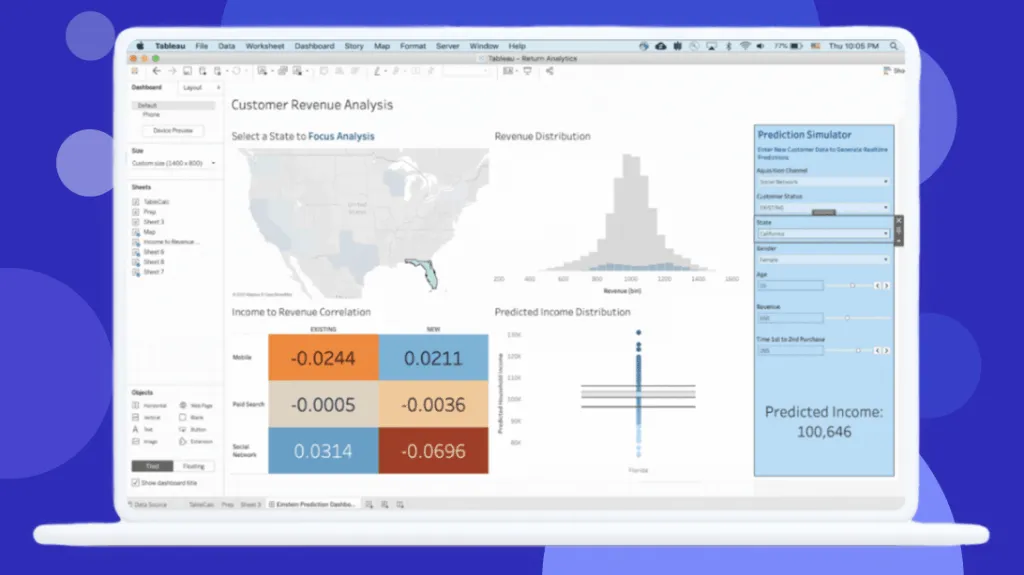
Feature Comparison
| Feature | Count | Tableau |
|---|---|---|
| Data Analysis | ||
| Query Interface | AI agent writes SQL/Python queries on shared canvas with every step auditable and editable | Drag-and-drop visual query builder in Tableau Desktop with calculated fields and LOD expressions |
| Semantic Layer | Count Metrics semantic layer provides governed metrics with drag-and-drop analysis capabilities | Tableau Semantics AI-infused semantic layer integrated with Data 360 unified data layer |
| Data Preparation | In-canvas data exploration with AI agent handling transformations and multi-step analysis chains | Tableau Prep Builder included with Creator license for visual data cleaning and transformation workflows |
| Visualization & Reporting | ||
| Dashboard Creation | Canvas-based layout with AI-generated visualizations, gridded dashboards available as optional format | Industry-leading interactive dashboards with drill-down capabilities and visual best practices built in |
| Sharing & Distribution | Alerts, reports, and full canvases sent to Slack and email with real-time collaboration links | Governed publishing to Tableau Cloud or Server with scheduled refreshes, subscriptions, and mobile access |
| Public Sharing | Designed for internal team collaboration with invite-based canvas sharing | Tableau Public offers free unlimited public data visualization publishing and community gallery |
| Enterprise & Governance | ||
| Access Control | Fine-grain or group-wide permissions with full visibility over AI interactions with data | Role-based licensing (Creator/Explorer/Viewer) with Enterprise edition adding advanced security controls |
| Compliance | SOC 2 and GDPR compliant with guarantee that data is not used for model training | Enterprise-grade security via Hyperforce with compliance controls and on-premises Server deployment option |
| Audit Trail | Every query visible and every step auditable in editable canvases with full analysis history | Governed data management with centralized publishing and version control through Tableau Server/Cloud |
| Platform & Integration | ||
| Deployment Options | Cloud-based SaaS platform with browser access and no infrastructure management required | Tableau Cloud (SaaS), Tableau Server (self-hosted), and Tableau Desktop (offline) deployment options |
| Ecosystem Integration | MCP protocol support connecting to Linear, HubSpot, Salesforce, Zendesk, Google Ads, Stripe, and more | Deep Salesforce CRM integration, Agentforce platform, Slack analytics, and embedded analytics capabilities |
| API & Extensibility | Warehouse-native connections with semantic layer support for LookML, dbt, Snowflake Cortex, and Cube | API-first composable architecture with Tableau Next enabling embedded analytics and developer tooling |
| Performance & Scalability | ||
| Query Performance | Intelligent compute layer optimizes every query for speed and cost control across AI-generated workloads | Extract-based architecture with scheduled refresh limits (10/day on standard Cloud plans) for performance |
| Caching | Three-tier caching across query results, canvas state, and semantic layer for reduced compute costs | Server-side caching with extract snapshots; real-time connections available but can impact dashboard speed |
| Scale Support | Transparent per-user pricing with no base fees scales linearly from individual to enterprise teams | Proven at enterprise scale with customers like JLR, KeyBank (10,000+ employees), and Box using the platform |
Data Analysis
Query Interface
Semantic Layer
Data Preparation
Visualization & Reporting
Dashboard Creation
Sharing & Distribution
Public Sharing
Enterprise & Governance
Access Control
Compliance
Audit Trail
Platform & Integration
Deployment Options
Ecosystem Integration
API & Extensibility
Performance & Scalability
Query Performance
Caching
Scale Support
Which approach fits
Count delivers a modern AI-first analytics canvas at a dramatically reduced cost, while Tableau provides the industry's comprehensive visualization platform with proven enterprise scale and a massive ecosystem. Count wins on collaboration and affordability; Tableau wins on visualization depth and organizational reach.
When each approach fits
Choose Count if:
Choose Count if your team values collaborative, AI-driven data exploration over traditional dashboard building. Count excels for data teams that want to ask ad-hoc questions and get full auditable analyses without writing every query manually. The pricing is straightforward at $0 for Free, $49/mo for Pro, and $69/mo for Scale, with no base fees and viewer seats included at every tier. Count is the stronger choice for organizations that find traditional BI dashboards too rigid and want a canvas-based approach where AI agents and human analysts work side by side in real time.
Choose Tableau if:
Choose Tableau if your organization needs the industry's most mature visual analytics platform with proven enterprise-grade deployment options. Tableau's drag-and-drop interface creates sophisticated interactive dashboards that have set the standard for data visualization. The platform supports cloud, self-hosted, and desktop deployments, and integrates deeply with Salesforce CRM. With 2,320 reviews and an 8.4/10 rating, plus recognition as a 2025 Gartner Magic Quadrant Leader, Tableau is the established choice for large organizations that need governed publishing workflows, broad data connectivity, and a massive training and community ecosystem.
These scenarios reflect the available product evidence. Your requirements, existing stack, and team expertise should guide the final decision.
Frequently Asked Questions
How does Count's pricing compare to Tableau for a growing team?
Count offers a free tier at $0, Pro at $49/mo, and Scale at $69/mo per user with no base fees and viewer seats included in every tier. Tableau charges $15/user/mo for Viewers, $42/user/mo for Explorers, and $75/user/mo for Creators on the Cloud Standard edition. A mid-sized team of 5 analysts and 25 viewers would pay roughly $345/mo on Count's Pro plan versus $4,125/mo or more on Tableau Cloud Standard. Tableau's Enterprise edition doubles per-user costs, with Creators at $115/user/mo and Explorers at $70/user/mo.
Can Count replace Tableau for enterprise data visualization needs?
Count and Tableau take fundamentally different approaches to analytics. Count uses a collaborative canvas where AI agents and analysts explore data together in real time, generating analyses from natural language prompts. Tableau provides a governed dashboard publishing workflow with industry-leading interactive visualizations and drill-down capabilities. Count is strong for ad-hoc exploration and team collaboration, while Tableau offers extensive visualization options, a mature ecosystem, and proven deployments at organizations like KeyBank (10,000+ employees) and JLR. Organizations with heavy dashboard consumption needs across large viewer populations tend to favor Tableau's structured Creator/Explorer/Viewer model.
Which tool has better AI and automation capabilities?
Both platforms invest heavily in AI but approach it differently. Count built its platform around an AI agent that analyzes data, writes queries, creates visualizations, and edits canvases from natural language prompts, with every step auditable and editable. The AI understands your data schema and chains multiple operations together. Tableau introduced Tableau Next with Agentforce integration, delivering agentic analytics through Slack with permission-aware metrics and natural language questions. Tableau's AI capabilities are layered onto its existing visualization platform through the Salesforce ecosystem, while Count's AI is core to the product experience from the ground up.
What data sources does each tool support?
Count connects to BigQuery, Snowflake, Databricks, PostgreSQL, MySQL, ClickHouse, MotherDuck, Athena, MSSQL, Azure Synapse, and Redshift. It also supports semantic layers including LookML, dbt, Snowflake Cortex, and Cube, plus file imports from Google Sheets, CSV, and TSV. Count's MCP protocol support connects to tools like HubSpot, Salesforce, Linear, Zendesk, Google Ads, and Stripe. Tableau offers one of the broadest connector libraries in the BI industry, covering most enterprise databases, cloud services, and file formats, with native Salesforce CRM integration providing unified customer data analysis through Data 360.