Decision comparison
Alteryx vs Tableau
Alteryx and Tableau serve complementary roles in the analytics stack. Alteryx excels at data preparation, blending, and advanced analytics automation, while Tableau is the gold standard for interactive data visualization and dashboard creation. Many organizations use both tools together, with Alteryx handling upstream data work and Tableau delivering the visual insights.
Architecture choice. These take different approaches to the same problem. Read the table as a fit question rather than a feature race.
These are different kinds of product — Data Preparation Tool and BI Platform.
Quick Comparison
| Decision factor | Alteryx | Tableau |
|---|---|---|
| Best For | Data preparation, blending, and analytics automation with low-/no-code workflows | Interactive data visualization, dashboards, and visual analytics for business users |
| Architecture | Unified platform with desktop, cloud, and hybrid deployment options | Cloud-hosted, self-hosted server, or desktop with Salesforce and Agentforce integration |
| Pricing Model | Three editions. Starter Edition at $250 per user per month, billed annually. Professional and Enterprise editions are quoted by sales. | Tableau Cloud Standard Edition: Viewer $15/user/month, Explorer $42/user/month, Creator $75/user/month; Enterprise Edition: Viewer $35/user/month, Explorer $70/user/month, Creator $115/user/month; Tableau+ Bundle requires contact sales for pricing details. |
| Ease of Use | Drag-and-drop workflow builder praised for data blending; steeper curve for advanced analytics | Highly intuitive drag-and-drop visualization; learning curve for advanced calculated fields |
| Scalability | Enterprise-grade with role-based access, workflow governance, and server-based scheduling | Deploys across cloud, on-premises, and Salesforce CRM with enterprise governance controls |
| Community/Support | Trusted by 8,000+ enterprises; recognized by Gartner, Forrester, IDC, Dresner, and BARC | Millions of community members; 2025 Gartner Magic Quadrant Leader; Tableau Public for sharing |
Alteryx
- Best For:
- Data preparation, blending, and analytics automation with low-/no-code workflows
- Architecture:
- Unified platform with desktop, cloud, and hybrid deployment options
- Pricing Model:
- Three editions. Starter Edition at $250 per user per month, billed annually. Professional and Enterprise editions are quoted by sales.
- Ease of Use:
- Drag-and-drop workflow builder praised for data blending; steeper curve for advanced analytics
- Scalability:
- Enterprise-grade with role-based access, workflow governance, and server-based scheduling
- Community/Support:
- Trusted by 8,000+ enterprises; recognized by Gartner, Forrester, IDC, Dresner, and BARC
Tableau
- Best For:
- Interactive data visualization, dashboards, and visual analytics for business users
- Architecture:
- Cloud-hosted, self-hosted server, or desktop with Salesforce and Agentforce integration
- Pricing Model:
- Tableau Cloud Standard Edition: Viewer $15/user/month, Explorer $42/user/month, Creator $75/user/month; Enterprise Edition: Viewer $35/user/month, Explorer $70/user/month, Creator $115/user/month; Tableau+ Bundle requires contact sales for pricing details.
- Ease of Use:
- Highly intuitive drag-and-drop visualization; learning curve for advanced calculated fields
- Scalability:
- Deploys across cloud, on-premises, and Salesforce CRM with enterprise governance controls
- Community/Support:
- Millions of community members; 2025 Gartner Magic Quadrant Leader; Tableau Public for sharing
Public signals
Verified factual signals only. Bars appear only for like-for-like metrics with five weekly assessments for every tool; missing evidence stays explicit. These signals do not establish enterprise adoption, product quality, or total cost.
| Metric | Alteryx | Tableau |
|---|---|---|
| GitHub commits, 90d(Developer adoption) | 44 | 33 |
| GitHub stars(Developer adoption) | 17 | 716 |
| Search interest(Market interest) | 3 | 72 |
| Hacker News mentions, 90d(Community interest) | 0 | 2 |
| PyPI weekly downloads(Developer adoption) | 116 | 946.1k |
| Stack Overflow questions(Community interest) | 262 | 5.3k |
| npm weekly downloads(Developer adoption) | Not available | 42.5k |
| Product Hunt comments(Community interest) | Not available | 3 |
| Product Hunt rating(Community interest) | Not available | 4.2/5 |
| Product Hunt reviews(Community interest) | Not available | 5 |
| Product Hunt votes(Community interest) | Not available | 7 |
As of October 12, 2026 — updated weekly.
Health & risk evidence
Observed public-source checks for mapped package versions and repositories.
Alteryx
October 12, 2026Package vulnerabilities
PyPI · ayx-python-sdk@2.6.1
0 vulnerabilities
across 1 package
Repository security score
Not available
Tableau
October 12, 2026Package vulnerabilities
npm · @tableau/embedding-api@3.16.1 · PyPI · tableauserverclient@0.41
0 vulnerabilities
across 2 packages
Repository security score
github.com/tableau/server-client-python
5.5/10
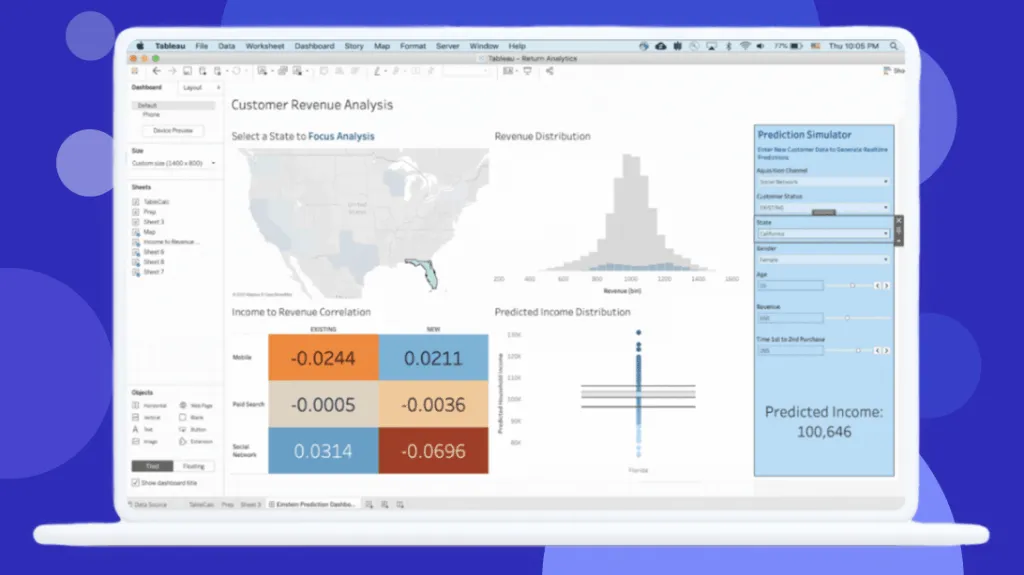
Interface Preview
Tableau
Feature Comparison
| Feature | Alteryx | Tableau |
|---|---|---|
| Data Preparation & Integration | ||
| Data Blending | Connect, clean, and blend data from 100+ prebuilt connectors and 6 major platforms | Basic data prep via Tableau Prep Builder included with Creator license |
| ETL Automation | Full ETL with automated low-/no-code workflows, reducing manual data prep by up to 90% | Limited ETL; primarily a visualization layer, often needs separate ETL tools |
| Data Connectors | Integrates with Snowflake, Databricks, AWS, Google, SAP, and Salesforce natively | Connects to most databases and cloud sources; some enterprise connectors need configuration |
| Data Quality | Built-in data profiling, cleansing, and business rule enforcement within workflows | Basic data profiling; complex cleaning requires external tools or Tableau Prep |
| Analytics & Visualization | ||
| Data Visualization | Limited native visualization; relies on partner BI tools for dashboards | Industry-leading interactive dashboards with drag-and-drop visual best practices |
| Predictive Analytics | Unified predictive analytics with AutoML, geospatial features, and AI assistants | Basic analytics trends and forecasting; advanced modeling requires external tools |
| Self-Service Analytics | Natural language prompts, visual workflows, and AI-guided analysis for any skill level | Intuitive self-service exploration with filtering, drill-down, and web authoring |
| Dashboard Sharing | Analytic apps let business users run governed processes and share results | Publish and share dashboards via Cloud, Server, or Tableau Public with role-based access |
| AI & Machine Learning | ||
| AI Integration | AI-assisted data preparation, Magic Reports, and Annie AI agent for guidance | Agentic analytics via Agentforce integration and Tableau Next platform |
| Machine Learning | Built-in AutoML, predictive modeling, and Intelligence Suite for ML workflows | AI-assisted semantic model creation; ML requires external tools or Einstein |
| Natural Language | Natural language prompts for data exploration and AI-generated narrative reports | Ask questions in natural language via Agentforce directly in Slack or Tableau |
| Governance & Security | ||
| Access Control | Role-based access, SSO/SCIM provisioning, and version control with run-level logs | Permission-aware analytics with enterprise SSO, row-level security, and governance |
| Data Lineage | Built-in workflow lineage tracking with Collibra and Atlan integrations | Data management via Data 360 unified layer; lineage within Tableau Catalog |
| Deployment Options | Cloud, on-premises, or hybrid deployment with governance intact across all modes | Tableau Cloud (SaaS), Tableau Server (self-hosted), or Salesforce CRM native |
| Collaboration & Ecosystem | ||
| Team Collaboration | Shared workspace for building, running, and managing analytics across teams | Tableau Cloud collaboration, Slack integration, and Tableau Public community |
| Enterprise Integrations | Deep integrations with Oracle, Microsoft, SAP, and major cloud data platforms | Native Salesforce CRM integration, Agentforce, and API-first composable architecture |
| Extensibility | Flexible APIs, extension points, and open standards for custom integrations | API-first architecture with embedded analytics and developer tools for custom builds |
Data Preparation & Integration
Data Blending
ETL Automation
Data Connectors
Data Quality
Analytics & Visualization
Data Visualization
Predictive Analytics
Self-Service Analytics
Dashboard Sharing
AI & Machine Learning
AI Integration
Machine Learning
Natural Language
Governance & Security
Access Control
Data Lineage
Deployment Options
Collaboration & Ecosystem
Team Collaboration
Enterprise Integrations
Extensibility
Which approach fits
Alteryx and Tableau serve complementary roles in the analytics stack. Alteryx excels at data preparation, blending, and advanced analytics automation, while Tableau is the gold standard for interactive data visualization and dashboard creation. Many organizations use both tools together, with Alteryx handling upstream data work and Tableau delivering the visual insights.
When each approach fits
These scenarios reflect the available product evidence. Your requirements, existing stack, and team expertise should guide the final decision.
Frequently Asked Questions
What is the main difference between Alteryx and Tableau?
Alteryx and Tableau serve complementary roles in the analytics stack. Alteryx excels at data preparation, blending, and advanced analytics automation, while Tableau is the gold standard for interactive data visualization and dashboard creation. Many organizations use both tools together, with Alteryx handling upstream data work and Tableau delivering the visual insights.
When should I choose Alteryx?
Choose Alteryx when you need Your primary challenge is data preparation, blending, and automating complex ETL workflows, You need built-in predictive analytics, AutoML, and machine learning capabilities without separate tools.
When should I choose Tableau?
Choose Tableau when you need Your priority is creating interactive, visually compelling dashboards and data storytelling, You need a flexible per-user pricing model with entry points starting at $15/user/month for viewers.