Decision comparison
Evidence vs Tableau
Evidence delivers a modern, code-first BI experience for technical teams who prefer SQL and markdown over visual builders, while Tableau provides the industry's most recognized drag-and-drop analytics platform with enterprise-grade features and Salesforce ecosystem integration.
Direct comparison. These are reviewed substitutes bought for the same job, so the differences below are the ones that decide between them.
All 2 are BI platforms.
Quick Comparison
| Decision factor | Evidence | Tableau |
|---|---|---|
| Ease of Use | Code-based workflow using SQL and markdown in a browser IDE with intelligent autocomplete and AI-assisted development | Drag-and-drop visual interface praised for intuitive design, though users report a steep learning curve for calculated fields |
| Data Visualization | Publication-quality visualizations designed for all device sizes, built through SQL-driven markdown components | Industry-leading interactive dashboards with drill-down capabilities, recognized as a 2025 Gartner Magic Quadrant Leader |
| Deployment | Open-source core with MIT license, cloud-hosted option available, supports self-hosted deployment via open framework | Available as Tableau Cloud (fully hosted SaaS), Tableau Server (self-hosted), and Tableau Desktop for offline work |
| Data Connectivity | Connects to major databases including Snowflake, BigQuery, and ClickHouse with scheduled syncs from minutes to daily | Broad data source connectivity with most connectors included, plus native Salesforce CRM and Agentforce integration |
| Scalability | Sub-second queries on billions of rows using columnar storage and vectorized execution with managed ClickHouse cluster | Enterprise-grade platform deployed across organizations of all sizes with Hyperforce-powered cloud infrastructure |
| Security | SOC 2 Type II certified with row-level security, SSO support, SCIM directory sync, SIEM logging, and BYO encryption keys | Enterprise security with SSO, row-level security, advanced data management, and compliance features in Enterprise edition |
Evidence
- Ease of Use:
- Code-based workflow using SQL and markdown in a browser IDE with intelligent autocomplete and AI-assisted development
- Data Visualization:
- Publication-quality visualizations designed for all device sizes, built through SQL-driven markdown components
- Deployment:
- Open-source core with MIT license, cloud-hosted option available, supports self-hosted deployment via open framework
- Data Connectivity:
- Connects to major databases including Snowflake, BigQuery, and ClickHouse with scheduled syncs from minutes to daily
- Scalability:
- Sub-second queries on billions of rows using columnar storage and vectorized execution with managed ClickHouse cluster
- Security:
- SOC 2 Type II certified with row-level security, SSO support, SCIM directory sync, SIEM logging, and BYO encryption keys
Tableau
- Ease of Use:
- Drag-and-drop visual interface praised for intuitive design, though users report a steep learning curve for calculated fields
- Data Visualization:
- Industry-leading interactive dashboards with drill-down capabilities, recognized as a 2025 Gartner Magic Quadrant Leader
- Deployment:
- Available as Tableau Cloud (fully hosted SaaS), Tableau Server (self-hosted), and Tableau Desktop for offline work
- Data Connectivity:
- Broad data source connectivity with most connectors included, plus native Salesforce CRM and Agentforce integration
- Scalability:
- Enterprise-grade platform deployed across organizations of all sizes with Hyperforce-powered cloud infrastructure
- Security:
- Enterprise security with SSO, row-level security, advanced data management, and compliance features in Enterprise edition
Public signals
Verified factual signals only. Bars appear only for like-for-like metrics with five weekly assessments for every tool; missing evidence stays explicit. These signals do not establish enterprise adoption, product quality, or total cost.
| Metric | Evidence | Tableau |
|---|---|---|
| GitHub commits, 90d(Product adoption) | 40 | Not available |
| GitHub stars(Product adoption) | 6,500+ | Not available |
| Search interest(Market interest) | 0 | 85 |
| npm weekly downloads(Product adoption) | 18.9k | Not available |
| Product Hunt comments(Community interest) | 28 | 3 |
| Product Hunt rating(Community interest) | 4.8/5 | 4.2/5 |
| Product Hunt reviews(Community interest) | 4 | 5 |
| Product Hunt votes(Community interest) | 113 | 7 |
| GitHub commits, 90d(Developer adoption) | Not available | 37 |
| GitHub stars(Developer adoption) | Not available | 716 |
| Hacker News mentions, 90d(Community interest) | Not available | 2 |
| npm weekly downloads(Developer adoption) | Not available | 32.2k |
| PyPI weekly downloads(Developer adoption) | Not available | 965.7k |
| Stack Overflow questions(Community interest) | Not available | 5.4k |
As of September 21, 2026 — updated weekly.
Health & risk evidence
Observed public-source checks for mapped package versions and repositories.
Evidence
September 21, 2026Package vulnerabilities
npm · @evidence-dev/evidence@40.1.8
0 vulnerabilities
across 1 package
Repository security score
Not available
Tableau
September 21, 2026Package vulnerabilities
npm · @tableau/embedding-api@3.16.1 · PyPI · tableauserverclient@0.41
0 vulnerabilities
across 2 packages
Repository security score
github.com/tableau/server-client-python
5.5/10
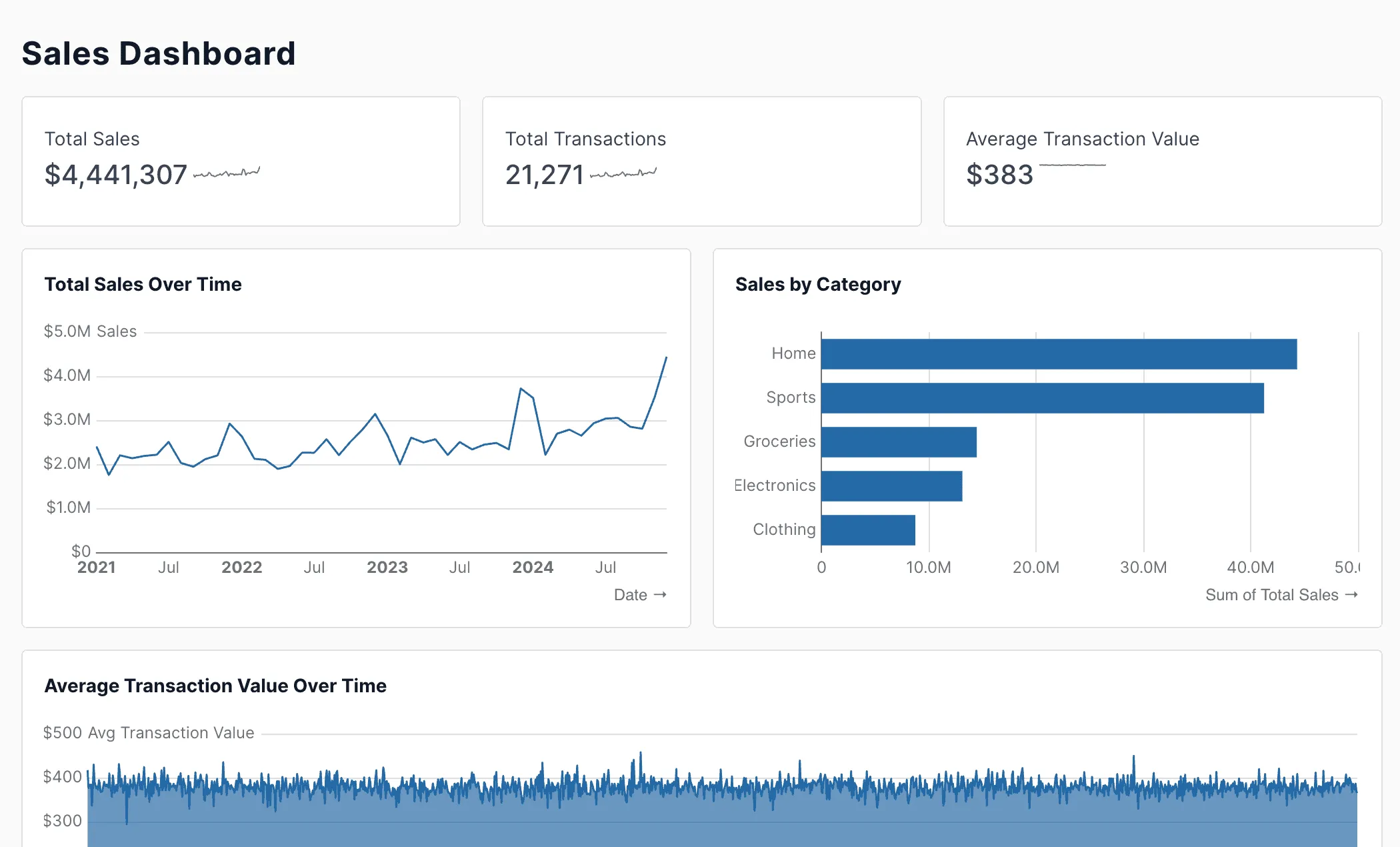
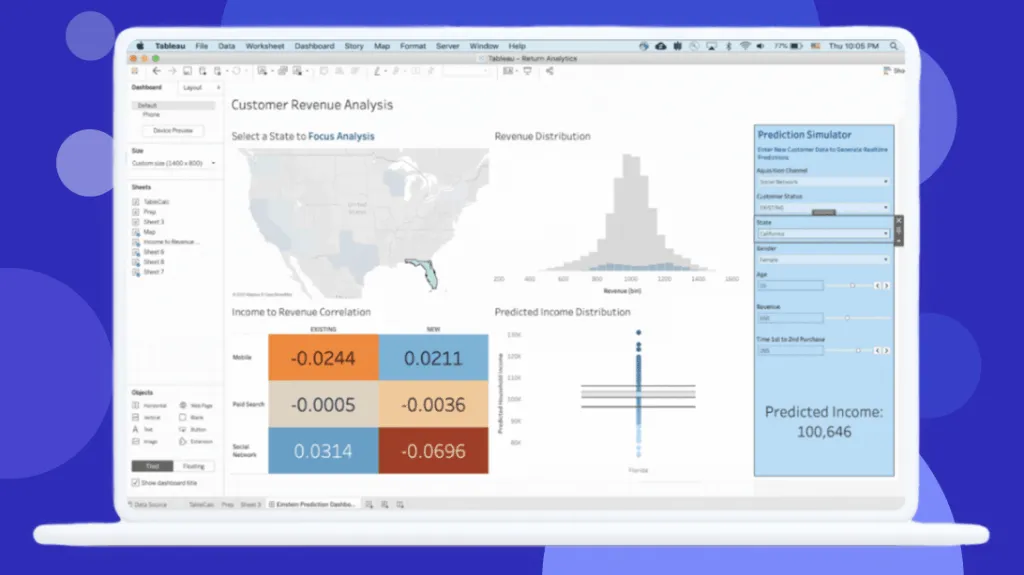
Interface Preview
Evidence
Tableau
Feature Comparison
| Feature | Evidence | Tableau |
|---|---|---|
| Data Analysis & Reporting | ||
| Report Building | Write SQL queries inside markdown files to generate automated, templated reports with loops and conditional logic | Create interactive dashboards with drag-and-drop interface and a full Desktop application for Creators |
| Templated Pages | Generate many pages from a single markdown template, enabling scalable report creation across datasets | Web-based editing for Explorers at $42/user/month, with publishing rights controlled through Creator licenses |
| AI Capabilities | Analytics agent | Agentic analytics with Agentforce integration, AI-assisted semantic model creation, and natural language Q&A |
| Development Experience | ||
| Authoring Interface | Browser-based IDE with real-time syntax validation, intelligent autocomplete for components and SQL queries | Tableau Desktop application for full authoring, Tableau Prep Builder for data cleaning and preparation workflows |
| Version Control | Built-in version control and testing using the same tools software engineers use, everything stored as code | Centralized publishing to Server or Cloud with governed access, but no native Git-based version control workflow |
| Collaboration | Code-based collaboration through standard Git workflows, enabling peer review and change tracking on reports | Slack integration for permission-aware analytics, dashboard commenting, scheduled subscriptions, and Tableau Public sharing |
| Performance & Infrastructure | ||
| Query Engine | Built-in query engine with columnar storage, vectorized execution, and multi-level intelligent caching | Hyper data engine for extract-based queries, with 10 scheduled extract refreshes per day on standard Cloud plans |
| Data Processing | Managed lakehouse with enterprise-grade ClickHouse cluster, automatic scaling and query optimization | Tableau Prep Builder for data cleaning included with Creator license, though complex ETL often requires separate tools |
| Caching & Optimization | Multi-level caching with automatic query optimization and memory management for sub-second interaction times | Extract-based caching with scheduled refreshes, real-time connections available but may slow dashboard performance |
| Security & Governance | ||
| Access Control | Row-level security policies, page-level access control, and SSO support for multiple identity providers | Role-based licensing with Viewer, Explorer, and Creator tiers controlling feature access and editing permissions |
| Compliance | SOC 2 Type II certified security controls with SIEM logging and customer-managed BYO encryption keys | Enterprise edition adds advanced security, data management, and embedded analytics with Hyperforce compliance |
| User Management | SCIM-based directory sync for automated user provisioning, integrated with existing identity infrastructure | Centralized governance with Data Culture framework, license management across Creator, Explorer, and Viewer roles |
| Ecosystem & Integration | ||
| Platform Integrations | Connects to Snowflake, BigQuery, ClickHouse, and other major databases with configurable sync schedules | Native Salesforce CRM integration, Agentforce for agentic AI, Slack integration, and broad third-party connectors |
| Embedding | Customer and embedded analytics capabilities, data apps, and AI chat features built into the platform | Embedded analytics requires Enterprise edition with Creator at $115/user/month and additional licensing for external users |
| Community & Support | Open-source community with 6,500+ GitHub stars, 17,000+ weekly downloads, 2,000+ Slack community members | Millions of community members, extensive training catalog, official certification programs, and broad learning resources |
Data Analysis & Reporting
Report Building
Templated Pages
AI Capabilities
Development Experience
Authoring Interface
Version Control
Collaboration
Performance & Infrastructure
Query Engine
Data Processing
Caching & Optimization
Security & Governance
Access Control
Compliance
User Management
Ecosystem & Integration
Platform Integrations
Embedding
Community & Support
Which to choose
Evidence delivers a modern, code-first BI experience for technical teams who prefer SQL and markdown over visual builders, while Tableau provides the industry's most recognized drag-and-drop analytics platform with enterprise-grade features and Salesforce ecosystem integration.
Best-fit scenarios
Choose Evidence if:
We recommend Evidence for data teams that value a code-based workflow and want to treat business intelligence like software engineering. Evidence excels when your analysts are comfortable writing SQL and markdown, and you need version-controlled, templated reports that scale across datasets. The open-source foundation with MIT license means you can start free and self-host, while the managed cloud option with its ClickHouse-powered query engine delivers sub-second performance on large datasets. Evidence is particularly strong for teams already using modern data stack tools like dbt and want their BI layer to follow the same code-first, Git-driven development practices.
Choose Tableau if:
We recommend Tableau for organizations that need a proven, enterprise-grade visual analytics platform with broad user accessibility. Tableau is the right choice when your team includes non-technical business users who need drag-and-drop dashboard creation, and when you require deep Salesforce CRM integration or agentic AI capabilities through Agentforce. With 2,320 user reviews averaging 8.4/10 and recognition as a 2025 Gartner Magic Quadrant Leader, Tableau delivers mature visualization capabilities backed by extensive training resources and a massive community.
These scenarios reflect the available product evidence. Your requirements, existing stack, and team expertise should guide the final decision.
Frequently Asked Questions
Is Evidence really free to use?
The supplied Evidence pricing page does not list a free tier. It lists Team at $15 per user/month and Pro at $25 per user/month; both plans include unlimited users. The supplied evidence does not provide Tableau pricing, so it cannot support a like-for-like cost comparison.
How does Tableau's pricing compare to Evidence for a typical team?
Evidence lists Team at $15 per user/month and Pro at $25 per user/month. The supplied evidence does not provide Tableau pricing, team-size requirements, or deployment licensing details, so a typical-team cost comparison cannot be made from the available evidence.
Can non-technical users work with Evidence, or is it only for developers?
Evidence is designed primarily for analysts and developers who are comfortable writing SQL and markdown. The platform includes intelligent autocomplete, real-time syntax validation, and an AI agent to assist with development, which lowers the barrier for technically inclined users. However, Evidence does not offer a drag-and-drop interface like Tableau. If your organization has many non-technical stakeholders who need to build or modify their own dashboards, Tableau's visual interface with its Explorer tier is better suited. That said, Evidence's published reports and data apps are fully interactive and accessible to any end user viewing them.
Which tool is better for enterprise security and compliance requirements?
Evidence publishes several advanced security and identity features under its Enterprise plan, including a SOC2 Audit Report, directory sync (SCIM), BYO encryption keys, SIEM audit logging, and multi-region support. The supplied evidence does not provide Tableau security-plan details, so it cannot establish which tool is better for a like-for-like compliance comparison.