Buying snapshot
Scroll sideways to see all columns. With a keyboard, focus this table and use the arrow keys.
| Decision point | What Fortinet and Lacework state |
|---|---|
Cloud coverage | Continuous posture assessment across AWS, Azure and GCP; the demo page also names private clouds for automating security and compliance. |
Modules | CSPM, CIEM, Kubernetes security, Cloud Detection and Response (CDR), vulnerability assessment, and code security: SAST, SCA, SBOM and Infrastructure as Code (IaC) security. |
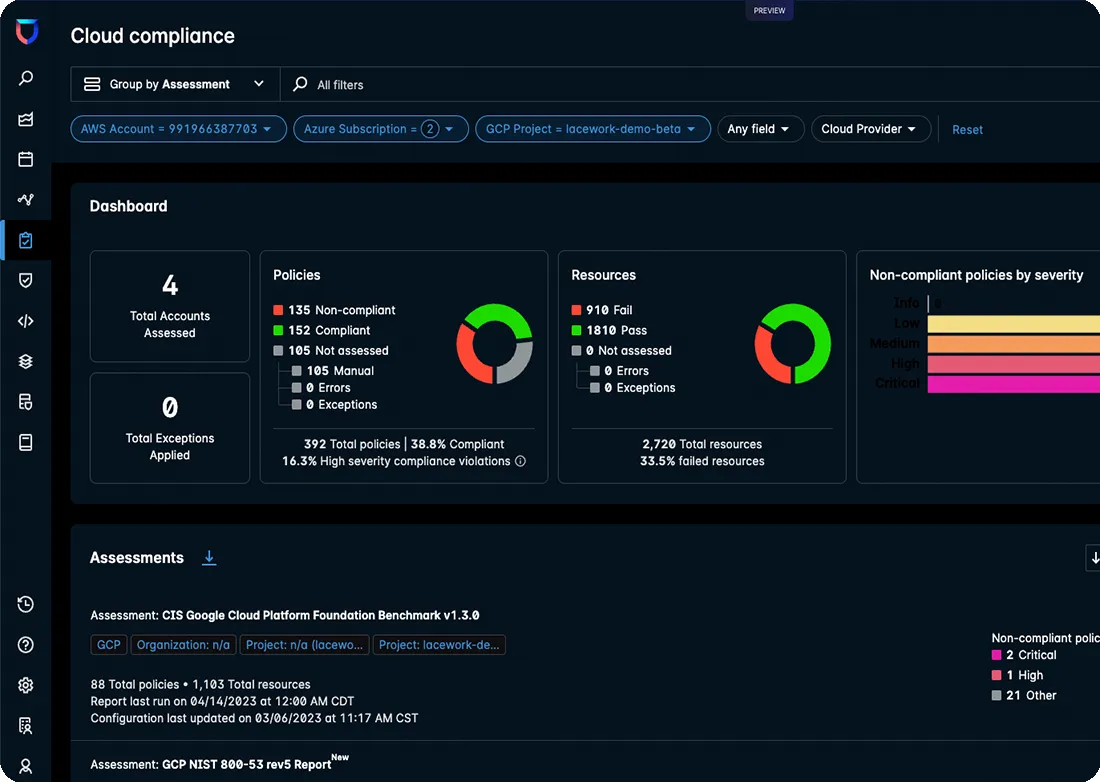
Compliance frameworks | Maps cloud assets, configurations and activity to frameworks including PCI DSS, HIPAA, SOC 2 and ISO 27001. |
License (CLI and SDK) | The lacework/go-sdk repository, which holds the Lacework CLI and a Go API client for the platform, is licensed under Apache-2.0. |
Installing the CLI | Install script for Bash or PowerShell, Homebrew (lacework/tap/lacework-cli) or Chocolatey (lacework-cli). |
Buying and setup | Fortinet offers a FortiCNAPP demo and a FortiCNAPP Ordering Guide; Fortinet Cloud Security consulting services offer three-day and five-day quickstart engagements. |
Our take
Lacework FortiCNAPP is worth a shortlist place if you want one platform for cloud posture, identities, runtime threats and code scanning across AWS, Azure and Google Cloud, and you would rather not maintain detection rules yourself. It fits best when your security team already uses the Fortinet Security Fabric.
Evaluate Lacework FortiCNAPP
Comparisons
Where it stands out
Detection without rule writing. Fortinet says FortiCNAPP monitors workloads and detects unusual behavior without the need to write and maintain rules, using patented machine learning to find early signs of compromised credentials, ransomware and cryptojacking. Its demo page claims it can eliminate false positives by 95% and reduce critical security alerts to about 1.4 per day; these are Fortinet's figures, not independent measurements.
Identity risk across clouds. The CIEM module works out each identity's net-effective permissions, flags identities with excessive privileges, gives personalized risk scores, and offers automated remediation guidance for right-sizing permissions.
Risk in context. FortiCNAPP connects risk insights with runtime threat data and shows relationships between entities, risks and threats to reveal possible attack paths. Fortinet says its vulnerability assessment can reduce up to 90% of vulnerability noise by seeing risk within the context of your environment.
Uses existing AWS findings. On AWS, FortiCNAPP can incorporate findings from services such as Amazon GuardDuty to add context for investigation and response.
Scriptable operations. The Lacework CLI manages compliance reports, external integrations, vulnerability scans and other operations, and the Go API client lets teams call the Lacework API from their own code.
Product screenshot

Trade-offs to weigh
Fortinet-centred integrations. Fortinet credits quicker response times partly to integrations with the Fortinet Security Fabric and leading workflow tools, and lists Security Fabric integration among the ways to streamline audits. Teams that do not run other Fortinet products should check which of those benefits still apply to them.
Two product names in daily use. The tooling still uses the Lacework name: the CLI is lacework-cli, settings live in $HOME/.lacework.toml, account URLs follow the account.lacework.net pattern, and Fortinet's page links to a Lacework CNAPP Login. Expect to see both names in documentation and scripts.
Open source covers the tooling only. The Apache-2.0 license applies to the go-sdk repository, a set of tools and libraries for interacting with the platform. The detection and posture features belong to the platform that customers log in to, so the open-source license does not describe what you buy from Fortinet.
Public signals
About these signals
Verified factual signals from public sources. They indicate observable activity or interest, not total adoption, product quality, or cost.
55 GitHub commits 90d40 GitHub stars
See all signals from 3 sources
Three-month score against stable baseline terms—not search volume or adoption.
Alternatives to Lacework FortiCNAPP
The reviewed substitutes for Lacework FortiCNAPP among the cloud security platforms, and what would make each one the better answer.
Direct alternatives
Reviewed substitutes: products bought for the same job, where a team picks one.
- Wiz
- Wiz and Lacework FortiCNAPP protect multi-cloud environments by finding risky configurations, vulnerable workloads and exposed identities. Wiz connects code, cloud and runtime in one security graph to rank risk, while Lacework FortiCNAPP, now sold by Fortinet, leans on behavioral analytics and anomaly detection to spot threats.Applies to: Choosing between two products of the same kind for one job.
- Orca Security
- Both are CNAPPs a buyer shortlists against each other, and the choice turns on detection model rather than coverage. FortiCNAPP baselines workload behaviour and alerts on deviation, which costs weeks before the baseline settles; Orca reads control-plane APIs and disk snapshots with nothing deployed to the workload, which is why reviewers score it higher on setup and multicloud visibility and lower on nothing that matters here. Either one is the whole cloud-security platform, so a team runs one.Applies to: Multi-cloud posture, workload and identity security for a team choosing a single CNAPP. Orca stands in for FortiCNAPP when the team is lean or needs on-prem and FedRAMP coverage; FortiCNAPP stands in for Orca when the SOC wants behavioural detection of zero-days and insiders and already runs the Fortinet fabric.
- Prisma Cloud
- The same CNAPP shortlist, decided on breadth against detection. Prisma Cloud carries CSPM, CWPP, CIEM and code security under one Palo Alto platform and wins on multi-cloud coverage and data security; FortiCNAPP's argument is machine-learning behavioural baselining of workloads. Reviewers place FortiCNAPP's value with teams already inside the Fortinet fabric and call its standalone case less differentiated, which is a replacement argument in both directions.Applies to: Securing cloud infrastructure, workloads and code for an enterprise buying one platform. Prisma Cloud stands in for FortiCNAPP when the requirement is breadth across clouds and code-to-cloud coverage; FortiCNAPP stands in when the SOC prioritises anomaly detection over static posture and the estate is already Fortinet.
Other approaches
A different approach to the same problem. Each substitutes only for the workload named beside it.
- Aqua Security
- Aqua Security is chosen instead of Lacework FortiCNAPP for cloud-native application lifecycle security workloads. We recommend Aqua Security over Lacework FortiCNAPP for teams that need lifecycle-oriented protection across containers, serverless functions, VMs, and heterogeneous deployment environments.