ThoughtSpot: product and architecture
Our verdict in this ThoughtSpot review: ThoughtSpot is a strong choice for enterprises that want governed, self-service analytics delivered through natural-language questions, AI agents, and embedded experiences—not another static dashboard estate. We recommend it for data teams that can define trusted metrics and want business users to explore large cloud datasets without routing every question through analysts. Avoid it when pixel-perfect reporting, extensive presentation customization, or ETL capabilities are central requirements.
Overview
ThoughtSpot describes its product as an Agentic Analytics Platform. Its pricing page highlights AI-powered dashboards and automated insights, natural-language search and data exploration, Spotter AI Agents, Analyst Studio for advanced analytics, and dynamic interactive dashboards.
The page also lists platform capabilities including drilldowns without a pre-defined drillpath, KPI monitoring, anomaly detection and alerts, mobile apps for iOS and Android, live pre-built connections including Snowflake, Databricks, and Redshift, row-level security, data encryption, data isolation, natural-language search, and system reporting and modeling.
Capacity varies by offer. The supplied pricing information shows a Developer offer that is free for one year and includes up to 10 users and up to 25M rows of data. It also shows a Pro offer with up to 1,000 users and 250M rows of data, while Enterprise lists unlimited users and data. Buyers should confirm which pricing model and feature set applies to their intended deployment.
ThoughtSpot also offers embedded analytics capabilities, including REST-based APIs and a Visual Embed SDK. Its pricing page describes an Enterprise option for building or embedding agentic AI analytics for multi-tenant, large-scale applications.
Key Features and Architecture
ThoughtSpot’s core interaction is consumer-style search over cloud data. Users can ask questions in natural language to create insights on demand, rather than start with a predefined dashboard or submit an analyst request. This directly supports ad hoc analysis, but the quality of answers depends on the governed models and metrics data teams establish underneath the experience.
The Semantic Model provides a trusted and secure metrics layer, agent-ready metadata, and data security. ThoughtSpot also describes this layer as supporting governed, reusable logical data models that help users create insights through AI-powered analytics. For analytics engineers, this is the architectural center of gravity: the platform promises broad self-service, but it requires disciplined metric definitions and model ownership to keep self-service from producing conflicting interpretations.
Key capabilities include:
- AI agents and Agentic MCP Server: ThoughtSpot’s Agentic MCP Server is designed to deliver insights inside agents, applications, and platforms where teams already work. This extends analytics beyond the ThoughtSpot interface, but it also makes governance of agent-ready metadata more important because the same definitions can influence decisions in multiple contexts.
- Analyst Studio: Analyst Studio combines data preparation for AI with SQL, spreadsheets, data mashups, and advanced analytics. It gives technical users a more hands-on workspace than search alone, though the provided information does not establish it as a replacement for a dedicated ETL tool.
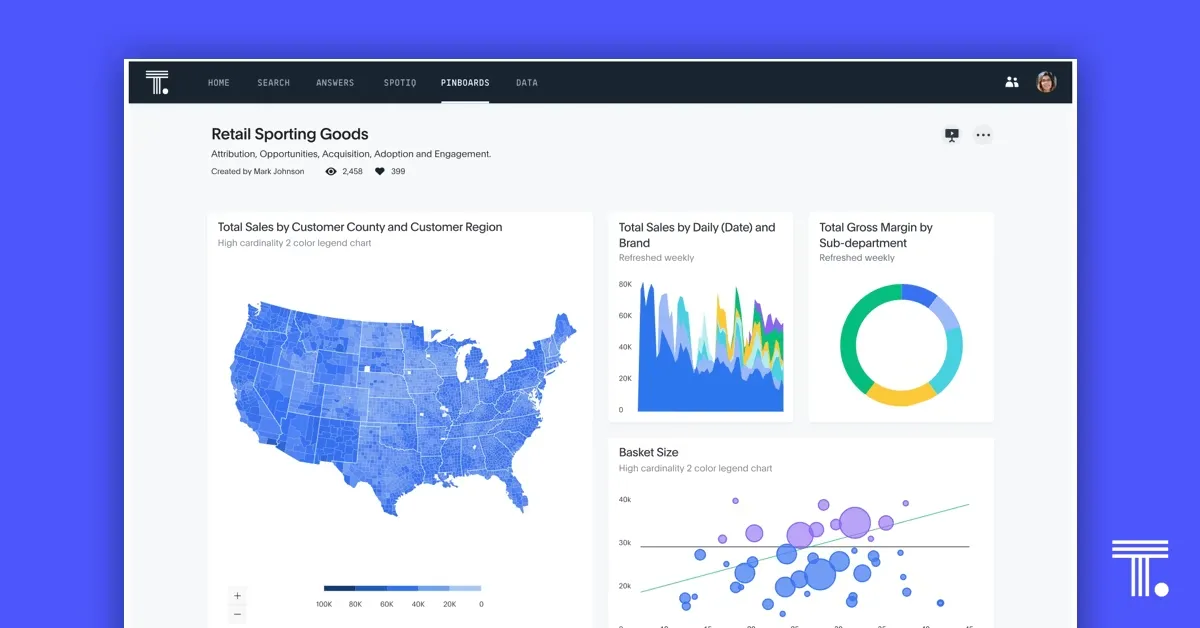
- Liveboards: Liveboards support personalized, interactive, actionable insights from cloud data. Their purpose is not merely dashboard display; ThoughtSpot frames them as a way to keep teams informed with live business signals and to reduce dependence on static, one-size-fits-all reporting.
- Automated insight discovery: The platform can auto-analyze billions of rows to identify anomalies, trends, and opportunities. That is valuable for finding questions users did not think to ask, but the available data does not specify detection methods, accuracy measurements, or alerting thresholds.
- AI-augmented dashboards and mobile access: ThoughtSpot describes AI-first, mobile-ready dashboards and says users can access granular insights from billions of rows with a single tap. This suits distributed users who need data in context, although mobile-ready does not remove the need to design concise, decision-oriented content.
- Real-time data management: The product describes real-time, zero-copy on in-memory capabilities alongside unified metadata and compliance. It also states that teams can connect a cloud data platform and begin live-querying in minutes. These are meaningful architectural claims, but implementation details and supported platform lists are not included in the supplied data.
- Embedded analytics: ThoughtSpot Embedded is positioned as a low-code way to deliver tailored analytics to customers. APIs, SDKs, workflow automation, and intelligent apps support embedding insights and turning them into actions inside product workflows.
The trade-off is clear. ThoughtSpot puts a polished discovery layer and AI interaction over governed cloud data, but its usefulness rises or falls with semantic-model quality, data security design, and the team’s willingness to treat business definitions as durable product assets.
Ideal Use Cases
ThoughtSpot is best for enterprise data organizations that have already centralized important cloud data and need to make it more usable for nontechnical decision-makers. A data team supporting a large sales, operations, or finance organization can use natural-language search and Liveboards to reduce repetitive requests for cuts of the same data. The platform’s stated support for billions of rows makes it relevant when a team’s data scale exceeds lightweight spreadsheet-based analysis.
A second strong fit is a governed self-service program led by analytics engineers and data leaders. For example, a team responsible for shared revenue, cost, or operational metrics can define reusable logical models in ThoughtSpot’s Semantic Model, then let business users ask their own follow-up questions. This is a better operating model when the problem is dashboard sprawl and metric inconsistency, not merely a lack of visualization options.
A third fit is a product team building customer-facing analytics. ThoughtSpot Embedded offers a low-code embedded analytics platform, plus APIs and SDKs, for teams that want interactive AI-driven analytics within their own apps and workflows. That can shorten time-to-market for an embedded experience, but it introduces platform dependency: your product analytics experience becomes materially tied to ThoughtSpot’s semantic, embedding, and API approach.
ThoughtSpot also fits leaders who want insight delivery across web, mobile, or existing business tools. Its agentic and workflow-oriented design is aimed at moving analytics closer to action instead of keeping it in a standalone reporting portal. We recommend ThoughtSpot for teams that have capable data-modeling ownership and a clear self-service audience, particularly where live cloud-data exploration matters more than carefully composed reports.
Don’t use this if your primary output is pixel-perfect reporting, if your selection hinges on extensive customization options, or if you expect the BI product to serve as an ETL tool. User feedback explicitly identifies pixel-perfect output, customization options, data modeling, documentation, and ETL tools as areas of weakness. Organizations that need those requirements should choose a product aligned to them rather than trying to force ThoughtSpot’s search-led analytics model into a reporting or data-engineering role.
Strengths & Trade-offs
Pros
- Natural-language discovery is central to the product. ThoughtSpot lists natural-language search and data exploration, along with AI-powered dashboards and automated insights.
- The interaction surface includes dashboards and embedded delivery. The official pricing material lists dynamic, interactive dashboards; its Developer plan includes dynamic embeddable AI dashboards and visualizations, plus an API and SDK.
- Pro has a disclosed data allowance. The official pricing page lists Pro for up to 1,000 users and 250M rows of data.
- LLM-token treatment is disclosed for selected plans. ThoughtSpot states that it does not meter or charge for LLM tokens; platform use is governed by the subscription, while fees from a customer’s own LLM provider may apply.
Cons
- Capacity varies by plan. Buyers should validate the applicable plan’s user and data limits: the official page lists Pro at up to 1,000 users and 250M rows, while Enterprise is described as having unlimited users and data.
- Some capabilities are listed as add-ons. The official feature comparison identifies options such as Analyst Studio, the Model Context Protocol server, and unlimited Spotter as add-ons for certain plans.
- Enterprise pricing is custom. The official page describes custom pricing tailored to teams, data, and deployment needs; buyers should confirm the plan, included capabilities, and deployment requirements that determine the commercial terms.