Decision comparison
Amazon QuickSight vs Sigma Computing
QuickSight and Sigma differ on where the query runs and what the user is handed. QuickSight delivers dashboards to a wide AWS audience, billed per session and backed by the SPICE in-memory engine. Sigma puts a spreadsheet grid over the warehouse, compiling every action to SQL so nothing is copied and nothing goes stale.
Direct comparison. These are reviewed substitutes bought for the same job, so the differences below are the ones that decide between them.
All 2 are BI platforms.
Quick Comparison
| Decision factor | Amazon QuickSight | Sigma Computing |
|---|---|---|
| What it is | AWS's BI service, priced per session for readers and backed by the SPICE in-memory engine | A spreadsheet-native interface over the warehouse, where analysts work in familiar rows and columns and every action becomes SQL |
| Primary interface | Dashboards and analyses, with natural language available on top | A spreadsheet grid over the warehouse, where every action becomes SQL |
| Query pattern | SPICE in-memory engine, or direct query against the source | Live SQL against the warehouse; no extract to refresh |
| Pricing model | Per-user pricing: Reader $3 per user/month, Reader Pro $20 per user/month, Author $24 per user/month and Author Pro $40 per user/month. A $250/month per-account infrastructure fee applies to some configurations. Capacity pricing starts at $250/month for 500 sessions with additional sessions at $0.50, or $20,000/year for 50,000 sessions with additional sessions at $0.40. Enterprise pricing on request. The captured pricing page states no free tier. | Free tier (5 users), Pro $25/mo, Enterprise custom |
| Cloud fit | AWS-native, with IAM, S3, Redshift and Athena integrated | Warehouse-native, working against Snowflake, BigQuery, Databricks and Redshift |
| What the user does | Reads a dashboard somebody designed, and filters it | Works in the data: adds columns, pivots, and builds on the result |
| Best fit | Wide internal readership inside AWS at predictable cost | Organisations with a governed warehouse whose users still export to spreadsheets |
| Connectivity | Connects to Snowflake, BigQuery, Redshift and Databricks over standard drivers, with REST APIs for automation | Connects to Snowflake, BigQuery, Redshift and Databricks over standard drivers, with REST APIs for automation |
Amazon QuickSight
- What it is:
- AWS's BI service, priced per session for readers and backed by the SPICE in-memory engine
- Primary interface:
- Dashboards and analyses, with natural language available on top
- Query pattern:
- SPICE in-memory engine, or direct query against the source
- Pricing model:
- Per-user pricing: Reader $3 per user/month, Reader Pro $20 per user/month, Author $24 per user/month and Author Pro $40 per user/month. A $250/month per-account infrastructure fee applies to some configurations. Capacity pricing starts at $250/month for 500 sessions with additional sessions at $0.50, or $20,000/year for 50,000 sessions with additional sessions at $0.40. Enterprise pricing on request. The captured pricing page states no free tier.
- Cloud fit:
- AWS-native, with IAM, S3, Redshift and Athena integrated
- What the user does:
- Reads a dashboard somebody designed, and filters it
- Best fit:
- Wide internal readership inside AWS at predictable cost
- Connectivity:
- Connects to Snowflake, BigQuery, Redshift and Databricks over standard drivers, with REST APIs for automation
Sigma Computing
- What it is:
- A spreadsheet-native interface over the warehouse, where analysts work in familiar rows and columns and every action becomes SQL
- Primary interface:
- A spreadsheet grid over the warehouse, where every action becomes SQL
- Query pattern:
- Live SQL against the warehouse; no extract to refresh
- Pricing model:
- Free tier (5 users), Pro $25/mo, Enterprise custom
- Cloud fit:
- Warehouse-native, working against Snowflake, BigQuery, Databricks and Redshift
- What the user does:
- Works in the data: adds columns, pivots, and builds on the result
- Best fit:
- Organisations with a governed warehouse whose users still export to spreadsheets
- Connectivity:
- Connects to Snowflake, BigQuery, Redshift and Databricks over standard drivers, with REST APIs for automation
Public signals
Verified factual signals only. Bars appear only for like-for-like metrics with five weekly assessments for every tool; missing evidence stays explicit. These signals do not establish enterprise adoption, product quality, or total cost.
| Metric | Amazon QuickSight | Sigma Computing |
|---|---|---|
| Search interest(Market interest) | 0 | 1 |
| npm weekly downloads(Developer adoption) | 140.3k | 16.1k |
| Product Hunt comments(Community interest) | 2 | 1 |
| Product Hunt rating(Community interest) | 5.0/5 | Unavailable |
| Product Hunt reviews(Community interest) | 1 | 0 |
| Product Hunt votes(Community interest) | 78 | 6 |
| Stack Overflow questions(Community interest) | 718 | Not available |
| GitHub commits, 90d(Developer adoption) | Not available | 0 |
| GitHub stars(Developer adoption) | Not available | 6 |
| Hacker News mentions, 90d(Community interest) | Not available | 0 |
As of September 21, 2026 — updated weekly.
Health & risk evidence
Observed public-source checks for mapped package versions and repositories.
Amazon QuickSight
September 21, 2026Package vulnerabilities
npm · amazon-quicksight-embedding-sdk@2.11.3
0 vulnerabilities
across 1 package
Repository security score
Not available
Sigma Computing
September 21, 2026Package vulnerabilities
npm · @sigmacomputing/embed-sdk@0.7.1
0 vulnerabilities
across 1 package
Repository security score
Not available
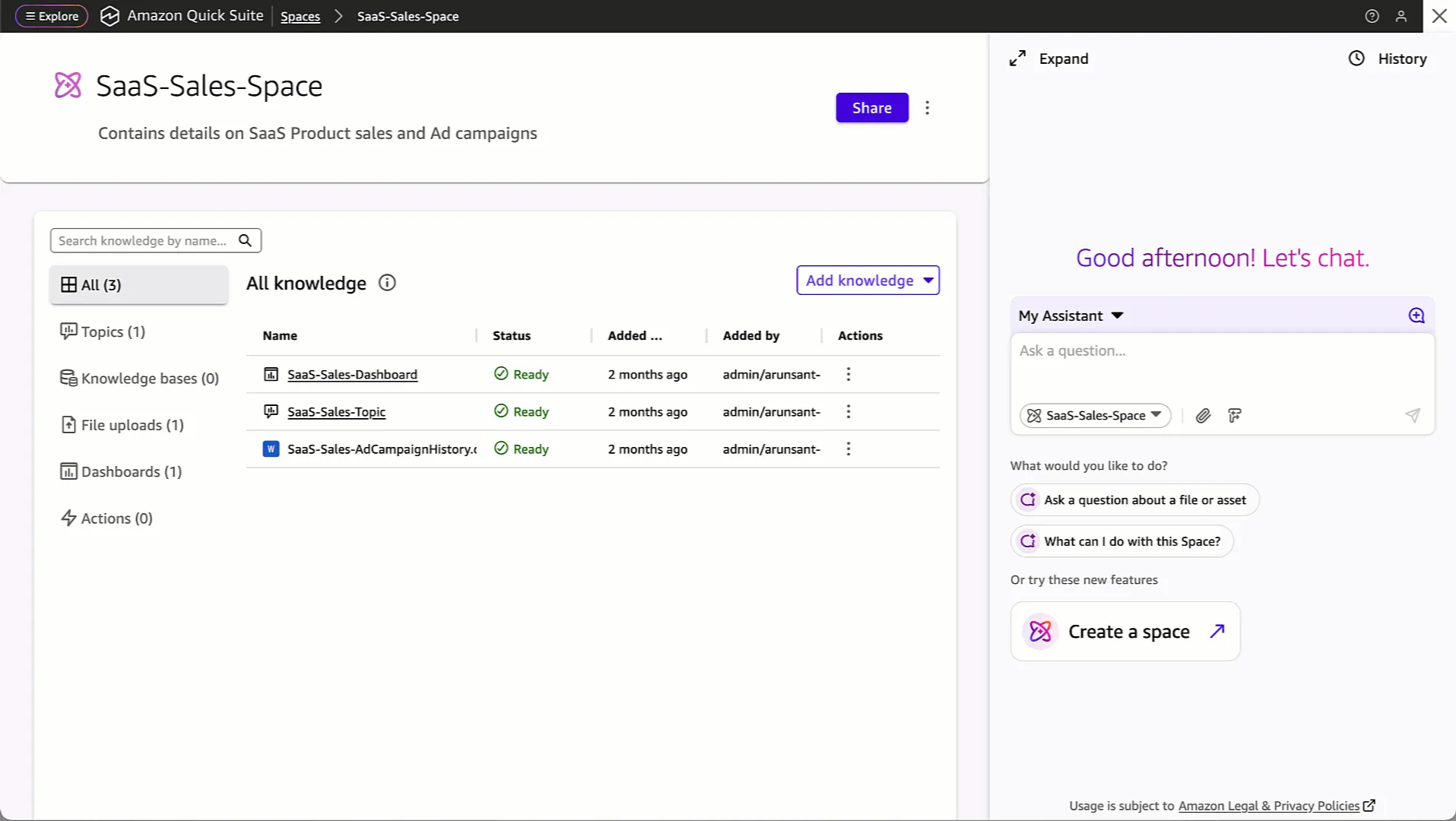
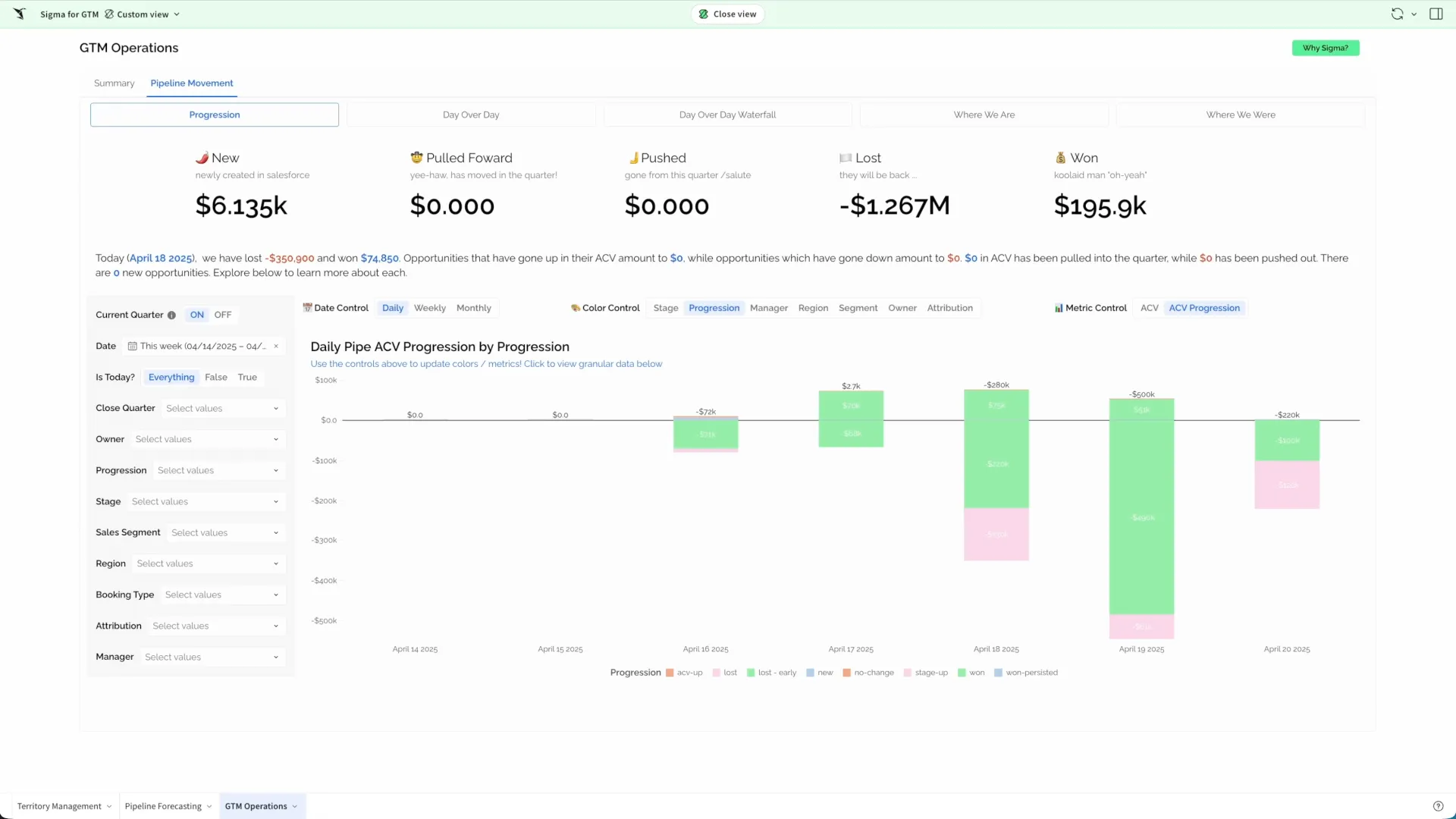
Interface Preview
Amazon QuickSight
Sigma Computing
Feature Comparison
| Feature | Amazon QuickSight | Sigma Computing |
|---|---|---|
| Interface | ||
| Spreadsheet-style grid and formulas | Not verified | Full support |
| Dashboard authoring | Full support | Full support |
| Ad-hoc exploration by business users | Partial support | Full support |
| Write-back to the warehouse | Not verified | Full support |
| Data | ||
| Own in-memory engine | Full support | Not verified |
| Live warehouse querying | Partial support | Full support |
| No separate copy to refresh | Partial support | Full support |
| Native cloud integration | Full support | Partial support |
| Commercial | ||
| Per-session pricing for readers | Full support | Not verified |
| Cost scales with use rather than headcount | Full support | Partial support |
| Warehouse compute is the variable cost | Partial support | Full support |
| Embedding in your own application | Full support | Full support |
| Platform | ||
| Warehouse connectivity | Full support | Full support |
| Scheduled distribution | Full support | Full support |
| Row-level security | Full support | Full support |
| REST API for automation | Full support | Full support |
Interface
Spreadsheet-style grid and formulas
Dashboard authoring
Ad-hoc exploration by business users
Write-back to the warehouse
Data
Own in-memory engine
Live warehouse querying
No separate copy to refresh
Native cloud integration
Commercial
Per-session pricing for readers
Cost scales with use rather than headcount
Warehouse compute is the variable cost
Embedding in your own application
Platform
Warehouse connectivity
Scheduled distribution
Row-level security
REST API for automation
Which to choose
QuickSight and Sigma differ on where the query runs and what the user is handed. QuickSight delivers dashboards to a wide AWS audience, billed per session and backed by the SPICE in-memory engine. Sigma puts a spreadsheet grid over the warehouse, compiling every action to SQL so nothing is copied and nothing goes stale.
Best-fit scenarios
Choose Amazon QuickSight if:
Choose Amazon QuickSight when many people need to read a small number of dashboards and the organisation is on AWS. Per-session pricing makes a wide occasional audience affordable, IAM is the access model you already administer, and SPICE keeps interaction fast while warehouse spend stays flat.
Choose Sigma Computing if:
Choose Sigma when a governed warehouse is the source of truth and people still export to work. A grid over the warehouse gives them columns, formulas and pivots without copying anything out, so numbers stay as current as the source and governance stays where the data is.
These scenarios reflect the available product evidence. Your requirements, existing stack, and team expertise should guide the final decision.
Frequently Asked Questions
Does a spreadsheet interface mean another copy of the data?
Not in this design — that is the point of it. Actions in the grid compile to SQL that runs against the warehouse, so there is no extract to refresh and nothing to go stale. The trade-off lands on warehouse compute instead: heavy interactive work is heavy querying, which on consumption pricing is a real line item. You are moving the cost, not removing it.
How far can people push a spreadsheet interface?
For pivoting, filtering, adding calculated columns and building on a result, far enough that most exports become unnecessary. For intricate multi-sheet financial models with circular references and bespoke layouts, not far enough, and those users will keep exporting. Look at what people actually do after they export today; that behaviour predicts whether this closes the gap for you.
Where do metric definitions live in each?
QuickSight defines calculated fields on datasets, reusable across the analyses built from them, with nothing preventing a second dataset from defining the same measure differently. Sigma's grid compiles to SQL over your warehouse tables, which pushes definitions toward dbt, while still allowing a workbook to define a calculation locally — the flexibility people adopt it for and the route to two workbooks disagreeing. Both are workable and both fail the same way if nobody owns the definition. Decide where revenue is defined, and make sure every surface reads that one place.
Does it query the warehouse, or a copy?
QuickSight usually queries a copy: SPICE holds data in memory on a refresh schedule, which is what keeps dashboards fast and Redshift or Athena quiet, at the cost of a second copy and a staleness window. Direct query is there when freshness wins. Sigma always queries live — grid operations compile to SQL against the warehouse — so there is one copy, security applied at the source applies everywhere, and the cost lands as compute. This single difference explains most of the others between these two.
How does licensing behave as the audience grows?
QuickSight's per-session reader pricing is built for breadth: a thousand people who each open a dashboard twice a month cost far less than a thousand named seats, which is the case most internal rollouts actually are. Sigma prices seats with a lighter viewer tier, so growth is forecastable and a very wide passive audience is the expensive shape. Count how many people will genuinely build against how many will only look, because these two models diverge exactly on that ratio.
How should we evaluate them?
Build the same two things on both: the dashboard your executives read every Monday, and the open-ended question an analyst raised last quarter. The first tests modelling, refresh, delivery and governance; the second tests exploration. Most teams find one platform suited to each, which turns an abstract comparison into a decision about which half of the work matters more.