Decision comparison
Cribl vs Splunk
Cribl and Splunk are not direct competitors but complementary tools that address different layers of the observability stack. Splunk is the destination: a powerful SIEM and log analytics platform with industry-leading search, alerting, and security capabilities built on the SPL query language. Cribl is the pipeline: an observability data router that sits between your sources and destinations, reducing volume, enriching data, and controlling where each log stream goes. The strongest architecture uses both together, with Cribl optimizing what reaches Splunk to control costs while preserving full analytical capability.
Used together. These are normally used together rather than chosen between. The comparison explains what each one does in the stack.
Applies to: Whether a telemetry pipeline replaces the SIEM or feeds it, and where log-volume cost is actually removed.
These are different kinds of product — Telemetry Pipeline and Log Management.
Quick Comparison
| Decision factor | Cribl | Splunk |
|---|---|---|
| Primary Role | Observability pipeline that routes, reduces, and enriches telemetry data before it reaches any destination | Enterprise SIEM, log management, and search analytics platform for security and IT operations |
| Core Strength | Reducing data volume and ingestion costs by filtering, sampling, and routing logs before they reach expensive destinations | Powerful SPL query language for ad-hoc search, correlation, and alerting across massive volumes of machine data |
| Deployment Model | Cloud SaaS, self-hosted, and hybrid; deploys in front of existing observability tools as a middleware layer | Splunk Cloud (fully managed SaaS), Splunk Enterprise (self-hosted on-premises or cloud IaaS) |
| Pricing Model | Cribl offers a free tier and paid plans. Free ($0): up to 1 TB/day ingestion, 1 worker group, 10 worker processes, 100 Edge nodes, 50 GB Lake, community support. Standard (contact sales): up to 5 TB/day, 50 workers, unlimited Edge nodes, 8x5 support, git backup. Enterprise (contact sales): unlimited data volume, unlimited workers/fleets/workspaces, RBAC, federated auth, dedicated 24x7 support. Consumption-based credit model for paid tiers. No published per-GB rates. | Splunk Free is a perpetual no-cost licence for a single self-hosted instance, capped at 500 MB of daily indexing and without alerting. Splunk Enterprise and Splunk Cloud use workload, ingest, or entity-based pricing that Splunk does not publish. |
| Query Language | No end-user query language; uses a visual pipeline builder with JavaScript-based functions for data transformation | Search Processing Language (SPL) with 140+ commands for filtering, transforming, statistical analysis, and visualization |
| Best For | Organizations spending heavily on Splunk or other SIEM ingestion and needing to control costs without losing visibility | Security operations centers, IT operations teams, and enterprises needing real-time search, alerting, and compliance reporting |
Cribl
- Primary Role:
- Observability pipeline that routes, reduces, and enriches telemetry data before it reaches any destination
- Core Strength:
- Reducing data volume and ingestion costs by filtering, sampling, and routing logs before they reach expensive destinations
- Deployment Model:
- Cloud SaaS, self-hosted, and hybrid; deploys in front of existing observability tools as a middleware layer
- Pricing Model:
- Cribl offers a free tier and paid plans. Free ($0): up to 1 TB/day ingestion, 1 worker group, 10 worker processes, 100 Edge nodes, 50 GB Lake, community support. Standard (contact sales): up to 5 TB/day, 50 workers, unlimited Edge nodes, 8x5 support, git backup. Enterprise (contact sales): unlimited data volume, unlimited workers/fleets/workspaces, RBAC, federated auth, dedicated 24x7 support. Consumption-based credit model for paid tiers. No published per-GB rates.
- Query Language:
- No end-user query language; uses a visual pipeline builder with JavaScript-based functions for data transformation
- Best For:
- Organizations spending heavily on Splunk or other SIEM ingestion and needing to control costs without losing visibility
Splunk
- Primary Role:
- Enterprise SIEM, log management, and search analytics platform for security and IT operations
- Core Strength:
- Powerful SPL query language for ad-hoc search, correlation, and alerting across massive volumes of machine data
- Deployment Model:
- Splunk Cloud (fully managed SaaS), Splunk Enterprise (self-hosted on-premises or cloud IaaS)
- Pricing Model:
- Splunk Free is a perpetual no-cost licence for a single self-hosted instance, capped at 500 MB of daily indexing and without alerting. Splunk Enterprise and Splunk Cloud use workload, ingest, or entity-based pricing that Splunk does not publish.
- Query Language:
- Search Processing Language (SPL) with 140+ commands for filtering, transforming, statistical analysis, and visualization
- Best For:
- Security operations centers, IT operations teams, and enterprises needing real-time search, alerting, and compliance reporting
Public signals
Verified factual signals only. Bars appear only for like-for-like metrics with five weekly assessments for every tool; missing evidence stays explicit. These signals do not establish enterprise adoption, product quality, or total cost.
| Metric | Cribl | Splunk |
|---|---|---|
| Docker Hub pulls(Product adoption) | 16.1M | 93.2M |
| GitHub commits, 90d(Developer adoption) | 47 | 13 |
| GitHub stars(Developer adoption) | 3 | 741 |
| Search interest(Market interest) | 0 | 15 |
| Hacker News mentions, 90d(Community interest) | 2 | 2 |
| npm weekly downloads(Developer adoption) | Not available | 34.0k |
| Product Hunt comments(Community interest) | Not available | 0 |
| Product Hunt reviews(Community interest) | Not available | 0 |
| Product Hunt votes(Community interest) | Not available | 67 |
| PyPI weekly downloads(Developer adoption) | Not available | 285.4k |
| Stack Overflow questions(Community interest) | Not available | 2.3k |
As of September 14, 2026 — updated weekly.
Health & risk evidence
Observed public-source checks for mapped package versions and repositories.
Cribl
Package vulnerabilities
Not available
Repository security score
Not available
Splunk
September 14, 2026Package vulnerabilities
npm · splunk-logging@0.11.1 · PyPI · splunk-sdk@3.0.1
0 vulnerabilities
across 2 packages
Repository security score
github.com/splunk/splunk-sdk-python
6.9/10
Interface Preview
Cribl

Splunk
Feature Comparison
| Feature | Cribl | Splunk |
|---|---|---|
| Data Collection & Ingestion | ||
| Log Collection | Collects from 100+ sources (Syslog, HTTP, Kafka, S3, Kinesis) and routes to any destination; acts as a universal receiver | Universal Forwarder and Heavy Forwarder agents collect logs from servers, network devices, and cloud services directly into Splunk indexers |
| Data Reduction | Built-in functions for sampling, filtering, aggregation, and field removal that typically reduce log volume 40-60% before ingestion | No pre-ingestion reduction; all forwarded data is indexed at full volume, though index-time transforms can drop specific events |
| Data Routing | Routes different data streams to different destinations simultaneously (e.g., security logs to Splunk, metrics to Datadog, archives to S3) | Data routes to Splunk indexers only; sending data to external systems requires additional configuration via HEC or custom outputs |
| Data Enrichment | In-stream enrichment with GeoIP lookups, regex extraction, field addition, and external lookup tables before data reaches the destination | Index-time and search-time field extraction, lookups, and knowledge objects applied after data is already ingested and indexed |
| Search & Analytics | ||
| Search Capabilities | Cribl Search provides federated search across S3, Azure Blob, and other data lakes without requiring re-ingestion into a SIEM | Full-text search with SPL across indexed data; supports sub-second queries on terabytes of machine data with distributed search heads |
| Alerting & Correlation | No native alerting engine; relies on downstream destinations like Splunk, Elastic, or CrowdStrike for alerting and correlation rules | Enterprise Security app with 1,400+ detection rules, risk-based alerting, and correlation searches across multiple data sources |
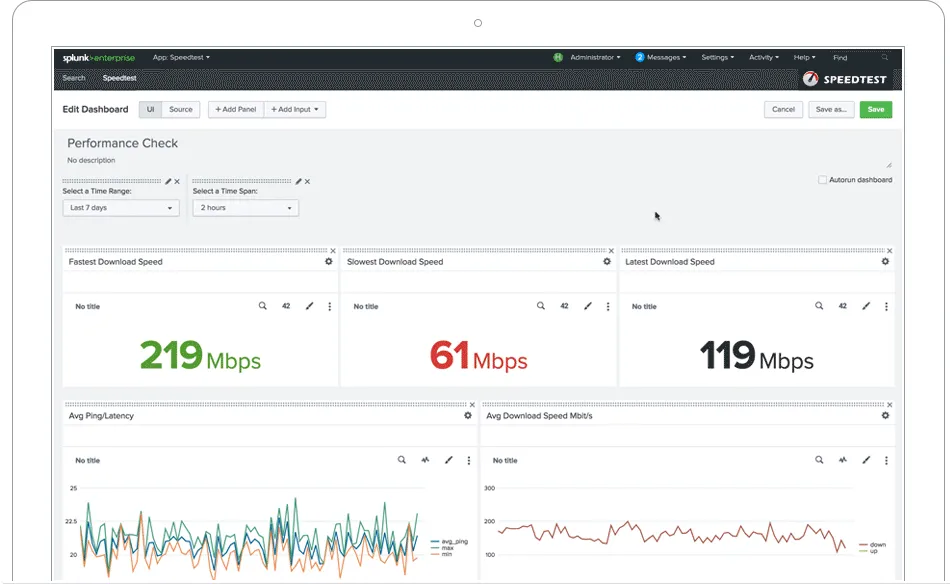
| Dashboards & Visualization | Monitoring dashboards for pipeline health, throughput, and data flow; not designed for end-user analytics or business dashboards | Dashboard Studio with drag-and-drop visualization, custom dashboards, and Splunk Dashboard Framework for embedded analytics |
| Architecture & Deployment | ||
| Scaling Model | Horizontal scaling via worker groups; each worker processes data independently, enabling linear throughput scaling across nodes | Indexer clustering with replication factor; search head clustering for high availability; requires careful capacity planning for large deployments |
| Edge Processing | Cribl Edge agents run on endpoints for local data collection, filtering, and routing with centralized fleet management up to 100 free nodes | Universal Forwarder is lightweight but performs minimal processing; Heavy Forwarder handles parsing but consumes significantly more resources |
| Data Lake Integration | Cribl Lake provides managed hot and warm storage on S3-compatible backends; native integration with Cribl Search for direct lake queries | Federated Search for Amazon S3 available in Splunk Cloud; SmartStore offloads warm/cold data to S3 but still requires Splunk for queries |
| Cost & Operations | ||
| Licensing Model | Consumption-based credits for paid tiers; free tier includes 1 TB/day, 1 worker group, 10 workers, 100 Edge nodes, and 50 GB Lake | Priced by daily ingestion volume (GB/day); costs scale linearly with data growth, making high-volume environments expensive |
| Total Cost of Ownership | Reduces overall observability spend by filtering data before it hits expensive destinations; teams report 30-50% savings on Splunk licenses | High ingestion costs at scale drive organizations to seek data reduction solutions; Enterprise licenses plus infrastructure can exceed $1M/year for large deployments |
| Vendor Lock-In | Vendor-neutral pipeline; can switch downstream destinations without reconfiguring data collection or transformation logic | SPL queries, apps, and dashboards create significant switching costs; migrating away from Splunk requires rebuilding search logic and alerting rules |
Data Collection & Ingestion
Log Collection
Data Reduction
Data Routing
Data Enrichment
Search & Analytics
Search Capabilities
Alerting & Correlation
Dashboards & Visualization
Architecture & Deployment
Scaling Model
Edge Processing
Data Lake Integration
Cost & Operations
Licensing Model
Total Cost of Ownership
Vendor Lock-In
How they fit together
Cribl and Splunk are not direct competitors but complementary tools that address different layers of the observability stack. Splunk is the destination: a powerful SIEM and log analytics platform with industry-leading search, alerting, and security capabilities built on the SPL query language. Cribl is the pipeline: an observability data router that sits between your sources and destinations, reducing volume, enriching data, and controlling where each log stream goes. The strongest architecture uses both together, with Cribl optimizing what reaches Splunk to control costs while preserving full analytical capability.
What each one handles
Use Cribl for:
Deploy Cribl when your Splunk ingestion costs are growing faster than your budget, when you need to route different data types to multiple destinations simultaneously, or when you want a vendor-neutral pipeline layer that reduces lock-in to any single analytics platform. Cribl is particularly valuable for organizations ingesting more than 100 GB/day into Splunk, where even a 30% reduction in volume translates to significant license savings.
Use Splunk for:
Choose Splunk when you need enterprise-grade SIEM capabilities, real-time threat detection, compliance reporting, or a mature search and analytics platform that your security and IT operations teams can rely on. Splunk is the right choice for security operations centers that need 1,400+ detection rules, for organizations with regulatory requirements for log retention and audit trails, and for teams that need the depth of SPL for ad-hoc investigations.
Use Cribl for:
Use Cribl alongside Splunk when you want to maintain Splunk's analytical power while controlling costs. Route high-value security events to Splunk, send operational logs to S3 via Cribl Lake, and forward metrics to a dedicated monitoring platform. This architecture gives you the best of both worlds: Splunk's search depth where it matters most and cost-efficient storage for everything else.
These roles reflect the available product evidence. Most teams run both; which one owns a given job depends on your stack and team.
Frequently Asked Questions
Can Cribl and Splunk be used together?
Yes, and this is one of the most common deployment patterns. Cribl sits between your data sources and Splunk, acting as an intelligent pipeline that filters, reduces, and routes logs before they reach Splunk indexers. This architecture lets you keep Splunk as your primary SIEM and search platform while significantly reducing the volume of data you pay to ingest. Many organizations deploy Cribl specifically to manage Splunk ingestion costs, routing high-value security logs to Splunk while sending lower-priority operational logs to cheaper storage like Amazon S3.
How much can Cribl reduce Splunk ingestion costs?
Organizations typically report 30-50% reductions in Splunk ingestion volume after deploying Cribl, though the actual savings depend on your data mix. Cribl achieves this through several mechanisms: removing unnecessary fields and metadata, sampling repetitive events, filtering out noise like debug logs, and aggregating similar events. For a company ingesting 500 GB/day into Splunk, a 40% reduction means 200 GB/day of avoided ingestion, which translates directly to lower Splunk licensing costs. Some teams route the filtered data to cheaper storage for compliance, maintaining full access without paying Splunk indexing prices.
Does Cribl replace Splunk or complement it?
Cribl complements Splunk rather than replacing it. Splunk provides the search, alerting, dashboards, and security analytics capabilities that Cribl does not offer. Cribl provides the data pipeline, routing, and reduction capabilities that Splunk lacks. Think of Cribl as the data logistics layer and Splunk as the analytics and detection layer. Some organizations do use Cribl to reduce their dependence on Splunk by routing certain data types to less expensive alternatives, but most maintain Splunk as their primary SIEM while using Cribl to optimize what goes into it.
Is Splunk still worth the cost in 2026?
Splunk remains the industry standard for enterprise SIEM and log analytics, with a mature SPL query language and a sizable ecosystem of security apps and integrations. The cost concern is real: at scale, Splunk ingestion fees can dominate an IT budget. However, the acquisition by Cisco has expanded Splunk's integration with network security infrastructure, and Splunk Cloud has improved the operational burden. For security-focused organizations that need real-time alerting, compliance reporting, and threat hunting, Splunk's depth is difficult to match. The key is managing what data you send to Splunk, which is exactly where tools like Cribl add value.
What is the Cribl free tier and how does it compare to Splunk's free offering?
Cribl's free tier includes up to 1 TB/day of data processing, 1 worker group, 10 worker processes, 100 Edge nodes, and 50 GB of Cribl Lake storage with community support. Splunk offers the perpetual Splunk Free licence for self-hosted single-instance use, limited to 500 MB of daily indexing. Cribl's free tier is notably generous for a data pipeline tool and is sufficient for small to mid-size environments. Splunk's free tier is more limited in throughput but provides actual search and analytics capabilities. If you only need data routing and reduction, Cribl's free offering covers substantial workloads.