Decision comparison
Hotjar vs Tableau
Hotjar and Tableau serve fundamentally different analytics needs and are not direct substitutes. Hotjar excels at qualitative user behavior intelligence, showing you how visitors interact with your website through heatmaps, session recordings, and surveys. Tableau is a full-scale business intelligence platform built for visualizing and analyzing structured datasets across your entire organization. Most teams that need both qualitative UX insights and quantitative BI dashboards will benefit from running these tools side by side rather than choosing one over the other.
Hotjar is no longer available as an active product
Hotjar is no longer a standalone product record: it was acquired and merged into Contentsquare. Retain this listing as historical; do not attach Contentsquare product releases to it.
Architecture choice. These take different approaches to the same problem. Read the table as a fit question rather than a feature race.
These are different kinds of product — Session Replay and BI Platform.
Quick Comparison
| Decision factor | Hotjar | Tableau |
|---|---|---|
| Primary Purpose | User behavior analytics and experience intelligence | Visual analytics and business intelligence dashboards |
| Best For | UX designers, product managers, and CRO specialists tracking on-site user behavior | Data analysts, BI teams, and enterprise organizations building interactive dashboards across large datasets |
| Pricing Model | Hotjar is sold under Contentsquare, and its pricing page publishes three plans: Free at $0, Growth at $49 and Pro at $99, billed monthly or yearly. Experience Analytics is the base; Voice of Customer and Product Analytics are added on. Enterprise is quoted. | Tableau Cloud Standard Edition: Viewer $15/user/month, Explorer $42/user/month, Creator $75/user/month; Enterprise Edition: Viewer $35/user/month, Explorer $70/user/month, Creator $115/user/month; Tableau+ Bundle requires contact sales for pricing details. |
| Ease of Use | Lightweight setup with a single tracking script; minimal learning curve for core features | Drag-and-drop interface praised as user-friendly, though advanced calculations have a steep learning curve |
| Data Visualization | Heatmaps, session replays, and funnel visualizations focused on user interaction patterns | Industry-leading interactive dashboards, charts, and visual storytelling across any structured dataset |
| Integrations | Google Analytics, HubSpot, Optimizely, Slack, and dozens of marketing and product tools | Connects to hundreds of data sources including Salesforce CRM, SQL databases, cloud warehouses, and spreadsheets |
Hotjar
- Primary Purpose:
- User behavior analytics and experience intelligence
- Best For:
- UX designers, product managers, and CRO specialists tracking on-site user behavior
- Pricing Model:
- Hotjar is sold under Contentsquare, and its pricing page publishes three plans: Free at $0, Growth at $49 and Pro at $99, billed monthly or yearly. Experience Analytics is the base; Voice of Customer and Product Analytics are added on. Enterprise is quoted.
- Ease of Use:
- Lightweight setup with a single tracking script; minimal learning curve for core features
- Data Visualization:
- Heatmaps, session replays, and funnel visualizations focused on user interaction patterns
- Integrations:
- Google Analytics, HubSpot, Optimizely, Slack, and dozens of marketing and product tools
Tableau
- Primary Purpose:
- Visual analytics and business intelligence dashboards
- Best For:
- Data analysts, BI teams, and enterprise organizations building interactive dashboards across large datasets
- Pricing Model:
- Tableau Cloud Standard Edition: Viewer $15/user/month, Explorer $42/user/month, Creator $75/user/month; Enterprise Edition: Viewer $35/user/month, Explorer $70/user/month, Creator $115/user/month; Tableau+ Bundle requires contact sales for pricing details.
- Ease of Use:
- Drag-and-drop interface praised as user-friendly, though advanced calculations have a steep learning curve
- Data Visualization:
- Industry-leading interactive dashboards, charts, and visual storytelling across any structured dataset
- Integrations:
- Connects to hundreds of data sources including Salesforce CRM, SQL databases, cloud warehouses, and spreadsheets
Public signals
Verified factual signals only. Bars appear only for like-for-like metrics with five weekly assessments for every tool; missing evidence stays explicit. These signals do not establish enterprise adoption, product quality, or total cost.
| Metric | Hotjar | Tableau |
|---|---|---|
| GitHub commits, 90d(Developer adoption) | 0 | 37 |
| GitHub stars(Developer adoption) | 52 | 716 |
| Search interest(Market interest) | 2 | 85 |
| Hacker News mentions, 90d(Community interest) | 0 | 2 |
| npm weekly downloads(Developer adoption) | 144.2k | 32.2k |
| Product Hunt comments(Community interest) | 153 | 3 |
| Product Hunt rating(Community interest) | 4.8/5 | 4.2/5 |
| Product Hunt reviews(Community interest) | 21 | 5 |
| Product Hunt votes(Community interest) | 1.3k | 7 |
| Stack Overflow questions(Community interest) | 58 | 5.4k |
| PyPI weekly downloads(Developer adoption) | Not available | 965.7k |
As of September 21, 2026 — updated weekly.
Health & risk evidence
Observed public-source checks for mapped package versions and repositories.
Hotjar
September 19, 2026Package vulnerabilities
npm · @hotjar/browser@1.0.9
0 vulnerabilities
across 1 package
Repository security score
github.com/hotjar/hotjar-js
3.7/10
Tableau
September 21, 2026Package vulnerabilities
npm · @tableau/embedding-api@3.16.1 · PyPI · tableauserverclient@0.41
0 vulnerabilities
across 2 packages
Repository security score
github.com/tableau/server-client-python
5.5/10
Interface Preview
Hotjar

Tableau
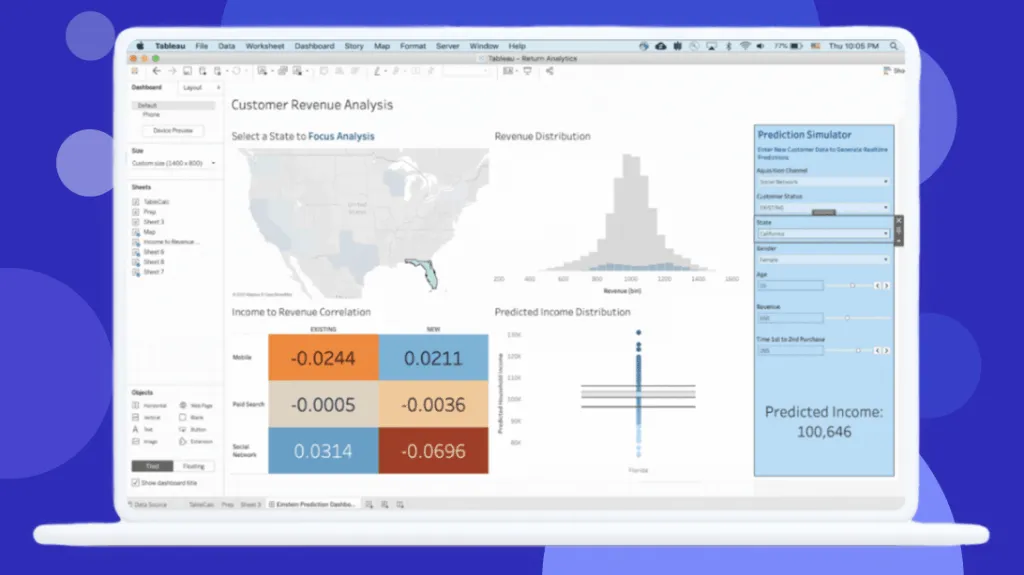
Feature Comparison
| Feature | Hotjar | Tableau |
|---|---|---|
| Core Analytics | ||
| Heatmaps | Full heatmap suite (click, scroll, move) across any page | Not available; Tableau focuses on structured data visualization |
| Session Recording | Watch real user sessions with one-click AI summaries highlighting key moments | Not verified |
| Interactive Dashboards | Limited; provides funnel and survey result views only | Industry-leading drag-and-drop dashboard builder with drill-down and filtering |
| Data Handling | ||
| Data Source Connections | Captures behavioral data from its own tracking script on your website | Connects to hundreds of sources: SQL databases, cloud warehouses, spreadsheets, and APIs |
| Large Dataset Support | Handles behavioral session data at website scale | Designed for enterprise-scale structured datasets with extract and live connection modes |
| Data Preparation | No data prep tools; data is auto-collected via tracking script | Tableau Prep Builder included with Creator license for data cleaning and transformation |
| User Research | ||
| Surveys | Built-in survey builder with 40+ templates and AI-powered analysis | Not available; Tableau does not collect primary user feedback |
| User Testing | Unmoderated user tests on sites and prototypes at scale | Not verified |
| Feedback Widgets | On-page feedback tools to capture user sentiment in real time | Not verified |
| Enterprise & Collaboration | ||
| Role-Based Access | Team-based access controls within Contentsquare platform | Granular role-based licensing (Creator, Explorer, Viewer) with row-level security |
| Embedded Analytics | Not available as an embeddable component | Embed dashboards into external applications via Enterprise edition |
| AI-Powered Features | AI survey generator, AI session summary, and sentiment analysis | Agentforce integration for agentic analytics, AI-assisted semantic modeling, and natural language Q&A |
| Deployment & Compliance | ||
| Deployment Options | Cloud-only SaaS with simple JavaScript snippet installation | Cloud (Tableau Cloud), self-hosted (Tableau Server), or desktop (Tableau Desktop) |
| Privacy Compliance | GDPR and CCPA ready; trusted by 1.3 million+ websites across 180+ countries | Enterprise-grade security with SSO, encryption, and compliance certifications |
| Mobile Access | Responsive web dashboard; tracks mobile user behavior on your site | Dedicated mobile app for viewing and interacting with dashboards on the go |
Core Analytics
Heatmaps
Session Recording
Interactive Dashboards
Data Handling
Data Source Connections
Large Dataset Support
Data Preparation
User Research
Surveys
User Testing
Feedback Widgets
Enterprise & Collaboration
Role-Based Access
Embedded Analytics
AI-Powered Features
Deployment & Compliance
Deployment Options
Privacy Compliance
Mobile Access
Which approach fits
Hotjar and Tableau serve fundamentally different analytics needs and are not direct substitutes. Hotjar excels at qualitative user behavior intelligence, showing you how visitors interact with your website through heatmaps, session recordings, and surveys. Tableau is a full-scale business intelligence platform built for visualizing and analyzing structured datasets across your entire organization. Most teams that need both qualitative UX insights and quantitative BI dashboards will benefit from running these tools side by side rather than choosing one over the other.
When each approach fits
Choose Hotjar if:
Choose Hotjar when your primary goal is understanding user behavior on your website. If you are a UX designer, product manager, or conversion rate optimization specialist who needs to see where visitors click, how far they scroll, why they abandon forms, and what they think about your site experience, Hotjar delivers those answers directly. The free tier makes it accessible for startups and small teams, while the Contentsquare integration scales for enterprise needs.
Choose Tableau if:
Choose Tableau when you need to build interactive dashboards and analyze large structured datasets from multiple business sources. If your team consists of data analysts building executive reports, sales dashboards, or financial models that pull from SQL databases, cloud warehouses, and CRM systems, Tableau is the industry standard. Plan for Creator licenses at $75/user/month for dashboard builders and Viewer licenses at $15/user/month for stakeholders who consume reports.
These scenarios reflect the available product evidence. Your requirements, existing stack, and team expertise should guide the final decision.
Frequently Asked Questions
Can Hotjar replace Tableau for business intelligence?
No. Hotjar is a user behavior analytics tool focused on website visitor interactions such as heatmaps, session recordings, and surveys. It does not connect to external databases, build custom dashboards from structured data, or handle the kind of cross-departmental reporting that Tableau provides. These tools address different analytics needs entirely.
Can I use Hotjar and Tableau together?
Yes, and many teams do. Hotjar captures qualitative data about how users interact with your website, while Tableau visualizes quantitative business metrics from your data warehouse. You can export Hotjar data and incorporate it into Tableau dashboards for a combined view of user behavior alongside business KPIs.
Which tool is more affordable for small teams?
Hotjar offers a free tier that covers basic heatmaps and session recordings, making it the more accessible option for small teams. Tableau requires at least one Creator license at $75 per user per month, with additional Viewer licenses at $15 per user per month. Even a modest Tableau deployment with a handful of Creators and a few dozen Viewers accumulates significant annual costs, while Hotjar lets you start collecting user behavior data at no cost.
Does Hotjar offer data visualization like Tableau?
Hotjar provides visualizations specific to user behavior: heatmaps showing click and scroll patterns, funnel charts showing drop-off points, and survey result dashboards. It does not offer the general-purpose, drag-and-drop chart building that Tableau is known for. If you need bar charts, scatter plots, or complex calculated fields across arbitrary datasets, Tableau is the right tool.
What are the main limitations of each tool?
Hotjar is limited to website behavioral data and does not support connections to external databases or advanced BI reporting. Users note that it lacks native A/B testing and mobile app analytics. Tableau is powerful but expensive at scale, with users citing a steep learning curve for advanced calculations, high costs for large deployments, and significant time spent on data preparation before analysis.