Decision comparison
AWS Kinesis vs Apache Kafka
AWS Kinesis and Apache Kafka serve the same fundamental purpose of real-time data streaming, but they target different operational profiles. Kinesis offers simplicity and managed operations while Kafka provides raw throughput, flexibility, and ecosystem breadth.
Direct comparison. These are reviewed substitutes bought for the same job, so the differences below are the ones that decide between them.
All 2 are event streaming platforms.
Quick Comparison
| Decision factor | AWS Kinesis | Apache Kafka |
|---|---|---|
| Pricing Model | Usage-based pricing starting at $0.08 per GB of data ingested, with example monthly charges of $593.04 for 7,413.12 GB of data ingested. Additional pricing tiers include $0.04, $0.03, and $0.01 per GB/month as shown in the sources. | Apache Kafka is open-source software available at no cost. |
| Deployment | Fully managed AWS service with no infrastructure to provision or maintain | Self-managed distributed cluster requiring broker provisioning, or use managed services like Confluent |
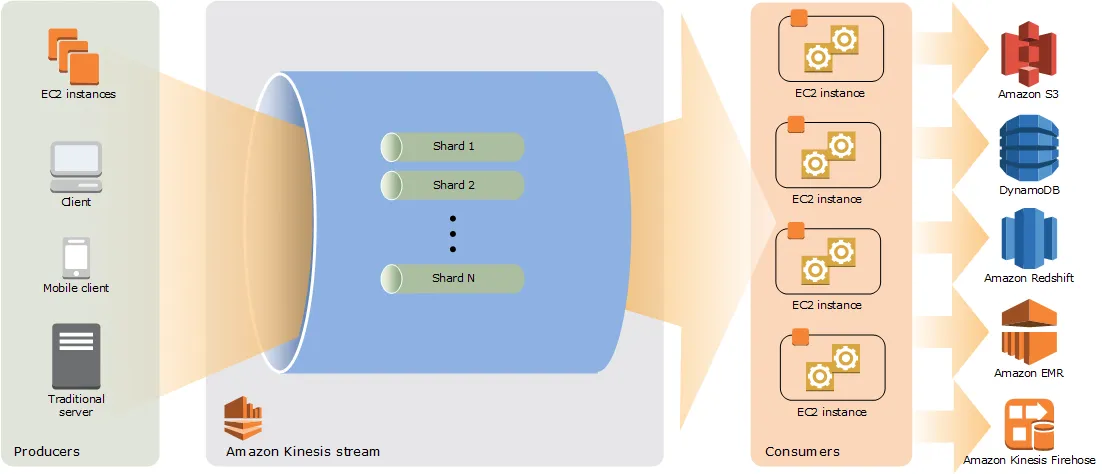
| Throughput | Each shard handles 1 MB/s ingestion and 2 MB/s reads, scales by adding shards | Handles millions of messages per second per cluster, scaling to trillions of messages per day |
| Latency | Sub-second processing latency with real-time ingestion and analytics capabilities | Latencies as low as 2ms with network-limited throughput across clustered brokers |
| Operational Complexity | Low complexity as a serverless managed service with automatic scaling in on-demand mode | High complexity requiring management of brokers, ZooKeeper/KRaft, partitions, and replication |
| Ecosystem | Deep AWS integration with Lambda, S3, Redshift, Firehose, and Data Analytics | Vast open-source ecosystem with Kafka Connect, Kafka Streams, Flink, Spark, and hundreds of connectors |
AWS Kinesis
- Pricing Model:
- Usage-based pricing starting at $0.08 per GB of data ingested, with example monthly charges of $593.04 for 7,413.12 GB of data ingested. Additional pricing tiers include $0.04, $0.03, and $0.01 per GB/month as shown in the sources.
- Deployment:
- Fully managed AWS service with no infrastructure to provision or maintain
- Throughput:
- Each shard handles 1 MB/s ingestion and 2 MB/s reads, scales by adding shards
- Latency:
- Sub-second processing latency with real-time ingestion and analytics capabilities
- Operational Complexity:
- Low complexity as a serverless managed service with automatic scaling in on-demand mode
- Ecosystem:
- Deep AWS integration with Lambda, S3, Redshift, Firehose, and Data Analytics
Apache Kafka
- Pricing Model:
- Apache Kafka is open-source software available at no cost.
- Deployment:
- Self-managed distributed cluster requiring broker provisioning, or use managed services like Confluent
- Throughput:
- Handles millions of messages per second per cluster, scaling to trillions of messages per day
- Latency:
- Latencies as low as 2ms with network-limited throughput across clustered brokers
- Operational Complexity:
- High complexity requiring management of brokers, ZooKeeper/KRaft, partitions, and replication
- Ecosystem:
- Vast open-source ecosystem with Kafka Connect, Kafka Streams, Flink, Spark, and hundreds of connectors
Public signals
Verified factual signals only. Bars appear only for like-for-like metrics with five weekly assessments for every tool; missing evidence stays explicit. These signals do not establish enterprise adoption, product quality, or total cost.
| Metric | AWS Kinesis | Apache Kafka |
|---|---|---|
| GitHub commits, 90d(Developer adoption) | 19 | Not available |
| GitHub stars(Developer adoption) | 667 | Not available |
| Search interest(Market interest) | 1 | 5 |
| Hacker News mentions, 90d(Community interest) | 0 | 7 |
| npm weekly downloads(Developer adoption) | 1.9M | Not available |
| Stack Overflow questions(Community interest) | 1.8k | 33.2k |
| Docker Hub pulls(Product adoption) | Not available | 42.4M |
| GitHub commits, 90d(Product adoption) | Not available | 559 |
| GitHub stars(Product adoption) | Not available | 33,000+ |
| npm weekly downloads(Ecosystem adoption) | Not available | 2.6M |
| PyPI weekly downloads(Ecosystem adoption) | Not available | 9.6M |
As of September 14, 2026 — updated weekly.
Health & risk evidence
Observed public-source checks for mapped package versions and repositories.
AWS Kinesis
September 14, 2026Package vulnerabilities
npm · @aws-sdk/client-kinesis@3.1131.0
0 vulnerabilities
across 1 package
Repository security score
Not available
Apache Kafka
September 14, 2026Package vulnerabilities
PyPI · confluent-kafka@2.15.0 · npm · kafkajs@2.2.4
0 vulnerabilities
across 2 packages
Repository security score
github.com/apache/kafka
6.1/10
Interface Preview
AWS Kinesis
Apache Kafka
Feature Comparison
| Feature | AWS Kinesis | Apache Kafka |
|---|---|---|
| Core Streaming | ||
| Message Throughput | 1 MB/s write and 2 MB/s read per shard, scales by adding shards | Millions of messages per second per cluster, trillions per day across thousands of brokers |
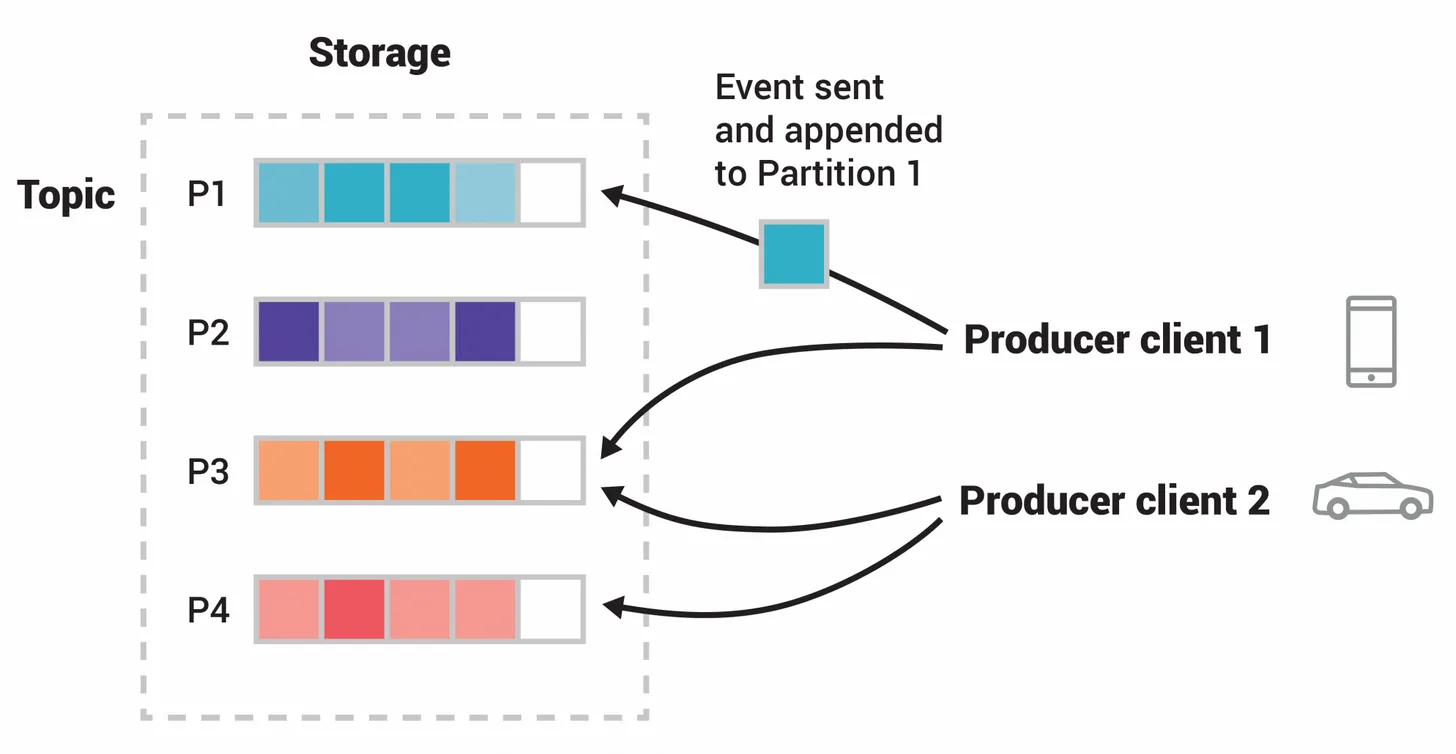
| Message Ordering | Guaranteed ordering within each shard using partition keys | Guaranteed ordering within each partition with configurable partition keys |
| Data Retention | Default 24 hours, extendable up to 365 days with additional cost | Configurable retention policies based on time or size, permanent storage supported |
| Scalability & Performance | ||
| Horizontal Scaling | Add shards for more throughput; on-demand mode auto-scales up to 200 MB/s | Add brokers and partitions seamlessly to expand cluster capacity |
| Processing Latency | Sub-second latency for real-time stream processing | Latencies as low as 2ms with network-limited throughput |
| Fault Tolerance | Built-in replication across AWS availability zones with managed failover | Multi-broker replication with automatic failover across availability zones and geographic regions |
| Operations & Management | ||
| Infrastructure Management | Fully managed serverless service, no servers to provision or maintain | Self-managed clusters requiring broker, ZooKeeper/KRaft, and partition management |
| Monitoring | Native CloudWatch integration with metrics for bytes, records, and latency | Requires external monitoring tools; community-reported lack of enterprise-grade observability |
| Auto-Scaling | On-demand mode provides automatic scaling without capacity planning | Manual scaling by adding brokers and rebalancing partitions |
| Integration & Ecosystem | ||
| Cloud Integration | Native integration with Lambda, S3, Redshift, OpenSearch, and Firehose | Cloud-agnostic with Connect interface for Postgres, Elasticsearch, S3, and hundreds more |
| Stream Processing | Kinesis Data Analytics using SQL or Apache Flink for real-time analysis | Built-in Kafka Streams library plus integration with Flink, Spark, and Storm |
| Client Libraries | AWS SDKs for major languages plus Kinesis Producer Library for high-throughput | Client libraries in Java, Python, Go, and many other programming languages |
| Security & Compliance | ||
| Encryption | Server-side encryption using AWS KMS keys for data at rest and in transit | SSL/TLS encryption with configurable security protocols and RBAC via Confluent |
| Access Control | IAM-based access control with fine-grained resource policies | ACL-based access control with SASL authentication mechanisms |
| Compliance | Inherits AWS compliance certifications including SOC, HIPAA, and PCI DSS | Compliance depends on deployment environment and configuration choices |
Core Streaming
Message Throughput
Message Ordering
Data Retention
Scalability & Performance
Horizontal Scaling
Processing Latency
Fault Tolerance
Operations & Management
Infrastructure Management
Monitoring
Auto-Scaling
Integration & Ecosystem
Cloud Integration
Stream Processing
Client Libraries
Security & Compliance
Encryption
Access Control
Compliance
Which to choose
AWS Kinesis and Apache Kafka serve the same fundamental purpose of real-time data streaming, but they target different operational profiles. Kinesis offers simplicity and managed operations while Kafka provides raw throughput, flexibility, and ecosystem breadth.
Best-fit scenarios
Choose AWS Kinesis if:
We recommend AWS Kinesis for teams already invested in the AWS ecosystem who need a fully managed streaming solution with minimal operational overhead. Kinesis is the stronger choice when your priority is getting a real-time pipeline running quickly without dedicating engineering resources to infrastructure management. Its on-demand mode auto-scales up to 200 MB/s, and native integrations with Lambda, S3, Redshift, and Firehose make it straightforward to build end-to-end data pipelines within AWS.
Choose Apache Kafka if:
We recommend Apache Kafka for organizations that need maximum throughput, full control over their streaming infrastructure, and cloud-agnostic portability. Kafka handles trillions of messages per day with latencies as low as 2ms, and its vast open-source ecosystem provides unmatched flexibility for complex data architectures. If your team has the expertise to manage distributed systems and you need features like exactly-once processing, built-in stream processing with Kafka Streams, and hundreds of pre-built connectors, Kafka delivers capabilities that no managed service can fully replicate.
These scenarios reflect the available product evidence. Your requirements, existing stack, and team expertise should guide the final decision.
Frequently Asked Questions
Is AWS Kinesis cheaper than Apache Kafka for small to medium workloads?
For small to medium streaming workloads under 500 GB per day, AWS Kinesis is typically cheaper because there is no broker infrastructure to manage and you pay only for what you use. Kinesis Data Streams provisioned mode costs $0.015 per shard-hour. For a 100 GB per day workload, provisioned Data Streams costs approximately $33 per month with 3 shards. On-demand mode for the same workload runs about $0.04 per GB ingested. However, once you scale beyond 1 TB per day, self-managed Kafka clusters with commodity hardware can become more cost-effective than Kinesis on-demand pricing.
Can Apache Kafka replace AWS Kinesis in an AWS environment?
Apache Kafka can replace AWS Kinesis in an AWS environment, but you take on the operational burden of managing the cluster yourself. You can run Kafka on EC2 instances or use Amazon MSK, which is a managed Kafka service from AWS. The trade-off is that Kafka gives you control over configuration, throughput potential, and access to the extensive Kafka ecosystem including Kafka Connect and Kafka Streams. However, you lose the seamless serverless integration with services like Lambda and Firehose that Kinesis provides natively.
Which platform handles higher throughput: AWS Kinesis or Apache Kafka?
Apache Kafka handles high throughput, as does AWS Kinesis. Kafka clusters can process millions of messages per second and scale to trillions of messages per day across thousands of brokers. Companies like Agoda process approximately 1.8 trillion events per day using Kafka. AWS Kinesis scales by adding shards, with each shard supporting 1 MB per second of ingestion and 2 MB per second of reads. While Kinesis on-demand mode auto-scales up to 200 MB per second, Kafka clusters can achieve high throughput with proper hardware provisioning.
What are the main operational differences between AWS Kinesis and Apache Kafka?
The main operational difference is that AWS Kinesis is a fully managed serverless service while Apache Kafka requires self-managed infrastructure. With Kinesis, AWS handles provisioning, scaling, patching, and failover automatically. You configure shards or use on-demand mode and start streaming. With Kafka, your team must manage broker deployment, ZooKeeper or KRaft coordination, partition rebalancing, replication, monitoring, and upgrades. Kafka users frequently cite complex setup, high memory consumption, and the need for significant distributed systems expertise as operational challenges. Kinesis eliminates this overhead but offers less configuration flexibility.