Buying snapshot
Scroll sideways to see all columns. With a keyboard, focus this table and use the arrow keys.
| Decision point | What AWS states |
|---|---|
Capacity modes | On-demand Standard, On-demand Advantage and provisioned. The on-demand modes do not require a throughput estimate; provisioned mode uses shards you size. |
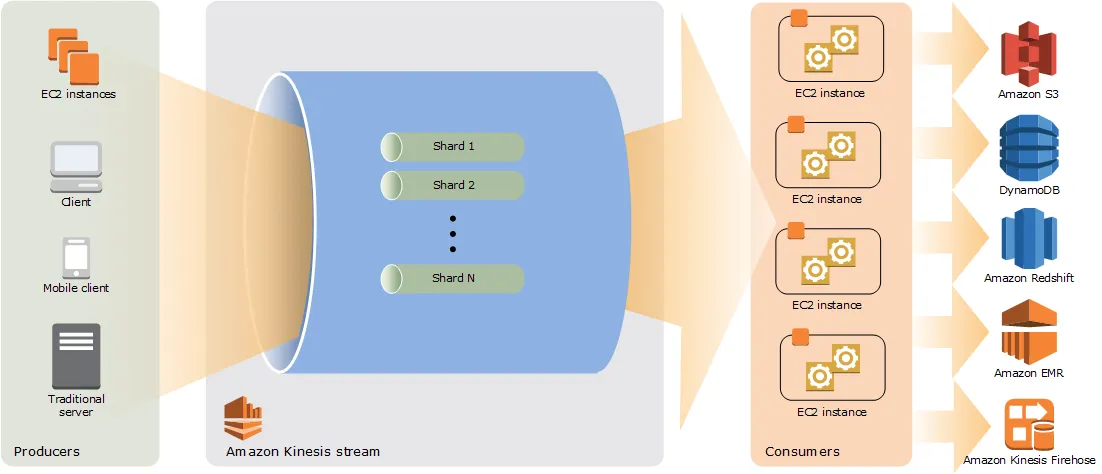
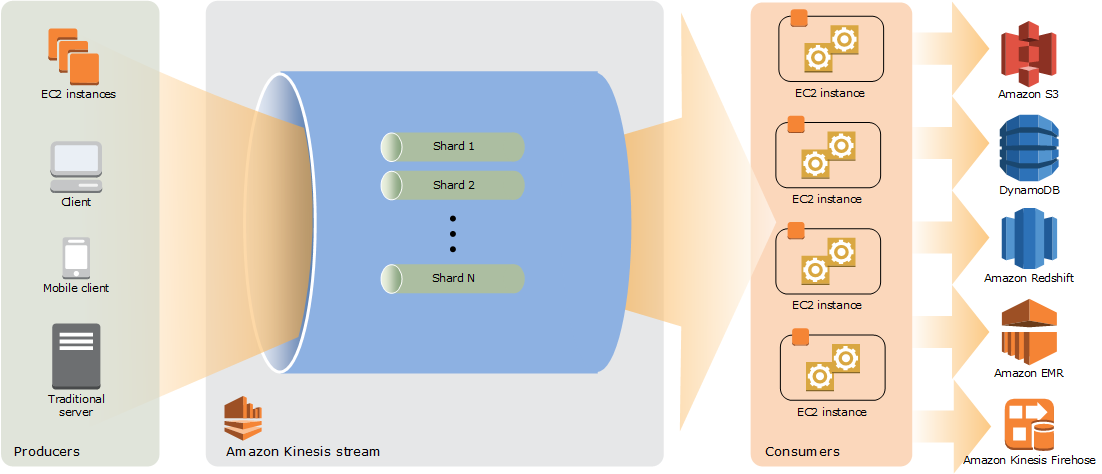
Provisioned capacity | One shard provides 1 MB/second or 1,000 records/second of ingest capacity and up to 2 MB/second of output. |
Retention | Data is stored for 24 hours by default without an additional charge. Extended retention reaches seven days; long-term retention can reach 365 days. |
Built-in delivery | On-demand Standard and On-demand Advantage streams can deliver source-format data to Amazon S3 or materialize it in Amazon S3 Tables using Apache Iceberg. |
Consumer library | Kinesis Client Library for Java is Apache-2.0 licensed; non-Java record processors run through its Java-based MultiLangDaemon. |
Our take
Kinesis Data Streams fits AWS-hosted streaming applications when the team can choose capacity around traffic shape. AWS positions On-demand Standard for unknown or unpredictable workloads, On-demand Advantage for at least 10 MB/s aggregate ingest, more than two consumers, more than 50 streams, or warm throughput, and provisioned mode for predictable traffic. Consider the On-demand Advantage account-level ingest and retrieval minimum before selecting that mode.
Evaluate AWS Kinesis
Popular comparisons
See all 5 AWS Kinesis comparisons
Where it stands out
On-demand scaling controls. Both on-demand modes accommodate ramping workloads. On-demand Advantage permits warm throughput at no additional charge.
Per-consumer read capacity. Enhanced fan-out gives each consumer up to 2 MB/second of read throughput per shard; without it, consumers share the shard output.
Delivery without a separate pipeline. S3 delivery buffers optionally compressed objects under an output key template. Streaming tables are queryable within minutes and use inline compaction.
Consumer coordination in KCL. KCL distributes work, balances workers, checkpoints records, provides at-least-once delivery after worker failures, and handles shard splits and merges while maintaining ordering.
Product screenshot
Trade-offs to weigh
Record size affects billed ingest. On-demand ingest rounds records to 1 KB; provisioned mode counts PUT Payload Units in 25 KB chunks.
Regional topology matters. Same-Region producer-to-stream and stream-to-consumer transfer is not charged. On-demand cross-Region reads incur standard transfer charges; provisioned cross-Region reads do not.
Non-Java KCL deployment. For a non-Java consumer, assess whether operating KCL’s Java-based MultiLangDaemon fits the deployment.
Pricing and billing conditions
Kinesis Data Streams uses pay-as-you-go pricing and is not currently in the AWS Free Tier. Rates vary by Region. Delivery charges are additional to stream charges, and standard AWS data-transfer charges apply where stated.
Scroll sideways to see all columns. With a keyboard, focus this table and use the arrow keys.
| Mode or option | Published example rates | Billing conditions |
|---|---|---|
On-demand Standard | US-East: $0.08 per GB ingested; $0.040 per GB retrieved; $0.040 per stream-hour. | Charges apply to GB written, GB read, and each operating stream-hour. Optional extended retention beyond 24 hours through seven days, long-term retention beyond seven days through one year, and enhanced fan-out add charges. |
On-demand Advantage | US-East: $0.032 per GB ingested; $0.016 per GB retrieved; no fixed stream-hour charge. | A 25 MB/s ingest and 25 MB/s retrieval minimum applies at account level across all on-demand streams, with a shortfall charge below either amount. Extended retention beyond 24 hours through one year is charged; enhanced fan-out has no additional charge. |
Provisioned | US-East: $0.015 per shard-hour; $0.014 per million 25 KB PUT Payload Units. | You select shards based on write and read demand. Extended retention through seven days adds $0.020 per shard-hour. Long-term retention beyond seven days costs $0.023 per GB-month, plus $0.021 per GB retrieved with GetRecords. Enhanced fan-out costs $0.015 per consumer-shard-hour plus $0.013 per GB retrieved. |
S3 delivery | US East (Ohio): $0.0275 per GB from On-demand Standard; $0.011 per GB from On-demand Advantage. | Available only for On-demand Standard and On-demand Advantage. Billed per GB successfully delivered to the S3 destination; failed delivery attempts routed to the DLQ are not separately charged. Standard AWS data-transfer charges apply. |
Streaming tables | US East (Ohio): $0.035 per GB from On-demand Standard; $0.014 per GB from On-demand Advantage. | Available only for On-demand Standard and On-demand Advantage. Billed per GB of uncompressed data successfully delivered to Amazon S3 Tables in Apache Iceberg format; standard AWS data-transfer charges apply. Failed delivery attempts routed to the dead-letter queue (DLQ) are not separately charged for delivery. |
AWS On-demand Standard example: Under AWS’s stated 30-day assumptions of 1,000 records/second at 3 KB, one consumer, and one-day retention: 7,413.12 GB × $0.08/GB = $593.04; 7,413.12 GB × $0.040/GB = $296.50; and 30 × 24 × $0.040 = $28.80; total $918.34/month. It excludes optional retention and enhanced fan-out charges.
AWS provisioned example: Under AWS’s stated stable 31-day workload of 100 records/second at 35 KB and four shards: 2,976 shard-hours × $0.015 = $44.64 plus 535.68 million PUT Payload Units × $0.014 per million = $7.499, totaling $52.14/month. Enabling extended retention for the whole month adds 2,976 shard-hours × $0.020 = $59.52; long-term retention and enhanced fan-out are excluded.
Public signals
About these signals
Verified factual signals from public sources. They indicate observable activity or interest, not total adoption, product quality, or cost.
14 GitHub commits 90d668 GitHub stars0 vulnerabilities across 1 package
See all signals from 6 sources
npm · @aws-sdk/client-kinesis@3.1156.0
Alternatives to AWS Kinesis
The reviewed substitutes for AWS Kinesis among the event streaming platforms, and what would make each one the better answer.
Direct alternatives
Reviewed substitutes: products bought for the same job, where a team picks one.
- Apache Kafka
- Apache Kafka and AWS Kinesis both carry streams of events between producers and consumers in real time. Kafka is open-source software that a team runs itself or buys as a managed service from several vendors, on any cloud or on-premises. Kinesis is Amazon's fully managed, serverless streaming service, which suits teams that want no brokers to operate on AWS.Applies to: Choosing between two products of the same kind for one job.
- Apache Pulsar
- Apache Pulsar and AWS Kinesis both ingest and deliver real-time event streams for pipelines and analytics. Kinesis is a fully managed AWS service with no servers to run. Pulsar is open-source software that runs on any cloud and adds multi-tenancy, geo-replication and both queue and stream messaging.Applies to: Choosing between these two for the event streaming decision.
Other approaches
A different approach to the same problem. Each substitutes only for the workload named beside it.
- Confluent
- Confluent is an alternative to AWS Kinesis for managed Kafka-based streaming and connector-heavy data integration workloads. **Confluent** is a unified data-streaming platform built on Apache Kafka and Apache Flink, with a managed Kafka service, an enterprise distribution, and more than 120 pre-built connectors.
- Redpanda
- Redpanda is preferred over AWS Kinesis for Kafka-compatible streaming workloads that need ZooKeeper-free and JVM-free operations. **Redpanda** is a Kafka API-compatible streaming platform designed to remove ZooKeeper and JVM dependencies while emphasizing simplified operations and resilient storage architecture.
- Azure Event Hubs
- AWS Kinesis is chosen instead of Azure Event Hubs for AWS-native real-time ingestion and analytics workloads. **AWS Kinesis** is a managed streaming service for collecting, processing, and analyzing real-time data and video streams, including log, event, and IoT analytics.
- NATS
- An AWS-native team often defaults to Kinesis rather than running any broker, which removes the reason to adopt NATS at all. The condition is the estate and the shape of the work: Kinesis covers streaming ingestion well and does not offer the request/reply and general pub/sub that NATS is also bought for, so the substitution holds only where streaming is the whole requirement.Applies to: Streaming ingestion on AWS. Kinesis stands in for NATS when the estate is AWS-only and nobody wants to operate a broker; NATS stands in when the same fabric must also carry service-to-service messaging, or the workload spans clouds.
Related technologies
Normally used together rather than chosen between, so these are not alternatives.
- Apache Airflow
- A streaming service carries events continuously; an orchestrator schedules and sequences batch work. They operate on different timescales and are commonly deployed together, so the reader's question is which one a given workload belongs to.Applies to: Whether work belongs on a continuous stream or in a scheduled batch pipeline.