Decision comparison
Databricks vs Teradata
Choose Databricks when teams need a cloud-native lakehouse for Spark-based engineering, collaborative notebooks, Delta Lake, and managed ML or generative-AI development. Choose Teradata when an enterprise requires governed, high-performance warehouse analytics with workload management and flexible public-cloud, hybrid, or on-premises deployment options.
Architecture choice. These take different approaches to the same problem. Read the table as a fit question rather than a feature race.
These are different kinds of product — Lakehouse Platform and Cloud Data Warehouse.
Quick Comparison
| Decision factor | Databricks | Teradata |
|---|---|---|
| Best For | Data engineering, collaborative Spark development, lakehouse analytics, and production machine-learning workflows using shared cloud object storage. | Enterprise governed analytics, high-performance reporting, workload management, and hybrid or multi-cloud data warehouse deployments. |
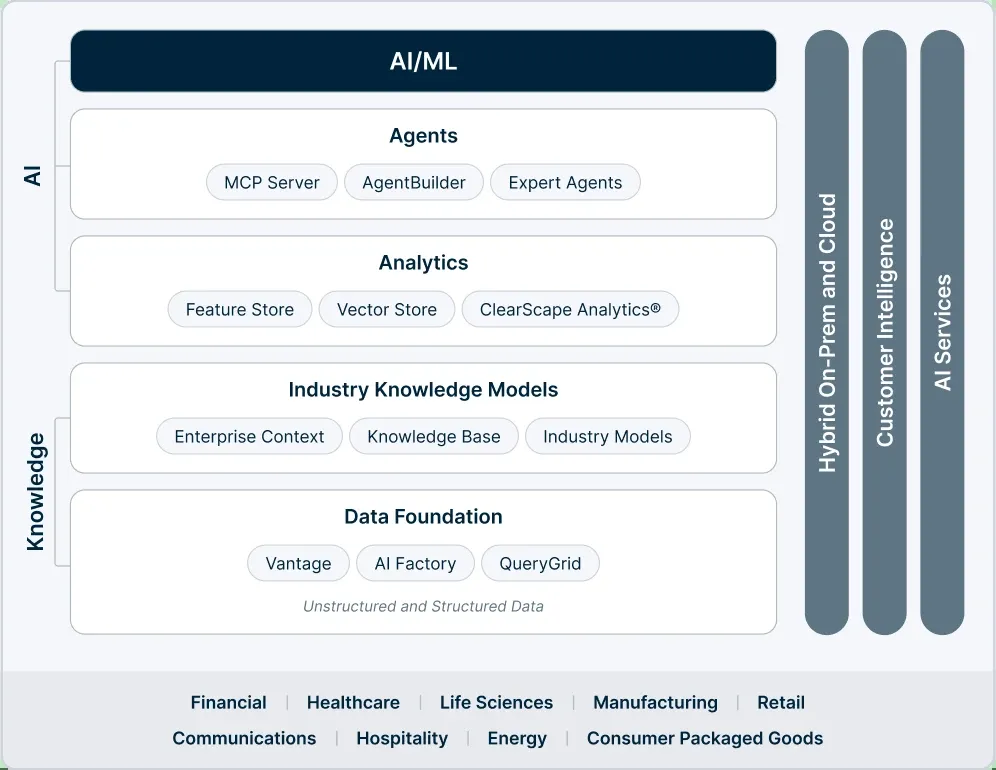
| Architecture | Multi-cloud lakehouse platform combining Delta Lake on object storage, managed Apache Spark, notebooks, SQL endpoints, and ML services. | Teradata Vantage unifies data warehouses, lakes, analytics, and new data types across public cloud, hybrid, on-premises, and VMware. |
| Pricing Model | Consumption-based: billed per Databricks Unit (DBU) per second on top of your own cloud compute and storage charges, with no up-front cost and committed-use discounts available. Published per-DBU rates are not machine-readable from the vendor pricing page. Free Edition is available at no cost for non-commercial use only; a 14-day trial with free credits covers paid-platform evaluation. | Usage-based pricing with options including $1.50, $4.80, $6.00, $7.20, $9,000/mo, and $10,500/mo. |
| Ease of Use | Collaborative notebooks support SQL, Python, Scala, and R, though users report the interface and initial learning curve can be confusing. | Strong enterprise warehouse and reporting capabilities, but users identify cloud integration, unstructured data, and development cycles as weaknesses. |
| Scalability | Managed Spark and Delta Lake scale data engineering and BI workloads across AWS, Azure, and GCP cloud deployments. | Supports AWS, Azure, GCP, hybrid multi-cloud, IntelliFlex on-premises, and commodity hardware deployments for large enterprise workloads. |
| Community/Support | User rating is 8.8/10 from 109 reviews; the Databricks CLI repository has 385 GitHub stars. | User rating is 8.1/10 from 220 reviews; the Teradata SQL Driver for Python repository has 74 GitHub stars. |
Databricks
- Best For:
- Data engineering, collaborative Spark development, lakehouse analytics, and production machine-learning workflows using shared cloud object storage.
- Architecture:
- Multi-cloud lakehouse platform combining Delta Lake on object storage, managed Apache Spark, notebooks, SQL endpoints, and ML services.
- Pricing Model:
- Consumption-based: billed per Databricks Unit (DBU) per second on top of your own cloud compute and storage charges, with no up-front cost and committed-use discounts available. Published per-DBU rates are not machine-readable from the vendor pricing page. Free Edition is available at no cost for non-commercial use only; a 14-day trial with free credits covers paid-platform evaluation.
- Ease of Use:
- Collaborative notebooks support SQL, Python, Scala, and R, though users report the interface and initial learning curve can be confusing.
- Scalability:
- Managed Spark and Delta Lake scale data engineering and BI workloads across AWS, Azure, and GCP cloud deployments.
- Community/Support:
- User rating is 8.8/10 from 109 reviews; the Databricks CLI repository has 385 GitHub stars.
Teradata
- Best For:
- Enterprise governed analytics, high-performance reporting, workload management, and hybrid or multi-cloud data warehouse deployments.
- Architecture:
- Teradata Vantage unifies data warehouses, lakes, analytics, and new data types across public cloud, hybrid, on-premises, and VMware.
- Pricing Model:
- Usage-based pricing with options including $1.50, $4.80, $6.00, $7.20, $9,000/mo, and $10,500/mo.
- Ease of Use:
- Strong enterprise warehouse and reporting capabilities, but users identify cloud integration, unstructured data, and development cycles as weaknesses.
- Scalability:
- Supports AWS, Azure, GCP, hybrid multi-cloud, IntelliFlex on-premises, and commodity hardware deployments for large enterprise workloads.
- Community/Support:
- User rating is 8.1/10 from 220 reviews; the Teradata SQL Driver for Python repository has 74 GitHub stars.
Public signals
Verified factual signals only. Bars appear only for like-for-like metrics with five weekly assessments for every tool; missing evidence stays explicit. These signals do not establish enterprise adoption, product quality, or total cost.
| Metric | Databricks | Teradata |
|---|---|---|
| GitHub commits, 90d(Ecosystem adoption) | 1.5k | Not available |
| GitHub stars(Ecosystem adoption) | 44,000+ | Not available |
| Search interest(Market interest) | 33 | 2 |
| Hacker News mentions, 90d(Community interest) | 63 | Not available |
| npm weekly downloads(Developer adoption) | 406.0k | 9.2k |
| Product Hunt comments(Community interest) | 5 | Not available |
| Product Hunt rating(Community interest) | 5.0/5 | Not available |
| Product Hunt reviews(Community interest) | 5 | Not available |
| Product Hunt votes(Community interest) | 86 | Not available |
| PyPI weekly downloads(Developer adoption) | 18.6M | 1.2M |
| Stack Overflow questions(Community interest) | 8.4k | 5.6k |
| GitHub commits, 90d(Developer adoption) | Not available | 7 |
| GitHub stars(Developer adoption) | Not available | 74 |
As of September 21, 2026 — updated weekly.
Health & risk evidence
Observed public-source checks for mapped package versions and repositories.
Databricks
September 21, 2026Package vulnerabilities
npm · @databricks/sql@2.1.0 · PyPI · databricks-sdk@0.140.0
0 vulnerabilities
across 2 packages
Repository security score
github.com/apache/spark
5.6/10
Teradata
September 21, 2026Package vulnerabilities
npm · teradatasql@20.0.68 · PyPI · teradatasql@20.0.0.68
0 vulnerabilities
across 2 packages
Repository security score
Not available
Interface Preview
Teradata
Feature Comparison
| Feature | Databricks | Teradata |
|---|---|---|
| Data storage and governance | ||
| Core data architecture | Lakehouse architecture unifies lake and warehouse workloads over object storage. | Vantage unifies data warehouses, lakes, analytics, and new data types. |
| Transactional data management | Delta Lake adds ACID transactions to Parquet files in cloud storage. | Enterprise data warehouse capabilities are provided through the Vantage platform. |
| Distributed data access | Delta Lake schema evolution and time travel manage evolving lake data. | Data fabric provides unified integration and management across distributed data. |
| Analytics and data engineering | ||
| Data processing engine | Managed Apache Spark executes engineering workloads from notebooks and jobs. | In-database analytics processes analytical workloads within the Vantage platform. |
| ETL pipeline development | Delta Live Tables defines declarative ETL pipelines for managed transformations. | Data ingestion capabilities bring enterprise and new-source data into Vantage. |
| BI query layer | Databricks SQL endpoints use Delta Engine optimizations for BI workloads. | Warehouse platform supports high-performance reporting and workload management. |
| AI and advanced analytics | ||
| Machine learning lifecycle | Managed MLflow provides experiment tracking, model serving, and ML workflows. | ClearScape Analytics delivers advanced analytics within the enterprise platform. |
| Generative AI capabilities | Mosaic AI services support generative AI applications on governed data. | Bring Your Own LLM supports AI using enterprise business context. |
| Vector data support | Mosaic AI services are integrated with the unified data platform. | Enterprise Vector Store supports vector-oriented AI and retrieval workloads. |
| Development and collaboration | ||
| Programming interfaces | Notebooks and jobs support SQL, Python, Scala, and R. | Python SQL Driver provides programmatic access to Teradata databases. |
| Team workspace | Shared notebooks, repos, dashboards, and role-based access support collaboration. | Consulting and managed services support enterprise intelligence activation. |
| Access and governance | Role-based access control governs shared workspace resources and collaboration. | Governed AI emphasizes reliable intelligence and restrictive governance controls. |
| Deployment and commercial model | ||
| Cloud deployment coverage | Managed platform deploys across AWS, Azure, and Google Cloud. | Vantage deploys across AWS, Azure, Google Cloud, and hybrid environments. |
| On-premises deployment | Provided data describes cloud deployments, not an on-premises offering. | IntelliFlex supports on-premises deployment; VMware supports commodity hardware. |
| Published pricing approach | Billed pay-as-you-go per Databricks Unit at per-second granularity, with no fixed monthly plans. | Usage-based enterprise pricing publishes amounts from $1.50 through $10,500 monthly. |
Data storage and governance
Core data architecture
Transactional data management
Distributed data access
Analytics and data engineering
Data processing engine
ETL pipeline development
BI query layer
AI and advanced analytics
Machine learning lifecycle
Generative AI capabilities
Vector data support
Development and collaboration
Programming interfaces
Team workspace
Access and governance
Deployment and commercial model
Cloud deployment coverage
On-premises deployment
Published pricing approach
Which approach fits
Choose Databricks when teams need a cloud-native lakehouse for Spark-based engineering, collaborative notebooks, Delta Lake, and managed ML or generative-AI development. Choose Teradata when an enterprise requires governed, high-performance warehouse analytics with workload management and flexible public-cloud, hybrid, or on-premises deployment options.
When each approach fits
Choose Databricks if:
Choose Databricks for teams building ETL with Spark and Delta Live Tables, querying lake data through Databricks SQL, and operationalizing MLflow or Mosaic AI across AWS, Azure, or GCP.
Choose Teradata if:
Choose Teradata for established enterprises prioritizing enterprise data warehousing, reporting performance, workload management, in-database analytics, data fabric, and hybrid or on-premises deployment.
These scenarios reflect the available product evidence. Your requirements, existing stack, and team expertise should guide the final decision.
Frequently Asked Questions
What is the main difference between Databricks and Teradata?
Databricks is a lakehouse platform centered on cloud object storage, Delta Lake, managed Apache Spark, collaborative notebooks, Databricks SQL, and integrated ML tooling. Its design is especially aligned to engineering and data-science workflows across SQL, Python, Scala, and R. Teradata Vantage is an enterprise analytics cloud platform that unifies warehouse, lake, analytics, and additional data sources, emphasizing in-database analytics, workload management, data fabric, governed AI, and hybrid deployment.
Which is better for small teams?
For a small technical team that wants to combine data engineering, analytics, and machine learning, Databricks is generally the more direct fit in this comparison. It provides shared notebooks, repositories, dashboards, managed Spark, and a free trial; published plans are pay-as-you-go per Databricks Unit at per-second granularity, with no fixed monthly plans. Teams should still budget time for onboarding because users report that Databricks can be confusing at first. Teradata is geared more explicitly toward enterprise-scale governed analytics and usage-based commercial arrangements.
Can I migrate from Databricks to Teradata?
Yes, but it is a platform migration rather than a simple database switch. Inventory Delta Lake tables stored as Parquet, Spark jobs, Delta Live Tables pipelines, Databricks SQL workloads, notebook code, MLflow experiments, and access policies. Then map data ingestion, target warehouse schemas, SQL behavior, scheduling, authentication, governance, and reporting workloads into Teradata Vantage. Spark-specific transformation logic and MLflow or Mosaic AI integrations will require redesign or replacement. Run parallel reconciliations for data correctness, performance, concurrency, and cost before cutting over production workloads.
What are the pricing differences?
Databricks provides named published plans in the supplied pricing data: Standard is per-DBU consumption with no fixed monthly plan, Premium is per-DBU consumption at higher volumes, and a free trial is available. Teradata uses a usage-based, enterprise-oriented model designed to charge for what is needed at scale. Its official pricing information includes published figures of $1.50, $4.80, $6.00, $7.20, $9,000 per month, and $10,500 per month, while also directing buyers to estimate pricing and calculate cloud ROI. The units tied to each listed Teradata amount are not specified in the provided data.