Decision comparison
Metabase vs Hex
Metabase and Hex target overlapping but distinct segments of the analytics market. Metabase is a quick path to company-wide dashboards and embedded analytics, with a proven open-source foundation trusted by over 90,000 companies and nearly 47,000 GitHub stars. Hex is the more powerful platform for data teams doing exploratory analysis in SQL and Python, with AI agents that accelerate the entire workflow from question to published data app. The choice depends on whether your primary need is broad self-service dashboards and embedded analytics or deep collaborative analysis with AI-powered notebooks.
Architecture choice. These take different approaches to the same problem. Read the table as a fit question rather than a feature race.
These are different kinds of product — BI Platform and Analytics Notebook.
Quick Comparison
| Decision factor | Metabase | Hex |
|---|---|---|
| Best For | Self-service BI dashboards and embedded analytics | Collaborative data notebooks and AI-driven analytics |
| Pricing Model | Community Edition is free, open-source and self-hosted, with unlimited users. Paid Metabase Cloud plans start with Starter at $100/month, or $90/month billed annually, including the first 5 users, then $6 per user/month. Pro is $575/month, or $517.50/month annually, including the first 10 users, then $12 per user/month. Enterprise is custom pricing starting at $20,000/year. Both paid plans offer a 14 days free trial. | Price starts at $36/month, with $75/month for higher usage, and $2.93 per hour for CPU usage. |
| Starting Price | $100/mo (Starter cloud) | $36/mo per seat |
| Open Source | Yes, full open-source edition available | No, proprietary SaaS platform |
| Primary Interface | Visual query builder and dashboard editor | Notebook with SQL, Python, and AI cells |
| AI Capabilities | Metabot AI for single-shot SQL generation | Agentic notebooks and conversational self-serve with AI agents |
Metabase
- Best For:
- Self-service BI dashboards and embedded analytics
- Pricing Model:
- Community Edition is free, open-source and self-hosted, with unlimited users. Paid Metabase Cloud plans start with Starter at $100/month, or $90/month billed annually, including the first 5 users, then $6 per user/month. Pro is $575/month, or $517.50/month annually, including the first 10 users, then $12 per user/month. Enterprise is custom pricing starting at $20,000/year. Both paid plans offer a 14 days free trial.
- Starting Price:
- $100/mo (Starter cloud)
- Open Source:
- Yes, full open-source edition available
- Primary Interface:
- Visual query builder and dashboard editor
- AI Capabilities:
- Metabot AI for single-shot SQL generation
Hex
- Best For:
- Collaborative data notebooks and AI-driven analytics
- Pricing Model:
- Price starts at $36/month, with $75/month for higher usage, and $2.93 per hour for CPU usage.
- Starting Price:
- $36/mo per seat
- Open Source:
- No, proprietary SaaS platform
- Primary Interface:
- Notebook with SQL, Python, and AI cells
- AI Capabilities:
- Agentic notebooks and conversational self-serve with AI agents
Public signals
Verified factual signals only. Bars appear only for like-for-like metrics with five weekly assessments for every tool; missing evidence stays explicit. These signals do not establish enterprise adoption, product quality, or total cost.
| Metric | Metabase | Hex |
|---|---|---|
| Docker Hub pulls(Product adoption) | 272.7M | Not available |
| GitHub commits, 90d(Product adoption) | 2.0k | Not available |
| GitHub stars(Product adoption) | 49,000+ | Not available |
| Search interest(Market interest) | Not available | 1 |
| Hacker News mentions, 90d(Community interest) | 12 | 0 |
| npm weekly downloads(Developer adoption) | 36.8k | Not available |
| Product Hunt comments(Community interest) | 30 | 25 |
| Product Hunt rating(Community interest) | 4.9/5 | 4.9/5 |
| Product Hunt reviews(Community interest) | 24 | 11 |
| Product Hunt votes(Community interest) | 310 | 294 |
| Stack Overflow questions(Community interest) | 374 | Not available |
| GitHub commits, 90d(Developer adoption) | Not available | 0 |
| GitHub stars(Developer adoption) | Not available | 24 |
As of September 21, 2026 — updated weekly.
Health & risk evidence
Observed public-source checks for mapped package versions and repositories.
Metabase
September 21, 2026Package vulnerabilities
npm · @metabase/embedding-sdk-react@0.63.1
0 vulnerabilities
across 1 package
Repository security score
github.com/metabase/metabase
7.1/10
Hex
Package vulnerabilities
Not available
Repository security score
Not available
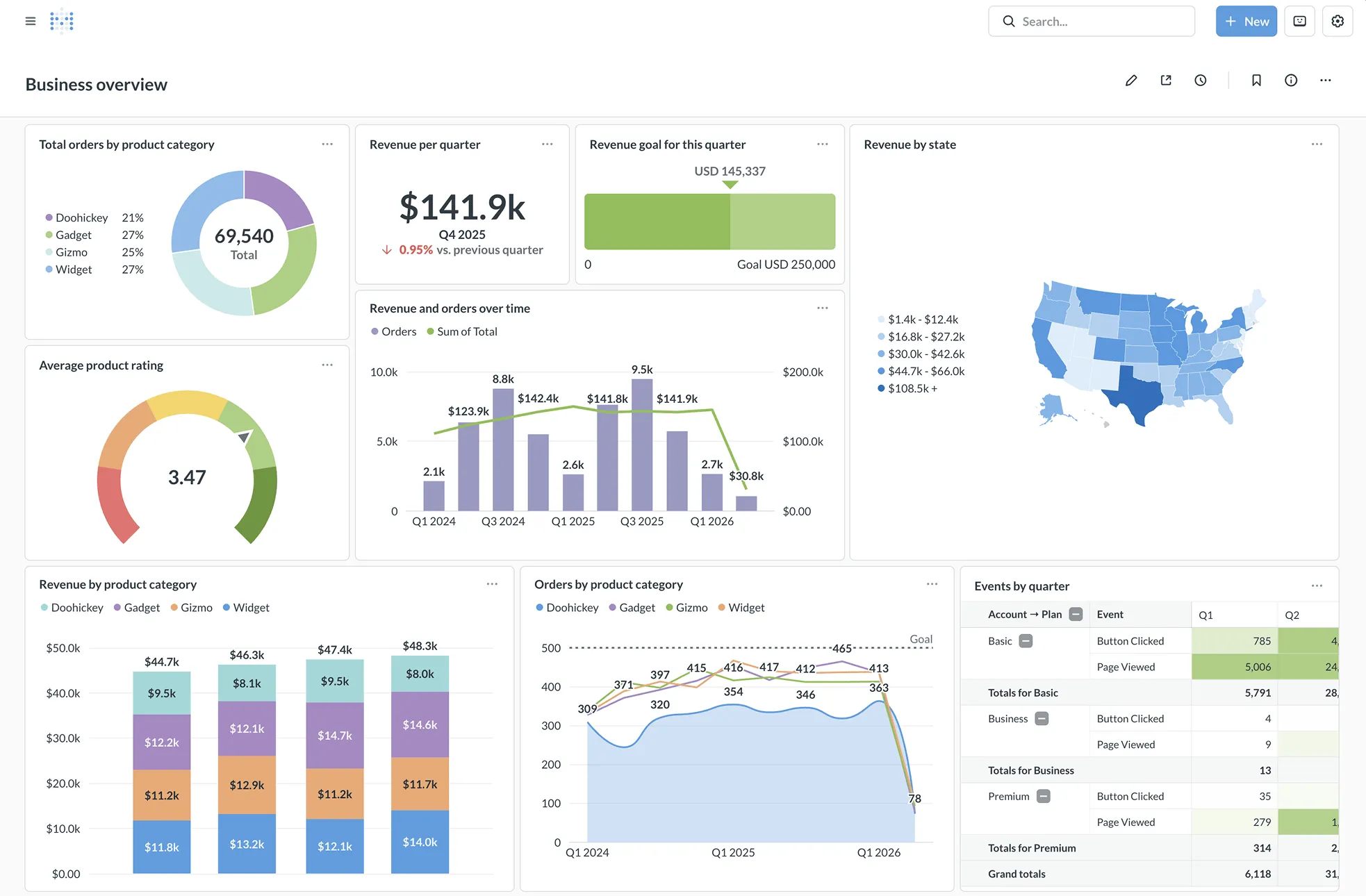
Interface Preview
Metabase
Hex
Feature Comparison
| Feature | Metabase | Hex |
|---|---|---|
| Data Querying & Analysis | ||
| No-Code Query Builder | Visual query builder with drag-and-drop, templates, and model caching | Spreadsheet-style calculations and data browsing for no-code workflows |
| SQL Support | Full SQL editor with variables, snippets, and native query support | SQL cells within notebooks with inline execution and result visualization |
| Python Support | Not available natively; limited to SQL and visual queries | Native Python cells with full library support for data science workflows |
| AI & Automation | ||
| AI-Powered Analysis | Metabot AI for natural language to SQL generation (add-on) | Built-in AI agent that writes SQL, Python, creates charts, and traces reasoning steps |
| Conversational Analytics | Metabot chat for database questions with single-shot SQL responses | Full conversational self-serve with multi-turn dialogue, semantic model awareness, and endorsed data sources |
| Dashboards & Apps | ||
| Dashboard Builder | Full dashboard editor with filters, cross-filters, drill-through, and scheduled delivery | Interactive data apps built from notebooks with dropdowns, filters, and published app views |
| Embedded Analytics | Production-grade embedding with iframes, React SDK, white-labeling, and multi-tenant data segregation | Not a primary use case; focused on internal team collaboration and published apps |
| Scheduled Reports | Email and Slack delivery with custom filters, PDF export, and alert triggers | Scheduled notebook runs with configurable compute profiles and notification support |
| Collaboration & Governance | ||
| Team Collaboration | Collections, verified items, official badges, and usage analytics tracking | Real-time collaborative notebooks with commenting, sharing, version history, and app publishing |
| Access Controls | Row-level, column-level, and database-managed permissions with SSO (SAML, LDAP, JWT) | Workspace-level permissions with role-based access and conversation monitoring via Context Studio |
| Deployment & Integration | ||
| Deployment Options | Self-hosted (Docker, JAR), Metabase Cloud, or air-gapped enterprise deployment | Cloud-only SaaS platform with scalable compute profiles up to 128 GB RAM |
| Data Source Connectors | 20+ native connectors including PostgreSQL, MySQL, Snowflake, BigQuery, and Redshift | Connects to major warehouses and databases with native integrations for Snowflake, BigQuery, Databricks, and more |
| Open Source | Fully open-source core with 48,000+ GitHub stars; Clojure codebase with active community | Proprietary closed-source platform; no self-hosted option available |
Data Querying & Analysis
No-Code Query Builder
SQL Support
Python Support
AI & Automation
AI-Powered Analysis
Conversational Analytics
Dashboards & Apps
Dashboard Builder
Embedded Analytics
Scheduled Reports
Collaboration & Governance
Team Collaboration
Access Controls
Deployment & Integration
Deployment Options
Data Source Connectors
Open Source
Which approach fits
Metabase and Hex target overlapping but distinct segments of the analytics market. Metabase is a quick path to company-wide dashboards and embedded analytics, with a proven open-source foundation trusted by over 90,000 companies and nearly 47,000 GitHub stars. Hex is the more powerful platform for data teams doing exploratory analysis in SQL and Python, with AI agents that accelerate the entire workflow from question to published data app. The choice depends on whether your primary need is broad self-service dashboards and embedded analytics or deep collaborative analysis with AI-powered notebooks.
When each approach fits
Choose Metabase if:
Choose Metabase if you need a fast, clean BI layer that non-technical teammates can use immediately. Its visual query builder, production-grade embedded analytics with white-labeling, and open-source self-hosted option make it the stronger choice for organizations that want company-wide dashboards, customer-facing analytics in SaaS products, and cost-effective deployment. The open-source edition is hard to beat for startups and teams that want to own their analytics infrastructure.
Choose Hex if:
Choose Hex if your data team lives in SQL and Python and wants an AI-powered collaborative workbench that goes beyond dashboards. Hex's agentic notebooks, conversational self-serve for business users, and ability to publish interactive data apps make it the better platform for organizations where data analysis is complex, iterative, and involves code. Teams at companies like Ramp, Figma, and Anthropic use Hex to bridge the gap between deep technical analysis and business-friendly outputs.
These scenarios reflect the available product evidence. Your requirements, existing stack, and team expertise should guide the final decision.
Frequently Asked Questions
What is the main difference between Metabase and Hex?
Metabase is a dashboard-first BI tool designed for self-service analytics and embedded analytics. It gives non-technical users a visual query builder to explore data without writing code, and developers can embed dashboards directly into SaaS products. Hex is a notebook-first analytics platform built for data teams that work in SQL and Python, with AI agents that assist in analysis and conversational self-serve for business users. Metabase excels at putting polished dashboards in front of business users, while Hex excels at exploratory analysis and publishing interactive data apps.
Can Metabase replace Hex or vice versa?
They serve different primary workflows. Metabase is best when your goal is company-wide self-service dashboards, embedded customer-facing analytics, and lightweight data exploration without code. Hex is best when data analysts and scientists need collaborative notebooks with SQL, Python, and AI assistance to perform deep analysis and then publish results as interactive apps. Some organizations use both: Metabase for broad internal and embedded dashboards, and Hex for the data team's analytical workbench.
Which tool is better for non-technical business users?
Metabase has the edge for traditional self-service BI. Its visual query builder lets business users build queries and explore data without any code, and its dashboard drill-through menus are configured out of the box. Hex has invested heavily in conversational self-serve, where business users can ask questions in natural language and get AI-generated answers backed by endorsed semantic models. The right choice depends on whether your users prefer clicking through dashboards or asking questions conversationally.
Is Metabase really free to use?
Metabase offers a fully functional open-source edition that you can self-host at no software cost using Docker or a JAR file. The cloud-hosted Starter plan costs $100/mo, the Pro plan is $575/mo with self-hosted or cloud deployment, and the Enterprise is custom pricing from $20,000 per year with priority support. The open-source version covers core querying, dashboards, and visualizations, while paid tiers add features like Metabot AI, Data Studio transformations, and advanced permissions.
How does Hex pricing compare to Metabase?
Hex uses a per-seat plus usage-based pricing model starting at $36/month per seat, with a higher-usage tier at $75/month per seat. Compute is billed separately at $2.93/hour for CPU usage beyond the free tiers (extra small, small, and medium profiles are free). Metabase's open-source edition has zero software cost for self-hosted deployments. For cloud hosting, Metabase starts at $100/mo for the entire Starter instance, making it significantly cheaper for teams that primarily need dashboards rather than notebook-based analytics.