Decision comparison
Metabase vs Omni Analytics
Metabase and Omni Analytics serve different segments of the BI market. Metabase is the stronger choice for teams that value open-source flexibility, low-cost self-hosting, and a gentle learning curve. Omni Analytics is built for organizations that want a semantic model at the center of their analytics stack, with AI deeply integrated into every workflow from querying to dashboard creation. Both tools handle embedded analytics well, but they approach the problem from fundamentally different directions.
Direct comparison. These are reviewed substitutes bought for the same job, so the differences below are the ones that decide between them.
All 2 are BI platforms.
Quick Comparison
| Decision factor | Metabase | Omni Analytics |
|---|---|---|
| Best For | Teams that want fast, self-hosted BI with an open-source foundation and embedded analytics | Data teams that need a semantic model powering AI-driven analytics and embedded reporting |
| Pricing | Community Edition is free, open-source and self-hosted, with unlimited users. Paid Metabase Cloud plans start with Starter at $100/month, or $90/month billed annually, including the first 5 users, then $6 per user/month. Pro is $575/month, or $517.50/month annually, including the first 10 users, then $12 per user/month. Enterprise is custom pricing starting at $20,000/year. Both paid plans offer a 14 days free trial. | Contact for pricing |
| Deployment | Self-hosted or Metabase Cloud; supports Docker, JAR, and managed hosting | Cloud-hosted SaaS platform |
| Learning Curve | Low barrier to entry with visual query builder; SQL editor available for power users | Moderate; analysts benefit from SQL and semantic modeling knowledge, but point-and-click UI is accessible |
| AI Capabilities | Metabot AI add-on for single-shot SQL generation and natural language queries | AI chat for natural language querying, agentic AI for driver analysis, forecasting, and dashboard creation |
| Data Governance | Row- and column-level permissions, SSO integration (SAML, LDAP, JWT), SOC1/SOC2/GDPR/CCPA compliance | Semantic model with version control, CI/CD, branch mode, role-based access, SOC 2/HIPAA/GDPR compliance |
Metabase
- Best For:
- Teams that want fast, self-hosted BI with an open-source foundation and embedded analytics
- Pricing:
- Community Edition is free, open-source and self-hosted, with unlimited users. Paid Metabase Cloud plans start with Starter at $100/month, or $90/month billed annually, including the first 5 users, then $6 per user/month. Pro is $575/month, or $517.50/month annually, including the first 10 users, then $12 per user/month. Enterprise is custom pricing starting at $20,000/year. Both paid plans offer a 14 days free trial.
- Deployment:
- Self-hosted or Metabase Cloud; supports Docker, JAR, and managed hosting
- Learning Curve:
- Low barrier to entry with visual query builder; SQL editor available for power users
- AI Capabilities:
- Metabot AI add-on for single-shot SQL generation and natural language queries
- Data Governance:
- Row- and column-level permissions, SSO integration (SAML, LDAP, JWT), SOC1/SOC2/GDPR/CCPA compliance
Omni Analytics
- Best For:
- Data teams that need a semantic model powering AI-driven analytics and embedded reporting
- Pricing:
- Contact for pricing
- Deployment:
- Cloud-hosted SaaS platform
- Learning Curve:
- Moderate; analysts benefit from SQL and semantic modeling knowledge, but point-and-click UI is accessible
- AI Capabilities:
- AI chat for natural language querying, agentic AI for driver analysis, forecasting, and dashboard creation
- Data Governance:
- Semantic model with version control, CI/CD, branch mode, role-based access, SOC 2/HIPAA/GDPR compliance
Public signals
Verified factual signals only. Bars appear only for like-for-like metrics with five weekly assessments for every tool; missing evidence stays explicit. These signals do not establish enterprise adoption, product quality, or total cost.
| Metric | Metabase | Omni Analytics |
|---|---|---|
| Docker Hub pulls(Product adoption) | 272.7M | Not available |
| GitHub commits, 90d(Product adoption) | 2.0k | Not available |
| GitHub stars(Product adoption) | 49,000+ | Not available |
| Hacker News mentions, 90d(Community interest) | 12 | Not available |
| npm weekly downloads(Developer adoption) | 36.8k | 9 |
| Product Hunt comments(Community interest) | 30 | Not available |
| Product Hunt rating(Community interest) | 4.9/5 | Not available |
| Product Hunt reviews(Community interest) | 24 | Not available |
| Product Hunt votes(Community interest) | 310 | Not available |
| Stack Overflow questions(Community interest) | 374 | Not available |
| GitHub commits, 90d(Developer adoption) | Not available | 31 |
| GitHub stars(Developer adoption) | Not available | 68 |
| PyPI weekly downloads(Developer adoption) | Not available | 383 |
As of September 21, 2026 — updated weekly.
Health & risk evidence
Observed public-source checks for mapped package versions and repositories.
Metabase
September 21, 2026Package vulnerabilities
npm · @metabase/embedding-sdk-react@0.63.1
0 vulnerabilities
across 1 package
Repository security score
github.com/metabase/metabase
7.1/10
Omni Analytics
September 21, 2026Package vulnerabilities
npm · @omni-co/model-local-editor@0.2.0 · PyPI · omni-python-sdk@0.1.11
0 vulnerabilities
across 2 packages
Repository security score
Not available
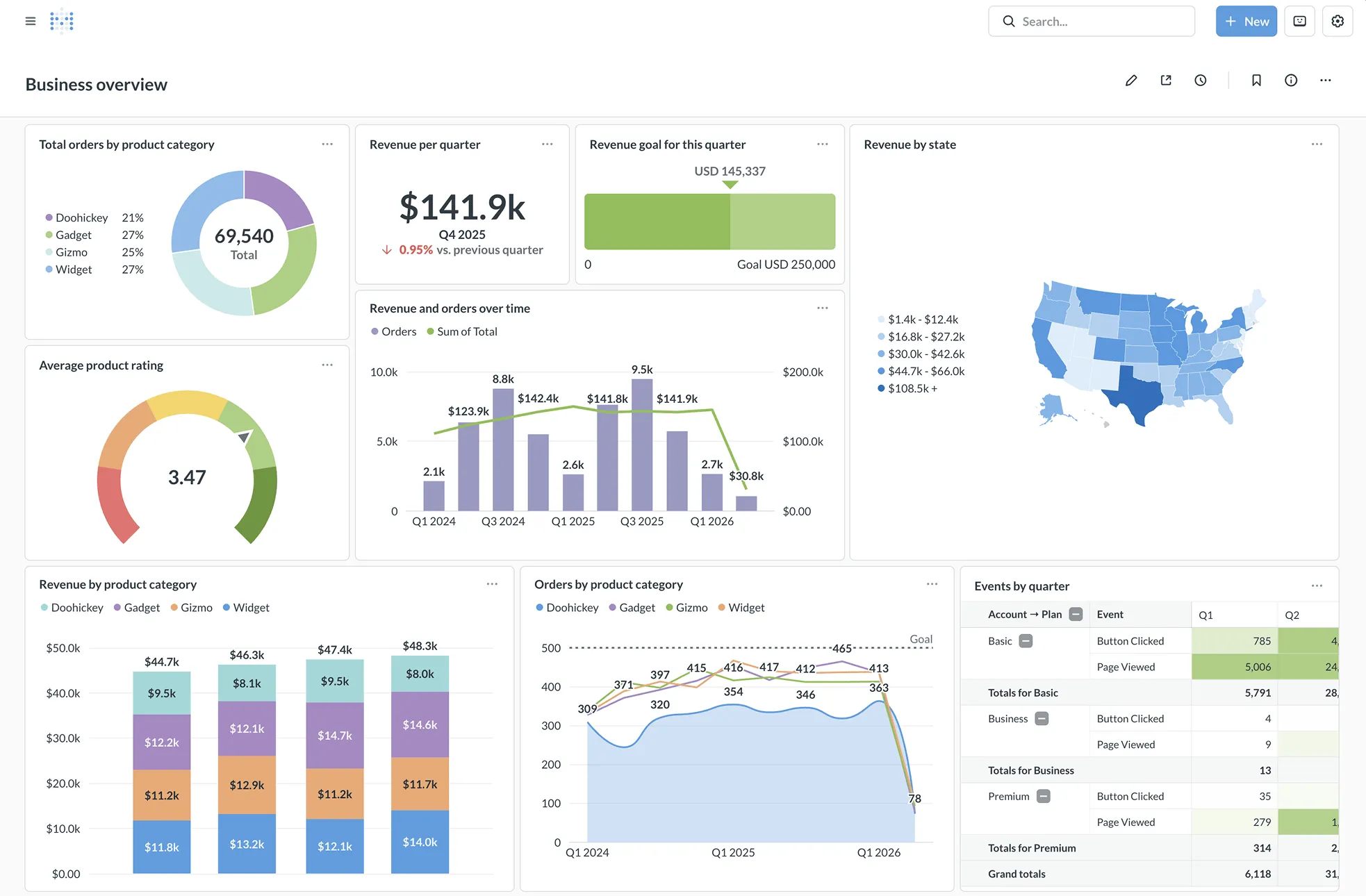
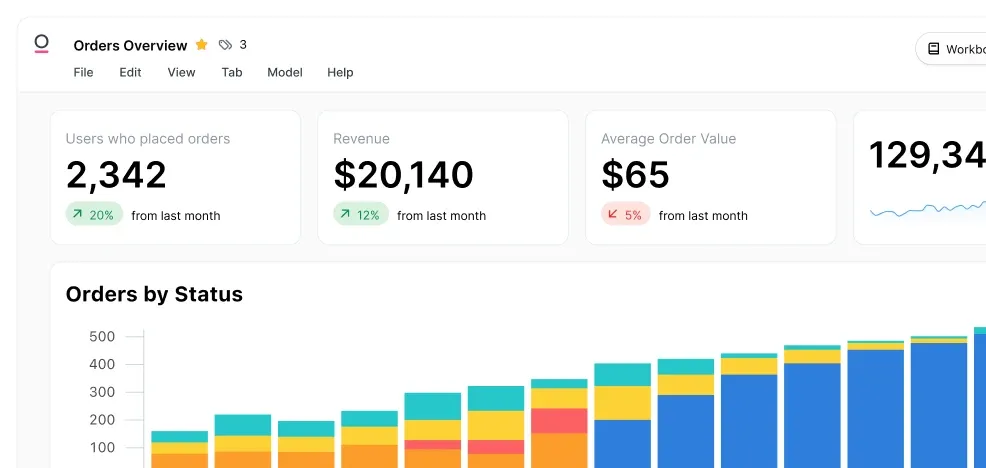
Interface Preview
Metabase
Omni Analytics
Feature Comparison
| Feature | Metabase | Omni Analytics |
|---|---|---|
| Core Analytics | ||
| Visual Query Builder | Full no-code query builder with drag-and-drop interface | Point-and-click field picker and chart editor |
| SQL Editor | Built-in SQL editor with variables and template tags | IDE-style SQL editor with intelligent autocomplete |
| Dashboards | Unlimited dashboards with filters, cross-filters, and drill-through | Custom dashboards with drill-downs, filters, and AI-generated layouts |
| Data Modeling | ||
| Semantic Layer | Models, measures, and segments via Data Studio | Full semantic model that auto-builds as users query; reusable metrics across deployments |
| Version Control | Export configs and models for staging environments | Native Git integration with branch mode and CI/CD pipelines |
| Spreadsheet Capabilities | CSV upload supported; no native spreadsheet interface | Built-in spreadsheet with formulas and forecasting on live governed data |
| AI and Automation | ||
| Natural Language Queries | Metabot AI generates SQL from natural language (add-on) | AI chat with context carryover for follow-up questions |
| Automated Insights | Automatic x-ray reports and scheduled alerts via email/Slack | AI-driven driver and drag analysis, change diagnosis, and scheduled insight delivery |
| AI Dashboard Building | Not verified | Agent-based dashboard creation from natural language prompts |
| Embedded Analytics | ||
| Embedding Options | iframes for speed or React SDK for customization; white-label support | SSO embedding, APIs, and MCP server for product integration |
| Multi-Tenant Support | Native one-database-per-tenant support with granular data segregation | Role-based access with governed metrics reusable across customer instances |
| Customization | White-labeling, dynamic styling, and custom click behaviors | Full CSS and markdown customization for on-brand analytics |
| Infrastructure | ||
| Data Source Connectors | 20+ database connectors including PostgreSQL, MySQL, and major warehouses | Snowflake, BigQuery, Databricks, Redshift, Postgres, ClickHouse, Trino, MySQL, and more |
| Open Source | Yes; open-source edition with 48,000+ GitHub stars | No; closed-source commercial platform |
| Caching and Performance | Result and model caching with granular duration controls | Modern processing with smart caching for fast dashboard loads |
Core Analytics
Visual Query Builder
SQL Editor
Dashboards
Data Modeling
Semantic Layer
Version Control
Spreadsheet Capabilities
AI and Automation
Natural Language Queries
Automated Insights
AI Dashboard Building
Embedded Analytics
Embedding Options
Multi-Tenant Support
Customization
Infrastructure
Data Source Connectors
Open Source
Caching and Performance
Which to choose
Metabase and Omni Analytics serve different segments of the BI market. Metabase is the stronger choice for teams that value open-source flexibility, low-cost self-hosting, and a gentle learning curve. Omni Analytics is built for organizations that want a semantic model at the center of their analytics stack, with AI deeply integrated into every workflow from querying to dashboard creation. Both tools handle embedded analytics well, but they approach the problem from fundamentally different directions.
Best-fit scenarios
Choose Metabase if:
We recommend Metabase for teams that need a proven, cost-effective BI tool with broad database connectivity and a strong open-source community. It works well for startups and mid-size companies that want to get from database to dashboard quickly without a large budget. Metabase is also the better option when self-hosting or air-gapped deployment is a requirement, and when you need embedded analytics with a React SDK or iframe-based approach.
Choose Omni Analytics if:
We recommend Omni Analytics for data teams that want AI-first analytics built on a governed semantic model. It is the stronger pick when your organization needs version-controlled data definitions, CI/CD workflows for analytics, and AI capabilities that go beyond simple query generation into driver analysis and agentic dashboard building. Omni is also well-suited for product teams looking to ship AI-powered embedded analytics without derailing their core roadmap.
These scenarios reflect the available product evidence. Your requirements, existing stack, and team expertise should guide the final decision.
Frequently Asked Questions
Can Metabase handle enterprise-scale deployments?
Yes. Metabase offers an Enterprise plan with priority support, advanced permissions including row- and column-level restrictions, multi-tenant data segregation, and SSO integration via SAML, LDAP, and JWT. It is trusted by over 90,000 companies and supports both cloud and self-hosted deployment for organizations with strict data residency requirements.
Does Omni Analytics require SQL knowledge?
Not necessarily. Omni provides a point-and-click UI for building queries and charts, along with Excel-like formulas in its built-in spreadsheet view. However, data teams will get the most value from Omni when they use SQL and the semantic modeling layer to define reusable metrics that non-technical users can then access through the AI chat interface.
Which tool is better for embedded analytics in a SaaS product?
Both tools support embedded analytics, but they differ in approach. Metabase provides iframes and a React SDK with white-label support, making it straightforward to embed dashboards directly. Omni Analytics offers SSO embedding, APIs, and an MCP server for extensive product integration, along with AI-powered querying that customers can use inside your product. The right choice depends on whether you need a quick embed solution (Metabase) or AI-driven analytics as a product feature (Omni).
How do the AI features in Metabase and Omni Analytics compare?
Metabase offers Metabot AI as an add-on that generates SQL from natural language queries, providing a single-shot approach to data exploration. Omni Analytics takes a broader approach with AI chat that supports multi-turn conversations with context carryover, automated driver and drag analysis, change diagnosis, and agentic dashboard creation from prompts. Omni's AI is built on top of its semantic model, which gives it structured context for more reliable answers.