Omni Analytics: product and architecture
Our Omni Analytics review verdict: choose Omni for teams that need governed metrics, SQL flexibility, and AI-assisted exploration in one BI platform; avoid it if transparent, self-serve pricing is a non-negotiable buying requirement. Omni’s core proposition is strong—a shared data model that grows as users query it—but its enterprise pricing model and supplied evidence leave important implementation and cost questions to validate during evaluation.
Overview
Omni Analytics is a business-intelligence platform positioned around turning organizational data into a source of truth for AI. Its stated goal is to let people get trusted answers without waiting in an analytics queue, combining a shared data model with the freedom to work in SQL. That positioning is particularly relevant to data teams trying to prevent every dashboard, spreadsheet, and ad hoc query from becoming a separate definition of the business.
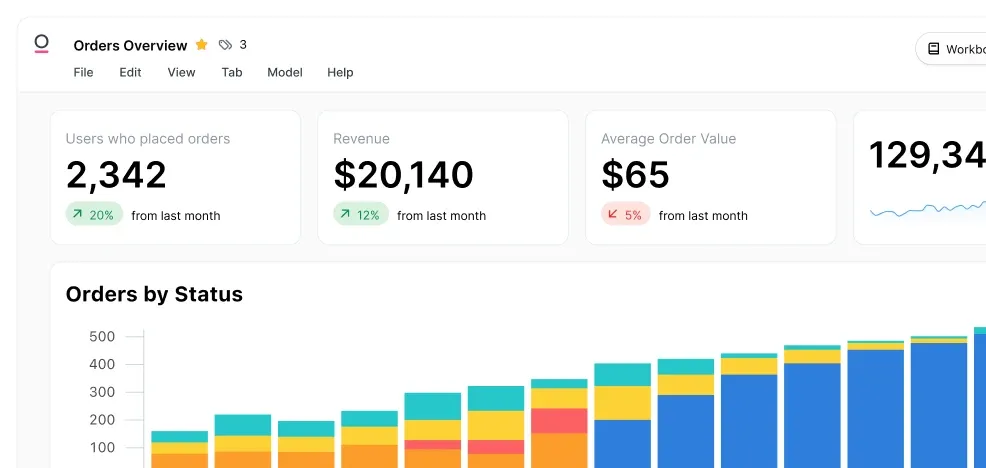
The defining product idea is that Omni builds a data model as users query, then turns that work into shareable metrics. In practice, this means a one-off analysis is not necessarily isolated from the governed layer: Omni applies one-off queries directly into the data model, expanding the shareable data available to others. That is a meaningful architectural choice for analytics engineers, because it treats exploration and semantic consistency as connected workflows rather than separate tools.
Omni also presents itself as an AI analytics platform. Its product description centers on asking questions conversationally, refining results with filters, fields, and calculated metrics, receiving summaries, and asking follow-up questions with context carried over. Users can then move into a workbook and use the full analytics interface, which gives the product a path from natural-language investigation to structured analysis.
We recommend Omni Analytics for organizations that want a centrally reusable metric layer without forcing every user into hand-written SQL. The trade-off is governance: making exploratory work reusable can accelerate shared understanding, but it also raises the bar for review, testing, and ownership of changes to the data model. Teams without clear metric stewardship should not assume the platform alone will create trustworthy definitions.
Key Features and Architecture
Omni Analytics combines several technical capabilities around a shared semantic model. The supplied product data describes a model that is built as a user queries, allowing metrics created through analysis to become shareable. This approach aims to preserve the speed of ad hoc work while making reusable business logic available across the organization and across internal and external deployments.
Key product capabilities include:
- Query-driven data modeling: Omni auto-builds a data model as users query and applies one-off queries into that model. This is designed to make exploratory analysis cumulative rather than disposable, so users can build upon existing shareable data.
- SQL alongside governed metrics: The platform explicitly combines shared-model consistency with SQL freedom. Analytics engineers can retain SQL as part of the workflow while business users can work from reusable metrics instead of recreating definitions.
- Conversational AI exploration: Users can ask a question in a chat-like interaction, then refine the answer by filtering, adding fields, and calculating metrics. Follow-up questions retain context, reducing the need to restate the investigation at each step.
- Workbooks and full analytics UI: After an AI-assisted interaction, users can start a workbook and continue in Omni’s full analytics interface. This creates a deliberate handoff from quick question answering to deeper exploration.
- Dashboards with modern processing and smart caching: Omni states that dashboards load instantly because of modern processing and smart caching. The source provides no benchmark, workload definition, or latency measurement, so this should be treated as a product capability claim rather than a quantified performance guarantee.
- Custom embedded analytics: CSS and markdown can be used to match analytics to a product’s brand. That is a concrete customization option for customer-facing deployments where standard embedded dashboards would look disconnected from the application.
- Deployment controls: Version control, CI/CD, and testing environments are supplied as controls for shipping updates safely. These features make Omni more relevant to teams that treat analytics changes as production changes rather than informal dashboard edits.
- Security controls: Omni lists role-based access, audit logs, and compliance with SOC 2, HIPAA, and GDPR standards. These controls matter when analytics is deployed to customers or used with sensitive organizational data.
The architecture is strongest when metric definitions must travel across multiple uses. Omni describes reusable metric logic and business context across internal and external deployments, which reduces the temptation to create parallel definitions for internal reporting and customer-facing analytics. The cost is operational discipline: version control and CI/CD are valuable only when a team has defined review practices and is willing to use them.
Two supplied implementation examples are worth noting, although neither is a universal benchmark. Standard Metrics built AI-powered customer-facing analytics in less than 3 months, while ActiveProspect rebuilt customer-facing dashboards in less than two weeks. Those are useful signals that Omni can support rapid customer-facing delivery, but they do not establish expected rollout times for every team, data model, or security environment.
Ideal Use Cases
Omni Analytics is best suited to data organizations that need both controlled definitions and flexible investigation. A data team supporting a growing company can use the shared model to define key metrics once, while analysts and business users explore those definitions through the UI, workbooks, and conversational AI. This is a stronger fit than a purely dashboard-centric workflow when recurring questions evolve into reusable business logic.
A first practical scenario is a centralized analytics team serving multiple internal functions. For example, data engineers can support a model with governed metrics, analytics engineers can use SQL and deployment controls, and non-technical stakeholders can ask questions, refine fields and filters, and continue into workbooks. The value is not merely access; it is the possibility that the same metric logic remains available as questions move from exploration to reporting.
A second scenario is customer-facing analytics inside a software product. Omni explicitly supports CSS and markdown customization, reusable metric logic across external deployments, and security controls including role-based access and audit logs. The ActiveProspect example—customer-facing dashboards rebuilt in less than two weeks—shows the type of delivery objective Omni is designed to support, even though it should not be read as a promised implementation timeline.
A third scenario is an organization with formal release practices for analytics. Teams that already use version control, CI/CD, and testing environments can apply those mechanisms to dashboards, metrics, and related updates. This is especially relevant where a change to shared logic can affect both internal decision-making and externally visible analytics, making unreviewed edits risky.
Do not use Omni if your selection process requires published, predictable pricing before technical validation. Do not use it if your team wants every analysis to remain isolated and does not want to govern the evolution of shared metric definitions. Omni’s strength is the connection between exploration and a shared model; teams that reject that operating model should look for a simpler, less governed analytics workflow.
Strengths & Trade-offs
In our evaluation, Omni Analytics has a clear value proposition for governed, AI-enabled analytics, but it is not universally the right BI platform. Its advantages come from joining analysis, reusable metric logic, external deployment capabilities, and release controls. Those same choices introduce governance and commercial trade-offs that teams should evaluate directly.
Pros
- Exploration can become reusable governance: Omni auto-builds a data model as users query and applies one-off queries into it. This is more useful than isolated ad hoc analysis when teams want discoveries to become shareable metrics.
- SQL is retained alongside a shared semantic model: The product explicitly combines consistency from a shared data model with SQL freedom. That is a practical fit for analytics engineers who need technical control without requiring every stakeholder to write SQL.
- AI interactions have an escalation path: Users can ask questions, refine filters and fields, calculate metrics, receive summaries, ask context-aware follow-ups, and then continue in a workbook. This is more substantive than a standalone chat surface because it connects question answering to full analytics work.
- Customer-facing analytics has concrete customization options: CSS and markdown support enables branded analytics experiences rather than forcing an unmodified default interface into a product.
- Release controls are built into the platform story: Version control, CI/CD, and testing environments support safer updates. This directly addresses the risk that a change to shared metrics affects many consumers.
- Security is explicitly represented: Role-based access, audit logs, and stated SOC 2, HIPAA, and GDPR compliance address common requirements for sensitive data and external deployments.
Cons
- Published pricing is absent: Omni is sold under an Enterprise model, but the supplied data contains no price, capacity limits, or cost drivers. That weakens early-stage budget planning and makes comparable total-cost analysis harder.
- The query-driven model requires governance: Allowing one-off queries to expand a shared model is powerful, but teams need ownership, review practices, and testing discipline to avoid poorly managed metric sprawl.
- Dashboard speed is not independently quantified in the supplied data: Omni says dashboards load instantly using modern processing and smart caching, but provides no latency target, benchmark, dataset size, or concurrency information.
- Implementation evidence is limited: The supplied examples cite less than 3 months for Standard Metrics and less than two weeks for ActiveProspect, but do not describe implementation scope, migration complexity, or ongoing operating effort.
- The supplied integration evidence is narrow: No named data-platform integrations are provided in the source data. Buyers with mandatory integration requirements need to validate those requirements rather than infer support from Omni’s BI category.
The key trade-off is straightforward: Omni gives teams an integrated route from AI-assisted questions to governed, reusable analytics, but it rewards disciplined data practices. We recommend it where analytics is treated as a production capability with shared definitions and controlled change management. Teams seeking a low-governance, price-transparent reporting tool should look elsewhere.