Decision comparison
Omni Analytics vs Tableau
Omni Analytics and Tableau represent two different generations of business intelligence thinking. Tableau is an established presence in visual analytics, offering strong data visualization capabilities, a sizable user community, and close Salesforce ecosystem integration. Omni Analytics is a modern AI-native platform that puts the semantic model and natural language querying at the center of the analytics experience, with strong embedded analytics capabilities for product teams. Tableau suits organizations that need proven enterprise BI with advanced visualization and broad deployment options. Omni suits data teams that want to ship AI-powered analytics quickly, whether for internal use or embedded in customer-facing products.
Direct comparison. These are reviewed substitutes bought for the same job, so the differences below are the ones that decide between them.
All 2 are BI platforms.
Quick Comparison
| Decision factor | Omni Analytics | Tableau |
|---|---|---|
| Primary Focus | AI-native analytics platform combining semantic modeling with natural language querying | Visual analytics and interactive dashboards with enterprise-grade governance |
| AI Capabilities | Conversational AI chat with context carryover, agent-driven dashboard creation, and AI-powered forecasting | Agentforce Tableau for proactive insights, natural language Q&A, and AI-assisted data preparation |
| Deployment Model | Cloud-hosted SaaS with embedded analytics via SSO, APIs, and MCP server | Tableau Cloud (SaaS), Tableau Server (self-hosted), and Tableau Desktop (offline) |
| Semantic Layer | Auto-building semantic model that grows as users query, with shared metric definitions | Tableau Semantics with AI-assisted model creation, integrated with Data 360 unified data layer |
| Pricing Model | Contact for pricing | Tableau Cloud Standard Edition: Viewer $15/user/month, Explorer $42/user/month, Creator $75/user/month; Enterprise Edition: Viewer $35/user/month, Explorer $70/user/month, Creator $115/user/month; Tableau+ Bundle requires contact sales for pricing details. |
| Best For | Data teams wanting AI-first analytics with developer-friendly workflows and embedded use cases | Organizations needing advanced visualization, broad connector support, and Salesforce ecosystem integration |
Omni Analytics
- Primary Focus:
- AI-native analytics platform combining semantic modeling with natural language querying
- AI Capabilities:
- Conversational AI chat with context carryover, agent-driven dashboard creation, and AI-powered forecasting
- Deployment Model:
- Cloud-hosted SaaS with embedded analytics via SSO, APIs, and MCP server
- Semantic Layer:
- Auto-building semantic model that grows as users query, with shared metric definitions
- Pricing Model:
- Contact for pricing
- Best For:
- Data teams wanting AI-first analytics with developer-friendly workflows and embedded use cases
Tableau
- Primary Focus:
- Visual analytics and interactive dashboards with enterprise-grade governance
- AI Capabilities:
- Agentforce Tableau for proactive insights, natural language Q&A, and AI-assisted data preparation
- Deployment Model:
- Tableau Cloud (SaaS), Tableau Server (self-hosted), and Tableau Desktop (offline)
- Semantic Layer:
- Tableau Semantics with AI-assisted model creation, integrated with Data 360 unified data layer
- Pricing Model:
- Tableau Cloud Standard Edition: Viewer $15/user/month, Explorer $42/user/month, Creator $75/user/month; Enterprise Edition: Viewer $35/user/month, Explorer $70/user/month, Creator $115/user/month; Tableau+ Bundle requires contact sales for pricing details.
- Best For:
- Organizations needing advanced visualization, broad connector support, and Salesforce ecosystem integration
Public signals
Verified factual signals only. Bars appear only for like-for-like metrics with five weekly assessments for every tool; missing evidence stays explicit. These signals do not establish enterprise adoption, product quality, or total cost.
| Metric | Omni Analytics | Tableau |
|---|---|---|
| GitHub commits, 90d(Developer adoption) | 31 | 37 |
| GitHub stars(Developer adoption) | 68 | 716 |
| Search interest(Market interest) | Unavailable | 85 |
| npm weekly downloads(Developer adoption) | 9 | 32.2k |
| PyPI weekly downloads(Developer adoption) | 383 | 965.7k |
| Hacker News mentions, 90d(Community interest) | Not available | 2 |
| Product Hunt comments(Community interest) | Not available | 3 |
| Product Hunt rating(Community interest) | Not available | 4.2/5 |
| Product Hunt reviews(Community interest) | Not available | 5 |
| Product Hunt votes(Community interest) | Not available | 7 |
| Stack Overflow questions(Community interest) | Not available | 5.4k |
As of September 21, 2026 — updated weekly.
Health & risk evidence
Observed public-source checks for mapped package versions and repositories.
Omni Analytics
September 21, 2026Package vulnerabilities
npm · @omni-co/model-local-editor@0.2.0 · PyPI · omni-python-sdk@0.1.11
0 vulnerabilities
across 2 packages
Repository security score
Not available
Tableau
September 21, 2026Package vulnerabilities
npm · @tableau/embedding-api@3.16.1 · PyPI · tableauserverclient@0.41
0 vulnerabilities
across 2 packages
Repository security score
github.com/tableau/server-client-python
5.5/10
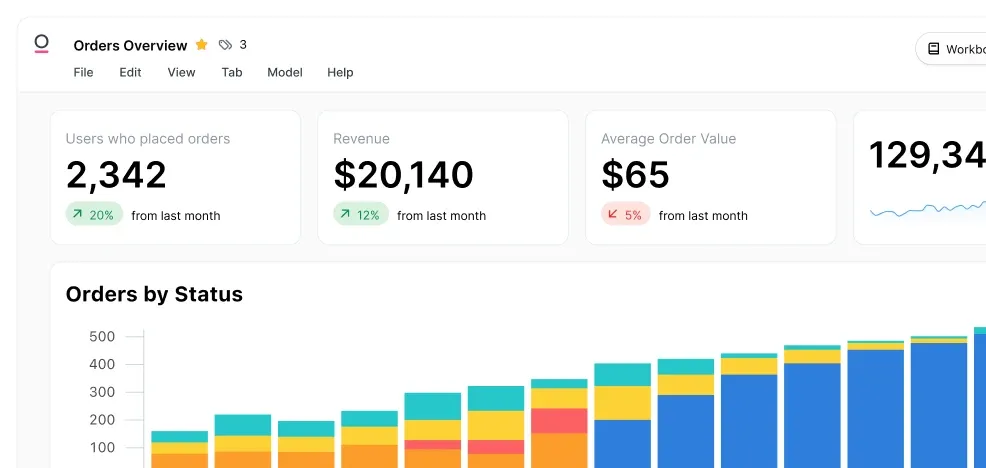
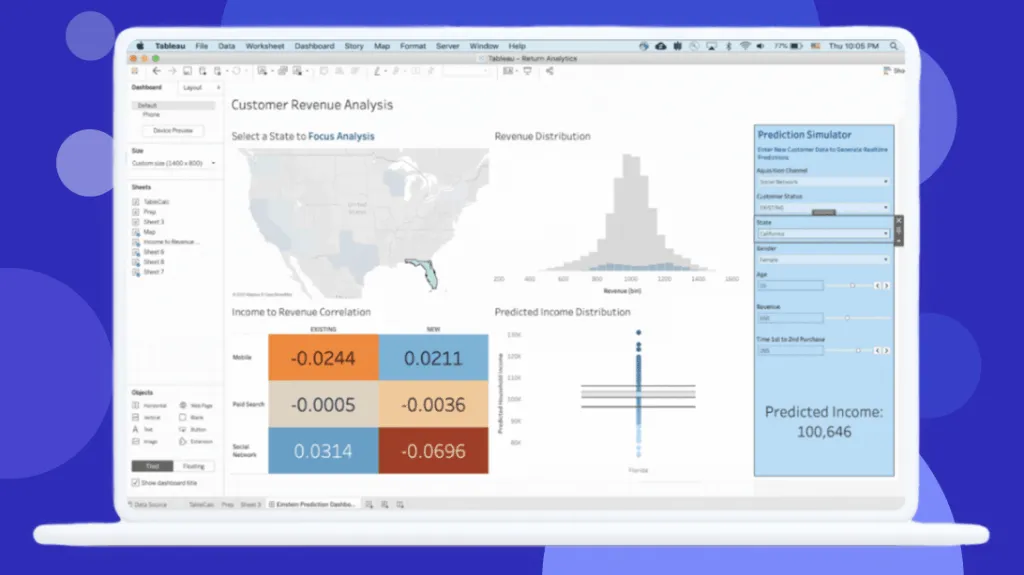
Interface Preview
Omni Analytics
Tableau
Feature Comparison
| Feature | Omni Analytics | Tableau |
|---|---|---|
| Data Visualization & Dashboards | ||
| Dashboard Creation | Dashboards with custom visualizations, drill-downs, and filters; AI can generate dashboards from a prompt | Industry-leading drag-and-drop dashboard builder with extensive chart types and visual best practices |
| Interactive Exploration | Point-and-click field picker, chart editor, spreadsheet mode, and raw SQL IDE | Guided analytics with drill-down, filtering, and visual storytelling across Desktop and Cloud |
| Mobile Access | Web-based dashboards accessible on any device | Dedicated mobile experience with alerts and subscriptions for Viewer tier and above |
| AI & Natural Language | ||
| Natural Language Querying | Conversational AI chat with context carryover; ask follow-up questions naturally | Agentforce-powered Q&A with natural language questions answered directly in Slack or Tableau |
| AI-Assisted Authoring | Agent Blobby creates dashboards from scratch via prompts; AI-driven editing and forecasting tools | AI-assisted semantic model creation; auto-generate semantic models from workspaces |
| Proactive Insights | AI analyzes drivers and drags on key metrics; delivers scheduled insight summaries to inbox | Agentforce agents deployed across the enterprise provide proactive insights and anomaly detection |
| Data Modeling & Governance | ||
| Semantic Model | Auto-building model that captures one-off queries as reusable definitions; experts define core logic | Tableau Semantics with AI-infused model creation integrated into the Data 360 unified data layer |
| Version Control | Native Git integration with branching, CI/CD, and testing environments for safe deployment | Workbook versioning and content management via Tableau Server or Cloud governance features |
| Security & Compliance | Role-based access, audit logs, and compliance with SOC 2, HIPAA, and GDPR standards | Enterprise-grade security built on Salesforce Hyperforce; advanced management and governance in Enterprise tier |
| Embedded Analytics & Extensibility | ||
| Embedded Analytics | White-label embedding with SSO, APIs, MCP server, CSS and markdown customization | Embedded analytics available in Enterprise edition with additional licensing for external users |
| Data Connectors | Connects to Snowflake, BigQuery, Databricks, dbt, Redshift, Postgres, ClickHouse, Trino, MySQL, and more | Broad connector library across cloud databases, on-premises systems, and native Salesforce CRM integration |
| API & Developer Tools | APIs, MCP server, and developer-friendly workflows for integrating AI analytics into existing products | API-first architecture with composable design in Tableau Next; REST API and extensions available |
| Collaboration & Sharing | ||
| Team Collaboration | Shared semantic model where experts define logic and domain users contribute; collaborative workbooks | Tableau Community with millions of members; Tableau Public for sharing; collaborative dashboards |
| Slack & Messaging Integration | Not a highlighted native integration | Native Slack integration for sharing live, permission-aware dashboards and asking questions via Agentforce |
| Scheduled Reporting | Scheduled insight delivery to inbox; automated updates for stakeholders | Subscriptions, alerts, and scheduled extract refreshes (10 per day on standard Cloud plans) |
Data Visualization & Dashboards
Dashboard Creation
Interactive Exploration
Mobile Access
AI & Natural Language
Natural Language Querying
AI-Assisted Authoring
Proactive Insights
Data Modeling & Governance
Semantic Model
Version Control
Security & Compliance
Embedded Analytics & Extensibility
Embedded Analytics
Data Connectors
API & Developer Tools
Collaboration & Sharing
Team Collaboration
Slack & Messaging Integration
Scheduled Reporting
Which to choose
Omni Analytics and Tableau represent two different generations of business intelligence thinking. Tableau is an established presence in visual analytics, offering strong data visualization capabilities, a sizable user community, and close Salesforce ecosystem integration. Omni Analytics is a modern AI-native platform that puts the semantic model and natural language querying at the center of the analytics experience, with strong embedded analytics capabilities for product teams. Tableau suits organizations that need proven enterprise BI with advanced visualization and broad deployment options. Omni suits data teams that want to ship AI-powered analytics quickly, whether for internal use or embedded in customer-facing products.
Best-fit scenarios
Choose Omni Analytics if:
Choose Omni Analytics if your team wants AI-first analytics with a strong semantic model foundation. Omni stands out for organizations building customer-facing data products, thanks to its white-label embedding with SSO, APIs, and MCP server, plus full brand customization through CSS and markdown. Data teams that value developer workflows like Git-based version control, CI/CD, and branching will find Omni's approach refreshing compared to legacy BI tools. The conversational AI interface lets business users self-serve without waiting for analyst support, while the auto-building semantic model ensures metrics stay consistent across every query. If you need to ship embedded analytics quickly and want AI capabilities woven into the platform rather than bolted on, Omni is the stronger choice.
Choose Tableau if:
Choose Tableau if your organization needs the most advanced data visualization capabilities on the market, backed by a mature ecosystem of training resources, community support, and certified professionals. Tableau's published pricing gives clear budget visibility, and its three-tier licensing model lets you right-size costs across Creators, Explorers, and Viewers. The Salesforce integration makes Tableau the natural fit for organizations already in that ecosystem, and the addition of agentic analytics through Agentforce and Tableau Next adds modern AI capabilities to an already powerful platform. Enterprises that need flexible deployment with Cloud, Server, and Desktop options, plus Slack-native analytics, will find Tableau delivers the breadth and governance required at scale.
These scenarios reflect the available product evidence. Your requirements, existing stack, and team expertise should guide the final decision.
Frequently Asked Questions
What is the main difference between Omni Analytics and Tableau?
Omni Analytics is an AI-native analytics platform built around a semantic model that auto-generates as users query, designed for teams that want conversational AI access to their data and developer-friendly embedded analytics. Tableau is a mature visual analytics platform known for its prominent data visualization, extensive connector ecosystem, and close integration with the Salesforce stack. Omni prioritizes AI-first workflows and modern data team tooling like Git and CI/CD, while Tableau emphasizes visual exploration, enterprise governance, and a large established user community.
How does pricing compare between Omni Analytics and Tableau?
Omni Analytics uses enterprise pricing that requires contacting sales, with a free trial available. Tableau publishes per-user pricing with three tiers: Viewer at $15/user/month, Explorer at $42/user/month, and Creator at $75/user/month for the Standard Cloud edition. Tableau's Enterprise edition nearly doubles those rates (Viewer $35, Explorer $70, Creator $115). A mid-sized Tableau deployment with 5 Creators, 15 Explorers, and 50 Viewers costs roughly $60,900/year. Without published pricing from Omni, direct cost comparison requires contacting both vendors for quotes based on your team size and use case.
Which platform is better for embedded analytics?
Omni Analytics was built with embedded analytics as a core use case. It offers white-label embedding with SSO, APIs, an MCP server, and full CSS and markdown customization so analytics look native within your product. Customers like Standard Metrics built AI-powered customer-facing analytics in under 3 months, and ActiveProspect rebuilt customer-facing dashboards in under two weeks. Tableau supports embedded analytics but requires the Enterprise edition with additional licensing, which can add $10,000-$50,000+ per year depending on external user count. For teams building data products, Omni provides a more streamlined and cost-effective embedded path.
Which tool has better AI capabilities?
Both platforms invest heavily in AI but take different approaches. Omni Analytics centers its platform around AI with a conversational chat interface where users ask questions in natural language with context carryover, plus an AI agent (Blobby) that can create dashboards from scratch via prompts and add forecasts to time-series data. Tableau brings agentic analytics through Agentforce integration, delivering proactive insights and natural language Q&A across Slack and Tableau interfaces. Omni's AI is tightly woven into everyday analytics workflows, while Tableau's AI benefits from the extensive Salesforce Agentforce ecosystem.
Can Omni Analytics replace Tableau for an existing team?
It depends on your primary use case. Omni Analytics can replace Tableau for teams that prioritize AI-driven querying, semantic modeling, and embedded analytics with modern developer workflows. However, Tableau has extensive visualization capabilities, a sizable community, and a mature ecosystem of training resources and certified professionals. Organizations heavily invested in the Salesforce stack will find Tableau's native integrations difficult to replicate. We recommend running a proof-of-concept with Omni's free trial alongside your existing Tableau setup to evaluate the transition.