Decision comparison
Metabase vs Power BI
Metabase and Power BI target different segments of the BI market. Metabase wins on speed of deployment, open-source flexibility, and embedded analytics for product teams. Power BI wins on enterprise scale, Microsoft ecosystem integration, and per-user cost at large organizations. We recommend Metabase for startups and product-led companies that need to ship analytics fast, and Power BI for enterprises already running on Microsoft 365 and Azure.
Direct comparison. These are reviewed substitutes bought for the same job, so the differences below are the ones that decide between them.
All 2 are BI platforms.
Quick Comparison
| Decision factor | Metabase | Power BI |
|---|---|---|
| Pricing Model | Community Edition is free, open-source and self-hosted, with unlimited users. Paid Metabase Cloud plans start with Starter at $100/month, or $90/month billed annually, including the first 5 users, then $6 per user/month. Pro is $575/month, or $517.50/month annually, including the first 10 users, then $12 per user/month. Enterprise is custom pricing starting at $20,000/year. Both paid plans offer a 14 days free trial. | A free account is available. Power BI Pro $14.00 per user per month and Power BI Premium Per User $24.00 per user per month, both paid yearly. Power BI Embedded is priced by capacity. |
| Best For | Startups and mid-size teams that want fast self-service analytics with minimal setup | Enterprises already invested in the Microsoft ecosystem needing large-scale BI |
| Deployment | Self-hosted (Docker, JAR) or Metabase Cloud | Power BI Desktop (free app), Power BI Service (cloud), Microsoft Fabric capacity |
| Data Modeling | Visual query builder, native SQL editor, model and metric caching | DAX calculations, Power Query, semantic modeling with enterprise-grade ingestion |
| Ecosystem | 20+ database connectors; embeddable via iframes or React SDK | Deep integration with Microsoft 365, Azure, Teams, Excel, PowerPoint, Dynamics 365 |
| Open Source | Yes — Clojure-based, 48,000+ GitHub stars, active community | No — proprietary Microsoft product |
Metabase
- Pricing Model:
- Community Edition is free, open-source and self-hosted, with unlimited users. Paid Metabase Cloud plans start with Starter at $100/month, or $90/month billed annually, including the first 5 users, then $6 per user/month. Pro is $575/month, or $517.50/month annually, including the first 10 users, then $12 per user/month. Enterprise is custom pricing starting at $20,000/year. Both paid plans offer a 14 days free trial.
- Best For:
- Startups and mid-size teams that want fast self-service analytics with minimal setup
- Deployment:
- Self-hosted (Docker, JAR) or Metabase Cloud
- Data Modeling:
- Visual query builder, native SQL editor, model and metric caching
- Ecosystem:
- 20+ database connectors; embeddable via iframes or React SDK
- Open Source:
- Yes — Clojure-based, 48,000+ GitHub stars, active community
Power BI
- Pricing Model:
- A free account is available. Power BI Pro $14.00 per user per month and Power BI Premium Per User $24.00 per user per month, both paid yearly. Power BI Embedded is priced by capacity.
- Best For:
- Enterprises already invested in the Microsoft ecosystem needing large-scale BI
- Deployment:
- Power BI Desktop (free app), Power BI Service (cloud), Microsoft Fabric capacity
- Data Modeling:
- DAX calculations, Power Query, semantic modeling with enterprise-grade ingestion
- Ecosystem:
- Deep integration with Microsoft 365, Azure, Teams, Excel, PowerPoint, Dynamics 365
- Open Source:
- No — proprietary Microsoft product
Public signals
Verified factual signals only. Bars appear only for like-for-like metrics with five weekly assessments for every tool; missing evidence stays explicit. These signals do not establish enterprise adoption, product quality, or total cost.
| Metric | Metabase | Power BI |
|---|---|---|
| Docker Hub pulls(Product adoption) | 272.7M | Not available |
| GitHub commits, 90d(Product adoption) | 2.0k | Not available |
| GitHub stars(Product adoption) | 49,000+ | Not available |
| Search interest(Market interest) | Not available | 62 |
| Hacker News mentions, 90d(Community interest) | 12 | 0 |
| npm weekly downloads(Developer adoption) | 36.8k | 241.2k |
| Product Hunt comments(Community interest) | 30 | 0 |
| Product Hunt rating(Community interest) | 4.9/5 | Unavailable |
| Product Hunt reviews(Community interest) | 24 | 0 |
| Product Hunt votes(Community interest) | 310 | 2 |
| Stack Overflow questions(Community interest) | 374 | 20.5k |
| GitHub commits, 90d(Developer adoption) | Not available | 0 |
| GitHub stars(Developer adoption) | Not available | 1,000+ |
As of September 21, 2026 — updated weekly.
Health & risk evidence
Observed public-source checks for mapped package versions and repositories.
Metabase
September 21, 2026Package vulnerabilities
npm · @metabase/embedding-sdk-react@0.63.1
0 vulnerabilities
across 1 package
Repository security score
github.com/metabase/metabase
7.1/10
Power BI
September 21, 2026Package vulnerabilities
npm · powerbi-client@2.24.1
0 vulnerabilities
across 1 package
Repository security score
github.com/microsoft/PowerBI-JavaScript
7.4/10
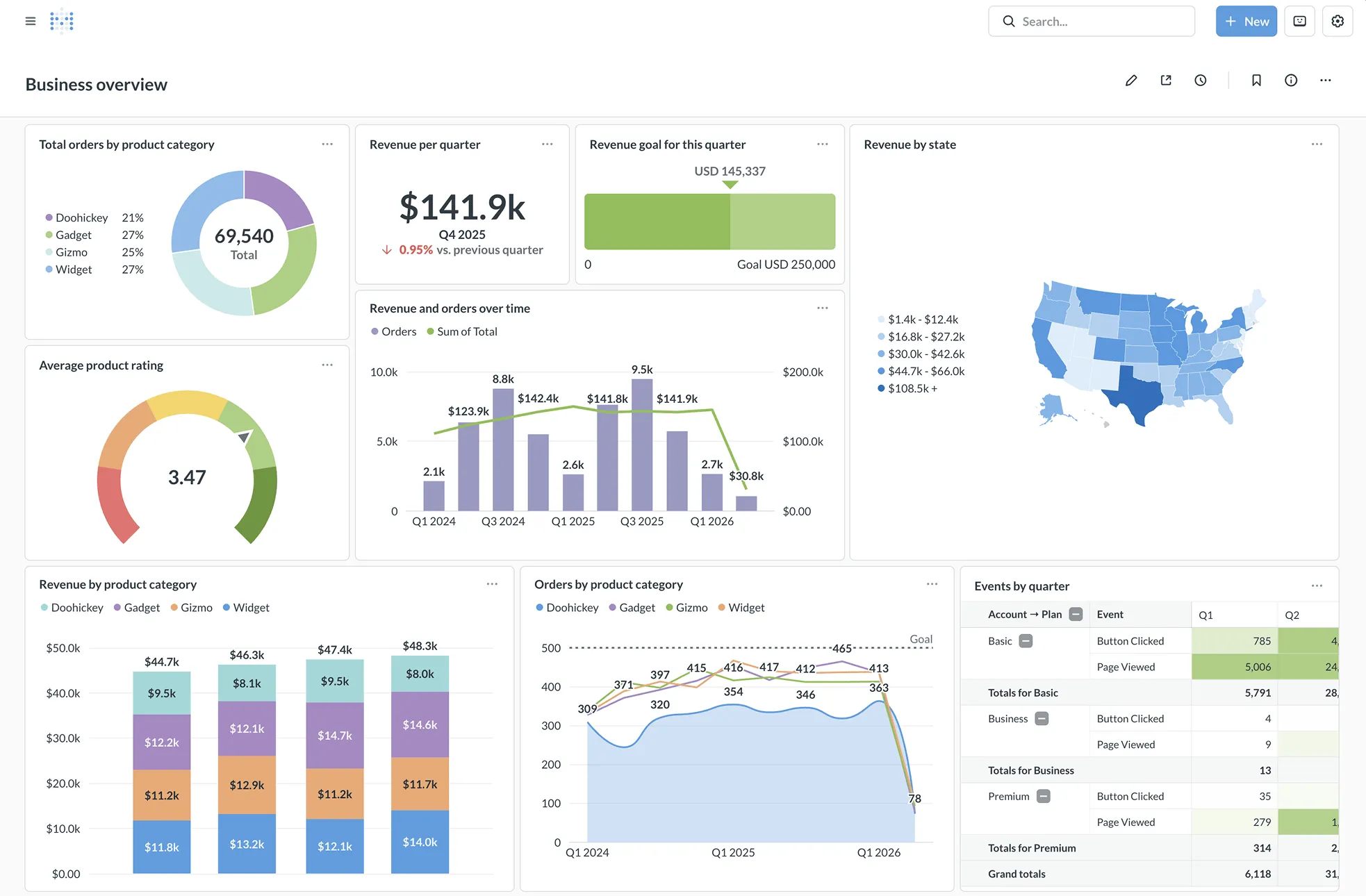
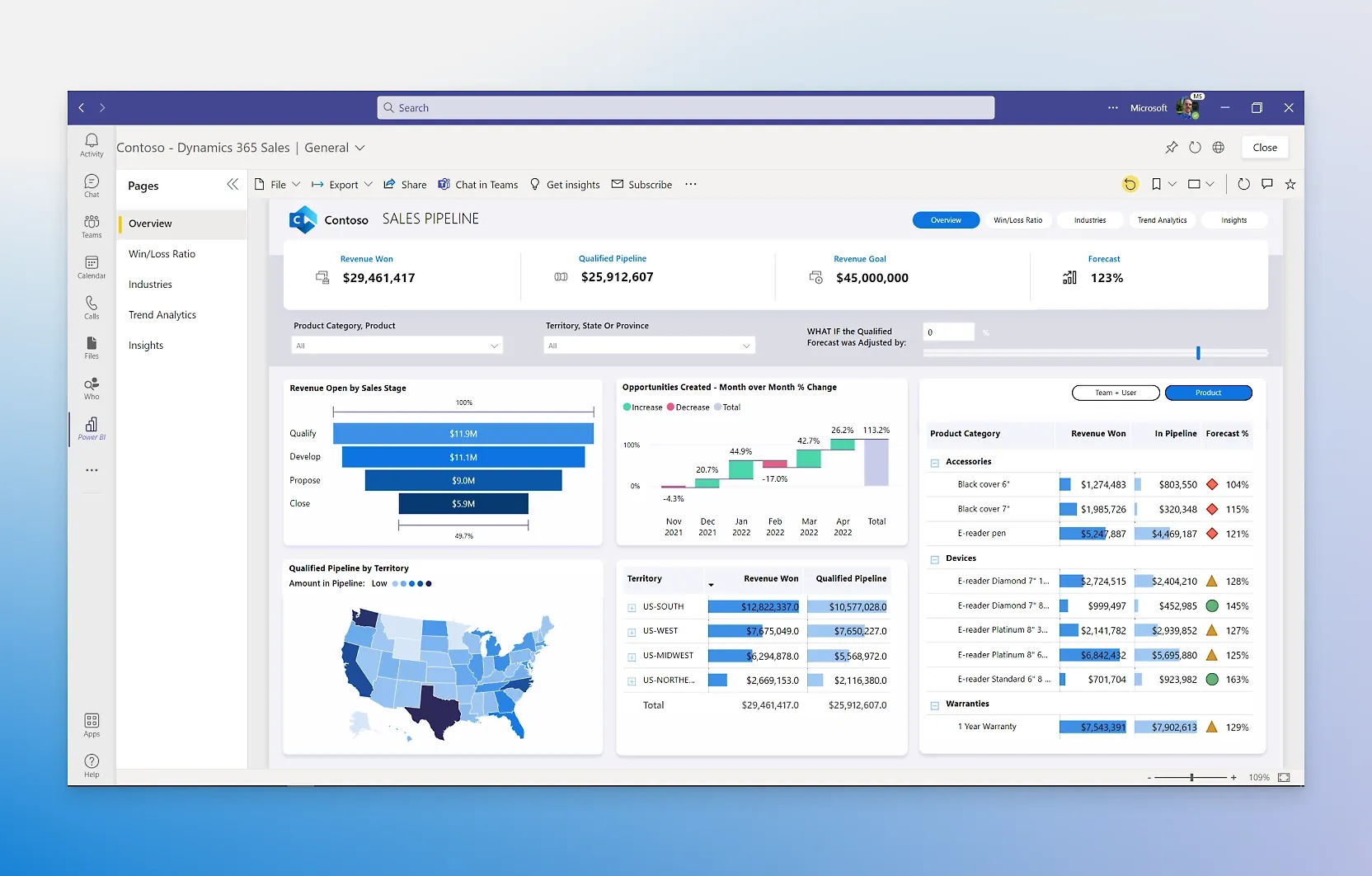
Interface Preview
Metabase
Power BI
Feature Comparison
| Feature | Metabase | Power BI |
|---|---|---|
| Data Querying | ||
| Visual Query Builder | Built-in no-code query builder for non-technical users | Drag-and-drop report canvas with hundreds of visuals |
| SQL / Advanced Query Support | Native SQL editor with full query support | DAX query language and Power Query for advanced modeling |
| AI-Assisted Querying | Metabot AI for single-shot SQL generation (add-on) | Copilot in Microsoft Fabric for report creation, DAX generation, and data summaries |
| Deployment & Architecture | ||
| Self-Hosted Option | Yes — Docker, JAR, or air-gapped deployments | No — cloud-based Power BI Service; Desktop app for local authoring only |
| Cloud Hosting | Metabase Cloud with managed infrastructure | Power BI Service and Microsoft Fabric capacity |
| Scalability | Scales from startup to enterprise; staging environments for safe deployments | Enterprise-grade; handles petabytes with semantic modeling across thousands of users |
| Sharing & Collaboration | ||
| Embedded Analytics | White-label embedding via iframes or React SDK | Power BI Embedded for customer-facing reports branded as your own |
| Scheduled Reports & Alerts | Email and Slack delivery with custom filters and real-time alerts | Report sharing via Teams, PowerPoint, Excel, and SharePoint |
| Dashboard Sharing | Public link sharing, PDF export, CSV/XLSX/JSON downloads | Share across Microsoft 365 apps; free users can view reports on Premium/Fabric capacity |
| Security & Permissions | ||
| Row/Column-Level Security | Row- and column-level permissions with database-managed row-level security | Row-level security with role-based access; governed through Microsoft Purview |
| SSO & Authentication | SAML, LDAP, JWT, and Google SSO with group mapping | Azure Active Directory SSO with Microsoft 365 E5 integration |
| Compliance | SOC1, SOC2, GDPR, CCPA compliant | Microsoft governance, security, and compliance; Microsoft Purview integration |
| Data Connectivity | ||
| Data Source Support | 20+ database connectors (PostgreSQL, MySQL, and more) | Connects to any data source via OneLake data hub; deep Azure integration |
| Data Transformation | SQL and Python transforms available (add-on on some plans) | Power Query and full Microsoft Fabric workloads for ETL |
| Live Query vs. Import | Live visualization layer — data stays in your database, no ingestion | Supports both direct query and imported datasets with scheduled refreshes |
Data Querying
Visual Query Builder
SQL / Advanced Query Support
AI-Assisted Querying
Deployment & Architecture
Self-Hosted Option
Cloud Hosting
Scalability
Sharing & Collaboration
Embedded Analytics
Scheduled Reports & Alerts
Dashboard Sharing
Security & Permissions
Row/Column-Level Security
SSO & Authentication
Compliance
Data Connectivity
Data Source Support
Data Transformation
Live Query vs. Import
Which to choose
Metabase and Power BI target different segments of the BI market. Metabase wins on speed of deployment, open-source flexibility, and embedded analytics for product teams. Power BI wins on enterprise scale, Microsoft ecosystem integration, and per-user cost at large organizations. We recommend Metabase for startups and product-led companies that need to ship analytics fast, and Power BI for enterprises already running on Microsoft 365 and Azure.
Best-fit scenarios
Choose Metabase if:
We recommend Metabase for startups and mid-size companies that want to get from database to dashboard in minutes, not weeks. Its open-source foundation means you can self-host with zero licensing cost, and the visual query builder lets non-technical teammates explore data independently. If you are building a SaaS product that needs customer-facing analytics, Metabase's white-label embedding with the React SDK is production-ready and avoids the overhead of rolling your own reporting layer. Teams with fewer than 100 users who value control over their deployment and do not need deep Microsoft integration will find Metabase the more practical and cost-effective choice.
Choose Power BI if:
We recommend Power BI for enterprises that already rely on Microsoft 365, Azure, and Teams as core infrastructure. At $14 per user per month for Pro, the per-seat cost is extremely competitive for organizations with hundreds or thousands of analysts. The Copilot AI features accelerate report creation and DAX authoring, and the tight integration with Excel, PowerPoint, and SharePoint means insights flow directly into the tools your teams already use daily. If your organization needs to handle petabytes of data, requires Microsoft Purview governance, or wants a unified analytics platform through Microsoft Fabric, Power BI is the stronger choice at enterprise scale.
These scenarios reflect the available product evidence. Your requirements, existing stack, and team expertise should guide the final decision.
Frequently Asked Questions
Is Metabase really free?
Metabase offers an open-source edition that you can self-host at no licensing cost using Docker or a standalone JAR file. Paid cloud plans start at $100 per month for the Starter tier, with higher-tier plans available for teams that need self-hosted cloud deployment or enterprise features. The open-source edition includes the core query builder, SQL editor, dashboards, and 20+ database connectors, making it a fully functional BI tool at zero cost.
Can Power BI connect to non-Microsoft data sources?
Yes. Power BI connects to a wide range of data sources through its OneLake data hub, not just Microsoft products. You can pull data from PostgreSQL, MySQL, Snowflake, and many other databases. That said, the deepest integrations and most seamless experience come when pairing Power BI with Azure, Dynamics 365, and other Microsoft services.
Which tool is better for embedded analytics in a SaaS product?
Metabase has a strong edge for SaaS embedding. It offers white-label analytics through iframes or a React SDK, with multi-tenant data segregation and granular permissions built in. Power BI Embedded also supports customer-facing reports branded as your own, but it requires Azure capacity pricing and is generally better suited for internal embedding within Microsoft-powered applications rather than external product analytics.
Do we need technical skills to use either tool?
Both tools are designed for mixed-skill teams. Metabase's visual query builder lets non-technical users create reports without SQL, while power users can drop into the SQL editor for complex analysis. Power BI provides a drag-and-drop report canvas and AI-generated reports through Copilot, though advanced modeling requires learning DAX. We consider Metabase slightly faster to learn for small teams, while Power BI offers more depth for enterprise data modeling.