Decision comparison
Metabase vs Redash
Metabase and Redash are both strong open-source BI tools, but they serve different audiences. Metabase delivers a polished, enterprise-ready platform with a no-code query builder, embedded analytics, advanced permissions, and a growing AI layer. Redash remains a focused, SQL-first tool that excels at connecting to diverse data sources and letting technical teams query and visualize data with minimal overhead. Your choice depends on whether you need self-service BI for mixed-skill teams or a lean query tool for SQL-fluent analysts.
Redash is maintained by volunteers, not by its owner
Databricks acquired Redash in June 2020 and shut the hosted Redash Cloud service down on 30 November 2021. Databricks-funded development on the open-source project wound down afterwards, and since late 2023 it has been maintained by a small group of volunteers. It still ships: v26.3.0 was released on 2 March 2026, at roughly one release a year. Redash remains free, Apache-2.0 and self-hostable; what changed is who decides its direction and how fast it follows the databases it connects to.
Direct comparison. These are reviewed substitutes bought for the same job, so the differences below are the ones that decide between them.
All 2 are BI platforms.
Quick Comparison
| Decision factor | Metabase | Redash |
|---|---|---|
| Best For | Teams needing self-service BI with embedded analytics | SQL-proficient teams needing a lightweight query and visualization tool |
| Pricing | Community Edition is free, open-source and self-hosted, with unlimited users. Paid Metabase Cloud plans start with Starter at $100/month, or $90/month billed annually, including the first 5 users, then $6 per user/month. Pro is $575/month, or $517.50/month annually, including the first 10 users, then $12 per user/month. Enterprise is custom pricing starting at $20,000/year. Both paid plans offer a 14 days free trial. | Self-hosted free (BSD-2-Clause license) |
| Ease of Use | No-code query builder plus SQL editor for power users | SQL-first interface with browser-based query editor |
| Data Source Support | 20+ native database connectors including PostgreSQL, MySQL, Redshift, BigQuery | Broad SQL, NoSQL, Big Data, and API data source support including PostgreSQL, MySQL, BigQuery, Redshift, Snowflake, Athena |
| Community Size | 48,000+ GitHub stars, 66 user reviews (8.4/10 rating) | 28,000+ GitHub stars, 17 user reviews (8.1/10 rating) |
| Deployment Options | Self-hosted (Docker, JAR) or Metabase Cloud | Self-hosted via Docker |
Metabase
- Best For:
- Teams needing self-service BI with embedded analytics
- Pricing:
- Community Edition is free, open-source and self-hosted, with unlimited users. Paid Metabase Cloud plans start with Starter at $100/month, or $90/month billed annually, including the first 5 users, then $6 per user/month. Pro is $575/month, or $517.50/month annually, including the first 10 users, then $12 per user/month. Enterprise is custom pricing starting at $20,000/year. Both paid plans offer a 14 days free trial.
- Ease of Use:
- No-code query builder plus SQL editor for power users
- Data Source Support:
- 20+ native database connectors including PostgreSQL, MySQL, Redshift, BigQuery
- Community Size:
- 48,000+ GitHub stars, 66 user reviews (8.4/10 rating)
- Deployment Options:
- Self-hosted (Docker, JAR) or Metabase Cloud
Redash
- Best For:
- SQL-proficient teams needing a lightweight query and visualization tool
- Pricing:
- Self-hosted free (BSD-2-Clause license)
- Ease of Use:
- SQL-first interface with browser-based query editor
- Data Source Support:
- Broad SQL, NoSQL, Big Data, and API data source support including PostgreSQL, MySQL, BigQuery, Redshift, Snowflake, Athena
- Community Size:
- 28,000+ GitHub stars, 17 user reviews (8.1/10 rating)
- Deployment Options:
- Self-hosted via Docker
Public signals
Verified factual signals only. Bars appear only for like-for-like metrics with five weekly assessments for every tool; missing evidence stays explicit. These signals do not establish enterprise adoption, product quality, or total cost.
| Metric | Metabase | Redash |
|---|---|---|
| Docker Hub pulls(Product adoption) | 272.7M | 100.1M |
| GitHub commits, 90d(Product adoption) | 2.0k | 14 |
| GitHub stars(Product adoption) | 49,000+ | 28,000+ |
| Search interest(Market interest) | Not available | 0 |
| Hacker News mentions, 90d(Community interest) | 12 | 2 |
| npm weekly downloads(Developer adoption) | 36.8k | Not available |
| Product Hunt comments(Community interest) | 30 | 1 |
| Product Hunt rating(Community interest) | 4.9/5 | Unavailable |
| Product Hunt reviews(Community interest) | 24 | 0 |
| Product Hunt votes(Community interest) | 310 | 9 |
| Stack Overflow questions(Community interest) | 374 | 133 |
| PyPI weekly downloads(Developer adoption) | Not available | 6.9k |
As of September 21, 2026 — updated weekly.
Health & risk evidence
Observed public-source checks for mapped package versions and repositories.
Metabase
September 21, 2026Package vulnerabilities
npm · @metabase/embedding-sdk-react@0.63.1
0 vulnerabilities
across 1 package
Repository security score
github.com/metabase/metabase
7.1/10
Redash
September 21, 2026Package vulnerabilities
PyPI · redash-toolbelt@0.1.9
0 vulnerabilities
across 1 package
Repository security score
github.com/getredash/redash
6.1/10
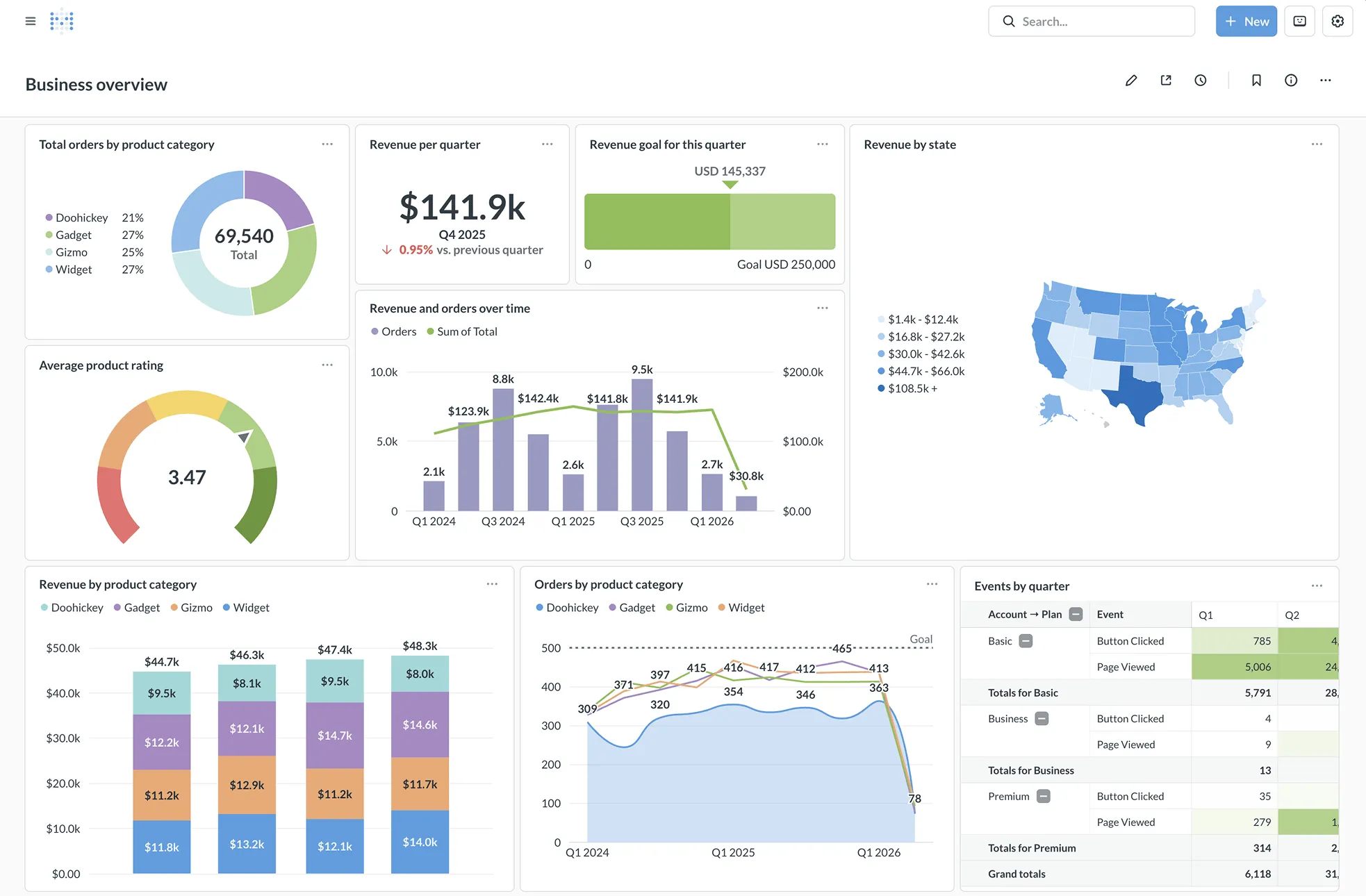
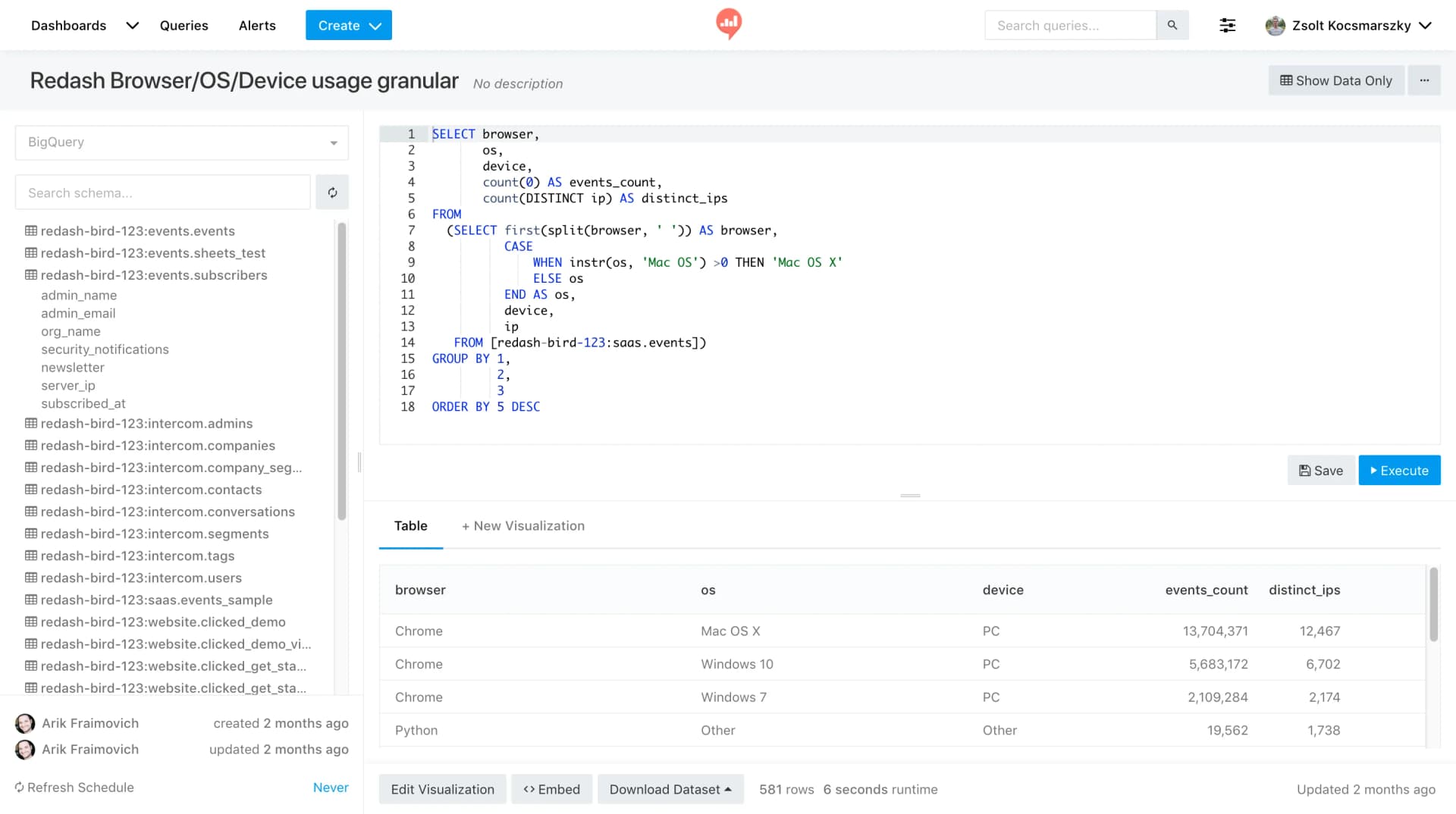
Interface Preview
Metabase
Redash
Feature Comparison
| Feature | Metabase | Redash |
|---|---|---|
| Query & Data Exploration | ||
| Visual Query Builder (No-Code) | Full no-code query builder with drag-and-drop | Not available; SQL-only query interface |
| SQL Editor | Built-in SQL editor with variable support | Powerful SQL editor with auto-complete and snippets |
| Query Result Caching | Granular result and model caching built-in | Results cached with configurable auto-refresh schedules |
| Visualization & Dashboards | ||
| Dashboard Creation | Interactive dashboards with drill-through and cross-filtering | Drag-and-drop dashboard builder with resize support |
| Visualization Types | Charts, maps, pivot tables, funnels, and automatic x-ray reports | Charts, cohort, pivot table, boxplot, map, counter, sankey, sunburst, word cloud, funnel |
| Scheduled Reports & Alerts | Email and Slack alerts with scheduled delivery and custom filters | Alert system with scheduled refresh from data sources |
| Embedded Analytics & Sharing | ||
| Embedded Analytics | Full embedded analytics with React SDK and iframe options, white-labeling | Public link sharing and embeddable widgets via URL |
| White-Labeling | Available on Pro and Enterprise plans with dynamic styling | Not available as a built-in feature |
| API Access | REST API for programmatic access | Full REST API for queries, dashboards, and data sources |
| Security & Administration | ||
| SSO Integration | SAML, LDAP, JWT, and Google SSO with group mapping | SSO support with access control |
| Row/Column-Level Permissions | Granular row-level, column-level, and collection-level permissions | Basic user management and access control |
| Multi-Tenant Data Segregation | Native support for one-database-per-tenant architecture | Not available as a built-in feature |
| Platform & Ecosystem | ||
| AI Features | Metabot AI for natural language SQL generation (add-on) | No built-in AI features |
| Data Modeling / Semantic Layer | Data Studio with models, metrics, segments, SQL/Python transforms | No built-in data modeling layer |
| Primary Language | Clojure (backend) | Python (backend) |
Query & Data Exploration
Visual Query Builder (No-Code)
SQL Editor
Query Result Caching
Visualization & Dashboards
Dashboard Creation
Visualization Types
Scheduled Reports & Alerts
Embedded Analytics & Sharing
Embedded Analytics
White-Labeling
API Access
Security & Administration
SSO Integration
Row/Column-Level Permissions
Multi-Tenant Data Segregation
Platform & Ecosystem
AI Features
Data Modeling / Semantic Layer
Primary Language
Which to choose
Metabase and Redash are both strong open-source BI tools, but they serve different audiences. Metabase delivers a polished, enterprise-ready platform with a no-code query builder, embedded analytics, advanced permissions, and a growing AI layer. Redash remains a focused, SQL-first tool that excels at connecting to diverse data sources and letting technical teams query and visualize data with minimal overhead. Your choice depends on whether you need self-service BI for mixed-skill teams or a lean query tool for SQL-fluent analysts.
Best-fit scenarios
Choose Metabase if:
We recommend Metabase when you need a BI platform that serves both technical and non-technical users. The no-code visual query builder lets business stakeholders explore data independently, while the SQL editor gives analysts full control for complex queries. Metabase stands out with its embedded analytics capabilities, including a React SDK and white-labeling, making it the stronger choice for SaaS companies that need customer-facing dashboards. The granular permission system with row-level, column-level, and collection-level security gives administrators fine control over data access. Metabase Cloud offers a fully managed deployment path, and the recently introduced Data Studio provides a semantic layer with models, metrics, and transforms. With 46,900+ GitHub stars and an 8.4/10 user rating, Metabase has a sizable community and a quick release cadence.
Choose Redash if:
We recommend Redash when your team is comfortable writing SQL and you want a no-frills tool to query, visualize, and share data. Redash connects to a wide range of SQL, NoSQL, Big Data, and API data sources, making it a strong fit for organizations with heterogeneous data stacks. The browser-based SQL editor with auto-complete, snippets, and schema browsing provides a productive query workflow. Redash offers a broader set of visualization types out of the box, including sankey diagrams, sunburst charts, and word clouds. As a fully open-source tool under the BSD-2-Clause license with no paid tiers, Redash has zero licensing cost for self-hosted deployments. With 28,500+ GitHub stars and backing from Databricks (which acquired Redash in 2020), the project continues to receive active development. Redash is the better pick for data teams that want a straightforward, cost-free query and dashboard tool without the overhead of a full BI platform.
These scenarios reflect the available product evidence. Your requirements, existing stack, and team expertise should guide the final decision.
Frequently Asked Questions
Is Redash still actively maintained after the Databricks acquisition?
Yes. Databricks acquired Redash in June 2020, and the project remains actively maintained as open-source software under the BSD-2-Clause license. The latest release (v26.3.0) shipped in March 2026, and the GitHub repository shows recent commit activity. Databricks continues to invest in Redash while integrating its technology into the broader Databricks platform.
Can Metabase be used for free?
Yes. Metabase offers a fully functional open-source edition that you can self-host at no cost. The open-source version includes the visual query builder, SQL editor, dashboards, and core security features. Paid cloud plans start at $100/mo for the Starter tier. The Enterprise plan adds priority support, advanced permissions, and additional Data Studio features at per-user pricing.
Which tool has better data source support?
Both tools support a wide range of databases, but they approach connectivity differently. Metabase offers 20+ native database connectors covering PostgreSQL, MySQL, Redshift, BigQuery, MongoDB, and other major databases. Redash supports SQL, NoSQL, Big Data, and API data sources including PostgreSQL, MySQL, BigQuery, Redshift, Snowflake, Athena, Spark SQL, and MariaDB. Redash also lets you use query results as a data source to join data across different databases, which is useful for cross-database analysis.
Which tool is better for embedding analytics into a SaaS product?
Metabase is the stronger choice for embedded analytics. It provides a dedicated React SDK for deep integration, iframe-based embedding for quick setup, and white-labeling to match your product branding. Paid plans include dynamic styling, custom click behaviors, and interactive controls ranging from view-only mode to full data discovery. Redash supports public link sharing and embeddable widgets via secret URLs, but it lacks a dedicated embedding SDK and white-labeling capabilities.