Decision comparison
Qlik Sense vs Power BI
Qlik Sense and Power BI are both established business intelligence platforms recognized as Leaders in the Gartner Magic Quadrant for Analytics and BI Platforms. Qlik Sense stands out with its unique Associative Engine and on-premises deployment for regulated industries, while Power BI features transparent pricing starting at free and close Microsoft ecosystem integration.
Direct comparison. These are reviewed substitutes bought for the same job, so the differences below are the ones that decide between them.
All 2 are BI platforms.
Quick Comparison
| Decision factor | Qlik Sense | Power BI |
|---|---|---|
| Primary Purpose | Self-service BI platform with associative analytics engine for data discovery and visualization | Microsoft business intelligence platform with deep Microsoft 365 and Azure integration |
| Pricing Model | Contact for pricing | A free account is available. Power BI Pro $14.00 per user per month and Power BI Premium Per User $24.00 per user per month, both paid yearly. Power BI Embedded is priced by capacity. |
| Deployment Model | On-premises client-managed deployment; Qlik Cloud Analytics available as SaaS option | Cloud-first SaaS via Power BI Service; Power BI Desktop available as free authoring tool |
| Analytics Engine | Proprietary Associative Engine that indexes all data relationships for free-form exploration | DAX formula language and Power Query for data modeling with Copilot AI assistance |
| Learning Curve | Steep learning curve initially; powerful once users master associative exploration model | Moderate; familiar Microsoft interface with drag-and-drop canvas and AI-generated reports |
| Best For | Organizations needing governed on-premises analytics with augmented AI-driven insights | Teams already invested in Microsoft 365 seeking cost-effective self-service BI |
Qlik Sense
- Primary Purpose:
- Self-service BI platform with associative analytics engine for data discovery and visualization
- Pricing Model:
- Contact for pricing
- Deployment Model:
- On-premises client-managed deployment; Qlik Cloud Analytics available as SaaS option
- Analytics Engine:
- Proprietary Associative Engine that indexes all data relationships for free-form exploration
- Learning Curve:
- Steep learning curve initially; powerful once users master associative exploration model
- Best For:
- Organizations needing governed on-premises analytics with augmented AI-driven insights
Power BI
- Primary Purpose:
- Microsoft business intelligence platform with deep Microsoft 365 and Azure integration
- Pricing Model:
- A free account is available. Power BI Pro $14.00 per user per month and Power BI Premium Per User $24.00 per user per month, both paid yearly. Power BI Embedded is priced by capacity.
- Deployment Model:
- Cloud-first SaaS via Power BI Service; Power BI Desktop available as free authoring tool
- Analytics Engine:
- DAX formula language and Power Query for data modeling with Copilot AI assistance
- Learning Curve:
- Moderate; familiar Microsoft interface with drag-and-drop canvas and AI-generated reports
- Best For:
- Teams already invested in Microsoft 365 seeking cost-effective self-service BI
Public signals
Verified factual signals only. Bars appear only for like-for-like metrics with five weekly assessments for every tool; missing evidence stays explicit. These signals do not establish enterprise adoption, product quality, or total cost.
| Metric | Qlik Sense | Power BI |
|---|---|---|
| GitHub commits, 90d(Developer adoption) | 0 | 0 |
| GitHub stars(Developer adoption) | 48 | 1,000+ |
| Search interest(Market interest) | 1 | 62 |
| Hacker News mentions, 90d(Community interest) | 0 | 0 |
| npm weekly downloads(Developer adoption) | 9.4k | 241.2k |
| Stack Overflow questions(Community interest) | 806 | 20.5k |
| Product Hunt comments(Community interest) | Not available | 0 |
| Product Hunt reviews(Community interest) | Not available | 0 |
| Product Hunt votes(Community interest) | Not available | 2 |
As of September 21, 2026 — updated weekly.
Health & risk evidence
Observed public-source checks for mapped package versions and repositories.
Qlik Sense
September 21, 2026Package vulnerabilities
npm · @qlik/api@2.16.0
0 vulnerabilities
across 1 package
Repository security score
Not available
Power BI
September 21, 2026Package vulnerabilities
npm · powerbi-client@2.24.1
0 vulnerabilities
across 1 package
Repository security score
github.com/microsoft/PowerBI-JavaScript
7.4/10
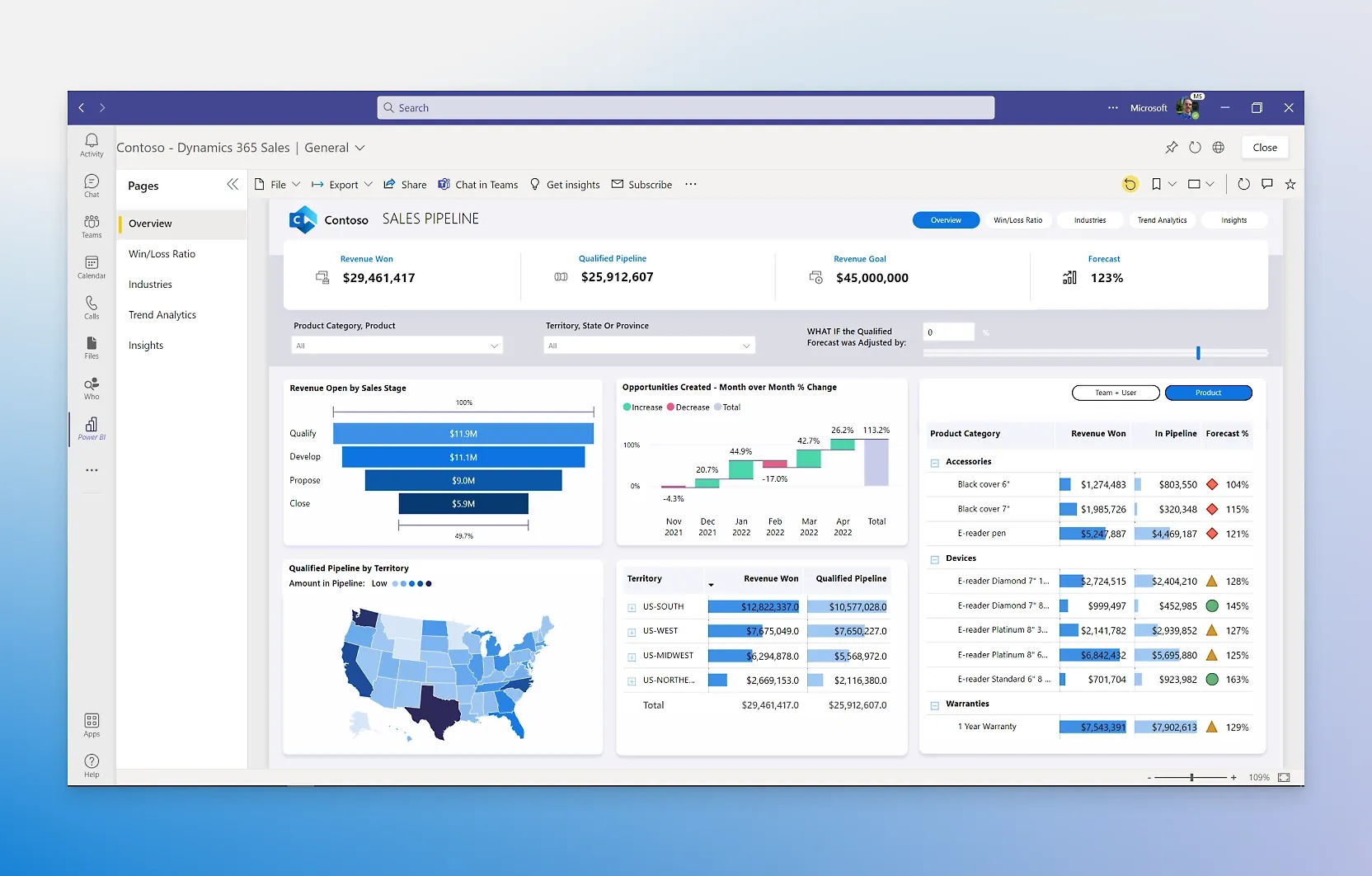
Interface Preview
Power BI
Feature Comparison
| Feature | Qlik Sense | Power BI |
|---|---|---|
| Data Exploration and Visualization | ||
| Analytics Engine | Proprietary Associative Engine indexes all data relationships, enabling free-form exploration with instant calculations at scale | DAX formula language combined with Power Query modeling provides semantic modeling and enterprise-grade data ingestion |
| Interactive Dashboards | Every chart, table, and object is interactive and updates instantly to current context with each user selection | Drag-and-drop report canvas with hundreds of visuals and AI that auto-generates reports from natural language prompts |
| Natural Language Interaction | Insight Advisor uses NLP for search-based visual discovery and conversational analytics within Qlik Sense | Copilot creates reports in seconds from conversational language, generates DAX calculations, and writes text summaries |
| AI and Augmented Analytics | ||
| AI-Powered Insights | Insight Advisor auto-generates analyses and suggestions using AI and ML built into the platform foundation | AI features find patterns in data, create reports instantly, provide answers, and generate DAX queries automatically |
| Predictive Analytics | Qlik AutoML provides key-driver analysis, predictive analytics, and what-if scenarios directly for analytics users | Advanced AI capabilities integrated through Microsoft Azure for predictive insights embedded in reports |
| Automated Insight Generation | AI-assisted creation and data preparation automate analytics generation for users at all skill levels | Copilot auto-generates tailored reports and adds insightful text summaries with customizable tone, scope, and style |
| Data Integration and Preparation | ||
| Data Connectivity | Connects to hundreds of data sources with complete data preparation and integration capabilities for big and small data | Creates datasets from any source and adds them to the OneLake data hub to establish a single source of truth |
| Data Catalog and Governance | Self-service data catalog of analytics-ready data with data origin tracking and journey visibility for governance | Microsoft Purview integration provides data discovery, cataloging, and sensitivity labeling in a unified governance view |
| Data Preparation | Built-in data prep capabilities allow users to work with nearly limitless combinations of data sources directly | Power Query provides a transformation engine for connecting, cleaning, and shaping data before visualization |
| Collaboration and Sharing | ||
| Team Collaboration | Collaboration and notes feature adds narrative context to analytics with discussion threads for team decisioning | Reports embed directly into Microsoft Teams, PowerPoint, Excel, and SharePoint for sharing across Microsoft 365 |
| Mobile Access | Built for mobile with responsive design and touch interaction native to the platform; offline analysis available | Mobile-responsive reports accessible through the Power BI mobile app across devices with data refresh capabilities |
| Embedded Analytics | Complete set of open APIs for custom analytics solutions, new visualizations, extensions, and embedded analytics | Power BI Embedded enables embedding reports in custom applications, branded as your own with reduced developer overhead |
| Enterprise Capabilities | ||
| Automation and Alerting | Application automation with visual low-code workflows; data-driven alerting monitors all data without visualization limits | Integration with Microsoft Power Platform for low-code automation; alerting through Power BI Service dashboards |
| Reporting and Distribution | Pixel-perfect reports in Microsoft Office and PDF formats with scheduled distribution via email and shared folders | Paginated reports with scheduled delivery; seamless export to PowerPoint and Excel through native Microsoft integration |
| Security and Compliance | On-premises deployment provides full data control for highly regulated industries with client-managed security | Built-in Microsoft governance, security, and compliance features with end-to-end visibility into the data estate |
Data Exploration and Visualization
Analytics Engine
Interactive Dashboards
Natural Language Interaction
AI and Augmented Analytics
AI-Powered Insights
Predictive Analytics
Automated Insight Generation
Data Integration and Preparation
Data Connectivity
Data Catalog and Governance
Data Preparation
Collaboration and Sharing
Team Collaboration
Mobile Access
Embedded Analytics
Enterprise Capabilities
Automation and Alerting
Reporting and Distribution
Security and Compliance
Which to choose
Qlik Sense and Power BI are both established business intelligence platforms recognized as Leaders in the Gartner Magic Quadrant for Analytics and BI Platforms. Qlik Sense stands out with its unique Associative Engine and on-premises deployment for regulated industries, while Power BI features transparent pricing starting at free and close Microsoft ecosystem integration.
Best-fit scenarios
Choose Qlik Sense if:
We recommend Qlik Sense for organizations that need on-premises analytics in regulated industries where data must remain client-managed. The Associative Engine provides a fundamentally different exploration experience compared to query-based tools, indexing all data relationships so users can make selections freely in any direction without predefined drill paths. Qlik Sense is trusted by over 40,000 customers worldwide, including Honda, Lenovo, Samsung, and Merck, and has been named a Gartner Magic Quadrant Leader for 15 consecutive years. Organizations that need augmented analytics with built-in AI, automated insight generation through Insight Advisor, and predictive capabilities via Qlik AutoML will find Qlik Sense delivers a complete analytics platform. The trade-off is enterprise pricing that requires contacting sales.
Choose Power BI if:
We recommend Power BI for teams already invested in the Microsoft ecosystem who want cost-effective business intelligence with transparent pricing. The free tier lets individual users author reports with Power BI Desktop, Pro at $14/user/month enables sharing and collaboration, and Premium at $24/user/month unlocks enterprise-scale features. Power BI integrates natively with Microsoft 365, Azure, Teams, Excel, PowerPoint, and Dynamics 365, which eliminates friction for organizations already running Microsoft infrastructure. Microsoft Fabric extends Power BI into a unified analytics platform with OneLake, data engineering workloads, and unified governance. Copilot AI generates reports from natural language descriptions, writes DAX queries, and creates data summaries. Companies like Walmart, Lumen, and Abercrombie & Fitch use Power BI to democratize data access across their organizations.
These scenarios reflect the available product evidence. Your requirements, existing stack, and team expertise should guide the final decision.
Frequently Asked Questions
What is the main technical difference between Qlik Sense and Power BI?
The core technical distinction is the analytics engine. Qlik Sense uses a proprietary Associative Engine that indexes every relationship between data points, allowing users to make selections freely across any object in any direction. This associative model highlights both related and unrelated data, revealing connections that query-based tools miss. Power BI uses the DAX formula language and Power Query for data modeling, operating on a more traditional query-based approach where users define relationships and build calculated measures. Power BI's Copilot adds AI-generated reports and natural language DAX queries, while Qlik's Insight Advisor provides NLP-driven search and conversational analytics. Both tools support augmented analytics, but their underlying engines approach data exploration from fundamentally different paradigms.
How do Qlik Sense and Power BI compare on pricing?
Power BI offers transparent, published pricing with a free tier for individual report authoring, Pro at $14 per user per month paid yearly, and Premium at $24 per user per month paid yearly. Power BI is also included in Microsoft 365 E5 licenses. Power BI Embedded and Microsoft Fabric capacity pricing are available for organizations needing customer-facing reports or unified analytics workloads. Qlik Sense uses enterprise pricing that requires contacting sales for on-premises deployments, while Qlik Cloud Analytics pricing is available on their pricing page. For smaller teams and organizations with budget constraints, Power BI's free and low-cost tiers provide a clear cost advantage. For larger enterprises that need Qlik's Associative Engine and on-premises deployment, the total cost depends on the negotiated agreement.
Can Qlik Sense and Power BI both handle large enterprise deployments?
Both platforms serve large enterprises, though they approach scale differently. Qlik Sense is trusted by over 40,000 customers worldwide, with deployments at organizations like Merck across 60 countries and Honda with over 7,000 users. Qlik's on-premises deployment gives regulated industries full control over data and infrastructure. Power BI scales to transform petabytes with enterprise-grade ingestion and semantic modeling across thousands of users. Microsoft Fabric extends Power BI's capacity model with reservation-based pricing and pay-as-you-go options. Walmart uses Power BI to bring together data from multiple vendors across their technology stack, and Lumen eliminated nearly 10,000 manual hours through Microsoft-powered automation. Both platforms have earned Gartner Magic Quadrant Leader recognition in the Analytics and BI category.
Which platform has better AI and augmented analytics capabilities?
Both Qlik Sense and Power BI invest heavily in AI-powered analytics, with different strengths. Qlik Sense has AI and ML built into its foundation, with Insight Advisor providing automated insight generation, search-based visual discovery using NLP, and conversational analytics. Qlik AutoML delivers key-driver analysis, predictive analytics, and what-if scenarios for analytics users without requiring data science expertise. Power BI leverages Microsoft's Copilot AI to create reports from conversational language descriptions, generate DAX calculations, write text summaries with customizable tone and style, and auto-generate reports from data. Power BI also benefits from deeper Azure AI integrations for advanced predictive capabilities. Qlik's AI is tightly integrated with its Associative Engine, while Power BI's AI leverages the extensive Microsoft AI ecosystem including Azure and Copilot.