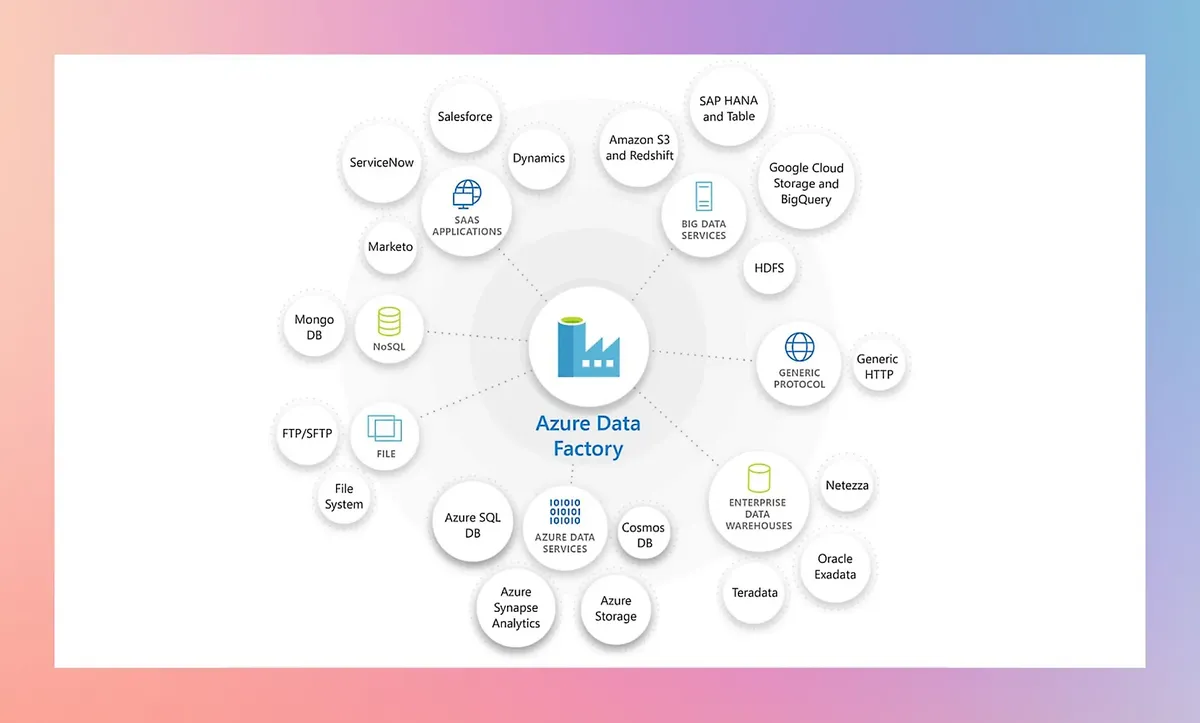
Azure Data Factory: product and architecture
This Azure Data Factory review examines Microsoft's cloud-native data integration service that has become a go-to option for enterprises building ETL and ELT pipelines at scale. Azure Data Factory (ADF) sits at the center of Microsoft's data platform strategy, offering a visual authoring experience, over 100 built-in connectors, and deep integration across the Azure ecosystem. For organizations already invested in Microsoft's cloud, ADF delivers a compelling pipeline orchestration layer. But it also carries complexity and costs that demand careful evaluation before committing.
Overview
Azure Data Factory is a managed, serverless data integration service that lets teams build, schedule, and monitor data pipelines without managing infrastructure. Microsoft positions it as the backbone for moving and transforming data across cloud and on-premises environments.
ADF works through a visual pipeline designer where users define activities — data copy operations, data flow transformations, stored procedure calls, and custom code execution. Pipelines can pull data from SaaS applications, databases, file systems, and streaming sources through a library of 100+ native connectors. The service supports both code-free transformations via Mapping Data Flows (Spark-based under the hood) and code-first approaches through Azure Databricks, HDInsight, or custom activities.
A self-hosted integration runtime bridges on-premises data sources to the cloud, which matters for hybrid architectures. ADF also handles SSIS package execution for teams migrating legacy SQL Server Integration Services workloads. Monitoring happens through the Azure portal with built-in alerting, Log Analytics integration, and pipeline-level metrics.
Key Features and Architecture
ADF's architecture revolves around four core components: pipelines, activities, datasets, and integration runtimes.
Pipelines and Activities form the execution backbone. A pipeline groups activities into a logical workflow. Activities range from simple copy operations to complex transformations and control flow constructs like ForEach loops, If conditions, and Switch statements. Pipelines support parameterization, making them reusable across environments and datasets.
Mapping Data Flows provide a visual, code-free transformation layer that compiles to Apache Spark. Users drag and drop transformations — joins, aggregations, pivots, window functions, and derived columns — through a GUI. The engine optimizes partitioning and execution automatically. For teams without Spark expertise, this is one of ADF's strongest differentiators.
Integration Runtimes handle the actual compute. Azure IR runs in Microsoft's cloud, Auto-Resolve IR picks the nearest region, and Self-Hosted IR runs on your own machines for accessing on-premises or private-network data sources. SSIS IR provisions a dedicated cluster for running legacy SSIS packages.
Triggers and Scheduling offer three trigger types: schedule-based (cron-like), tumbling window (fixed-interval with retry and dependency), and event-based (blob storage events or custom events). Tumbling window triggers excel at backfill scenarios where you need to process historical time slices.
Source Control Integration links pipelines to Git repositories (Azure DevOps or GitHub), enabling branching, pull requests, and CI/CD workflows. This is critical for production-grade deployments where pipeline definitions need version history and review processes.
Monitoring and Lineage through Azure Monitor and Microsoft Purview gives visibility into pipeline runs, activity durations, and data lineage across the organization. The built-in monitoring hub shows real-time and historical pipeline execution with drill-down into individual activities.
Ideal Use Cases
ADF fits best in specific scenarios. Large enterprises already running on Azure will find the native integrations with Azure SQL, Synapse Analytics, Blob Storage, and Data Lake Storage Gen2 reduce friction significantly. The managed infrastructure means no cluster provisioning or patching.
Hybrid data integration is another strong fit. Organizations with on-premises SQL Server, Oracle, or SAP systems that need to feed cloud analytics benefit from the self-hosted integration runtime. SSIS migration projects also land here — teams can lift-and-shift existing SSIS packages to ADF's SSIS IR without rewriting transformation logic.
Batch-oriented ETL/ELT workloads with well-defined schedules work well. Think nightly data warehouse loads, periodic CRM extracts, or scheduled file processing from SFTP drops. ADF's tumbling window triggers handle time-series backfill scenarios that many competing tools handle poorly.
Where ADF struggles: real-time streaming, low-latency event processing, and scenarios requiring sub-minute scheduling. Teams needing those patterns should look at Azure Event Hubs or Stream Analytics instead.
Pros and Cons
Pros:
- Native Azure ecosystem integration with Synapse, Data Lake, and Purview reduces glue code
- Visual pipeline designer and Mapping Data Flows reduce the barrier for non-developers
- Self-hosted integration runtime handles hybrid and on-premises connectivity without extra licensing
- Git integration and CI/CD support enable production-grade deployment practices
- SSIS migration path preserves existing investment in SQL Server Integration Services packages
- Consumption pricing means zero cost when pipelines are idle
Cons:
- Data Flow cluster startup latency (3-5 minutes) makes short-running transformations expensive
- Debugging complex pipelines through the web UI is cumbersome compared to code-first tools
- Connector quality varies — some connectors trail in feature support or have undocumented limitations
- Vendor lock-in to Azure; migrating pipelines to another cloud or on-premises platform requires a full rewrite