Decision comparison
Evidence vs Looker
Evidence and Looker serve fundamentally different workflows within the business intelligence space. Evidence delivers a code-first approach where analysts write SQL and markdown to produce polished, version-controlled reports, while Looker provides an enterprise-grade semantic layer and self-service exploration platform for organizations that need governed metrics across large teams.
Direct comparison. These are reviewed substitutes bought for the same job, so the differences below are the ones that decide between them.
All 2 are BI platforms.
Quick Comparison
| Decision factor | Evidence | Looker |
|---|---|---|
| Approach | Code-based BI using SQL and markdown files | GUI-based enterprise BI with LookML modeling language |
| Pricing Model | Team $2,500 per month, billed monthly, for unlimited users, including the analytics agent, page-level access control and 20K AI credits. Enterprise is quote-only and adds SSO, SCIM, row-level access rules and embedding. A 30-day trial is offered. | Looker (Google Cloud core) publishes no platform or per-user price. It offers three platform editions — Standard for organisations under 50 users, Enterprise, and Embed — each including one production instance, 10 Standard Users and 2 Developer Users, and each requiring a custom quote. Data-token overages beyond an instance's monthly allocation are published, at $3.00 per 1M input tokens and $20.00 per 1M output tokens. |
| Deployment | Open-source self-hosted or cloud-hosted SaaS | Fully managed SaaS on Google Cloud Platform |
| Target User | Data analysts and engineers comfortable with code | Business analysts, data teams, and non-technical stakeholders |
| Semantic Layer | No dedicated semantic layer; logic lives in SQL queries | LookML semantic layer defines reusable metrics, joins, and permissions |
| Data Connectivity | Connects to Snowflake, BigQuery, ClickHouse, DuckDB, and other major databases | Queries warehouses directly including BigQuery, Snowflake, Redshift, and others |
| Visualization | Publication-quality charts rendered from markdown component syntax | Interactive dashboards with drag-and-drop canvas via Looker Studio |
| Collaboration | Git-based version control for shared report development | Shared dashboards, scheduled reports, and Slack integration |
| AI Features | AI agent assists with documentation lookup, schema checks, and markdown generation | Gemini-powered Conversational Analytics for natural language data queries |
| Open Source | Yes, MIT-licensed open-source core with 6,100+ GitHub stars | No, proprietary closed-source platform owned by Google |
Evidence
- Approach:
- Code-based BI using SQL and markdown files
- Pricing Model:
- Team $2,500 per month, billed monthly, for unlimited users, including the analytics agent, page-level access control and 20K AI credits. Enterprise is quote-only and adds SSO, SCIM, row-level access rules and embedding. A 30-day trial is offered.
- Deployment:
- Open-source self-hosted or cloud-hosted SaaS
- Target User:
- Data analysts and engineers comfortable with code
- Semantic Layer:
- No dedicated semantic layer; logic lives in SQL queries
- Data Connectivity:
- Connects to Snowflake, BigQuery, ClickHouse, DuckDB, and other major databases
- Visualization:
- Publication-quality charts rendered from markdown component syntax
- Collaboration:
- Git-based version control for shared report development
- AI Features:
- AI agent assists with documentation lookup, schema checks, and markdown generation
- Open Source:
- Yes, MIT-licensed open-source core with 6,100+ GitHub stars
Looker
- Approach:
- GUI-based enterprise BI with LookML modeling language
- Pricing Model:
- Looker (Google Cloud core) publishes no platform or per-user price. It offers three platform editions — Standard for organisations under 50 users, Enterprise, and Embed — each including one production instance, 10 Standard Users and 2 Developer Users, and each requiring a custom quote. Data-token overages beyond an instance's monthly allocation are published, at $3.00 per 1M input tokens and $20.00 per 1M output tokens.
- Deployment:
- Fully managed SaaS on Google Cloud Platform
- Target User:
- Business analysts, data teams, and non-technical stakeholders
- Semantic Layer:
- LookML semantic layer defines reusable metrics, joins, and permissions
- Data Connectivity:
- Queries warehouses directly including BigQuery, Snowflake, Redshift, and others
- Visualization:
- Interactive dashboards with drag-and-drop canvas via Looker Studio
- Collaboration:
- Shared dashboards, scheduled reports, and Slack integration
- AI Features:
- Gemini-powered Conversational Analytics for natural language data queries
- Open Source:
- No, proprietary closed-source platform owned by Google
Public signals
Verified factual signals only. Bars appear only for like-for-like metrics with five weekly assessments for every tool; missing evidence stays explicit. These signals do not establish enterprise adoption, product quality, or total cost.
| Metric | Evidence | Looker |
|---|---|---|
| GitHub commits, 90d(Product adoption) | 40 | Not available |
| GitHub stars(Product adoption) | 6,500+ | Not available |
| Search interest(Market interest) | 0 | 2 |
| npm weekly downloads(Product adoption) | 18.9k | Not available |
| Product Hunt comments(Community interest) | 28 | 5 |
| Product Hunt rating(Community interest) | 4.8/5 | Unavailable |
| Product Hunt reviews(Community interest) | 4 | 0 |
| Product Hunt votes(Community interest) | 113 | 83 |
| Hacker News mentions, 90d(Community interest) | Not available | 2 |
| npm weekly downloads(Developer adoption) | Not available | 104.6k |
| PyPI weekly downloads(Developer adoption) | Not available | 2.0M |
| Stack Overflow questions(Community interest) | Not available | 226 |
As of September 21, 2026 — updated weekly.
Health & risk evidence
Observed public-source checks for mapped package versions and repositories.
Evidence
September 21, 2026Package vulnerabilities
npm · @evidence-dev/evidence@40.1.8
0 vulnerabilities
across 1 package
Repository security score
Not available
Looker
September 21, 2026Package vulnerabilities
npm · @looker/sdk@26.12.0 · PyPI · looker-sdk@26.12.0
0 vulnerabilities
across 2 packages
Repository security score
Not available
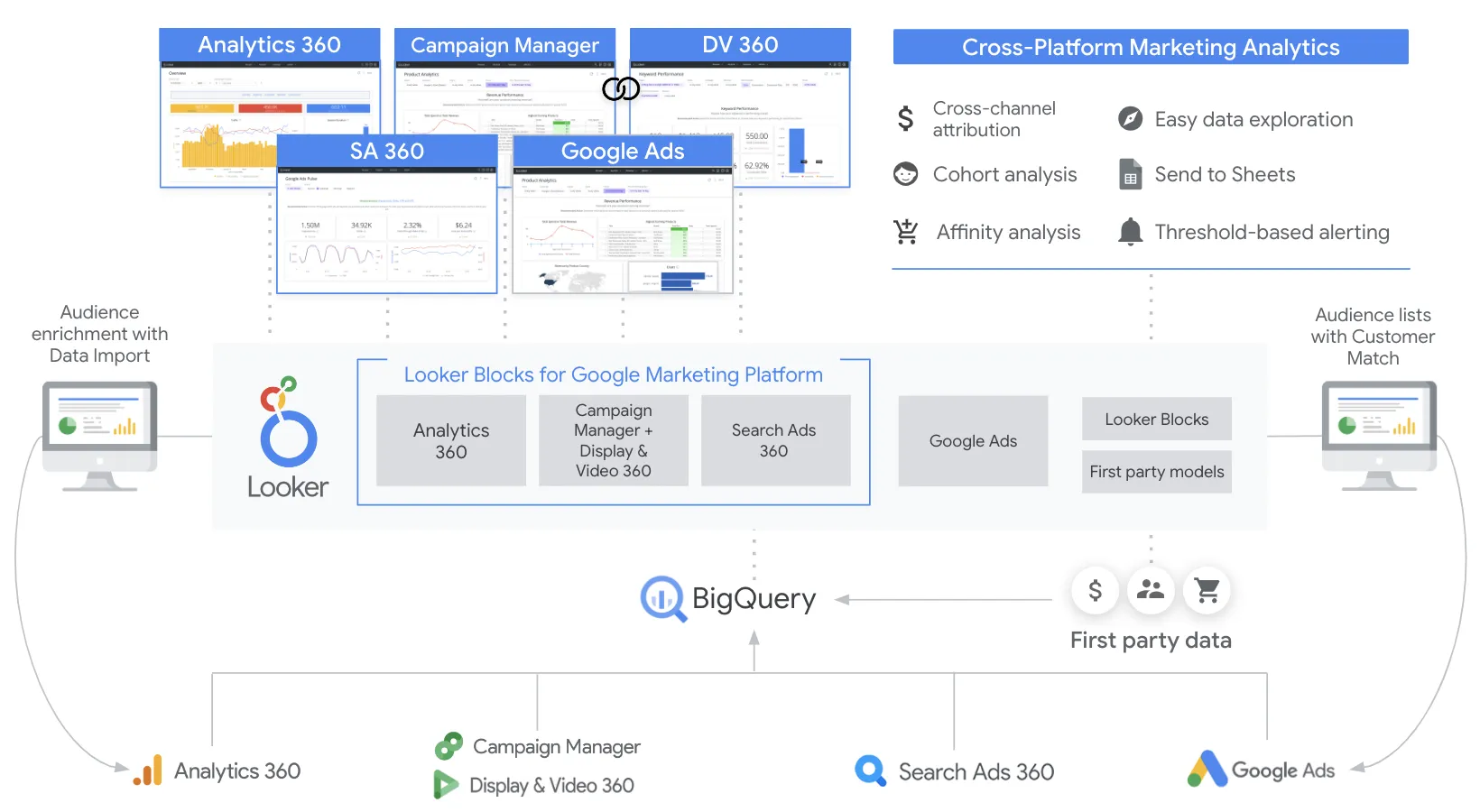
Interface Preview
Evidence
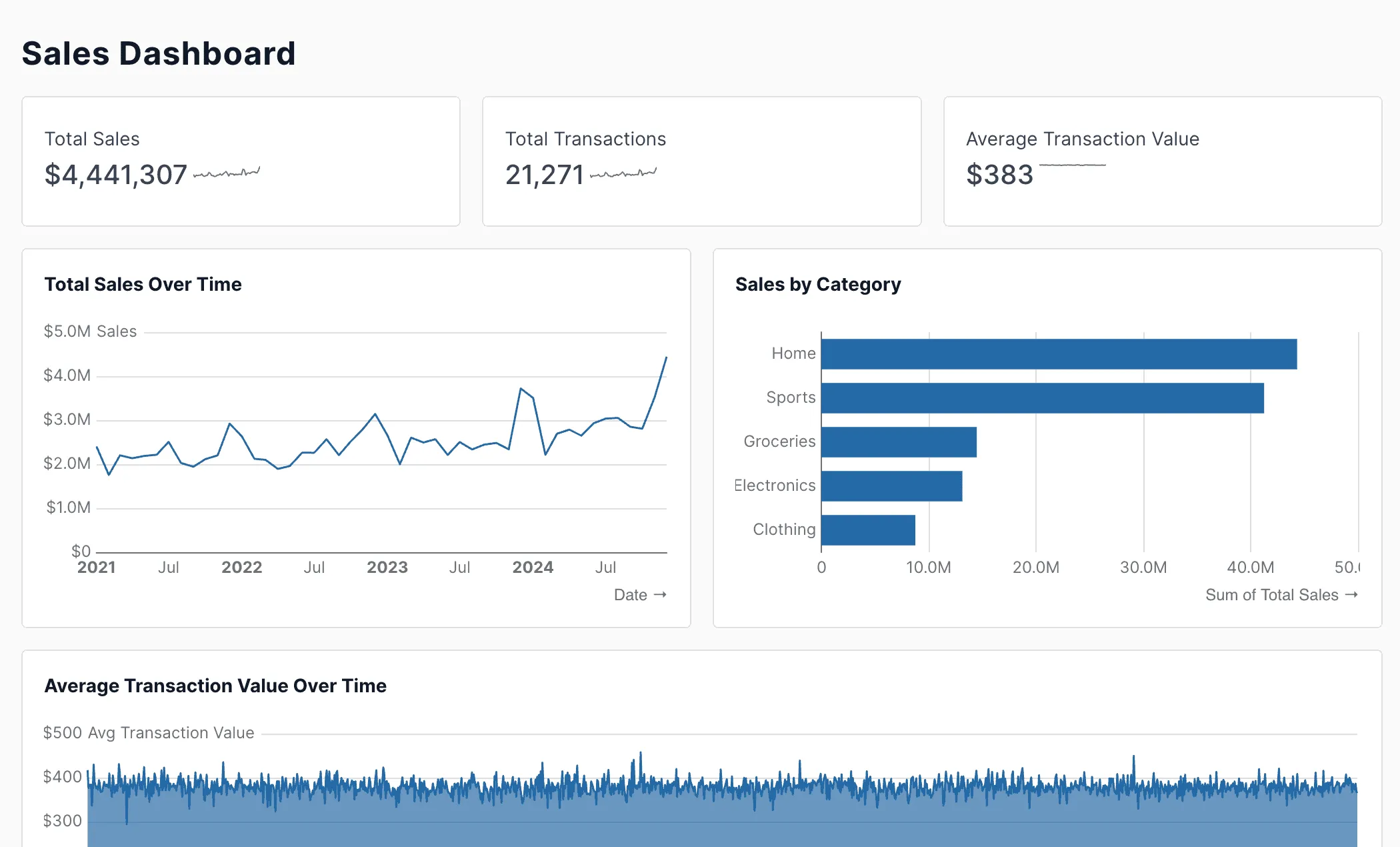
Looker
Feature Comparison
| Feature | Evidence | Looker |
|---|---|---|
| Data Modeling & Querying | ||
| Semantic Layer | No centralized semantic layer; business logic is embedded directly in SQL queries within markdown files | LookML provides a governed semantic layer that defines reusable metrics, joins, derived tables, and row-level permissions in a single place |
| Direct Warehouse Querying | Connects to data warehouses and runs SQL queries at build time or via scheduled syncs from minutes to daily intervals | Queries data warehouses directly with no intermediate storage, delivering always-fresh results from the source database |
| Query Performance Optimization | Uses a columnar ClickHouse-based query engine with vectorized execution and multi-level intelligent caching for sub-second queries on billions of rows | Relies on the connected warehouse's native query optimization; Looker generates optimized SQL and supports persistent derived tables for caching |
| Report Building & Visualization | ||
| Code-Based Report Authoring | Reports are authored entirely in SQL and markdown files with loops, conditionals, and templated pages that generate multiple reports from a single template | Reports are built through a GUI with Explores and dashboard editors; LookML is code-based but focuses on data modeling rather than report layout |
| Self-Service Dashboards | End users consume published reports but do not build or modify dashboards through a self-service interface | Business users explore data through Explores, expand filters, drill down to row-level detail, and build ad hoc reports in Looker Studio |
| Drag-and-Drop Canvas | No drag-and-drop interface; all layout and visualization is defined through markdown syntax and component tags | Looker Studio provides a flexible drag-and-drop canvas with access to over 1,000 data source connectors for interactive report building |
| Developer Experience | ||
| Version Control Integration | Reports stored as markdown files in Git repositories with full branching, pull requests, and CI/CD testing workflows | LookML projects integrate with Git for version-controlled model development with branching and deployment workflows |
| Browser-Based IDE | Includes a browser-based IDE with real-time syntax validation, intelligent autocomplete for components and SQL, and live preview | Provides an in-browser LookML IDE for editing models with syntax highlighting, validation, and Git integration built in |
| API & SDK Access | No documented public REST API or SDK for programmatic content management or embedding workflows | Offers comprehensive REST APIs, SDKs, and integrations for automating content delivery, user management, permissions, and embedding workflows |
| Enterprise & Security | ||
| Row-Level Security | Implements built-in row-level security policies that restrict data access so users only see authorized records | Enforces row-level and column-level security through LookML access filters and permission sets defined in the semantic layer |
| SSO & Identity Management | Supports single sign-on with multiple SSO providers and SCIM-based directory sync for automated user provisioning | Integrates with Google Cloud IAM for SSO, supports SAML-based identity providers, and provides private networking within the Google Cloud ecosystem |
| Embedded Analytics | Supports embedding reports and data apps within external applications and customer-facing products | Provides robust embedded analytics with white-labeling, interactive dashboards in external apps, and full API-driven embedding workflows for SaaS products |
| AI & Extensibility | ||
| AI-Powered Analytics | Includes an AI development agent that looks up documentation, checks schemas, debugs errors, and generates Evidence markdown code | Provides Gemini-powered Conversational Analytics that lets users ask data questions in natural language and integrates with Vertex AI for custom AI workflows |
| Marketplace & Extensions | No marketplace or extension ecosystem; customization is done through code in markdown templates and SQL files | Offers the Looker Marketplace with pre-built Blocks, custom visualizations, applications like LookML Diagram and ML Accelerator, and action integrations |
| Open Source Ecosystem | MIT-licensed open-source core built with Svelte and DuckDB, with 6,100+ GitHub stars and an active community of 2,000+ members | Proprietary closed-source platform; acquired by Google for $2.6 billion in 2019 and operates as part of Google Cloud Platform |
Data Modeling & Querying
Semantic Layer
Direct Warehouse Querying
Query Performance Optimization
Report Building & Visualization
Code-Based Report Authoring
Self-Service Dashboards
Drag-and-Drop Canvas
Developer Experience
Version Control Integration
Browser-Based IDE
API & SDK Access
Enterprise & Security
Row-Level Security
SSO & Identity Management
Embedded Analytics
AI & Extensibility
AI-Powered Analytics
Marketplace & Extensions
Open Source Ecosystem
Which to choose
Evidence and Looker serve fundamentally different workflows within the business intelligence space. Evidence delivers a code-first approach where analysts write SQL and markdown to produce polished, version-controlled reports, while Looker provides an enterprise-grade semantic layer and self-service exploration platform for organizations that need governed metrics across large teams.
Best-fit scenarios
These scenarios reflect the available product evidence. Your requirements, existing stack, and team expertise should guide the final decision.
Frequently Asked Questions
Can Evidence replace Looker for enterprise business intelligence?
Evidence and Looker address different segments of the BI market. Evidence works best for data teams that author reports in SQL and markdown, producing static or scheduled builds that are versioned in Git. It lacks a centralized semantic layer, self-service Explores, and the broad API ecosystem that Looker provides. Looker, on the other hand, centralizes business logic in LookML and exposes governed metrics to hundreds or thousands of business users through dashboards, embedded analytics, and conversational AI. Organizations with large non-technical user bases that need self-service access to governed data will find Looker covers more of their requirements, while smaller teams focused on code-driven reporting will get more out of Evidence.
How do the pricing models for Evidence and Looker compare?
Evidence operates on a freemium model with a free tier for a single user and paid plans starting at $15 per seat per month, scaling to $25 per seat per month for team features, with additional usage-based charges at $0.01 for high-volume scenarios. The open-source core under the MIT license can also be self-hosted at no licensing cost. Looker uses an annual commitment model with pricing determined through a sales conversation. Looker does not publish fixed per-seat rates on its website, and organizations should expect enterprise-level pricing that scales with the number of users and features required. The two tools sit at very different price points, with Evidence targeting smaller teams and Looker targeting larger enterprise deployments.
Which tool provides better version control and developer workflows?
Both tools integrate with Git, but they do so in different ways. Evidence stores every report as a markdown file in a standard Git repository, so analysts use familiar branching, merging, pull request reviews, and CI/CD pipelines directly on their report code. Changes to SQL queries, visualizations, and page layouts are all tracked in the same commit history. Looker integrates Git through its LookML IDE, where data modelers version-control the semantic layer definitions. However, dashboard configurations and Explore layouts in Looker are managed through the platform rather than Git. Evidence provides a more complete code-as-infrastructure experience where everything lives in the repository.
How do the AI capabilities of Evidence and Looker differ?
Evidence includes an AI development agent that operates within its browser-based IDE. This agent looks up documentation, inspects database schemas, identifies errors in report code, and generates Evidence markdown syntax to accelerate the authoring process. It is focused on helping developers build reports faster rather than helping end users analyze data. Looker integrates Google's Gemini models through its Conversational Analytics feature, which allows business users to ask data questions in natural language and receive answers grounded in the governed LookML semantic layer. Looker also connects with Vertex AI for building custom AI workflows and extensions. The key difference is that Evidence's AI targets report authors while Looker's AI targets data consumers.