Decision comparison
Looker vs Tableau
Looker and Tableau are both mature, enterprise-grade BI platforms recognized as Leaders in Gartner's 2025 Magic Quadrant for Analytics and Business Intelligence Platforms. They share identical user ratings of 8.4/10, but they serve fundamentally different operational philosophies. Looker is the stronger choice when your priority is a governed semantic layer that enforces consistent metrics across the organization, particularly if your data stack already runs on Google Cloud and BigQuery. Tableau wins when visual exploration, interactive dashboard design, and broad accessibility for non-technical users are the primary goals, especially for organizations already invested in the Salesforce ecosystem.
Direct comparison. These are reviewed substitutes bought for the same job, so the differences below are the ones that decide between them.
All 2 are BI platforms.
Quick Comparison
| Decision factor | Looker | Tableau |
|---|---|---|
| Best For | Data teams that need a governed semantic layer and embedded analytics across the organization | Analysts and business users who need powerful visual exploration and interactive dashboards |
| Pricing Model | Looker (Google Cloud core) publishes no platform or per-user price. It offers three platform editions — Standard for organisations under 50 users, Enterprise, and Embed — each including one production instance, 10 Standard Users and 2 Developer Users, and each requiring a custom quote. Data-token overages beyond an instance's monthly allocation are published, at $3.00 per 1M input tokens and $20.00 per 1M output tokens. | Tableau Cloud Standard Edition: Viewer $15/user/month, Explorer $42/user/month, Creator $75/user/month; Enterprise Edition: Viewer $35/user/month, Explorer $70/user/month, Creator $115/user/month; Tableau+ Bundle requires contact sales for pricing details. |
| Ease of Use | Requires learning LookML; steeper initial curve but enables self-service once models are built | Intuitive drag-and-drop interface; strong visual best practices built in |
| Data Modeling | LookML semantic modeling with version-controlled, reusable metrics and derived tables | Semantic layer with AI-assisted model creation via Tableau Semantics in Tableau Next |
| Deployment Options | Cloud-native on Google Cloud Platform with direct query against warehouses | Tableau Cloud (fully hosted SaaS), Tableau Server (self-hosted), and Tableau Desktop |
| Ecosystem Integration | Deep Google Cloud and BigQuery integration; REST APIs and SDKs for custom workflows | Native Salesforce CRM integration; Slack integration; Agentforce for agentic analytics |
Looker
- Best For:
- Data teams that need a governed semantic layer and embedded analytics across the organization
- Pricing Model:
- Looker (Google Cloud core) publishes no platform or per-user price. It offers three platform editions — Standard for organisations under 50 users, Enterprise, and Embed — each including one production instance, 10 Standard Users and 2 Developer Users, and each requiring a custom quote. Data-token overages beyond an instance's monthly allocation are published, at $3.00 per 1M input tokens and $20.00 per 1M output tokens.
- Ease of Use:
- Requires learning LookML; steeper initial curve but enables self-service once models are built
- Data Modeling:
- LookML semantic modeling with version-controlled, reusable metrics and derived tables
- Deployment Options:
- Cloud-native on Google Cloud Platform with direct query against warehouses
- Ecosystem Integration:
- Deep Google Cloud and BigQuery integration; REST APIs and SDKs for custom workflows
Tableau
- Best For:
- Analysts and business users who need powerful visual exploration and interactive dashboards
- Pricing Model:
- Tableau Cloud Standard Edition: Viewer $15/user/month, Explorer $42/user/month, Creator $75/user/month; Enterprise Edition: Viewer $35/user/month, Explorer $70/user/month, Creator $115/user/month; Tableau+ Bundle requires contact sales for pricing details.
- Ease of Use:
- Intuitive drag-and-drop interface; strong visual best practices built in
- Data Modeling:
- Semantic layer with AI-assisted model creation via Tableau Semantics in Tableau Next
- Deployment Options:
- Tableau Cloud (fully hosted SaaS), Tableau Server (self-hosted), and Tableau Desktop
- Ecosystem Integration:
- Native Salesforce CRM integration; Slack integration; Agentforce for agentic analytics
Public signals
Verified factual signals only. Bars appear only for like-for-like metrics with five weekly assessments for every tool; missing evidence stays explicit. These signals do not establish enterprise adoption, product quality, or total cost.
| Metric | Looker | Tableau |
|---|---|---|
| Search interest(Market interest) | 2 | 85 |
| Hacker News mentions, 90d(Community interest) | 2 | 2 |
| npm weekly downloads(Developer adoption) | 104.6k | 32.2k |
| Product Hunt comments(Community interest) | 5 | 3 |
| Product Hunt rating(Community interest) | Unavailable | 4.2/5 |
| Product Hunt reviews(Community interest) | 0 | 5 |
| Product Hunt votes(Community interest) | 83 | 7 |
| PyPI weekly downloads(Developer adoption) | 2.0M | 965.7k |
| Stack Overflow questions(Community interest) | 226 | 5.4k |
| GitHub commits, 90d(Developer adoption) | Not available | 37 |
| GitHub stars(Developer adoption) | Not available | 716 |
As of September 21, 2026 — updated weekly.
Health & risk evidence
Observed public-source checks for mapped package versions and repositories.
Looker
September 21, 2026Package vulnerabilities
npm · @looker/sdk@26.12.0 · PyPI · looker-sdk@26.12.0
0 vulnerabilities
across 2 packages
Repository security score
Not available
Tableau
September 21, 2026Package vulnerabilities
npm · @tableau/embedding-api@3.16.1 · PyPI · tableauserverclient@0.41
0 vulnerabilities
across 2 packages
Repository security score
github.com/tableau/server-client-python
5.5/10
Interface Preview
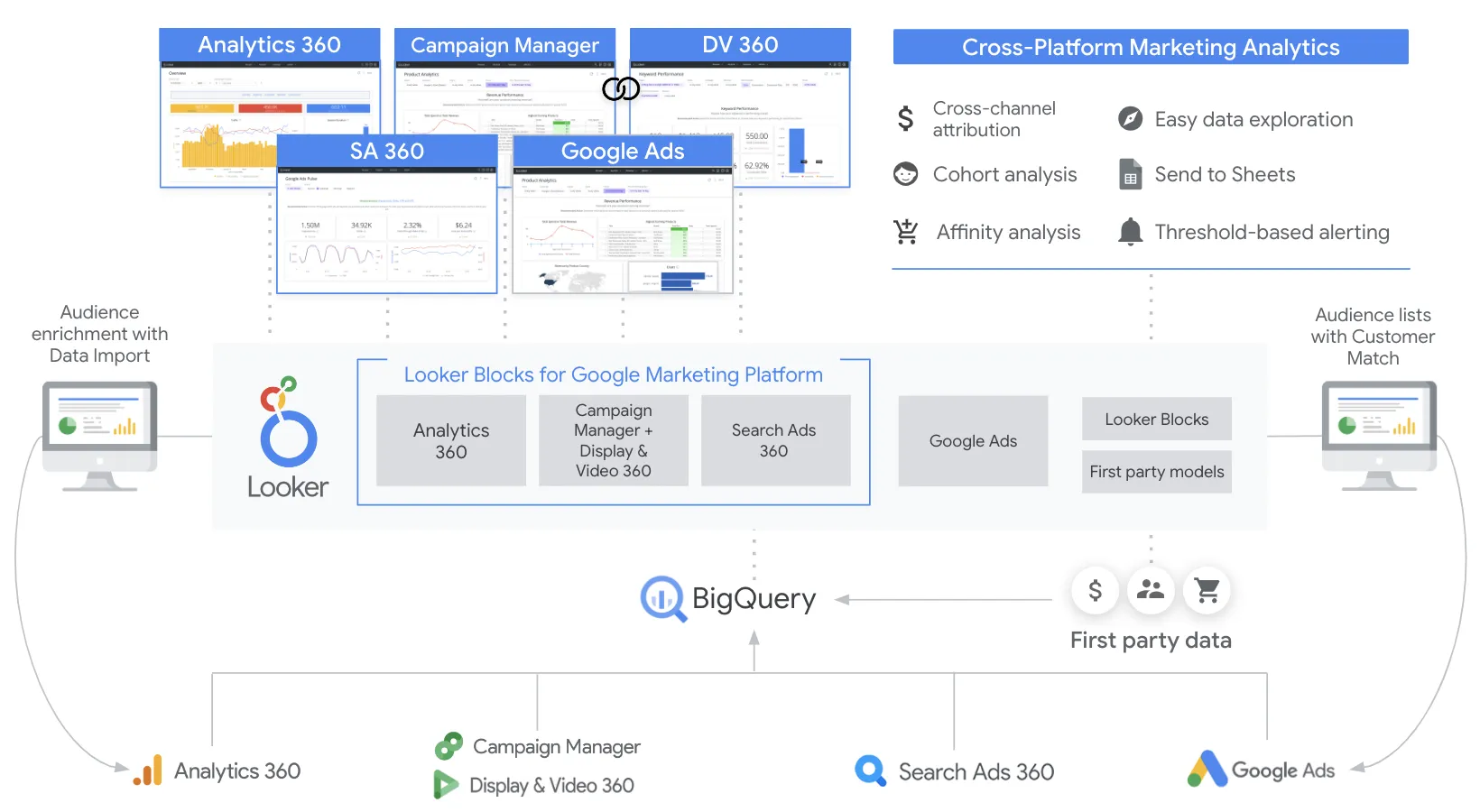
Looker
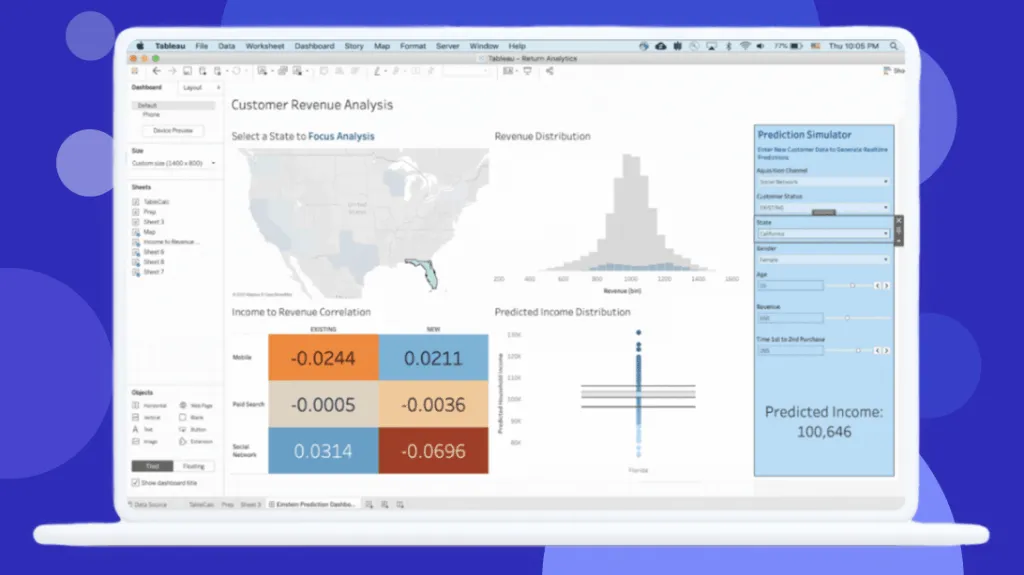
Tableau
Feature Comparison
| Feature | Looker | Tableau |
|---|---|---|
| Data Modeling & Governance | ||
| Semantic modeling layer | LookML-based semantic layer with reusable metrics, joins, and derived tables | Tableau Semantics with AI-assisted model creation integrated into Data 360 |
| Version control | Git-integrated version control for LookML models | Content versioning through Tableau Server/Cloud revision history |
| Row-level security | Row-level and column-level security with audit features | Row-level security available; Enterprise edition adds advanced security |
| Visualization & Exploration | ||
| Dashboard creation | Explores and dashboards built on governed LookML models with drill-down capabilities | Industry-leading interactive dashboards with drag-and-drop visual design |
| Self-service analytics | Users explore governed data through Explores; Looker Studio for ad hoc reports | Web-based editing for Explorers; full Desktop app for Creators with visual best practices |
| Data visualization variety | Standard chart types plus custom visualizations via Looker Marketplace plug-ins | Extensive visualization library widely regarded as the deepest in the BI market |
| AI & Advanced Analytics | ||
| Conversational analytics | Gemini-powered Conversational Analytics for natural-language data queries | Agentforce Tableau for natural-language Q&A and proactive insights |
| AI integration | Vertex AI integration via Looker extensions for custom AI workflows | Agentforce integration with autonomous analytics agents deployed enterprise-wide |
| Agentic analytics | Not a primary focus; AI features centered on conversational and embedded use cases | Tableau Next delivers agentic analytics with Agentforce for autonomous insight delivery |
| Deployment & Integration | ||
| Embedded analytics | Robust embedding and white-labeling with API coverage for custom data apps | Embedded analytics available in Enterprise edition with additional licensing |
| API capabilities | API-first platform with REST APIs, SDKs, and extensive automation support | API-first architecture in Tableau Next; composable design for custom integrations |
| Cloud platform integration | Native Google Cloud Platform integration with BigQuery, IAM, and private networking | Native Salesforce integration; Hyperforce infrastructure; Slack analytics integration |
| Pricing & Licensing | ||
| Entry cost | Annual commitment required; contact sales for pricing | Viewer at $15/user/month; Explorer at $42/user/month; Creator at $75/user/month (Cloud Standard) |
| Enterprise pricing | Custom enterprise pricing through Google Cloud sales | Enterprise Edition: Viewer $35/mo, Explorer $70/mo, Creator $115/mo per user |
| Free tier | No free tier; free trial available | Tableau Public is free for public data; Tableau Desktop offers a free trial |
Data Modeling & Governance
Semantic modeling layer
Version control
Row-level security
Visualization & Exploration
Dashboard creation
Self-service analytics
Data visualization variety
AI & Advanced Analytics
Conversational analytics
AI integration
Agentic analytics
Deployment & Integration
Embedded analytics
API capabilities
Cloud platform integration
Pricing & Licensing
Entry cost
Enterprise pricing
Free tier
Which to choose
Looker and Tableau are both mature, enterprise-grade BI platforms recognized as Leaders in Gartner's 2025 Magic Quadrant for Analytics and Business Intelligence Platforms. They share identical user ratings of 8.4/10, but they serve fundamentally different operational philosophies. Looker is the stronger choice when your priority is a governed semantic layer that enforces consistent metrics across the organization, particularly if your data stack already runs on Google Cloud and BigQuery. Tableau wins when visual exploration, interactive dashboard design, and broad accessibility for non-technical users are the primary goals, especially for organizations already invested in the Salesforce ecosystem.
Best-fit scenarios
Choose Looker if:
We recommend Looker for data teams that need centralized governance over business logic and metrics. Looker's LookML semantic modeling layer lets you define reusable metrics, joins, and derived tables in version-controlled code, ensuring every dashboard and API consumer references the same trusted definitions. The platform's API-first architecture and robust embedded analytics capabilities make it the stronger choice for organizations building customer-facing data products or integrating analytics into SaaS applications. If your data warehouse runs on BigQuery and your infrastructure lives on Google Cloud, Looker's native integration eliminates friction and keeps queries running directly against the warehouse with always-fresh results. Teams should budget for LookML training and expect an initial ramp-up period, but the long-term payoff is a scalable, governed analytics environment.
Choose Tableau if:
We recommend Tableau for organizations where visual exploration and dashboard consumption span a wide range of users from analysts to executives. Tableau's drag-and-drop interface and deep visualization library remain the industry benchmark for interactive analytics, and its tiered licensing model (Viewer at $15/user/month, Explorer at $42, Creator at $75 on Cloud Standard) gives you transparent cost control as your user base grows. The Salesforce acquisition has added native CRM integration and Agentforce-powered agentic analytics through Tableau Next, which delivers autonomous insights directly into Slack and enterprise workflows. Tableau is a strong fit when your team needs flexible deployment options across Cloud, Server, and Desktop, and when broad adoption by business users is a priority alongside centralized semantic governance. Watch license sprawl carefully, as costs compound quickly when departments request upgrades from Viewer to Explorer or Creator.
These scenarios reflect the available product evidence. Your requirements, existing stack, and team expertise should guide the final decision.
Frequently Asked Questions
What are the main differences between Looker and Tableau in how they handle data modeling?
Looker uses LookML, a proprietary modeling language that lets data teams define reusable metrics, joins, permissions, and derived tables in version-controlled code integrated with Git. Every dashboard and API query references this single source of truth. Tableau takes a different approach with Tableau Semantics, an AI-assisted semantic layer integrated into Data 360 that powers Tableau Next. While both platforms now offer semantic layers, Looker's code-first approach gives data engineers more granular control, whereas Tableau's approach prioritizes accessibility for analysts who prefer visual model creation over writing code.
How does pricing compare between Looker and Tableau for a mid-sized team?
Tableau publishes transparent per-user pricing for its Cloud Standard edition: Viewer at $15/user/month, Explorer at $42/user/month, and Creator at $75/user/month, all billed annually. The Enterprise edition increases those to $35, $70, and $115 respectively. A team of 5 Creators, 15 Explorers, and 50 Viewers on Cloud Standard would pay roughly $60,900/year. Looker requires an annual commitment and directs buyers to contact Google Cloud sales for pricing, making direct comparison difficult. However, industry estimates place Looker deployments for similar team sizes in the $60,000 to $120,000/year range. Both platforms carry additional costs for training, infrastructure, and data preparation.
Which platform is easier to learn for non-technical business users?
Tableau is generally easier for non-technical users to pick up. Its drag-and-drop interface and built-in visual best practices let business users start exploring data and building visualizations without writing code. User reviews consistently cite ease of use and a user-friendly interface as top strengths. Looker requires data teams to first build LookML models before business users can explore data through the Explores interface. Once those models are in place, end users find Looker straightforward for self-service analytics, but the initial setup demands SQL and LookML expertise. Both platforms have a learning curve for advanced use cases, with user reviews noting that mastering either tool takes dedicated training time.
Can Looker and Tableau be embedded into other applications?
Both platforms support embedded analytics, but Looker has a stronger out-of-the-box story for embedding. Looker offers robust embedding and white-labeling options designed for SaaS products, with extensive API coverage that lets developers build fully custom data experiences. Tableau supports embedded analytics through its Enterprise edition, but it requires additional licensing that can add $10,000 to $50,000 or more per year depending on external user count. For organizations building customer-facing data products or embedding analytics into their own software, Looker's API-first architecture and purpose-built embedding capabilities give it an advantage.
How do Looker and Tableau integrate with cloud platforms and other tools?
Looker is tightly integrated with Google Cloud Platform, offering native connections to BigQuery, SSO through Google Cloud IAM, and private networking. It queries data warehouses directly without storing data locally, ensuring always-fresh results. Tableau, now owned by Salesforce, integrates natively with Salesforce CRM and offers Slack-based analytics for permission-aware data sharing in team conversations. Tableau Next runs on Hyperforce infrastructure with Data 360 as its unified data layer. Both platforms connect to a wide range of data sources, but your existing cloud ecosystem will heavily influence which platform offers smoother integration.