Decision comparison
Metabase vs Qlik Sense
Metabase and Qlik Sense serve different segments of the BI market. Metabase is the stronger choice for startups and mid-size teams that need fast, affordable analytics with open-source flexibility. Qlik Sense is built for large enterprises that require advanced associative analytics, augmented AI, and robust data governance across complex data environments. Your decision should hinge on team size, budget, and how deeply you need AI-driven predictive capabilities.
Direct comparison. These are reviewed substitutes bought for the same job, so the differences below are the ones that decide between them.
All 2 are BI platforms.
Quick Comparison
| Decision factor | Metabase | Qlik Sense |
|---|---|---|
| Best For | Startups and teams that want fast, self-serve BI with minimal setup | Enterprises needing advanced associative analytics with governance and augmented AI |
| Pricing Model | Community Edition is free, open-source and self-hosted, with unlimited users. Paid Metabase Cloud plans start with Starter at $100/month, or $90/month billed annually, including the first 5 users, then $6 per user/month. Pro is $575/month, or $517.50/month annually, including the first 10 users, then $12 per user/month. Enterprise is custom pricing starting at $20,000/year. Both paid plans offer a 14 days free trial. | Contact for pricing |
| Deployment | Self-hosted (open source) or Metabase Cloud | On-premises (client-managed) or Qlik Cloud Analytics (SaaS) |
| Data Connectivity | 20+ database connectors including PostgreSQL, MySQL, and major data warehouses | Hundreds of data source connectors including apps, databases, cloud services, and files |
| AI Capabilities | Metabot AI for single-shot SQL generation and natural language querying (add-on) | Augmented analytics with Insight Advisor, AutoML, predictive analytics, and NLP interaction |
| Open Source | Yes — fully open source with self-hosted option at no cost | No — proprietary commercial software |
Metabase
- Best For:
- Startups and teams that want fast, self-serve BI with minimal setup
- Pricing Model:
- Community Edition is free, open-source and self-hosted, with unlimited users. Paid Metabase Cloud plans start with Starter at $100/month, or $90/month billed annually, including the first 5 users, then $6 per user/month. Pro is $575/month, or $517.50/month annually, including the first 10 users, then $12 per user/month. Enterprise is custom pricing starting at $20,000/year. Both paid plans offer a 14 days free trial.
- Deployment:
- Self-hosted (open source) or Metabase Cloud
- Data Connectivity:
- 20+ database connectors including PostgreSQL, MySQL, and major data warehouses
- AI Capabilities:
- Metabot AI for single-shot SQL generation and natural language querying (add-on)
- Open Source:
- Yes — fully open source with self-hosted option at no cost
Qlik Sense
- Best For:
- Enterprises needing advanced associative analytics with governance and augmented AI
- Pricing Model:
- Contact for pricing
- Deployment:
- On-premises (client-managed) or Qlik Cloud Analytics (SaaS)
- Data Connectivity:
- Hundreds of data source connectors including apps, databases, cloud services, and files
- AI Capabilities:
- Augmented analytics with Insight Advisor, AutoML, predictive analytics, and NLP interaction
- Open Source:
- No — proprietary commercial software
Public signals
Verified factual signals only. Bars appear only for like-for-like metrics with five weekly assessments for every tool; missing evidence stays explicit. These signals do not establish enterprise adoption, product quality, or total cost.
| Metric | Metabase | Qlik Sense |
|---|---|---|
| Docker Hub pulls(Product adoption) | 272.7M | Not available |
| GitHub commits, 90d(Product adoption) | 2.0k | Not available |
| GitHub stars(Product adoption) | 49,000+ | Not available |
| Search interest(Market interest) | Not available | 1 |
| Hacker News mentions, 90d(Community interest) | 12 | 0 |
| npm weekly downloads(Developer adoption) | 36.8k | 9.4k |
| Product Hunt comments(Community interest) | 30 | Not available |
| Product Hunt rating(Community interest) | 4.9/5 | Not available |
| Product Hunt reviews(Community interest) | 24 | Not available |
| Product Hunt votes(Community interest) | 310 | Not available |
| Stack Overflow questions(Community interest) | 374 | 806 |
| GitHub commits, 90d(Developer adoption) | Not available | 0 |
| GitHub stars(Developer adoption) | Not available | 48 |
As of September 21, 2026 — updated weekly.
Health & risk evidence
Observed public-source checks for mapped package versions and repositories.
Metabase
September 21, 2026Package vulnerabilities
npm · @metabase/embedding-sdk-react@0.63.1
0 vulnerabilities
across 1 package
Repository security score
github.com/metabase/metabase
7.1/10
Qlik Sense
September 21, 2026Package vulnerabilities
npm · @qlik/api@2.16.0
0 vulnerabilities
across 1 package
Repository security score
Not available
Interface Preview
Metabase
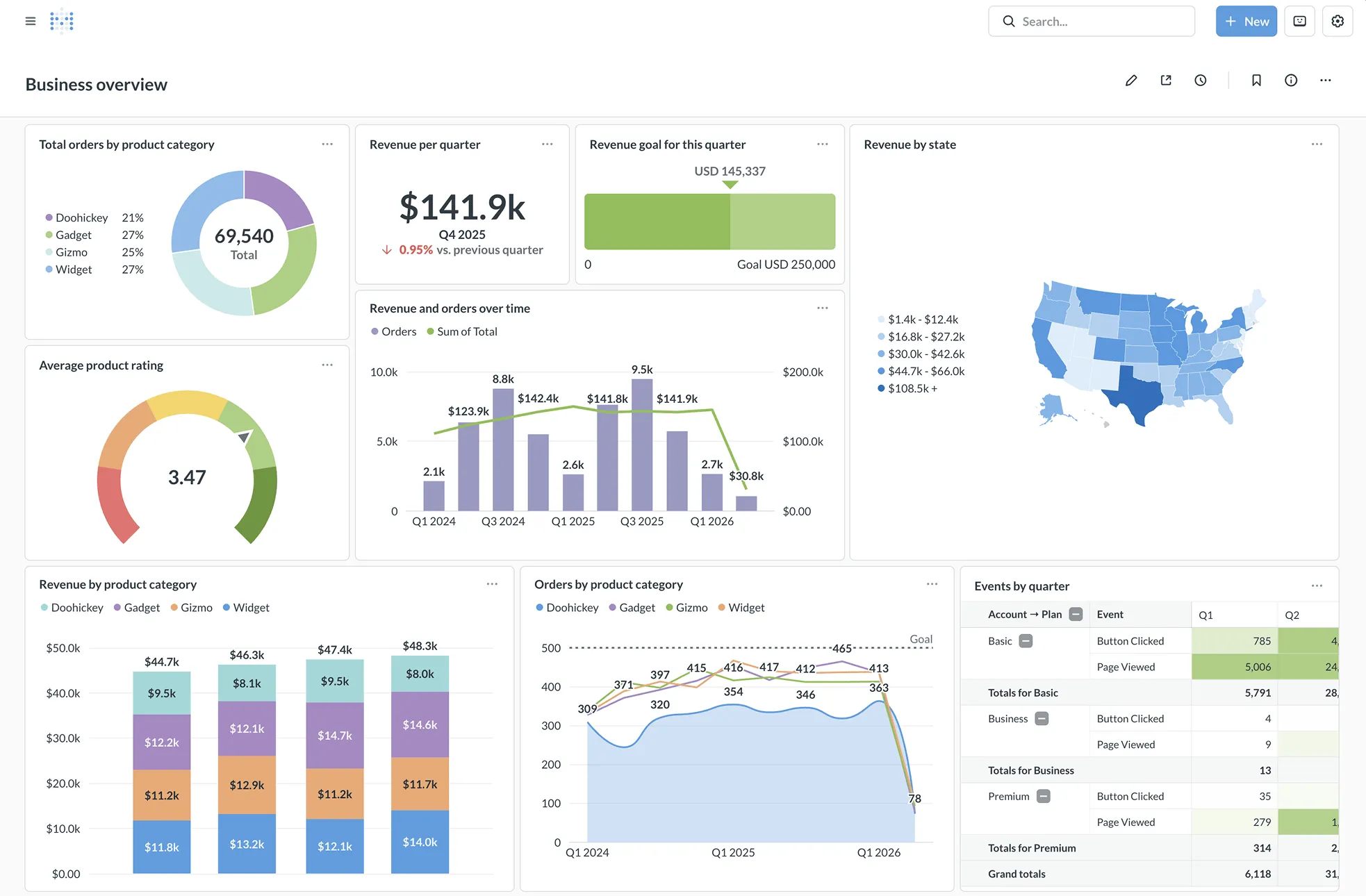
Feature Comparison
| Feature | Metabase | Qlik Sense |
|---|---|---|
| Data Visualization & Dashboards | ||
| Interactive Dashboards | Yes — drag-and-drop dashboards with cross-filters and drill-through | Yes — fully interactive dashboards with associative exploration |
| Chart Types & Visualizations | Standard chart library with unlimited charts and visualizations | Extensive visualization library with custom extensions via APIs |
| Mobile Support | Responsive web interface accessible on mobile devices | Native mobile support with responsive design, touch interaction, and offline analysis |
| Querying & Data Exploration | ||
| No-Code Query Builder | Yes — visual query builder for non-technical users | Yes — self-service exploration with associative selections |
| SQL Editor | Yes — native SQL editor for power users alongside the visual builder | Script-based data load editor rather than direct SQL querying |
| Natural Language Querying | Metabot AI provides natural language to SQL generation (add-on) | Insight Advisor offers search-based and conversational analytics via NLP |
| AI & Advanced Analytics | ||
| Augmented Analytics | Automatic x-ray reports for quick data analysis | Full augmented analytics suite with automated insight generation and AI-assisted creation |
| Predictive Analytics | Not natively supported | Yes — AutoML, predictive analytics, and what-if scenarios built in |
| Alerting & Automation | Scheduled delivery and alerts via email and Slack | Data-driven alerting with event-driven automation and application automation workflows |
| Governance & Security | ||
| Data Permissions | Row-level, column-level, and collection-based permissions with SSO integration (SAML, LDAP, JWT) | Section access for row-level security with full governance framework |
| Data Catalog | Data reference and glossary for organizing metadata | Self-service data catalog with lineage tracking and data governance |
| Multi-Tenant Data Segregation | Native support for one-database-per-tenant and granular permissions | Supported through section access and managed spaces in Qlik Cloud |
| Embedding & Extensibility | ||
| Embedded Analytics | Yes — iframes or React SDK with white-labeling and dynamic styling | Yes — open APIs for custom apps, extensions, and fully embedded interactive analytics |
| Application Automation | API access and scheduled tasks; no built-in visual automation builder | Visual low-code automation builder with broad library of cloud connectors |
| Data Preparation | Models and metrics with SQL transforms; Data Studio for semantic layer curation | Complete data prep and integration capabilities for combining data at any scale |
Data Visualization & Dashboards
Interactive Dashboards
Chart Types & Visualizations
Mobile Support
Querying & Data Exploration
No-Code Query Builder
SQL Editor
Natural Language Querying
AI & Advanced Analytics
Augmented Analytics
Predictive Analytics
Alerting & Automation
Governance & Security
Data Permissions
Data Catalog
Multi-Tenant Data Segregation
Embedding & Extensibility
Embedded Analytics
Application Automation
Data Preparation
Which to choose
Metabase and Qlik Sense serve different segments of the BI market. Metabase is the stronger choice for startups and mid-size teams that need fast, affordable analytics with open-source flexibility. Qlik Sense is built for large enterprises that require advanced associative analytics, augmented AI, and robust data governance across complex data environments. Your decision should hinge on team size, budget, and how deeply you need AI-driven predictive capabilities.
Best-fit scenarios
Choose Metabase if:
We recommend Metabase for startups, small-to-mid-size teams, and any organization that values speed of deployment and open-source transparency. If your primary goal is getting non-technical teammates querying data within minutes — without a procurement cycle — Metabase delivers. Its visual query builder, embedded analytics SDK, and tiered pricing from a free self-hosted edition to paid cloud plans make it practical for teams that want production-grade BI without enterprise overhead. The open-source foundation means you retain full control over your data and deployment, and the 46,000+ GitHub stars reflect a strong community backing the project.
Choose Qlik Sense if:
We recommend Qlik Sense for large enterprises and data-mature organizations that need a comprehensive analytics platform with powerful AI capabilities. Qlik's unique Associative Engine lets users explore data freely without being limited to predefined queries, which is a genuine differentiator for complex analytical workflows. With augmented analytics, AutoML, predictive capabilities, and a data catalog with governance, Qlik Sense covers advanced use cases that Metabase does not address. The platform is trusted by over 40,000 customers including Honda, Samsung, Lenovo, and Merck, and Gartner has named Qlik a Leader in the Analytics and BI Magic Quadrant for 15 consecutive years.
These scenarios reflect the available product evidence. Your requirements, existing stack, and team expertise should guide the final decision.
Frequently Asked Questions
Is Metabase really free to use?
Yes, Metabase offers a fully open-source edition that you can self-host at no cost. The open-source version includes the query builder, SQL editor, dashboards, and 20+ database connectors. Paid plans add features like cloud hosting, priority support, and Metabot AI — starting at $100/mo for the Starter tier. The Pro tier costs $250/mo and the Enterprise tier is custom pricing from $20,000/year, both of which include self-hosted or cloud deployment options.
How does Qlik Sense pricing work?
Qlik Sense uses enterprise pricing that requires contacting their sales team for on-premises deployments. For cloud-based analytics, Qlik Cloud Analytics offers tiered pricing plans available on their pricing page. Qlik does not publish fixed per-seat rates for Qlik Sense client-managed deployments, so you will need to request a quote based on your organization's size and requirements.
What is Qlik's Associative Engine and why does it matter?
Qlik's Associative Engine is a patented technology that indexes every relationship in your data, allowing users to make selections freely across any field in any direction. Unlike query-based tools that follow predefined paths, the Associative Engine highlights related and unrelated data with every click. This means analysts can explore data without knowing the right question in advance, which helps uncover hidden patterns that traditional dashboard tools might miss.
Can Metabase handle enterprise-scale deployments?
Metabase supports enterprise use cases with features like row-level and column-level permissions, SSO integration via SAML, LDAP, and JWT, multi-tenant data segregation, usage analytics, and staging environments for safe testing. Over 90,000 companies use Metabase, and the platform scales from startup production databases to large data warehouses. The Enterprise plan adds priority support and advanced governance features for organizations with stricter requirements.
Which tool is better for embedded analytics?
Both tools support embedded analytics, but they approach it differently. Metabase provides an embedded analytics SDK built on React, along with iframe embedding, white-labeling, and dynamic styling — designed to drop customer-facing analytics into SaaS products with minimal engineering effort. Qlik Sense offers a complete set of open APIs for building custom applications, new visualizations, and extensions, or embedding fully interactive analytics into existing workflows. Metabase is generally faster to integrate for straightforward embedded use cases, while Qlik Sense provides more flexibility for deeply customized enterprise integrations.