Preset: product and architecture
Our verdict: Preset is a strong choice for teams that want Apache Superset without owning the operational burden of running it themselves. This Preset review finds the product most compelling for analytics teams that value open-source portability, managed cloud delivery, and governed self-service exploration; it is less compelling for buyers who need fully documented enterprise pricing or a clearly evidenced feature set beyond the Superset ecosystem.
Preset is a fully managed cloud service built on Apache Superset, positioned as an AI-native business intelligence product for dashboards, embedded analytics, self-service exploration, and conversational analytics. Its core proposition is straightforward: use a managed version of an open-source BI platform while gaining enterprise-oriented security, collaboration capabilities, and professional support. The public repository associated with Preset has 46 GitHub stars, uses Python as its primary language, and lists version 0.3.12 as its latest release on April 22, 2026; these are public activity signals, not proof of enterprise deployment scale.
Overview
Preset is a managed Apache Superset service, not a separate proprietary BI engine. That distinction matters. Teams build on the Superset foundation while Preset handles the cloud-service layer, including managed access to current Superset capabilities, workspace deployment, security controls, and support-oriented product packaging.
The product’s market position is attractive for organizations that want a dashboarding and data-exploration environment without accepting traditional vendor lock-in as the price of managed BI. Preset explicitly emphasizes that charts and dashboards can be migrated to open-source Apache Superset. This is a meaningful architectural escape hatch, although it also means teams should understand the underlying Superset model rather than treating Preset as an interchangeable managed SaaS dashboard tool.
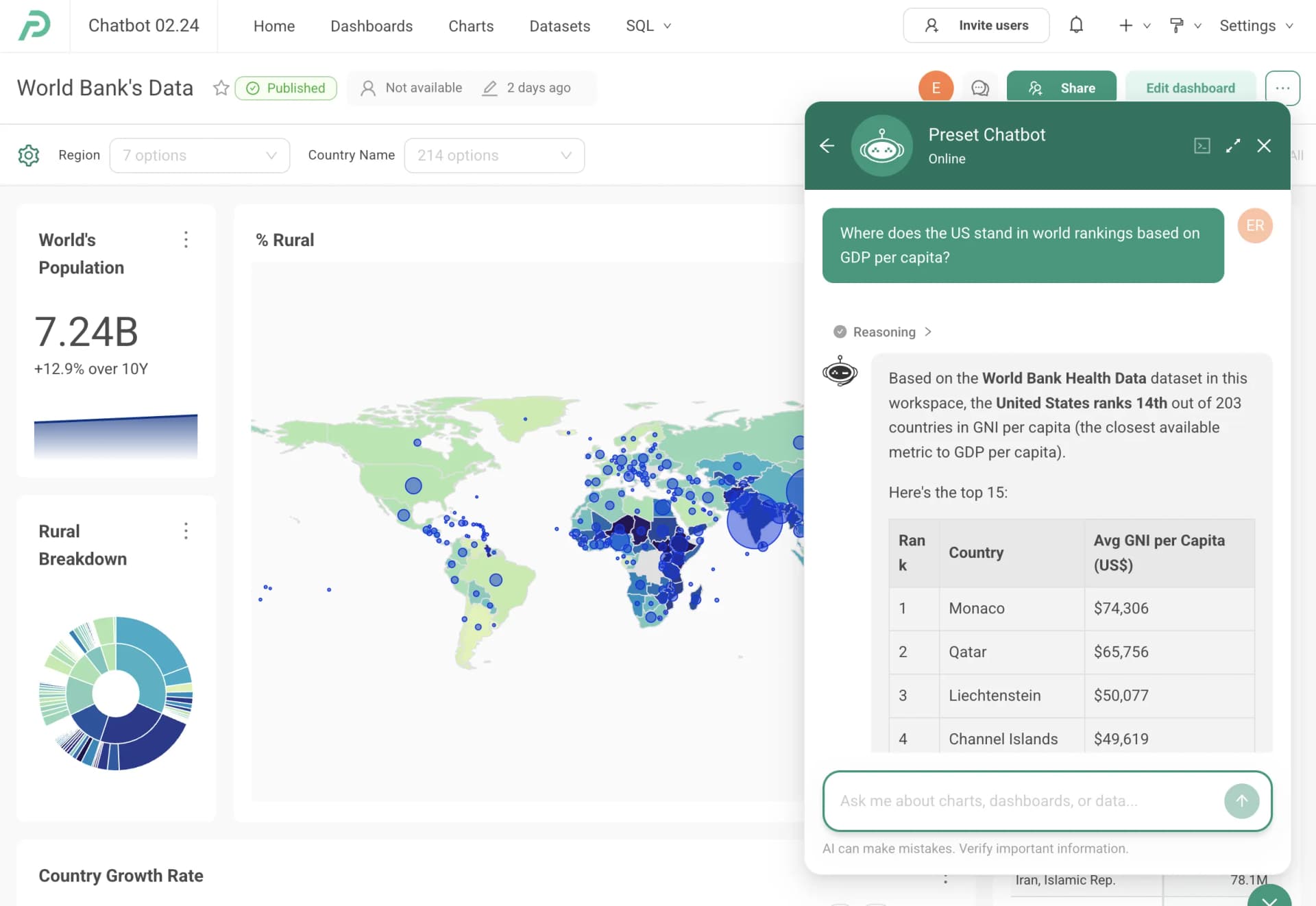
AI is a major part of Preset’s current product direction. Its stated AI offering includes a chatbot and MCP-based access intended to let users ask questions, build charts, and create dashboards conversationally. We view that as useful when coupled with governance, because Preset says AI queries follow the same row-level security and permissions model used by dashboards and exposes generated queries for review and editing.
Preset is best for data teams that already see Apache Superset as a viable long-term analytics standard but do not want to self-manage it. We recommend Preset for organizations that need a managed Superset deployment with practical guardrails around data access and team isolation. Choose another product if your buying decision depends on transparent, fully detailed plan entitlements, since the supplied pricing evidence gives prices and plan names but leaves important inclusions unspecified.
Key Features and Architecture
Preset’s architecture centers on Apache Superset, with Preset delivering it as a managed cloud service. The platform’s update model is specific: Preset states that it provides the latest Superset features after testing, on a two-week release cadence. That cadence is valuable for teams that want recent upstream functionality without independently coordinating upgrades, but it also means platform change management remains relevant for teams with heavily governed dashboard estates.
The product uses a dataset-centric approach to dashboard creation. Preset describes this as allowing people to create dashboards immediately from relevant data rather than requiring every exploration to begin with raw technical context. For analytics engineers, the benefit is a more reusable data surface for business users; the trade-off is that dataset quality and access design become central to successful self-service.
Key product capabilities include:
- Interactive, drag-and-drop dashboards for business users, with SQL-oriented workflows also supported for analysts who need direct query control.
- Dataset-centric dashboard creation designed to reduce the time required for users to move from governed data to visual exploration.
- Multiple-workspace deployment through a one-click workflow, allowing organizations to give separate teams their own Superset workspaces.
- Role-based access control and row-level security, enabling administrators to assign roles and constrain data access at a granular level.
- Preset Chatbot, which converts plain-English questions into visualizations and dashboards through conversation rather than requiring SQL or manual chart construction.
- An MCP service that connects Claude, Cursor, and other MCP-compatible AI tools directly to data for querying and visualization workflows.
- Visible and editable AI-generated queries, rather than opaque generated results that cannot be inspected by analysts.
The AI governance model is one of Preset’s stronger claims. Preset says its conversational queries honor the same row-level security and permission model as its dashboards. That is the right design principle for a data product that introduces natural-language interaction, because an AI layer that bypasses existing access policies would undermine the platform’s governance model.
The workspace model is also operationally relevant. Separate Superset workspaces can protect sensitive data across teams, but this design does not remove the need for disciplined role design, dataset management, and access reviews. Preset provides the mechanisms; it does not eliminate the organizational work required to decide who should see which data.
Ideal Use Cases
Preset works best when a data team has already chosen, or is prepared to choose, Apache Superset as the analytical foundation and wants a managed cloud delivery model. A 5-to-20-person data organization supporting analysts, business users, and internal stakeholders can use the dataset-centric approach to publish reusable analytical surfaces while keeping SQL-capable users productive. The managed environment is particularly useful when that team lacks dedicated capacity for operating and updating a self-hosted Superset deployment.
A second strong scenario is a multi-team organization with meaningful data-separation requirements. For example, a data organization supporting finance, operations, and customer-facing teams can create separate workspaces and apply role-based access control plus row-level security. Preset’s one-click multiple-workspace deployment is relevant here because it directly addresses team isolation, although administrators still need to design the workspace and permission boundaries responsibly.
A third scenario is an organization experimenting with conversational analytics while insisting on query transparency. Teams that want users to ask questions in plain English, but also want analysts to inspect and edit the resulting query, should evaluate Preset Chatbot. The MCP service is especially relevant to teams already using Claude, Cursor, or another MCP-compatible AI tool and that want those tools connected to data and visualization workflows.
Preset can also fit embedded analytics initiatives where a managed Superset-based dashboard product is preferable to building a visualization layer from scratch. The product description explicitly includes embedded analytics, dashboards, and self-service exploration at enterprise-grade scale. However, the supplied information does not document embedding implementation details, deployment constraints, or commercial entitlements, so teams should validate those requirements directly before committing.
Don’t use Preset if you need a product with fully disclosed feature-by-feature plan packaging before engaging a vendor. Avoid it as well if your team does not want to work within the Apache Superset ecosystem, because Preset’s managed-service value is inseparable from that foundation. Teams that need a proven benchmark for query performance, documented scale limits, or verified enterprise customer counts will find material evidence missing from the available data.
Strengths & Trade-offs
Preset’s strongest advantage is that it offers managed delivery of Apache Superset while preserving a stated migration path to open-source Superset. That lowers dependency on a fully proprietary dashboard environment, though it comes with the cost of adopting Superset’s concepts and operating model rather than a wholly separate managed BI experience.
Pros
- Managed Apache Superset delivery reduces the need for a team to independently operate the underlying open-source BI platform.
- Preset states that Superset updates are released and tested every two weeks, giving customers a defined path to current upstream functionality.
- One-click deployment of multiple workspaces directly supports team separation and sensitive-data boundaries.
- RBAC and row-level security provide concrete access-control mechanisms instead of relying on broad workspace visibility.
- Preset Chatbot can translate plain-English questions into charts and dashboards, while generated queries remain visible and editable for technical review.
- MCP connectivity to Claude, Cursor, and other MCP-compatible tools gives AI-enabled teams an integration path beyond Preset’s own interface.
- The Free tier’s 1-user limit provides a low-friction way for an individual to evaluate the product.
Cons
- Monthly billing carries a premium: Professional is $20 per user per month on an annual commitment but $25 billed monthly, so flexibility costs 25%.
- Enterprise is quote-only, so the tier that adds dbt integration, managed private cloud, SSO and SCIM cannot be budgeted from published figures.
- The Free tier is explicitly limited to 1 user, making it unsuitable as evidence for a broader team rollout.
- No performance benchmarks, data-volume limits, query-concurrency figures, or documented customer-scale metrics are supplied, so teams cannot assess operational fit from the available information alone.
- The product’s value is tightly tied to Apache Superset; organizations seeking a BI product outside that technical foundation should look elsewhere.
- The GitHub repository license is listed as
NOASSERTION, which means the repository metadata alone does not establish a clear license interpretation for buyers.
The overall trade-off is favorable for Superset-aligned teams: Preset offers managed operations, security controls, AI workflow support, and portability. The cost is not merely financial. Teams must validate commercial packaging, operational requirements, and the Superset fit before treating Preset as a default enterprise BI standard.