Decision comparison
Looker vs Preset
Looker and Preset represent two fundamentally different approaches to business intelligence. Looker is the enterprise-grade, governed BI platform for organizations that need centralized semantic modeling with LookML, deep embedded analytics, and tight Google Cloud integration. Preset is the open-source-backed, developer-friendly BI platform for teams that want fast time-to-dashboard, transparent pricing, conversational AI with broad tool compatibility, and zero vendor lock-in. Looker commands a premium for its API-first architecture and enterprise embedding capabilities, while Preset delivers comparable visualization and self-service features at a fraction of the cost. The right choice depends on whether you need Looker's governed modeling layer and embedding depth, or Preset's open architecture and cost efficiency.
Direct comparison. These are reviewed substitutes bought for the same job, so the differences below are the ones that decide between them.
All 2 are BI platforms.
Quick Comparison
| Decision factor | Looker | Preset |
|---|---|---|
| Primary Focus | Governed semantic layer and embedded analytics within Google Cloud | Managed open-source BI with fast time-to-dashboard and conversational AI |
| Data Modeling | LookML modeling language with Git version control for reusable metrics and business logic | Dataset-centric approach with semantic layer and Jinja templating for dynamic dashboards |
| Pricing Approach | Looker (Google Cloud core) publishes no platform or per-user price. It offers three platform editions — Standard for organisations under 50 users, Enterprise, and Embed — each including one production instance, 10 Standard Users and 2 Developer Users, and each requiring a custom quote. Data-token overages beyond an instance's monthly allocation are published, at $3.00 per 1M input tokens and $20.00 per 1M output tokens. | Starter $0 forever for up to 5 users and 1 workspace. Professional $20 per user per month billed annually, or $25 per user per month billed monthly, with unlimited users and 3 workspaces. Enterprise is quote-only. Dashboard viewer licences are listed at $500 per month for 50 viewers. |
| Open Source Foundation | Proprietary platform; acquired by Google in 2019 for $2.6 billion | Built on Apache Superset; founded by Superset's original creator |
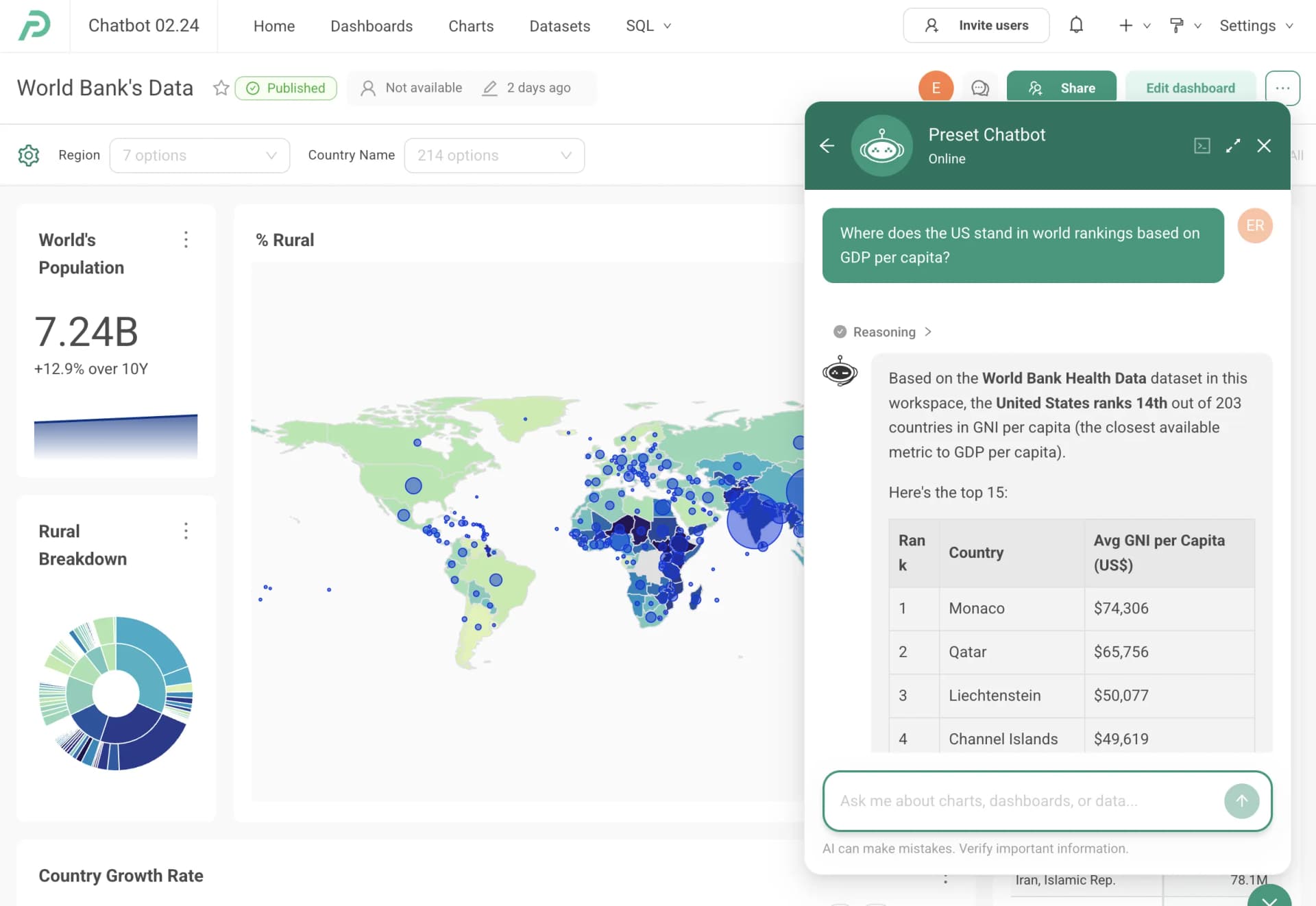
| AI Capabilities | Conversational Analytics powered by Gemini; Vertex AI extension integration | Preset Chatbot for natural language queries; MCP service for Claude, Cursor, and other AI tools |
| Best For | Enterprises needing a governed, API-first BI platform with deep Google Cloud integration | Data teams wanting open-source flexibility, fast setup, and cost-effective BI |
Looker
- Primary Focus:
- Governed semantic layer and embedded analytics within Google Cloud
- Data Modeling:
- LookML modeling language with Git version control for reusable metrics and business logic
- Pricing Approach:
- Looker (Google Cloud core) publishes no platform or per-user price. It offers three platform editions — Standard for organisations under 50 users, Enterprise, and Embed — each including one production instance, 10 Standard Users and 2 Developer Users, and each requiring a custom quote. Data-token overages beyond an instance's monthly allocation are published, at $3.00 per 1M input tokens and $20.00 per 1M output tokens.
- Open Source Foundation:
- Proprietary platform; acquired by Google in 2019 for $2.6 billion
- AI Capabilities:
- Conversational Analytics powered by Gemini; Vertex AI extension integration
- Best For:
- Enterprises needing a governed, API-first BI platform with deep Google Cloud integration
Preset
- Primary Focus:
- Managed open-source BI with fast time-to-dashboard and conversational AI
- Data Modeling:
- Dataset-centric approach with semantic layer and Jinja templating for dynamic dashboards
- Pricing Approach:
- Starter $0 forever for up to 5 users and 1 workspace. Professional $20 per user per month billed annually, or $25 per user per month billed monthly, with unlimited users and 3 workspaces. Enterprise is quote-only. Dashboard viewer licences are listed at $500 per month for 50 viewers.
- Open Source Foundation:
- Built on Apache Superset; founded by Superset's original creator
- AI Capabilities:
- Preset Chatbot for natural language queries; MCP service for Claude, Cursor, and other AI tools
- Best For:
- Data teams wanting open-source flexibility, fast setup, and cost-effective BI
Public signals
Verified factual signals only. Bars appear only for like-for-like metrics with five weekly assessments for every tool; missing evidence stays explicit. These signals do not establish enterprise adoption, product quality, or total cost.
| Metric | Looker | Preset |
|---|---|---|
| Search interest(Market interest) | 2 | Unavailable |
| Hacker News mentions, 90d(Community interest) | 2 | Not available |
| npm weekly downloads(Developer adoption) | 104.6k | Not available |
| Product Hunt comments(Community interest) | 5 | Not available |
| Product Hunt reviews(Community interest) | 0 | Not available |
| Product Hunt votes(Community interest) | 83 | Not available |
| PyPI weekly downloads(Developer adoption) | 2.0M | Not available |
| Stack Overflow questions(Community interest) | 226 | Not available |
| GitHub commits, 90d(Developer adoption) | Not available | 2 |
| GitHub stars(Developer adoption) | Not available | 46 |
| PyPI weekly downloads(Ecosystem adoption) | Not available | 87.1k |
As of September 21, 2026 — updated weekly.
Health & risk evidence
Observed public-source checks for mapped package versions and repositories.
Looker
September 21, 2026Package vulnerabilities
npm · @looker/sdk@26.12.0 · PyPI · looker-sdk@26.12.0
0 vulnerabilities
across 2 packages
Repository security score
Not available
Preset
September 21, 2026Package vulnerabilities
PyPI · apache-superset@6.1.0
0 vulnerabilities
across 1 package
Repository security score
Not available
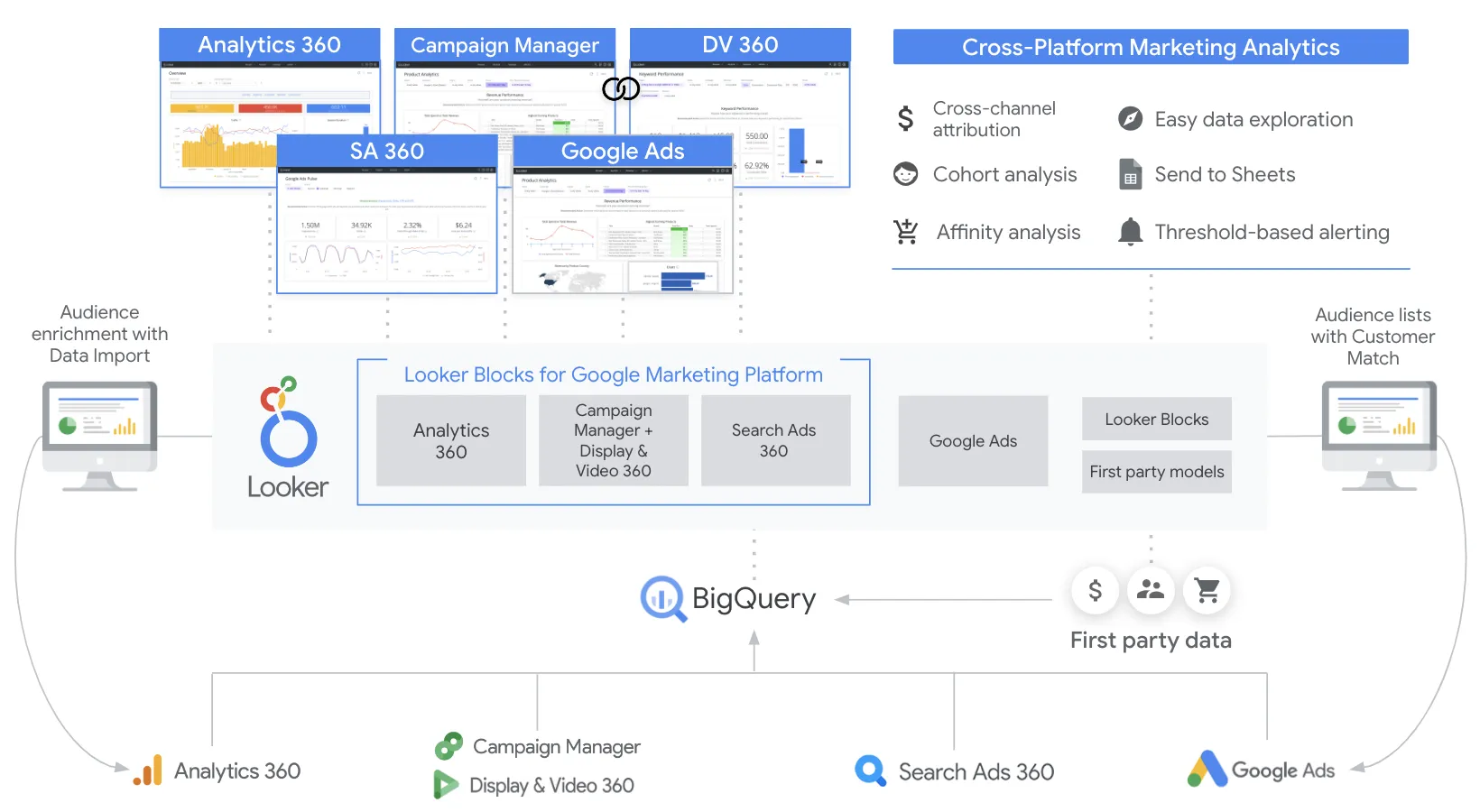
Interface Preview
Looker
Preset
Feature Comparison
| Feature | Looker | Preset |
|---|---|---|
| Data Modeling & Governance | ||
| Semantic Layer | LookML modeling language for defining reusable metrics, joins, permissions, and derived tables with Git version control | Dataset-centric semantic layer with last-mile SQL transformations and Jinja templating |
| Row-Level Security | Row-level and column-level security with audit features and enterprise governance controls | Row-level security (RLS) that also applies to AI-generated queries |
| Access Control | SSO with Google Cloud IAM, private networking, and granular permission models | RBAC, SSO, SCIM integration, and audit logs with SOC 2 certification |
| Visualization & Exploration | ||
| Dashboard Building | Enterprise dashboards with real-time data, governed explores, and drill-down to row-level detail | Drag-and-drop dashboard builder with over 40 visualization types and CSS template customization |
| Self-Service Exploration | Explores for self-service analysis on governed models; Looker Studio for ad hoc reports with 1,000+ connectors | No-code visual queries for business users plus collaborative SQL IDE for analysts |
| Chart Variety | Standard enterprise chart types with custom visualization extensions via marketplace | Over 40 chart types including funnel charts, Sankey diagrams, geospatial charts, and calendar heatmaps |
| AI & Automation | ||
| Conversational Analytics | Conversational Analytics powered by Gemini for natural language data questions with API access | Preset Chatbot turns plain-English questions into visualizations and dashboards through conversation |
| AI Tool Integration | Vertex AI extensions for custom AI workflows within the Looker instance | MCP service connects Claude, Cursor, and other MCP-compatible AI tools directly to your data |
| AI Security Model | AI queries governed through the same LookML permission model as dashboards | AI queries respect the same row-level security and permissions; every generated query is visible and editable |
| Embedding & Integration | ||
| Embedded Analytics | Robust embedded analytics with white-labeling, interactive dashboards, and full API coverage for custom data experiences | Embedded dashboards available as a Professional add-on with viewer licenses at $500/mo for 50 viewers |
| API & Developer Tools | API-first platform with REST APIs, SDKs, and extensive programmatic control over content and permissions | API access available in Enterprise tier; dbt integration and SSH tunnel database connections |
| Database Connectivity | Direct query against warehouses with no data storage; always-fresh results from BigQuery, Redshift, Snowflake, and more | Connects to most SQL databases with caching for charts and dashboards to reduce load on data stack |
| Deployment & Operations | ||
| Deployment Options | Fully managed on Google Cloud with private networking and unified Google Cloud ToS | Cloud-hosted, managed cloud, on-premises, and embedded deployment models |
| Version Control | Git-integrated LookML models with version-controlled business logic | Manage Superset assets as code; updates released and tested every two weeks |
| Vendor Lock-In | Proprietary platform tied to Google Cloud ecosystem | Built on open-source Apache Superset; migrate charts and dashboards to self-hosted Superset at any time |
Data Modeling & Governance
Semantic Layer
Row-Level Security
Access Control
Visualization & Exploration
Dashboard Building
Self-Service Exploration
Chart Variety
AI & Automation
Conversational Analytics
AI Tool Integration
AI Security Model
Embedding & Integration
Embedded Analytics
API & Developer Tools
Database Connectivity
Deployment & Operations
Deployment Options
Version Control
Vendor Lock-In
Which to choose
Looker and Preset represent two fundamentally different approaches to business intelligence. Looker is the enterprise-grade, governed BI platform for organizations that need centralized semantic modeling with LookML, deep embedded analytics, and tight Google Cloud integration. Preset is the open-source-backed, developer-friendly BI platform for teams that want fast time-to-dashboard, transparent pricing, conversational AI with broad tool compatibility, and zero vendor lock-in. Looker commands a premium for its API-first architecture and enterprise embedding capabilities, while Preset delivers comparable visualization and self-service features at a fraction of the cost. The right choice depends on whether you need Looker's governed modeling layer and embedding depth, or Preset's open architecture and cost efficiency.
Best-fit scenarios
Choose Looker if:
Choose Looker if your organization needs a governed semantic layer that centralizes business logic across teams, robust embedded analytics for customer-facing applications, and deep integration with Google Cloud services like BigQuery and Vertex AI. Looker is purpose-built for enterprises with dedicated data teams that can develop and maintain LookML models, and its API-first architecture makes it the stronger platform for building custom data products and monetizing data through embedded experiences. The platform is recognized as a Leader in the 2025 Gartner Magic Quadrant for Analytics and Business Intelligence Platforms.
Choose Preset if:
Choose Preset if your team values open-source flexibility, transparent pricing, and fast setup without vendor lock-in. Preset's free Starter tier and $20/month Professional plan make it accessible to teams of all sizes, and its foundation on Apache Superset means you can migrate your dashboards and charts to self-hosted Superset at any time. The platform is especially strong for organizations that want AI-powered analytics with MCP service compatibility across tools like Claude and Cursor, and its drag-and-drop builder with 40+ visualization types delivers production-ready dashboards without requiring a custom modeling language.
These scenarios reflect the available product evidence. Your requirements, existing stack, and team expertise should guide the final decision.
Frequently Asked Questions
What is the main difference between Looker and Preset?
Looker is a proprietary enterprise BI platform built around LookML, a semantic modeling language that centralizes business logic in a governed layer with Git version control. It is part of Google Cloud and targets large organizations that need embedded analytics and deep cloud integration. Preset is a fully managed cloud service for Apache Superset, the open-source BI platform. It offers faster time-to-dashboard with a dataset-centric approach and no vendor lock-in, since you can migrate your work to self-hosted Superset at any time.
Which platform is more cost-effective for small to mid-size teams?
Preset is significantly more accessible for smaller teams. Its Starter tier is free forever for up to 5 users with unlimited dashboards and charts. The Professional tier costs $20 per user per month billed annually. Looker requires an annual commitment and does not publish per-seat pricing, with all plans requiring a sales conversation. For teams evaluating BI tools on a budget, Preset's transparent pricing and free tier provide a much lower barrier to entry.
Can both Looker and Preset handle embedded analytics?
Yes, but Looker is the stronger choice for embedded analytics at scale. Looker offers robust embedding with white-labeling, fully interactive dashboards, and comprehensive API coverage that lets you build custom data experiences within your own applications. Preset offers embedded dashboards as an add-on to its Professional and Enterprise plans, with viewer licenses priced at $500 per month for 50 viewers. For SaaS products that need deeply integrated, branded analytics, Looker's API-first architecture provides more flexibility.
How do the AI capabilities compare between Looker and Preset?
Both platforms offer conversational analytics but through different AI ecosystems. Looker provides Conversational Analytics powered by Google's Gemini models, with an API for building custom AI applications using Vertex AI extensions. Preset offers the Preset Chatbot for natural language queries and an MCP service that connects AI tools like Claude and Cursor directly to your data. Both platforms enforce their existing security models on AI-generated queries, keeping results governed and auditable.
Is Preset a good alternative to Looker for teams already on Google Cloud?
It depends on your priorities. Looker is deeply integrated into Google Cloud with SSO via Cloud IAM, private networking, seamless BigQuery connectivity, and unified Terms of Service. If your organization is heavily invested in the Google Cloud ecosystem and needs tight integration with Vertex AI and BigQuery, Looker is the natural choice. Preset connects to BigQuery and other SQL databases but does not offer the same depth of Google Cloud integration. Teams that prioritize open-source flexibility, lower cost, and broader AI tool compatibility may still prefer Preset even within a Google Cloud environment.