Buying snapshot
Scroll sideways to see all columns. With a keyboard, focus this table and use the arrow keys.
| Decision point | What Runcrate states |
|---|---|
GPUs | 22 GPU models, from B300, B200, H200 and H100 down to V100 and Gaudi2, each listed at its lowest live hourly rate. Instances come with SSH, Jupyter and VS Code in the browser, and ready images for fine-tuning and serving. |
Models | 127 models on November 1, 2026: 70 text, 5 vision, 24 image, 13 video, 3 speech, 3 transcription and 9 embeddings. |
Agent access | A remote MCP server with browser sign-in and no key to paste, and an MIT-licensed CLI for Linux, macOS and Windows that manages instances, runs commands over keyless SSH and copies files. |
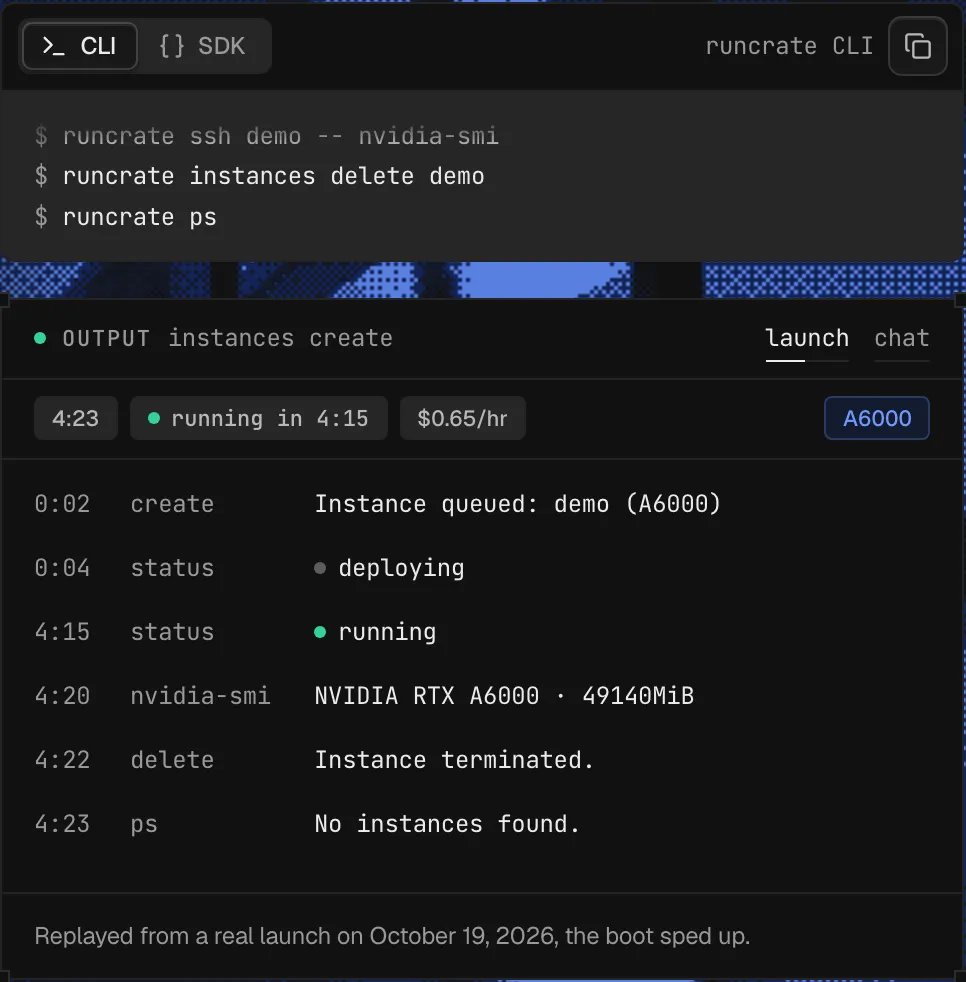
Launch to running | Median 4:14 across 449 launches on 16 GPU models, September 19 to October 18, 2026; the slowest tenth took longer than 6:50. The wait is not billed. |
Our take
Choose Runcrate when a developer or a coding agent needs short-lived GPU machines and hosted open-model inference on one prepaid account, and the work should stop on its own when it is done. If you need to train one model across several machines on a fast interconnect, or a long reserved contract, check those terms first: self-serve clusters run on Ethernet, and a reserved cluster is signed with the GPU owner you pick.
Evaluate Runcrate
Comparisons
Where it stands out
You pay for running time. Billing starts when the instance reports running, and most GPUs then bill by the second. A few bill in whole minutes, rounded up, including about 30 seconds of teardown after you delete.
Unattended work stops itself. An instance can carry a maximum runtime of 5 minutes to 168 hours and an idle stop of 5 minutes to 24 hours, and a job stops its machine, and its billing, when its command ends.
Agents spend within set limits. An agent can top up the balance from the workspace card only after an owner or manager grants the billing permission, with daily and monthly caps, and cards cannot be added from the CLI.
Files outlive the GPU. A volume of 10 GB to 10,000 GB stays when you delete the instance and mounts on the next one, so you can delete the GPU between jobs.
Free models to start. Five open models are free with a GitHub account, then half price on shared capacity, and list price when that capacity is busy.
Product screenshot
Trade-offs to weigh
Rates move. The GPU table shows the lowest live rate for each GPU, the JSON feed refreshes every 5 minutes, and a sold-out GPU stays listed for 30 days at 0 available with its last price. Budget from the hourly cost the CLI prints at launch, such as $0.65/hr for an A6000 on October 19, 2026.
An empty balance stops running work. A launch needs $10 or an hour of the machine, whichever is more, or just $10 with auto-recharge on. Under $1.00, Runcrate tries auto-recharge, emails you and waits 15 minutes, then deletes running instances, or sooner once the balance reaches -$10.00. Keep auto-recharge on and data on volumes.
Self-serve clusters suit independent jobs. They run on Ethernet, which Runcrate calls good for independent jobs, Slurm job arrays and Ray tasks, not for training one model across machines. InfiniBand or RoCE clusters are coming, on request. Offers are on datacenter hosts unless you opt in to community hosts.
Pricing and billing conditions
The bill is the hours of the GPU you launch at its live rate, the tokens, images or seconds each model call uses, and the volumes you keep, all drawn from one prepaid balance.
Scroll sideways to see all columns. With a keyboard, focus this table and use the arrow keys.
| What you buy | Price | Conditions |
|---|---|---|
GPU instances | From $0.36 per GPU-hour | Live rate of the GPU you launch. By the second on most GPUs; H200 by the minute. |
Runcrate's example | $20 | 8 hours on one H100, 11 hours on one A100 80GB or 37 hours on one L40S. |
Inference, DeepSeek V3.2 | $0.273 per 1M input tokens, $0.399 per 1M output tokens | Input and output priced separately; most image models per image, video per second. No monthly fee. |
Storage volumes | $0.03 per GB a month | Prepaid a week at a time; unused days return to the balance when deleted early. |
Prepaid machine | Discount for paying ahead | 1 to 12 months, chosen at launch. |
Reserved clusters | Offers from GPU owners | A month or longer, after Runcrate verifies the company and its need; you sign with the owner you pick. |
Public signals
About these signals
Verified factual signals from public sources. They indicate observable activity or interest, not total adoption, product quality, or cost.
16 GitHub commits 90d2 GitHub stars0 vulnerabilities across 2 packages
See all signals from 5 sources
npm · @runcrate/sdk@0.5.0 · PyPI · runcrate-sdk@0.5.0
Alternatives to Runcrate
The reviewed substitutes for Runcrate among the model hosting platforms, and what would make each one the better answer.
Direct alternatives
Reviewed substitutes: products bought for the same job, where a team picks one.
- Replicate
- Both run hosted image, video, audio and language models through an API and bill per use. Runcrate uses the OpenAI request format and bills text models per token (Runcrate's inference pricing page), while Replicate uses its own client and bills many models per second of execution.Applies to: Calling hosted image, video and language models from an application without running GPUs.
- Fireworks AI
- Both serve open models through an OpenAI-compatible API billed per token, so an application can switch between them by changing the base URL (Runcrate documents the base URL https://api.runcrate.ai/v1). Fireworks AI runs dedicated deployments of a model; Runcrate rents whole GPU instances with SSH instead.Applies to: Serving open-model inference to an application through an OpenAI-compatible API.
- Together AI
- Both serve open models through an OpenAI-compatible API billed per token and also rent GPUs on the same account (Runcrate's pricing page lists GPU instances beside its model API). Together AI adds a managed fine-tuning service; on Runcrate you fine-tune on your own GPU instance.Applies to: Calling open models from an application, with GPUs on the same account for fine-tuning.
Other approaches
A different approach to the same problem. Each substitutes only for the workload named beside it.
- Anyscale
- Both can run Ray workloads across several GPU machines. Anyscale is a managed Ray platform for training, fine-tuning and serving; Runcrate rents self-serve clusters that can come with Ray installed across the machines, which it describes as suited to independent jobs and Ray tasks rather than training one model across machines (Runcrate CLI documentation).Applies to: Running Ray jobs on rented multi-GPU clusters.
- Groq
- Both serve open chat models through an OpenAI-compatible API billed per token. Groq runs them on its own LPU chips for low-latency chat and speech; Runcrate serves them on GPUs and adds image and video models and rentable GPU instances on the same balance.Applies to: Serving open chat models to an application, where latency or model range decides.
- Modal
- Both run GPU workloads without buying hardware, billed for the time they run. Modal runs code as serverless Python functions; Runcrate rents a whole GPU instance with SSH that runs until you delete it, or a job that stops when its command ends (Runcrate CLI documentation).Applies to: Running training, fine-tuning or batch GPU jobs in the cloud.