Decision comparison
Power BI vs Apache Superset
Power BI and Apache Superset represent two fundamentally different philosophies in business intelligence. Power BI is a fully managed, enterprise-grade platform that excels when your organization is already embedded in the Microsoft ecosystem. It delivers polished self-service BI with AI-powered Copilot features, deep integration with Teams, Excel, and Azure, and a governance model backed by Microsoft Purview. Apache Superset is a community-driven, open-source platform built for teams that want full control over their BI stack. It connects to any SQL database, provides a built-in semantic layer and SQL Lab IDE, and costs nothing to license. The choice between them comes down to whether you value a managed, tightly integrated experience or an open, infrastructure-agnostic platform you fully own.
Direct comparison. These are reviewed substitutes bought for the same job, so the differences below are the ones that decide between them.
All 2 are BI platforms.
Quick Comparison
| Decision factor | Power BI | Apache Superset |
|---|---|---|
| Deployment Model | Fully managed SaaS with Power BI Service; Power BI Desktop for local authoring; Microsoft Fabric for enterprise capacity | Self-hosted open-source deployment; Docker and Kubernetes support; managed offerings available from third-party vendors |
| Pricing | A free account is available. Power BI Pro $14.00 per user per month and Power BI Premium Per User $24.00 per user per month, both paid yearly. Power BI Embedded is priced by capacity. | Free and open-source under Apache License 2.0 |
| Visualization Library | Hundreds of built-in visuals plus a marketplace of community and certified custom visuals | 40+ pre-installed chart types with a plug-in architecture for building custom visualizations |
| Data Modeling | DAX formula language and Power Query M for data transformation with in-memory tabular models | SQL-native with a semantic layer for defining metrics and dimensions; SQL Lab IDE for ad-hoc exploration |
| Target Audience | Business analysts, enterprise BI teams, and organizations already invested in the Microsoft ecosystem | Data engineers, SQL-proficient analysts, and organizations that want full control over their BI infrastructure |
| Ecosystem Integration | Deep integration with Microsoft 365, Azure, Teams, Excel, PowerPoint, Dynamics 365, and Power Platform | Connects to any SQL-based database including Snowflake, BigQuery, Redshift, PostgreSQL, Druid, and dozens more |
Power BI
- Deployment Model:
- Fully managed SaaS with Power BI Service; Power BI Desktop for local authoring; Microsoft Fabric for enterprise capacity
- Pricing:
- A free account is available. Power BI Pro $14.00 per user per month and Power BI Premium Per User $24.00 per user per month, both paid yearly. Power BI Embedded is priced by capacity.
- Visualization Library:
- Hundreds of built-in visuals plus a marketplace of community and certified custom visuals
- Data Modeling:
- DAX formula language and Power Query M for data transformation with in-memory tabular models
- Target Audience:
- Business analysts, enterprise BI teams, and organizations already invested in the Microsoft ecosystem
- Ecosystem Integration:
- Deep integration with Microsoft 365, Azure, Teams, Excel, PowerPoint, Dynamics 365, and Power Platform
Apache Superset
- Deployment Model:
- Self-hosted open-source deployment; Docker and Kubernetes support; managed offerings available from third-party vendors
- Pricing:
- Free and open-source under Apache License 2.0
- Visualization Library:
- 40+ pre-installed chart types with a plug-in architecture for building custom visualizations
- Data Modeling:
- SQL-native with a semantic layer for defining metrics and dimensions; SQL Lab IDE for ad-hoc exploration
- Target Audience:
- Data engineers, SQL-proficient analysts, and organizations that want full control over their BI infrastructure
- Ecosystem Integration:
- Connects to any SQL-based database including Snowflake, BigQuery, Redshift, PostgreSQL, Druid, and dozens more
Public signals
Verified factual signals only. Bars appear only for like-for-like metrics with five weekly assessments for every tool; missing evidence stays explicit. These signals do not establish enterprise adoption, product quality, or total cost.
| Metric | Power BI | Apache Superset |
|---|---|---|
| GitHub commits, 90d(Developer adoption) | 0 | Not available |
| GitHub stars(Developer adoption) | 1,000+ | Not available |
| Search interest(Market interest) | 62 | 0 |
| Hacker News mentions, 90d(Community interest) | 0 | 0 |
| npm weekly downloads(Developer adoption) | 241.2k | 13.8k |
| Product Hunt comments(Community interest) | 0 | 0 |
| Product Hunt reviews(Community interest) | 0 | 0 |
| Product Hunt votes(Community interest) | 2 | 69 |
| Stack Overflow questions(Community interest) | 20.5k | 1.3k |
| Docker Hub pulls(Product adoption) | Not available | 605.5M |
| GitHub commits, 90d(Product adoption) | Not available | 2.3k |
| GitHub stars(Product adoption) | Not available | 74,000+ |
| PyPI weekly downloads(Product adoption) | Not available | 87.1k |
As of September 21, 2026 — updated weekly.
Health & risk evidence
Observed public-source checks for mapped package versions and repositories.
Power BI
September 21, 2026Package vulnerabilities
npm · powerbi-client@2.24.1
0 vulnerabilities
across 1 package
Repository security score
github.com/microsoft/PowerBI-JavaScript
7.4/10
Apache Superset
September 21, 2026Package vulnerabilities
npm · @superset-ui/core@0.20.4 · PyPI · apache-superset@6.1.0
0 vulnerabilities
across 2 packages
Repository security score
github.com/apache/superset
5.4/10
Interface Preview
Power BI
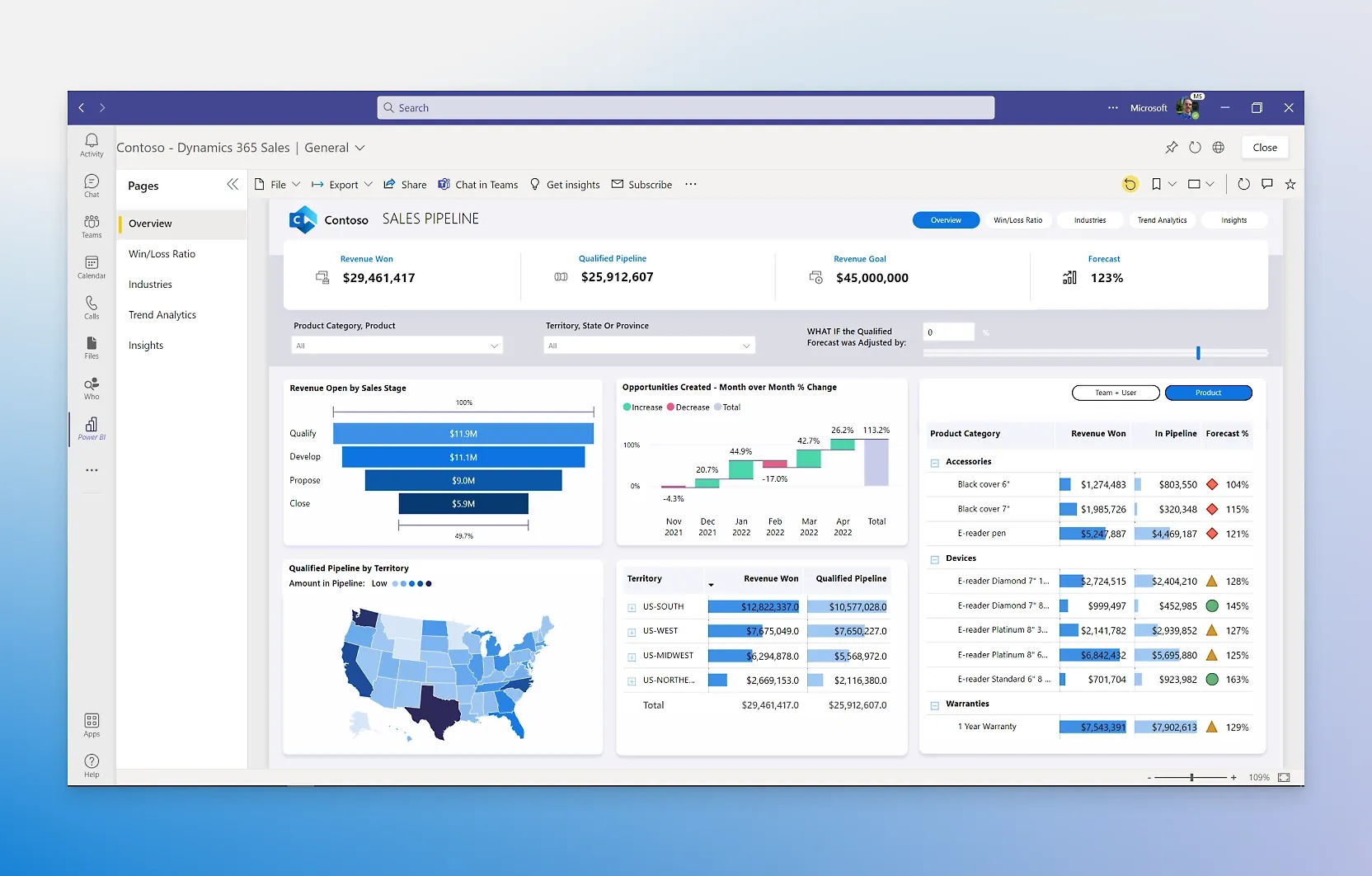
Apache Superset
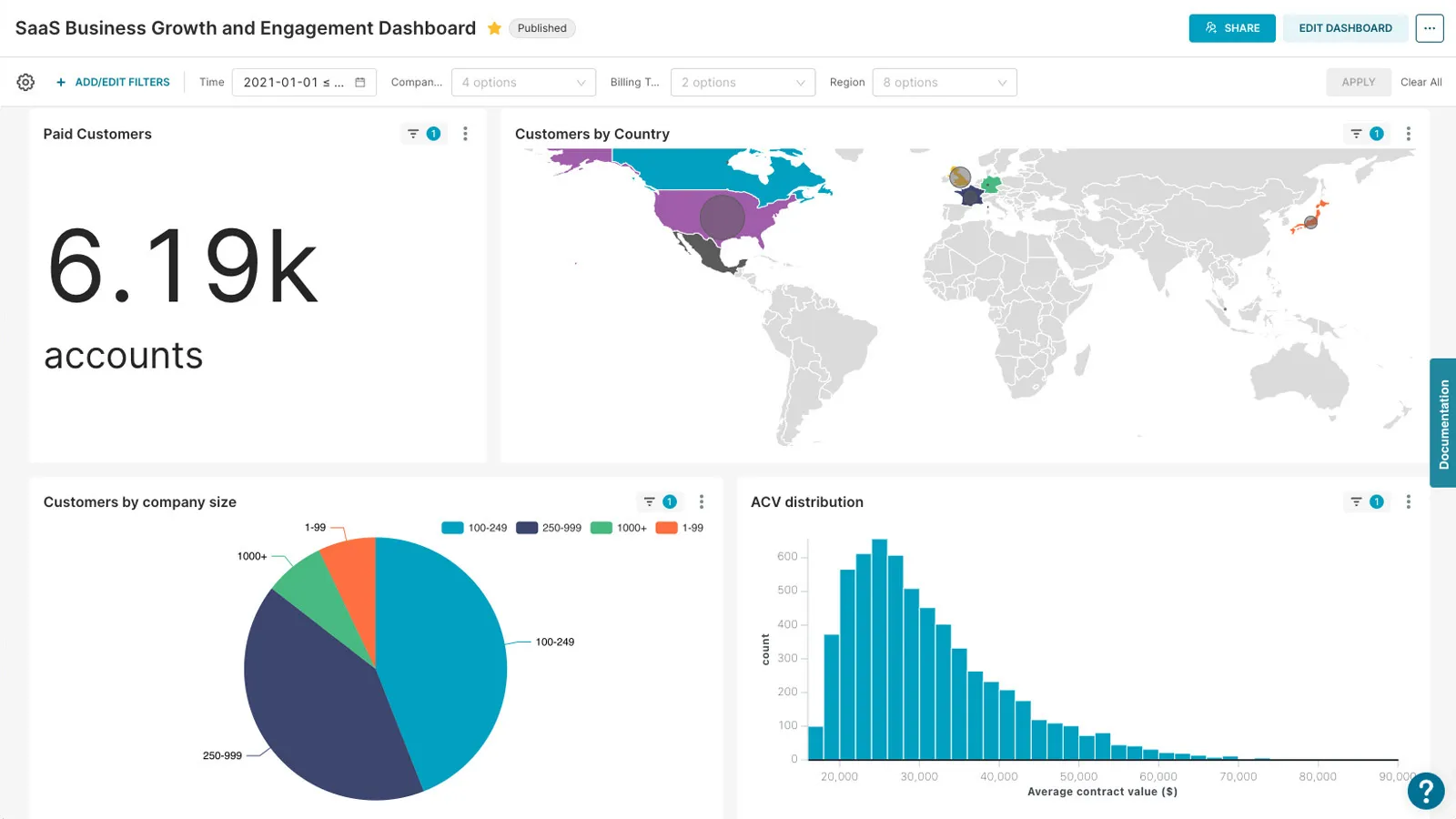
Feature Comparison
| Feature | Power BI | Apache Superset |
|---|---|---|
| Data Visualization | ||
| Built-in Chart Types | Hundreds of native visuals including bar, line, map, treemap, waterfall, KPI cards, and matrix tables | 40+ pre-installed visualization types including bar, line, pie, geospatial, pivot tables, and heatmaps |
| Custom Visuals | Custom visual marketplace with certified and community visuals; SDK for building proprietary visuals | Plug-in architecture for developers to build and register custom visualization components |
| Dashboard Interactivity | Cross-filtering, drill-through, bookmarks, tooltips, and conditional formatting on dashboards | Cross-filters, drill-to-detail, drill-by, Jinja templating, and dashboard-level filter controls |
| Data Connectivity & Modeling | ||
| Data Source Support | Hundreds of connectors including SQL Server, Azure, SharePoint, Salesforce, Google Analytics, and REST APIs | Connects to any SQL-based database via SQLAlchemy; supports BigQuery, Redshift, Snowflake, Druid, PostgreSQL, MySQL, and more |
| Data Transformation | Power Query editor with M language for ETL; DAX for calculated columns, measures, and tables | SQL-based transformations; virtual datasets for ad-hoc exploration; semantic layer for reusable metric definitions |
| Semantic Layer | Tabular model with measures, hierarchies, and relationships managed in Power BI Desktop or SSAS | Built-in semantic layer with metrics and dimensions that standardize business logic across dashboards |
| Collaboration & Sharing | ||
| Report Sharing | Publish to Power BI Service; share via workspaces, apps, embed in Teams, PowerPoint, and SharePoint | Dashboard sharing via role-based access; iframe embedding for integration into external applications |
| Embedding | Power BI Embedded for customer-facing analytics with white-labeling and branding customization | Dashboard embedding support; iframe-dependent approach may create performance bottlenecks at scale |
| AI & Copilot Features | Copilot in Microsoft Fabric generates reports, writes DAX queries, creates narrative summaries, and answers natural-language questions | No built-in AI or copilot features; community extensions and external integrations available |
| Security & Governance | ||
| Access Control | Azure Active Directory integration with row-level security, workspace roles, and Microsoft Purview governance | Role-based access control with integration for OAuth, OpenID, LDAP, and database-level permissions |
| Data Governance | End-to-end governance through Microsoft Purview with data cataloging, sensitivity labels, and compliance tools | Admin-managed security model; data access controlled at the database and dataset level |
| Compliance & Certification | Inherits Microsoft compliance certifications including SOC, ISO, HIPAA, and GDPR | Compliance depends entirely on the deployment environment and infrastructure the organization manages |
| Deployment & Scalability | ||
| Deployment Options | Cloud-native SaaS via Power BI Service; on-premises via Power BI Report Server; hybrid through Microsoft Fabric | Self-hosted via Docker, Kubernetes, or bare metal; managed cloud offerings available from third-party vendors |
| Scalability | Enterprise-grade scaling across thousands of users with Premium capacity; petabyte-scale data ingestion via Fabric | Horizontally scalable by adding worker nodes; leverages existing data infrastructure without an ingestion layer |
| Caching & Performance | In-memory columnar engine with automatic refresh scheduling and incremental refresh for large datasets | Built-in caching layer for chart and dashboard performance; query result caching configurable per dataset |
Data Visualization
Built-in Chart Types
Custom Visuals
Dashboard Interactivity
Data Connectivity & Modeling
Data Source Support
Data Transformation
Semantic Layer
Collaboration & Sharing
Report Sharing
Embedding
AI & Copilot Features
Security & Governance
Access Control
Data Governance
Compliance & Certification
Deployment & Scalability
Deployment Options
Scalability
Caching & Performance
Which to choose
Power BI and Apache Superset represent two fundamentally different philosophies in business intelligence. Power BI is a fully managed, enterprise-grade platform that excels when your organization is already embedded in the Microsoft ecosystem. It delivers polished self-service BI with AI-powered Copilot features, deep integration with Teams, Excel, and Azure, and a governance model backed by Microsoft Purview. Apache Superset is a community-driven, open-source platform built for teams that want full control over their BI stack. It connects to any SQL database, provides a built-in semantic layer and SQL Lab IDE, and costs nothing to license. The choice between them comes down to whether you value a managed, tightly integrated experience or an open, infrastructure-agnostic platform you fully own.
Best-fit scenarios
Choose Power BI if:
Choose Power BI if your organization runs on Microsoft 365 and Azure. The integration with Teams, Excel, PowerPoint, and SharePoint means reports flow into the tools your teams already use daily. Copilot in Fabric accelerates report creation by generating DAX queries and natural-language summaries, reducing the barrier for business users who lack SQL expertise. With Pro at $14/user/month, the per-seat cost is predictable and includes a fully managed service with enterprise security, compliance certifications, and automated governance through Purview. Power BI is the right choice for enterprises that need a governed, scalable BI platform without the operational burden of managing infrastructure.
Choose Apache Superset if:
Choose Apache Superset if your team is SQL-proficient and wants zero licensing costs with complete control over the BI environment. Superset connects to any SQL-based database, so it fits naturally into diverse data stacks that span multiple cloud providers. The 40+ visualization types and plug-in architecture give developers the flexibility to build exactly what they need. With 72,000+ GitHub stars and active community development under the Apache Foundation, the project has strong long-term viability. Superset is the right choice for data engineering teams, startups managing costs, and organizations that refuse vendor lock-in and want to self-host their analytics layer on their own infrastructure.
These scenarios reflect the available product evidence. Your requirements, existing stack, and team expertise should guide the final decision.
Frequently Asked Questions
Is Apache Superset really free compared to Power BI?
Apache Superset carries zero licensing fees under the Apache License 2.0. However, you still pay for the infrastructure to host it, whether that is cloud compute, storage, or engineering time to maintain the deployment. Power BI offers a free Desktop app for individual authoring, but sharing reports requires Power BI Pro at $14/user/month or Premium Per User at $24/user/month. For large organizations, Power BI also offers Fabric capacity-based pricing. The true cost comparison depends on your team size and whether you have the engineering resources to operate a self-hosted platform.
Can Apache Superset connect to the same data sources as Power BI?
Superset connects to any database that supports a SQLAlchemy dialect, which covers most modern databases including Snowflake, BigQuery, Redshift, PostgreSQL, MySQL, ClickHouse, Apache Druid, and dozens more. Power BI has hundreds of built-in connectors that extend beyond SQL databases to include SaaS platforms like Salesforce, Google Analytics, SharePoint, and REST APIs. If your data lives exclusively in SQL-based warehouses, Superset has broad coverage. If you need to pull from non-SQL sources or SaaS applications directly, Power BI offers a wider range of native connectors.
Which tool is easier to learn for non-technical business users?
Power BI is designed for business users with its drag-and-drop report canvas, natural-language Q&A feature, and Copilot that generates reports from conversational prompts. Non-technical users can create dashboards without writing any code. Apache Superset provides a no-code chart builder for basic visualizations, but getting the most out of it requires SQL knowledge. The SQL Lab IDE is powerful for data exploration, but it assumes familiarity with writing queries. Organizations with mixed technical skill levels will find Power BI more accessible to a broader range of users.
How do Power BI and Apache Superset handle embedded analytics?
Power BI offers Power BI Embedded as a dedicated product for customer-facing analytics. It supports white-labeling, branding customization, and capacity-based pricing designed for ISVs embedding reports in their own applications. Apache Superset supports dashboard embedding primarily through iframes. While this works for internal use cases, iframe-based embedding can introduce performance bottlenecks and lacks the native rendering speed of SDK-based approaches. If embedded analytics for external customers is a core requirement, Power BI Embedded provides a more polished and scalable solution.
What level of community and vendor support does each tool offer?
Power BI benefits from Microsoft enterprise support, extensive official documentation, a large partner ecosystem, and regular monthly feature updates. Apache Superset has a strong open-source community with over 72,000 GitHub stars, active development under the Apache Software Foundation, Slack channels, mailing lists, and community meetups. For enterprise support on Superset, several third-party vendors offer managed Superset deployments with SLAs. The trade-off is clear: Power BI gives you vendor-backed support out of the box, while Superset relies on community resources unless you engage a managed service provider.