Kedro: product and architecture
Overview
Kedro was created by QuantumBlack (McKinsey's AI division) in 2019 and open-sourced under the Apache 2.0 license. It joined the Linux Foundation's LF AI & Data in 2021, ensuring vendor-neutral governance. Kedro has 11,000+ GitHub stars and is used by organizations including McKinsey, NASA, Rolls-Royce, and numerous data science teams. The framework enforces software engineering best practices in data science projects: modular code structure, configuration-driven data access, reproducible pipelines, and automated documentation. Kedro provides a CLI for project scaffolding (kedro new), a data catalog for abstracting data sources, a pipeline API for defining workflows, and Kedro-Viz for interactive pipeline visualization. The framework integrates with deployment targets including Airflow, Kubeflow, Gemini Enterprise Agent Platform (formerly Vertex AI), and AWS Step Functions via plugins.
Key Features and Architecture
Data Catalog
The data catalog is a YAML-based registry of all data sources in your project. Define datasets once in catalog.yml — CSV files, Parquet, SQL databases, S3 buckets, API endpoints — and access them by name in your code. This eliminates hardcoded paths, centralizes configuration, and makes it trivial to swap data sources between environments (development vs production). The catalog supports 100+ dataset types via built-in connectors and custom implementations.
Pipeline API
Define ML pipelines as a series of Python functions connected by their inputs and outputs. Kedro resolves the execution order automatically based on data dependencies — no explicit DAG definition needed. Pipelines are modular: compose small pipelines into larger ones, and reuse pipeline components across projects. The kedro run command executes pipelines with automatic dependency resolution.
Project Template
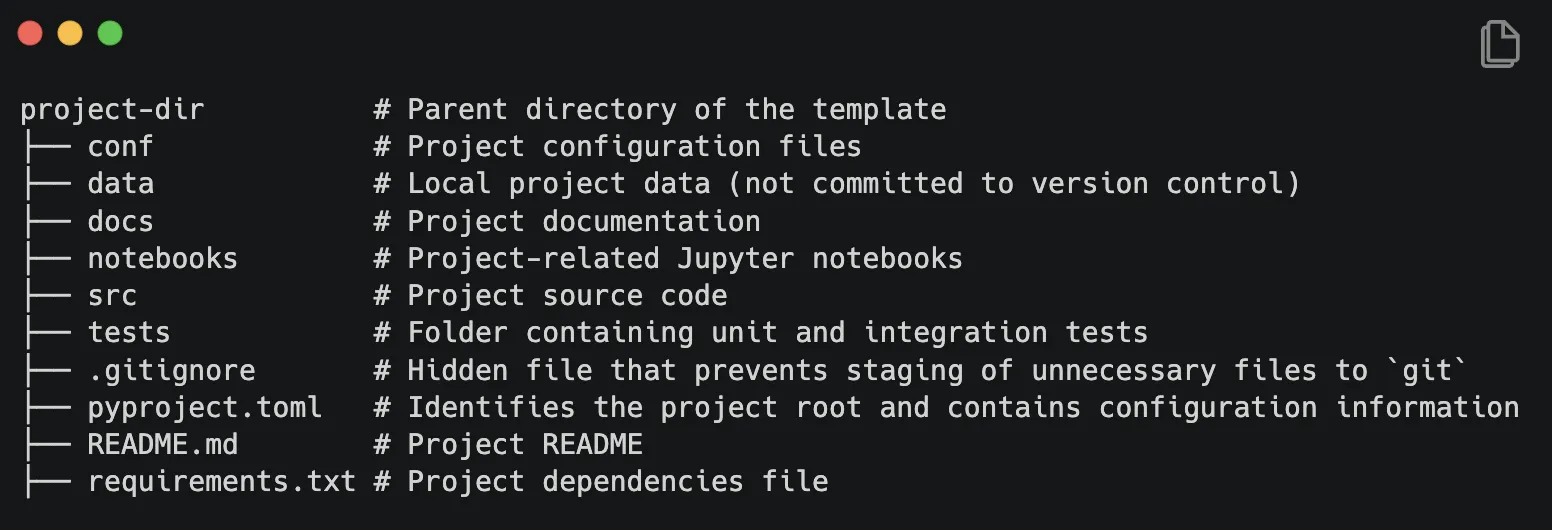
kedro new scaffolds a standardized project structure with separate directories for data, notebooks, source code, configuration, and tests. This structure enforces separation of concerns and makes projects navigable by any team member. The template includes configuration management for different environments (base, local, production).
Kedro-Viz
An interactive web-based visualization tool that renders your pipeline as a flowchart. Kedro-Viz shows data dependencies, node execution status, and dataset metadata. It's useful for understanding complex pipelines and communicating workflow structure to stakeholders.
Deployment Plugins
Kedro pipelines can be deployed to production orchestrators via plugins: kedro-airflow generates Airflow DAGs, kedro-kubeflow creates Kubeflow pipelines, kedro-vertexai deploys to Google Gemini Enterprise Agent Platform, and kedro-docker containerizes projects. This means you develop locally with Kedro and deploy to your production orchestrator without rewriting pipeline code.
Ideal Use Cases
Team Data Science Projects
Teams of 3+ data scientists working on the same ML project who need consistent code structure and practices. Kedro's standardized template and data catalog ensure everyone follows the same patterns, making code reviews easier and onboarding faster. McKinsey uses Kedro across hundreds of client engagements for this reason.
Production ML Pipelines
Organizations that need to move data science code from notebooks to production with minimal refactoring. Kedro's modular pipeline structure and configuration management make the transition from development to production straightforward. Deployment plugins handle the translation to production orchestrators.
Regulated Industries
Organizations in healthcare, finance, or government that need auditable, reproducible data pipelines. Kedro's data catalog provides a single source of truth for data lineage, and the pipeline structure ensures reproducibility. The standardized project template makes compliance audits easier.
Data Engineering Workflows
Teams building data transformation pipelines that need modularity and testability. Kedro's node-based architecture makes each transformation step independently testable, and the data catalog abstracts storage details from business logic.
Pricing and Licensing
Kedro employs an open source licensing model, making its core functionality freely available to users. This model aligns with common practices in data engineering tools, where open source adoption often eliminates direct licensing costs but may introduce considerations around support, integration, and scalability. For organizations evaluating Kedro, key pricing factors include whether enterprise-grade support, compliance certifications, or advanced deployment options (e.g., cloud-native or on-premise) are required. While the open source version is free, commercial use may involve evaluating third-party integrations, maintenance overhead, or the need for paid support tiers offered by vendors. Open source tools in this category typically range from fully free (with community support) to models that charge for premium features or enterprise-level service. Total cost of ownership often depends on deployment complexity, team size, and reliance on ecosystem tools. Users should prioritize assessing long-term maintenance costs, integration requirements, and whether the tool’s licensing aligns with their organization’s compliance and scalability needs. For precise details on enterprise offerings or support packages, consult the official Kedro website.
Strengths & Trade-offs
Pros
- Data catalog — YAML-based data source registry eliminates hardcoded paths; 100+ built-in dataset connectors
- Standardized structure —
kedro newscaffolds consistent project layout; makes code navigable and maintainable - Pipeline visualization — Kedro-Viz renders interactive flowcharts of your pipeline for understanding and communication
- Deployment flexibility — plugins for Airflow, Kubeflow, Gemini Enterprise Agent Platform, and Docker; develop locally, deploy anywhere
- 10K+ GitHub stars — active community, Linux Foundation governance, extensive documentation
- Completely free — no paid tiers, no commercial version; Apache 2.0 license
Cons
- Opinionated structure — the standardized template can feel restrictive for quick experiments or small projects
- Learning curve — understanding the data catalog, pipeline API, and project structure takes time
- No experiment tracking — Kedro doesn't track metrics or hyperparameters; need MLflow or W&B for that
- No model serving — pipeline framework only; need BentoML or Seldon for model deployment
- Overhead for small projects — the project structure and configuration add overhead that isn't justified for simple scripts
Getting Started
Getting started takes under 10 minutes. Visit the official website to create an account or download the application. The onboarding process walks through initial configuration, and most users are productive within their first session. For teams evaluating against alternatives, we recommend a 2-week trial period to assess whether the feature set aligns with workflow requirements. Documentation, community forums, and support channels are available to help with setup and advanced configuration. Enterprise customers can request a guided onboarding session with the vendor's solutions team.