TimescaleDB: product and architecture
Our verdict in this timescaledb review: Tiger Data is a strong choice for teams that need time-series, event, sensor, telemetry, or tick-data capabilities without abandoning PostgreSQL and SQL. We recommend it for engineering organizations that value Postgres compatibility and time-oriented query patterns more than a broad, general-purpose cloud warehouse experience. Its central trade-off is clear: Tiger Data specializes in live, time-indexed workloads, so teams seeking a warehouse-first platform for diverse enterprise BI should evaluate other products closely.
Tiger Data is the company and cloud platform from the creators of TimescaleDB, an open-source PostgreSQL extension. The product combines a self-hosted extension with Tiger Cloud, positioning PostgreSQL as a platform for real-time analytics, telemetry, sensor data, events, and financial tick data. The public product materials cite 1 quadrillion data points stored, 3 petabytes of data volume, and 3 trillion metrics per day; these are scale claims from Tiger Data, not independent benchmarks.
Overview
Tiger Data is best understood as a PostgreSQL extension and cloud platform for time-series and real-time analytical workloads, rather than as a conventional standalone data warehouse. TimescaleDB adds time-based data-management and analytical capabilities to PostgreSQL while retaining full SQL compatibility. That design matters: teams can use PostgreSQL tools and ecosystem conventions instead of adopting an entirely different database language or operational model.
The platform is oriented around data that arrives continuously and is naturally queried by time: operational telemetry, IoT and sensor readings, event streams, crypto data, and market tick data. Its stated message, “speed without sacrifice for time-series workloads,” is credible as a product position because the core features directly address partitioning, storage efficiency, and recurring aggregations. It does not mean Tiger Data is the right answer for every analytics architecture.
Tiger Cloud is Tiger Data’s elastic managed-cloud offering for startups and enterprises, while open-source TimescaleDB supports self-hosted deployments. That split gives organizations a meaningful operational choice: retain infrastructure responsibility with the self-hosted extension, or use the managed cloud service. The cost is that deployment, commercial support, and cloud-service details must be evaluated separately from the core extension’s capabilities.
The project has 23,473 GitHub stars, uses C as its primary repository language, and lists topics including analytics, financial analysis, historian, IoT, Postgres, PostgreSQL, and SQL. Those are useful public adoption and community signals, but they are not proof of enterprise deployment depth or workload suitability. The repository’s latest listed release is version 2.29.2, dated August 18, 2026, and its last push was September 7, 2026.
Key Features and Architecture
TimescaleDB’s architectural advantage is that it is packaged as a PostgreSQL extension for high-performance real-time analytics. Instead of asking teams to replace their SQL database with a separate time-series engine, it extends PostgreSQL for data organized around time. This is particularly useful when application and analytical teams already depend on PostgreSQL-compatible SQL, schemas, and operational practices.
Key technical capabilities include:
-
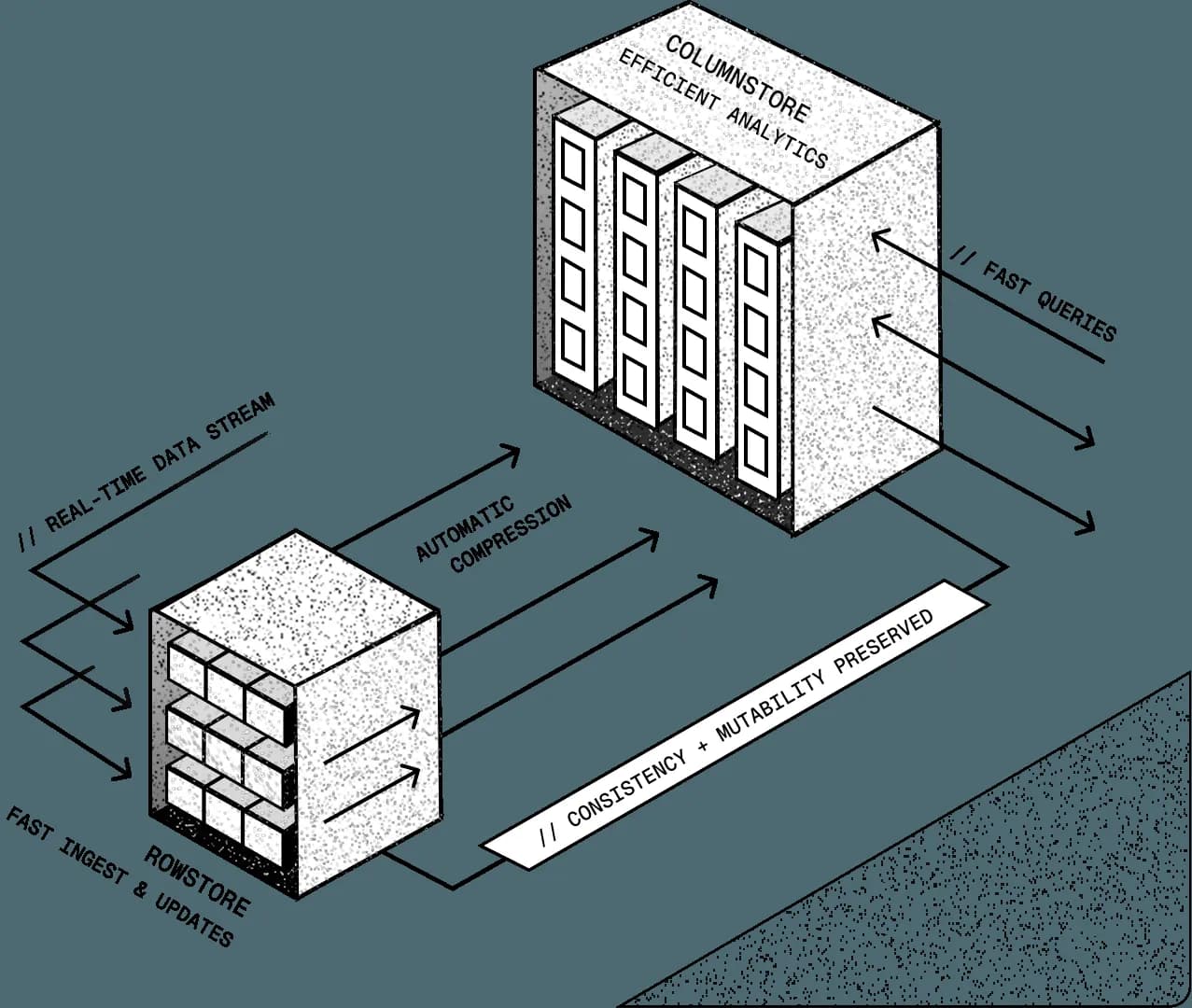
Automatic time-based partitioning. TimescaleDB automatically partitions time-series data by time, which is designed to make large, continuously growing datasets more manageable. For a telemetry or event table, this aligns physical data organization with the most common filter and retention dimension: time.
-
Columnar compression. The extension provides columnar compression for time-series workloads. This is a material feature for long-lived metric and event data because storage efficiency becomes a first-order concern as historical records accumulate.
-
Continuous aggregates. TimescaleDB supports continuous aggregates, allowing recurring aggregate views to be maintained for time-series queries. This reduces the need to repeatedly calculate the same rollups over raw historical records when users need regularly updated summaries.
-
Full SQL compatibility. Tiger Data states that TimescaleDB preserves full SQL compatibility, allowing teams to use PostgreSQL tools and ecosystem components. For organizations with existing SQL expertise, this lowers the cost of adopting time-series-specific capabilities compared with learning a wholly separate query model.
-
Real-time analytics focus. The product explicitly targets live telemetry, sensor data, event data, and tick data. This focus distinguishes it from products designed primarily for periodic bulk reporting or generalized warehouse transformations.
-
Search offerings on Postgres. Tiger Data’s product navigation includes vector and keyword search on Postgres alongside the time-series platform. The supplied material does not provide implementation details or performance characteristics for those search capabilities, so buyers should validate them directly rather than treating them as equivalent to a dedicated search product.
The design has an important limitation: PostgreSQL compatibility is a strength only when Postgres is already appropriate for the workload. TimescaleDB does not remove the need to design schemas, retention policies, queries, and operational practices for sustained high-volume ingestion. Its partitioning and compression features are specific technical tools, not a substitute for data-modeling discipline.
Tiger Data also has a clear operational boundary. Self-hosted TimescaleDB gives teams control and a free starting point, but that means they own deployment and maintenance choices. Tiger Cloud offers an elastic managed platform, but introduces managed-service pricing and a closer dependency on Tiger Data’s cloud environment.
Ideal Use Cases
Tiger Data is ideal for a data engineering team that already runs PostgreSQL and needs to retain large volumes of timestamped records while serving recent and historical queries. A team of 3–10 engineers managing product telemetry, infrastructure metrics, or application events can benefit from automatic time-based partitioning and continuous aggregates without forcing every user onto a new database syntax. This is especially compelling when application developers and analytics engineers both need SQL access to the same time-oriented operational data.
It is also well suited to industrial, energy, and IoT contexts where sensors emit measurements continuously. These workloads commonly need time-window analysis, rollups, and historical storage efficiency, all of which map directly to TimescaleDB’s partitioning, compression, and continuous aggregate capabilities. Teams should still test ingest behavior and query patterns against their own data volumes; Tiger Data’s public scale figures are not a workload-specific sizing guarantee.
Financial and crypto teams working with tick data are another natural fit. The platform explicitly names tick data, crypto, and financial-analysis topics, making it appropriate for organizations that need PostgreSQL-based analytics over rapidly arriving, timestamped market or transaction records. Its SQL compatibility can help data teams share familiar access patterns with analysts and application engineers.
Tiger Data can also work well for real-time event analytics when the event data remains closely tied to an application’s PostgreSQL environment. For example, a SaaS company with a small platform group may prefer one Postgres-oriented approach for event history and operational analysis instead of operating a separate specialized time-series database. The trade-off is that the team must understand when an event table is genuinely time-series data versus a broader analytical dataset requiring warehouse-oriented modeling.
Don’t use this if your primary requirement is a general-purpose enterprise warehouse for many unrelated business domains, with the available evidence here offering no basis to select Tiger Data over warehouse-first products. Avoid it if your team cannot support PostgreSQL-oriented schema and operational decisions and does not want a managed-cloud dependency. We recommend Tiger Data for teams whose central technical question is “how do we analyze time-indexed data on Postgres?” rather than “which platform should become our universal analytics warehouse?”
Strengths & Trade-offs
Tiger Data’s strengths are concrete and closely tied to its Postgres-based implementation:
-
PostgreSQL compatibility reduces migration friction. Full SQL compatibility lets teams use PostgreSQL tools and ecosystem practices, making the product more approachable for organizations already invested in Postgres.
-
Time-oriented storage management is built into the extension. Automatic time-based partitioning addresses the practical problem of continually growing metric, event, and sensor tables without requiring users to construct every partitioning workflow manually.
-
Columnar compression targets the cost of historical time-series storage. This is valuable when retaining large volumes of older measurements or events, where raw storage growth can quickly become operationally and financially consequential.
-
Continuous aggregates support recurring analytical summaries. Teams that repeatedly need time-window rollups can maintain aggregates instead of recalculating the same summaries entirely from raw data for every query.
-
Deployment choice is real. Teams can self-host the free extension or use Tiger Cloud’s managed, elastic platform. That flexibility serves both infrastructure-heavy organizations and startups that prefer managed operations.
-
There are visible public activity signals. The repository has 23,473 GitHub stars and a listed latest release of 2.29.2, with a last push on September 7, 2026. These are useful signs of public project activity, although they should not be mistaken for a support or reliability guarantee.
The limitations are equally important:
-
Tiger Data is specialized rather than warehouse-neutral. Its stated focus is time-series, telemetry, sensor, event, and tick data. Teams choosing it for broad, unrelated corporate analytics risk forcing warehouse-style workloads into a product optimized for time-indexed data.
-
Cloud pricing details are incomplete in the supplied evidence. Dollar amounts are present, including $30/month and $36/month, but named plan mappings and included resources are absent. This makes precise cost comparison difficult before a direct pricing discussion.
-
Self-hosting transfers operational responsibility to the buyer. Free self-hosted use is attractive, but teams must own the infrastructure and PostgreSQL-oriented operational work. The product data does not promise that the extension eliminates those responsibilities.
-
License status needs verification. The repository’s
NOASSERTIONlicense field is not enough for a legal or procurement review, even though the product is described as open source. -
Search capabilities lack evaluable technical detail here. Tiger Data lists vector and keyword search on Postgres, but the supplied evidence provides no indexing, performance, or operational details. Avoid selecting the platform primarily for search until those capabilities are validated against requirements.