Sling: product and architecture
In this Sling review, we evaluate a modern data integration tool built for ELT (Extract, Load, Transform) operations across databases, files, and storage systems. Developed by the Brooklyn-based company of the same name, Sling provides both a free open-source CLI and a web-based Platform for managing data pipelines. The core engine is written in Go with a streaming architecture that processes data efficiently without loading entire datasets into memory. With 839 GitHub stars and an active release cycle (latest v1.5.15 as of April 2026), Sling has earned a 9.2/10 rating from 14 user reviews. We recommend Sling for small to mid-sized data teams needing a budget-friendly ELT tool with cross-system quality checks and a generous free tier.
Overview
Sling is a data integration platform that simplifies the process of extracting data from sources and loading it into destinations. The tool handles database replication, file ingestion, cloud storage synchronization, and API data extraction through a unified YAML-based configuration system. Sling's Go-based core adopts a streaming design that holds minimal data in memory, making it efficient for large-scale data movement.
The product comes in two forms: the Sling CLI, which is free and open source under the AGPL-3.0 license, and the Sling Platform, a web-based interface that adds scheduling, monitoring, and team collaboration features. The CLI runs on Linux, macOS, and Windows, and can be installed via Homebrew, Scoop, Docker, pip, or direct binary download. Sling connects to 20+ databases including PostgreSQL, MySQL, Snowflake, BigQuery, Redshift, DuckDB, and MongoDB, along with 10+ storage systems like AWS S3, Google Cloud Storage, Azure Blob Storage, and SFTP.
Key Features and Architecture
Sling operates on a streaming design where data flows directly from source to destination without buffering full datasets in memory. Configuration is YAML-based, making replications declarative and version-controllable.
The tool supports multiple load modes: full-refresh, truncate, incremental (merge/append), snapshot (append with timestamp for historical data), and backfill. These modes cover the full spectrum of data loading patterns teams encounter in practice.
Core capabilities include:
- Database Replication: Sync data from production databases like PostgreSQL, MySQL, and Oracle to analytics warehouses such as Snowflake, BigQuery, and Redshift with automatic schema detection and incremental updates.
- File-to-Database Loading: Load CSV, Parquet, JSON, and Excel files directly into a data warehouse with auto-detected schemas and type conversions.
- Cloud Storage Sync: Move data between AWS S3, Google Cloud Storage, Azure Blob Storage, and databases using glob patterns for batch processing.
- API Data Extraction: Extract data from REST APIs using YAML-based specifications with built-in pagination, authentication, and incremental sync. Pre-built connectors exist for Stripe, HubSpot, and GitHub.
- Change Data Capture (CDC): Continuously replicate row-level inserts, updates, and deletes by reading the database transaction log with resumable initial loads.
- Quality Checks and Monitoring: Automatic alerts for schema or data deviations, with custom checks for data quality consistency.
- Transformations: Column hashing, text encoding/decoding, UUID parsing, accent cleaning, and other operations applied post-extraction and pre-load.
- Pipelines and Hooks: Complex workflows using HTTP requests, SQL queries, file operations, and custom logic triggered before or after replications.
- Parallel Streams and Retries: Process multiple streams concurrently with automatic retries for failed operations.
- Stream Chunking: Break large datasets into manageable chunks using time-based, numeric, or count-based partitioning.
- Schema Evolution: Detect schema changes and automatically update target schemas to match source schemas.
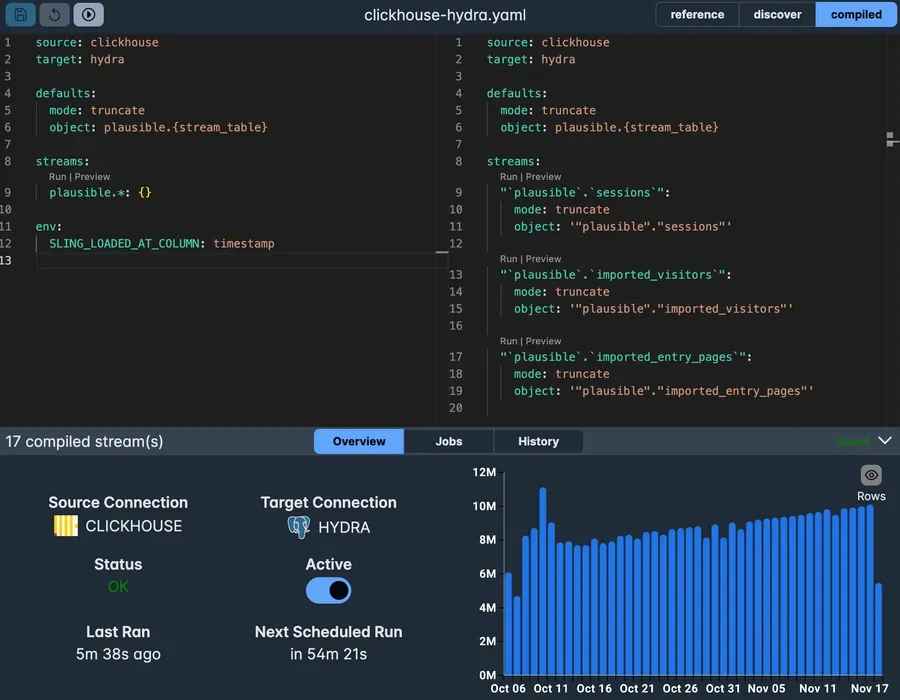
The Platform adds a web UI with a built-in editor (IDE) for previewing data, validating configurations, and compiling replications live. It also provides job scheduling, historical logs, execution monitoring, and agent management across multiple projects.
Ideal Use Cases
Sling fits best in several data integration scenarios:
Production-to-Warehouse Replication: Teams that need to sync operational databases (PostgreSQL, MySQL, Oracle) to analytics warehouses (Snowflake, BigQuery, Redshift) benefit from Sling's streaming architecture and incremental mode, which minimizes data transfer and processing time.
File Ingestion Pipelines: Data teams regularly loading CSV, Parquet, or JSON files from local storage or cloud buckets into a warehouse find Sling's auto-schema detection and multiple load modes practical. The CLI integrates into existing scripts and CI/CD pipelines.
Multi-Cloud Data Movement: Organizations operating across AWS, GCP, and Azure use Sling to move data between cloud storage providers and databases without writing custom transfer scripts.
Dagster-Integrated ELT: Sling has been adopted by the Dagster ecosystem for embedded ELT, making it a strong choice for teams already using Dagster as their orchestrator.
Small Teams Replacing Custom Scripts: Engineers maintaining hand-rolled bash or Python scripts for data movement can consolidate to declarative YAML configurations. As one user noted, Sling helped them "remove old bash scripts to a simple yaml file."
Strengths & Trade-offs
Pros:
- The Go-based streaming engine delivers fast performance with minimal memory footprint, handling large tables efficiently without buffering entire datasets.
- The CLI is completely free and open source, allowing teams to start without any financial commitment and inspect the source code.
- YAML-based configuration makes replications declarative, version-controllable, and easy to review in pull requests.
- Broad connector coverage spans 20+ databases (PostgreSQL, MySQL, Snowflake, BigQuery, Redshift, DuckDB, MongoDB, and more), 10+ file/storage systems (S3, GCS, Azure Blob, SFTP), and REST API extraction.
- Multiple load modes (full-refresh, truncate, incremental, snapshot, backfill) cover virtually every data loading pattern.
- Installation is straightforward across all major platforms: Homebrew on Mac, Scoop on Windows, direct binary on Linux, Docker, and pip for Python integration.
- The Dagster integration provides embedded ELT capabilities for teams using that orchestrator.
Cons:
- CDC and schema migration are locked to the Advanced plan, which puts these capabilities out of reach for smaller teams on the Standard tier.
- With 14 reviews and 839 GitHub stars, the community is still growing compared to well-established tools in the ELT space.
- The Platform UI is newer compared to the CLI, and advanced features like user roles and audit logs are only available on the highest tier.
- Self-hosting requires the Advanced plan, so teams wanting on-premises deployment need to commit to the top tier.